
How to Automate the Entire Customer Journey for a Local Business
Meet Chidera. She has never heard of your detailing studio, and in nineteen days she will be your regular. Nobody on your team will have chased a single step of it.
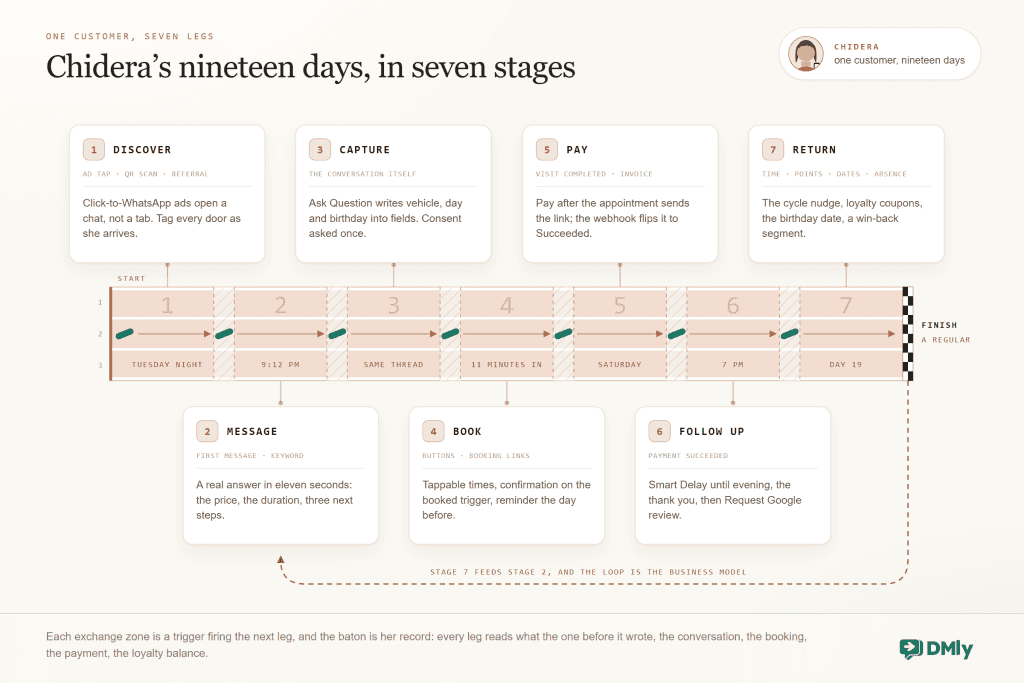
That sentence is the whole promise of customer journey automation for a local business, and this guide keeps it honest by walking every stage of Chidera’s journey with the actual build behind it: the ad that starts a conversation instead of a click, the answer that arrives in seconds, the booking made with two taps, the payment that reconciles itself, the review request that lands at the right hour, and the message five weeks later that brings her back. Every stage has a deep guide of its own; this page is the map that shows how they join up.
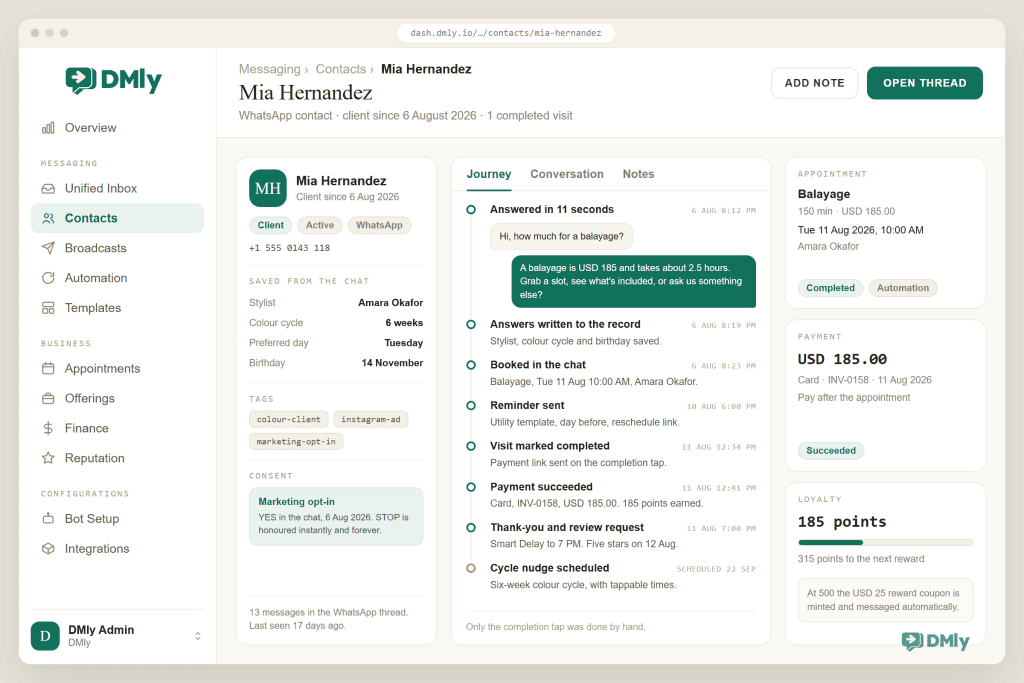
One definition before the journey starts. Customer journey automation is the wiring of triggers and messages so that each stage of a customer’s relationship starts the next one automatically: an enquiry triggers an answer, an answer becomes a booking, a booking schedules its reminder, a completed visit fires its review request and its return nudge. In DMly this is one system rather than five tools, which is what makes the wiring possible: the same contact record carries the conversation, the booking, the invoice and the loyalty balance, so every stage can see what the last one did.
Stage 1: Discovery That Starts a Conversation, Not a Click
Chidera meets you in an Instagram ad on a Tuesday night. The build decision at this stage is where the ad sends her, and the journey-automation answer is: into the chat, not onto a website. A click-to-WhatsApp ad opens a conversation your automation can continue; a landing page opens a tab she will close. There is a hard economic reason too: a conversation born from a click-to-WhatsApp ad is free to message for 72 hours, templates included, so the welcome sequence rides the window the ad spend already opened.
The same stage covers the unpaid doors: the QR on the shop window and the counter, the wa.me link in the Instagram bio and the Google Business Profile, the referral forward from a happy customer. Tag every door (ad campaign, window QR, referral) as contacts arrive, because stage 7 will want to know which doors produce regulars rather than one-off browsers. Our WhatsApp ads guide covers the paid door in depth.
Stage 2: The First Message, Answered in Seconds
Your whole journey lives or dies at this message. At 9:12 that night Chidera sends the one every local business knows by heart: “Hi, how much for a full interior detail?” She has two other tabs open, and whoever gives the first useful answer frames the comparison.
The build is the welcome-and-answers automation: a keyword or first-message trigger sends a real answer (the price range, not a holding message), buttons offer the three next steps her question implies (prices, book, ask something else), and a Handover to Human path catches everything the automation should not touch. An AI reply can cover the factual long tail if you want it to, with the same handover discipline. The deep dive on this stage is our beginner’s guide to no-code WhatsApp automation, and the boundary rule applies here as everywhere else: automate the facts, hand over the judgement.
Here is what Chidera actually received, eleven seconds after her question: “Hi! A full interior detail is $120 for a sedan and takes about three hours. Want to grab a Saturday slot, see what’s included, or ask us something else?” Notice the order of operations inside that one message: it answers first (the price, the thing she asked), sets expectations second (the duration), and only then offers next steps. The automated reply that opens with “Thanks for contacting us, an agent will respond shortly” does none of those jobs; it is a hold message wearing automation’s clothes, and the journey stalls at stage 2 while a competitor’s real answer lands.
Stage 3: Capture, So the Journey Has a Memory
Chidera asks whether you can do Saturday and mentions it is a gift for her husband’s birthday. A journey without capture forgets both facts by Thursday; an automated one saves them as it goes. The build: an Ask Question step or two writes her answers into custom fields (vehicle, preferred day), a tag records the campaign that brought her, and the birthday detail goes into a date field, because a date field in DMly is a future automation waiting to fire.
None of this is a form. It reads as conversation because it is conversation; the capture is just the automation writing down what she said. Contacts, fields, tags and the segments they enable are the customer-record half of the platform, and the reason stage 7 is possible at all.
Stage 3 is also where consent belongs. One question, asked once, while goodwill is fresh: “Want us to message you when Saturday openings or offers come up? Reply YES and we will, STOP anytime and we won’t.” The yes becomes a tag, the tag becomes the audience for every stage 7 message, and the journey never sends marketing to anyone who did not ask for it. Businesses that skip this step meet it later as blocks, a falling quality rating and throttled messaging limits; businesses that capture it here own an audience no algorithm can take away.
Stage 4: The Booking, Made in the Chat
Offered tappable times for Saturday, Chidera books the 10am in two taps and gets her confirmation in the same thread, eleven minutes after first hearing of your business. The build is the Book Meeting step (or the booking page link for browsers): services with true durations and buffers, staff with real hours, minimum notice protecting your morning, and the confirmation firing on the booked trigger.
The confirmation reads like a person wrote it: “You’re booked, Chidera: full interior detail, Saturday 10:00 with Tobi. We’ll send a reminder Friday; reply RESCHEDULE if the week stops cooperating.” Every element is doing retention work. The named staff member makes the booking feel held rather than logged, the reminder promise quiets the Friday-night doubt, and the reschedule word turns the most common failure of local-business bookings (a clash the customer is too embarrassed to mention) into a one-word fix.
The reminder schedules itself from the reminder times on the service, day-before with the reschedule link, so a conflict becomes a moved booking rather than an empty bay. If your business needs commitment for premium slots, prepayment holds the slot while she pays. The full machinery, including the deposit patterns and the evidence behind reminders, lives in our WhatsApp appointment booking guide and in the clinic and salon guides beside it.
The one habit stage 6 depends on: When Saturday comes and the job is done, someone taps the visit Completed. DMly auto-completes appointments about a day later, but automatic completion fires no triggers, so the review request and the return nudge in stages 6 and 7 hang on that one tap. Make it part of handing back the keys.
Stage 5: Payment That Reconciles Itself
The detail runs long and beautiful; at handover, Chidera pays by the link that arrived when the visit was marked done. The build options map to how you sell: Pay after the appointment on the service sends the link automatically; an invoice with line items suits itemized work and part payments; Request a payment covers the ad-hoc extra. Whichever path, the gateway’s webhook flips the payment to Succeeded and the record updates without anyone reconciling anything, and cash at the counter enters the same ledger through Record payment.
For the journey, the payment is also a signal: Payment succeeded is the cleanest “happy customer, real money” trigger in the system, and stage 6 fires from it. The money machinery in full is in our guides to invoicing through WhatsApp and tracking income and expenses in one place.
Stage 6: The Follow-Up That Most Businesses Never Send
At 7pm, with the car gleaming in her building’s car park, Chidera gets two messages a few minutes apart: a thank-you with one specific line about the work, and a Google review request, one tap. She leaves five stars from her sofa. The build is a short flow on the completed visit or the payment: Smart Delay until evening, the thank-you, the built-in Request Google review step, and a branch that routes any unhappy reply to a human instead of the review link, because a complaint caught in private is a public one-star that never happened.
The pair that went out that evening, for the record. The thank-you: “Hope the car feels brand new, Chidera. There’s a small card for the birthday boy in the glovebox.” Then, minutes later: “If we earned it, a quick Google review helps neighbours find us. One tap: [link]. If anything is less than perfect, reply here instead and the boss reads it personally.” The glovebox line is stage 3 paying its first dividend, and the final sentence is the complaint branch compressed into one line: the unhappy path is invited into the private thread, where it can be fixed, instead of onto the public profile, where it cannot.
This stage costs fifteen minutes to build and compounds for years: reviews are the discovery engine for stage 1 of every future customer’s journey. The wording that converts is in our live guide to getting more Google reviews automatically and the wider Google Business Profile automation guide.
Stage 7: The Return, Engineered
Nineteen days later, Chidera books again, and this is the stage where automation quietly outperforms every human process ever run at a front desk, because returning customers are made by timing, and timing is what machines do. Four builds cover it, and most businesses need two:
- The cycle nudge. A flow on the completed visit waits the natural cycle of your service (five weeks for a detail, six for colour, a term for tuition) and then offers tappable times. It is the salon rebooking machine, generalised to any trade.
- Loyalty that runs itself. Points per completed visit or per amount spent; when the balance crosses your threshold, a personal reward coupon is minted and messaged automatically. The stamp card that never gets lost.
- The date on the record. That birthday Chidera mentioned in stage 3 fires the key-date trigger every year: a warm line and a modest gift coupon. Cheapest loyal-customer generator in the whole system.
- The win-back safety net. A segment on days since the last visit catches anyone the nudges missed, and a specific broadcast (opted-in, approved template) reopens the door. Specific beats sentimental, and the salon, gym and restaurant guides all carry wording that works.
Five weeks after her first visit, the cycle nudge did its quiet work: “It’s been about five weeks since the last detail, which is roughly when dust declares victory. Saturday has 9:00 and 11:30 open if the car is due.” Two taps, booked, and the journey re-enters stage 4 without an ad, a discount or a phone call. Note what that message is not: it is not “We miss you!”, it is not a panicked discount, and it is not generic, because stage 3 wrote down the service, the interval and the day she books.
Stage 7 then feeds stage 2, and the loop closes: her referral forward is someone else’s stage 1. That is the journey automated entire, and no stage needed anyone to remember anything.
The Whole Journey on One Page
| Stage | The trigger | The build | Where to go deeper |
| 1. Discover | Ad tap, QR scan, referral | CTWA ads into chat; tagged entry doors | Our WhatsApp ads guide |
| 2. Message | First message / keyword | Welcome flow, answers, handover | The no-code automation guide |
| 3. Capture | The conversation itself | Ask Question to fields, tags, dates | Our WhatsApp CRM guide |
| 4. Book | Buttons and booking links | Book Meeting, reminders, policy | The appointment booking guide |
| 5. Pay | Visit completed / invoice sent | Pay-after links, invoices, webhook reconciliation | The WhatsApp invoicing guide |
| 6. Follow up | Payment succeeded / completed | Thank-you, review request, complaint branch | Our Google reviews guides |
| 7. Return | Time, points, dates, absence | Cycle nudges, loyalty, key dates, win-backs | The loyalty and industry guides |
The Same Journey in Any Local Business
Chidera’s detailing studio is invented; the seven stages are not, and they carry across every kind of local business. Stages 1 to 6 barely change from trade to trade. What changes is stage 7, because every trade has its own natural return cycle. The pattern to steal is always the same: name the interval after which a happy customer should reappear, then automate the nudge that lands just before that interval runs out.
| Business | Natural return cycle | The stage 7 build that fits |
| Restaurant or food business | Days to weeks | Day-based offers to opted-in diners and “the usual again?” reorder nudges |
| Salon or barbershop | Four to eight weeks by service | The rebooking nudge timed to the cut or colour cycle, plus key-date offers |
| Clinic or wellness practice | Recall intervals by treatment | Recall messages on the clinical schedule, with private-first feedback routing |
| Gym or fitness studio | Weekly attendance | The absence save when visits stop and milestone messages when they don’t |
| Tutor or training academy | Termly | Re-enrolment windows, progress rhythms and next-course offers |
| Ecommerce and D2C | Product replenishment | Restock reminders, post-delivery cross-sells and cart recovery |
Every row of that table has a guide of its own, from salons to tutors; this page is the journey view across all of them.
Which Journey Messages Need WhatsApp Templates?
Only the messages you start outside WhatsApp’s 24-hour window need a pre-approved template. Everything you send while replying to a customer inside that window can be written in your own words. Chidera’s journey shows where the line falls in practice. Stages 2 through 5 mostly ride the service window, because she keeps messaging first and every reply reopens the clock, and the click-to-WhatsApp ad opened a 72-hour free window on top. The Friday reminder usually falls outside the window, so it goes out as a utility template. Stage 6 can land either side of the line depending on when she last messaged, so build the review request as a template anyway and let the system pick the route when the window is open. Stage 7 is template country without exception: cycle nudges, win-backs and key-date offers are business-initiated marketing by definition.
The practical discipline: draft and submit your reminder, review request, cycle nudge, win-back and key-date templates before the journey needs them, because approval is usually fast but never instant, and Meta recategorises templates it thinks are mislabelled. Keep marketing templates specific to earn replies rather than blocks. Our copy-and-paste template library carries wording for every one of these, and the no-code guide covers how templates slot into flows.
What Does Customer Journey Automation Cost to Run?
Less than almost anyone guesses, and one important part of that changes on 1 October 2026. Meta moved WhatsApp to per-message pricing in July 2025, and up to 30 September 2026 two things stayed free: replies you wrote in your own words inside the 24-hour window, and utility templates delivered while that window was open. That is why stages 2 to 5, the conversion engine of Chidera’s journey, ran at roughly zero message cost. From 1 October 2026 both of those become billable: in-window service replies are charged at the same rate as that market’s utility messages, and utility templates sent inside the window are charged too. Stages 2 to 5 stop being free and start being cheap.
What Meta does charge for maps neatly onto two moments: utility templates sent outside the window (the Friday reminder) at a fraction of a cent to a few cents in most markets, and marketing templates (every stage 7 message) at rates that run from about a cent per delivered message in India to a few cents across most of the world and more in parts of Europe. A local business sending a few hundred journey messages a month is typically spending less on Meta fees than on a single coffee run, and that stays true after October even with the in-window messages added to the bill. Set it against the revenue of the no-shows those messages prevent and the regulars they create. The country-by-country numbers are in our WhatsApp API pricing rate card, and the platform side is a DMly subscription plus message credits, with current plans at dmly.io/pricing.
How to Build Your Customer Journey Automation: The Order That Works
Nobody builds seven stages in a weekend, and the businesses that try stall at stage 3. This order front-loads the revenue and lets each stage feed the next.
- Stages 2 and 4 first: answers and booking. This pair converts existing demand you are currently losing to slow replies. One afternoon, immediate payback.
- Stage 6 next: the follow-up. Fifteen minutes of build, compounding returns, and it establishes the completion-tap habit everything else uses.
- Stage 5: payment links. Gateway, webhook, pay-after on the services that suit it. Money starts reconciling itself.
- Stage 7: one return loop. The cycle nudge for your core service. Add loyalty and key dates once the nudge proves itself.
- Stage 1 last: pour fuel. Ads and QR doors go last on purpose, because sending paid traffic into an unbuilt journey is how ad budgets die. When the machine converts, then you scale the top.
- Stage 3 throughout: capture as you go. Every build above writes to the record; the discipline is simply never asking a question whose answer you do not save.
How to Measure Customer Journey Automation
One number per stage, read once a month, and no dashboard religion required. Those numbers are: response time to first message (stage 2, should be seconds), enquiry-to-booking rate (stages 3 to 4), no-show rate from the appointment reports (stage 4’s reminder at work), share of payments arriving by link (stage 5), reviews per hundred completed visits (stage 6), and the share of this month’s bookings from returning customers (stage 7, the number the whole machine exists to move). If stage 7’s number climbs for three consecutive months, the journey is working, whatever any individual flow’s statistics say.
Why Customer Journey Automation Fails (and the Fixes)
When customer journey automation disappoints, the cause is almost always one of five patterns, and not one of them is the software.
- The completion tap never happens. Visits auto-complete a day later, no trigger fires, and stages 6 and 7 silently never run. The business concludes review automation “doesn’t work” when it was never actually running. Fix: make the tap part of closing the sale, and audit weekly by checking that completed visits carry review requests.
- Paid traffic hits an unbuilt journey. Ads at stage 1 before answers, booking and follow-up exist means paying to generate messages nobody answers well. Fix: the build order above; ads go last.
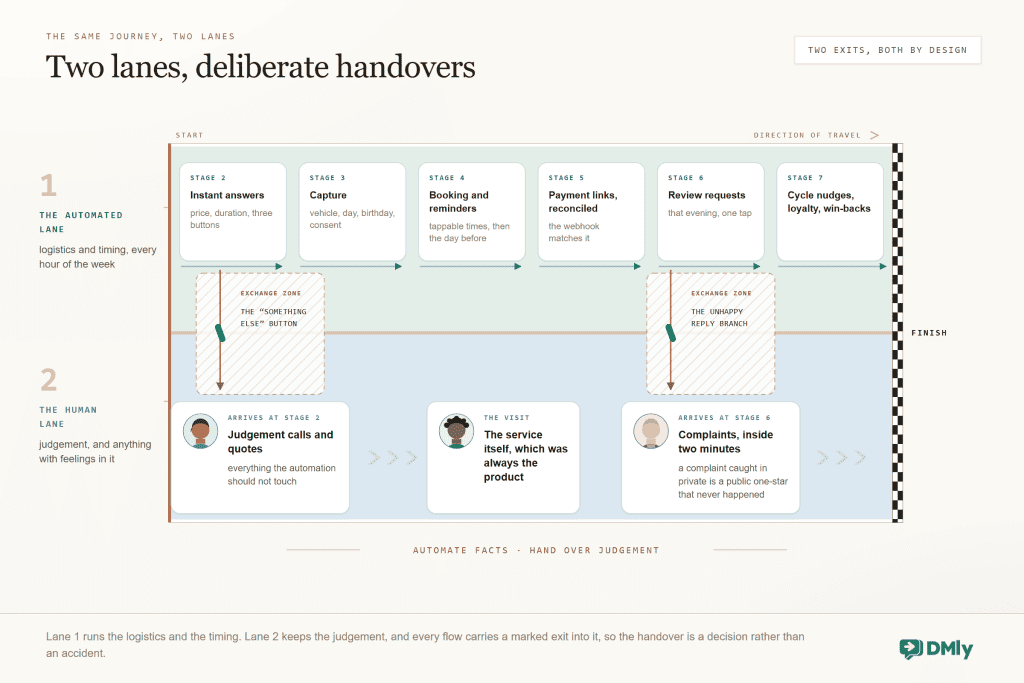
- The automation colonises the human lane. Complaints answered by buttons, judgement calls forced through menus, no visible way to reach a person. Customers feel processed and say so publicly. Fix: the two-lane rule, with a handover exit in every flow and a human on complaints inside minutes.
- Marketing goes to people who never opted in. Blocks climb, the quality rating slides, messaging limits throttle, and the channel that was meant to build the business gets rate-limited. Fix: consent captured at stage 3, STOP honoured instantly and forever, and stage 7 sent only to the opted-in segment.
- Nobody reads the numbers. Flows built in January run stale in September: a dead offer, a departed staff member’s name, a price from two menus ago. Fix: the monthly six-number review above, plus a quarterly read-through of every live message as if you were the customer.
Customer Journey Automation FAQs
What is customer journey automation?
It is wiring the stages of a customer relationship so each one triggers the next automatically: an enquiry triggers an instant answer, an answer becomes a booking with its own reminder, a completed visit fires its payment link, review request and return nudge. The customer experiences a business that is always on time; the business experiences a week with the chasing removed.
Do I need different tools for each stage?
The stages only chain if they share a customer record, which is the argument for a platform over a toolbox: when the chat, calendar, invoices and loyalty live in one system, stage 5 can see stage 4 and stage 7 can see everything. Stitching five tools together with integrations can work, but every seam is a place the journey forgets who Chidera is.
How long does it take to automate the whole journey?
Following the build order above: the converting core (answers, booking, follow-up) is a weekend of evenings; payments and the first return loop are the second week; ads go last, when the machine deserves them. Most local businesses are fully looped inside a month of part-time effort, and each stage pays for itself before the next one starts.
Will customers feel processed rather than served?
Only if you automate the wrong lane. The design rule is the same everywhere: automation owns the logistics and the timing, your people own the judgement and the feelings, and every flow carries a visible exit to a person. Done that way, customers experience faster answers and better-timed messages from the same humans they already liked, which reads as attentiveness, not processing.
Where should a business with no automation start?
Stage 2: the instant answer to the first message. It is the highest-leverage single build in the journey, it needs nothing else to exist first, and it converts demand you are already paying to generate. Our beginner’s guide to no-code WhatsApp automation walks that exact build in an afternoon.
One record, whole journey
Chat, bookings, payments, reviews and loyalty on one customer record, so every stage can trigger the next. Build the loop on the number your customers already message.
See the journey machinery in DMly
Nineteen Days, Nobody Chasing
Chidera’s journey took nineteen days, seven stages and zero follow-up tasks on anyone’s list. That is the honest pitch of customer journey automation: not fewer humans, but humans spent only where they change the outcome, while the timing (the discipline no busy business sustains by hand) runs on triggers.
Build stages 2 and 4 this week. The rest of the loop is waiting in the guides linked above, one stage at a time, and your first Chidera is already typing.
Writing about WhatsApp automation, bookings and growth for local business.
Turn WhatsApp into your busiest channel.
Start free and run message, bookings, payments and reviews in one place.
