
There is a clock running on every WhatsApp conversation your business has, and you cannot touch it. You can send five messages, ten, fifty. The clock does not move. Only your customer can restart it, and they restart it by writing to you.
That clock is the 24-hour messaging window, and it is the single rule that shapes almost everything a business can and cannot do on WhatsApp. It is not complicated, but it is unusual, and it catches people out because no other channel works this way. Email does not expire. A text message does not expire. WhatsApp conversations do.
Here is what it looks like when it bites. A customer messages a salon on Tuesday afternoon, the salon replies within the hour, the customer says thanks, and that is that. On Thursday the salon types a quick note about her appointment and presses send. It never arrives. Nothing is broken and nothing is misconfigured. The clock ran out on Wednesday afternoon and nobody wound it.
This guide explains the 24-hour messaging window properly: when the clock starts, what restarts it, what you can send on each side of it, what actually happens to the messages that fall outside, and what changes about the cost of all this on 1 October 2026. Once it is clear, a lot of otherwise baffling behaviour stops being baffling.
What the 24-Hour Messaging Window Is
It is the period after a customer messages you during which your business can reply with anything it likes. Outside that period, WhatsApp delivers only pre-approved message templates, and everything else is stopped.
Meta calls it the customer service window, and the logic makes sense the moment you look at it from your customer’s side. WhatsApp is a personal app, and your message sits in the same list as their mother and their group chat. The rule exists so that a business can answer freely anybody who contacted it, while being unable to send unsolicited messages whenever it feels like it. That single constraint is why WhatsApp inboxes are not the wasteland that email inboxes became, and it is why your messages still get opened.
It applies to the WhatsApp Business Platform, the official route that business tools connect through, which our guide to the WhatsApp Business API covers end to end. The free WhatsApp Business app on a phone works differently, and if you are weighing up the two, our coexistence guide covers what changes when you move.
The Clock Starts on Their Message, and Only They Can Restart It
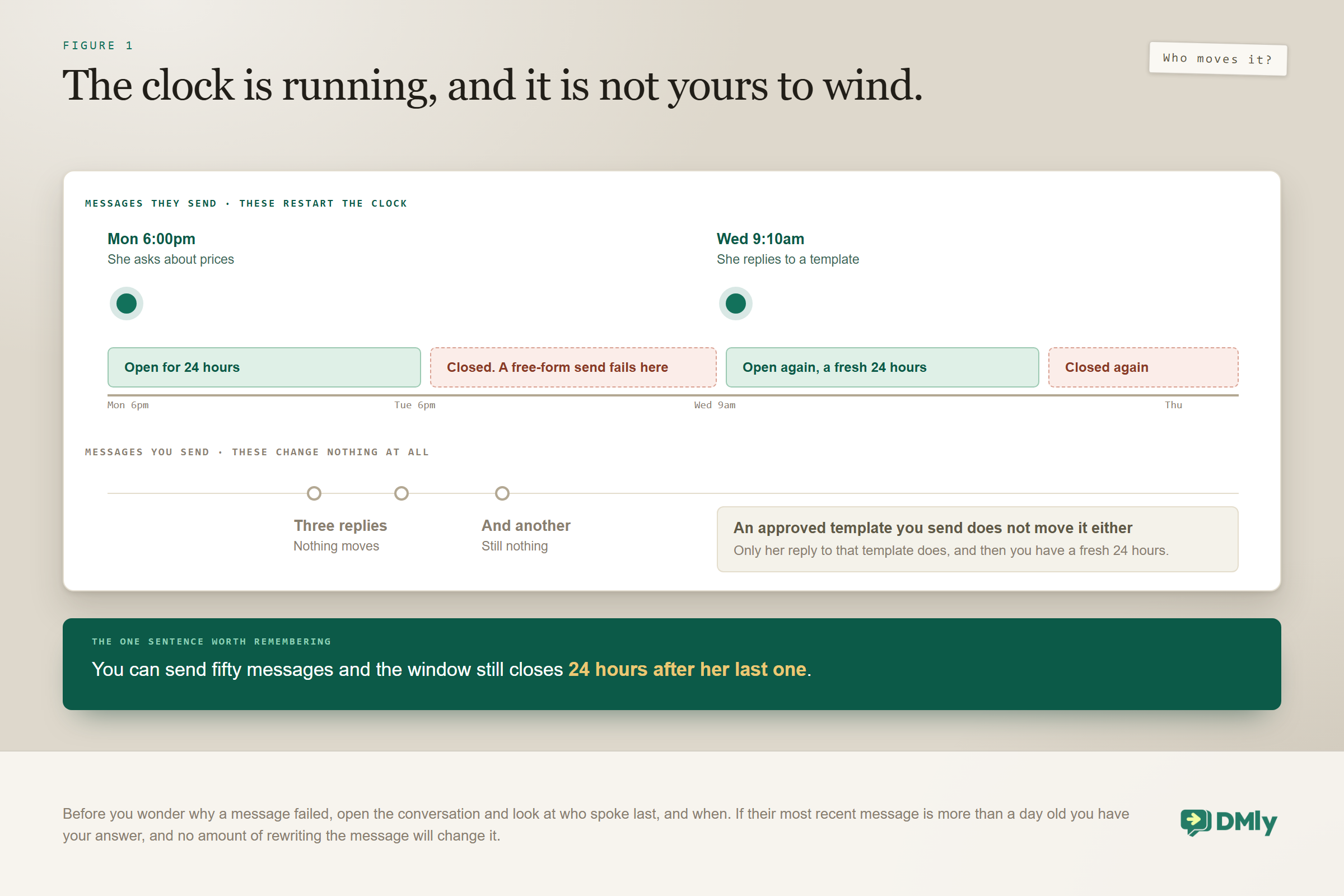
Your replies do not extend anything. This is the fact almost everybody gets wrong, and getting it right explains most of the rest.
- It is their message that starts it, not yours. You can send fifty messages and the window still closes 24 hours after their last one. A thread where you have done all the talking is still a closed thread.
- Every inbound message restarts the full 24 hours. A conversation where somebody replies daily stays open indefinitely, which is why an active support thread never runs into this at all.
- A contact who has never messaged you has no open window. There is nothing to expire, because nothing ever opened. This is the part people miss when they import a list of customers and wonder why they cannot message it.
The practical version of all three: before you wonder why a message failed, open the conversation and look at who spoke last, and when. If their most recent message is more than a day old, you have your answer, and no amount of rewriting will change it.
What You Can Send Inside the Window
Anything at all. There is no restriction on what leaves your inbox: free-form text, images, documents, voice notes, buttons and lists, written on the spot by a person or produced by an automation. No approval, no categories, no waiting.
This is why the great majority of good WhatsApp automation is reactive: it answers, and answering is unrestricted. A bot that replies to questions, quotes a price, offers three appointment times and takes a booking never touches a template, because every one of those messages lands inside a conversation the customer just opened.
Permission inside the window is not changing. What is changing is what it costs, and the date is close enough to plan around.
What Changes on 1 October 2026
Two kinds of message that are free inside the window today start being charged on 1 October 2026. Permission inside the 24-hour messaging window is untouched: you will still be able to send whatever you like to somebody who just wrote to you. What changes is the price, and the two kinds change on quite different terms.
- Service messages become billable, but only above 1,000 a month. A service message is an ordinary free-form reply sent inside the window, which is most of what a busy business sends. Meta gives every business phone number 1,000 free service messages every month and only charges from the 1,001st. The allowance resets monthly and does not roll over. Above it, the service rate per market is set to match that market’s utility and authentication rate.
- Utility messages sent inside an open window become billable too, from the very first one. These have been free in-window since July 2025 and there is no allowance of any kind for them, so for a business that runs on confirmations and reminders this second change is usually the larger bill of the two, and now clearly so.
The detail almost nobody mentions: Service messages get no volume tiers, while utility and authentication keep theirs. The two categories now scale differently: your utility cost per message can come down as you send more, and your service cost cannot. The free 1,000 a month is not a volume tier either, because it is a fixed allowance off the top rather than a rate that improves. Above it the line is strictly flat, so a business whose conversations run long pays proportionally more with no discount arriving at any point. The 72-hour free entry point for conversations started from a click-to-WhatsApp ad is unchanged, and none of this touches the free WhatsApp Business app on a phone, which is not on the platform this pricing applies to.
What all this changes about how you build is less than you would think and more than nothing. It rewards answering well the first time rather than in six short bursts, it rewards a booking link over a five-message back and forth, and it makes an assistant that resolves a question in two messages genuinely cheaper than one that resolves it in eight. Our guide to the October WhatsApp pricing change works through what it costs for three real businesses, and the rate card by country has the per-market numbers.
What Happens When the 24-Hour Messaging Window Closes
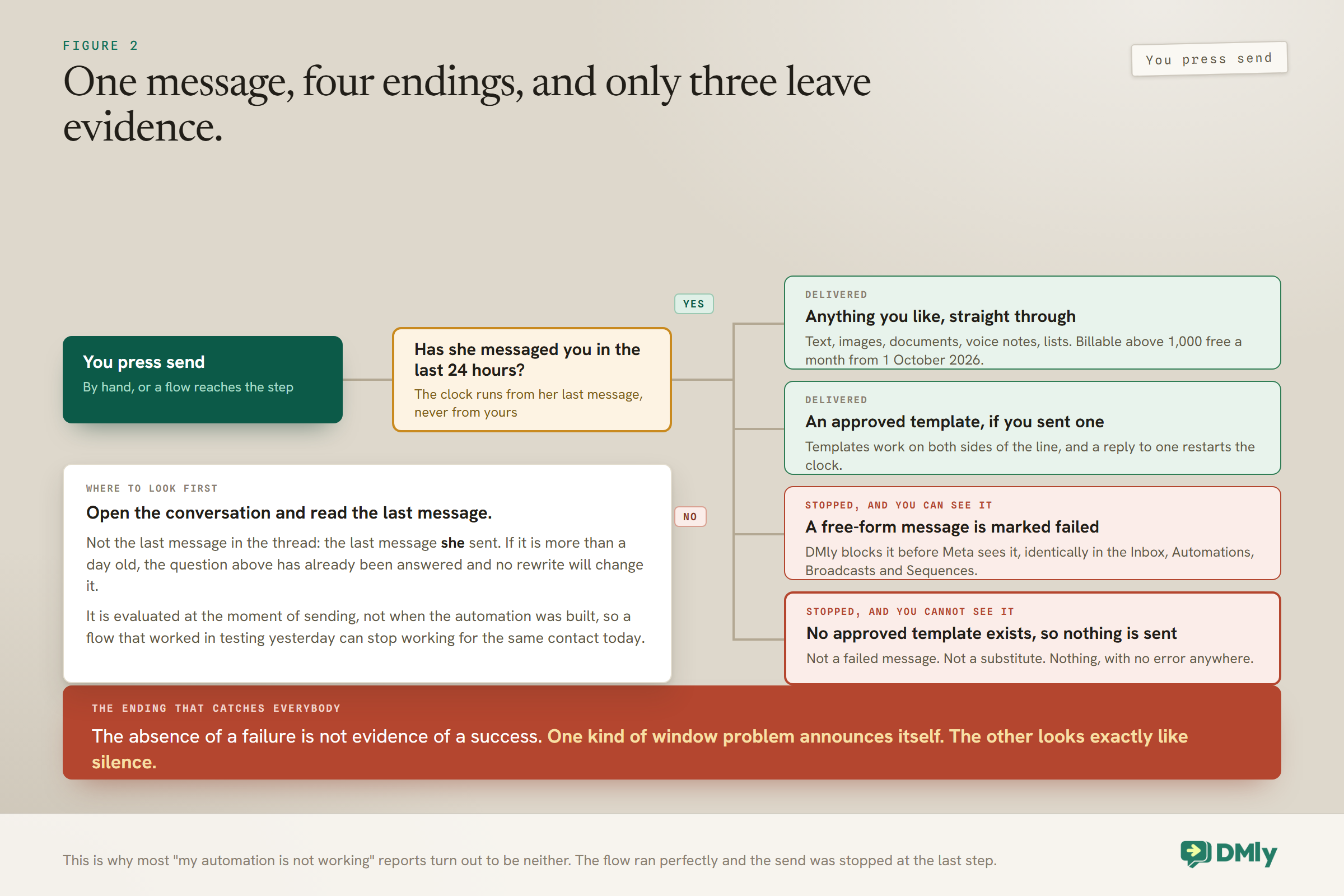
Once it closes, an approved template is the only thing that will be delivered, and everything else is stopped before it leaves the building. How it is stopped is worth knowing, because it decides what you see.
A free-form send to a contact whose window has closed is stopped by DMly, not by Meta, and recorded as failed rather than pretended into a Sent. DMly enforces this identically everywhere, in the Inbox composer, in Automations, in Broadcasts and in Sequences, because all four read the same window. That is the right design and it is worth appreciating: a platform that quietly marked those as delivered would leave you believing you had contacted people you had not.
In the Inbox you get told plainly. The composer swaps itself for a template picker and the conversation reads: WhatsApp’s 24-hour customer-care window is closed for this conversation. To re-engage, send an APPROVED template, free-form messages are blocked by Meta until the recipient texts back.
The failure with no error attached: There is a second, quieter case. If an automation reaches a step that needs a template, the window is shut and no approved template exists, nothing is sent at all. Not a failed message, not a substitute: nothing. So one kind of window problem announces itself as a failure and the other looks exactly like silence. The absence of a failure is not evidence of a success, and this single behaviour explains most “my automation is not working” reports. The flow ran perfectly. The send was blocked at the last step.
There is a third case, and it is the kindly one. If the template an automation needs is not approved but the customer messaged you within the last 24 hours, DMly sends an ordinary free-form message instead, and it arrives. So an unapproved template does not break everything: it breaks the out-of-window half, which is why a template problem so often shows up as some customers receiving the confirmation and some not.
The most common casualty is a multi-day nurture sequence written as ordinary messages. Message one lands because the window is open, and messages two and three cross the line and are recorded as failed. Anything that waits more than a few hours needs a template behind it.
How Templates Get You Through the Door
A template is a message you write in advance and submit to Meta for review, and once approved it can be delivered outside the 24-hour messaging window. That is the whole mechanism, and it is less onerous than it sounds, because most of what a business needs to send after the fact is entirely predictable: a booking confirmation, a reminder, an invoice, a receipt, a renewal notice.
DMly ships 20 system templates covering exactly that ground, appointment confirmations and updates and reminders, invoices, payment receipts, failed payments and renewal reminders, and they are submitted for Meta’s review automatically when you connect a live number. Templates you write yourself move through Draft, then Pending, then Approved or Rejected, and only an approved one ever executes. The categories, the review process and the wording rules are the whole subject of our guide to WhatsApp message templates.
One consequence is worth building your whole approach around: a template that gets a reply reopens the window. Send an approved reminder, the customer answers, and you are back in free-form territory for another 24 hours. Template out, reply back, ordinary conversation, is the intended rhythm of this channel, and it is how a business stays in genuine contact with somebody over months without ever breaking a rule.
The 72-Hour Exception That Is Not What People Think
You will see a 72-hour window mentioned alongside click-to-WhatsApp ads. It is real, and it is about money rather than permission. The distinction matters, because businesses plan three-day sequences off the back of it that cannot possibly deliver.
When somebody starts a conversation by tapping a click-to-WhatsApp ad, that conversation carries no Meta charge for 72 hours. Meta’s developer pricing page (updated 30 September 2026) now says the window may stay open for up to 7 days, while its business pricing page still says 72 hours, so plan on the shorter figure. That is the free entry point window, it survives the October change untouched, and it is genuinely useful if you advertise.
What it does not do is extend your ability to send free-form messages. The 24-hour rule still governs what you may send; the 72 hours govern what you pay. An ad-sourced conversation goes quiet after a day exactly like any other, and reaching that person on day two still needs a template.
The Other Cap People Confuse With the Window
Your messaging tier is a completely separate limit, and mistaking one for the other sends you fixing the wrong thing. The 24-hour messaging window governs when you may write to a particular person. The tier governs how many different people you may start a conversation with.
Precisely: the tier is Meta’s cap on how many different customers you can open a conversation with in any 24 hours. It does not limit replies to people who messaged you first, so a busy support day never touches it. It reads as one of six values on your WhatsApp configuration: 50, 250, 1,000, 10,000 or 100,000 customers per 24 hours, or Unlimited. An unverified business starts at 250, and Meta raises the tier on its own as you send more and keep quality up.
Two things about it are worth knowing before you go looking for a control. The tier and the quality rating you see in DMly are read-only: DMly reads them from Meta and shows them to you, and nothing in DMly blocks or throttles a send based on either. And DMly will happily hand Meta more conversations than your tier allows, because Meta is the one that rejects them. That is why a large broadcast on a low tier fails partially rather than being stopped up front. Our guide to quality rating, messaging limits and bans covers the whole picture.
How the 24-Hour Messaging Window Should Shape What You Build
Once the rule is clear, one design pattern falls out of it, and it is the one every well-run WhatsApp operation converges on.
| What you want to send | Which side it lands on | How to build it |
| Answers to enquiries | Inside | Free-form, by a person or an automation, no approval needed |
| Same-day nudges | Inside | Free-form with a short delay |
| Appointment reminders | Outside | An approved utility template, timed from the booking |
| Invoice and payment chases | Outside | An approved utility template |
| Offers and campaigns | Outside | An approved marketing template, to an audience that opted in |
The rule of thumb: if it happens inside the same conversation, write it freely. If it happens on a later day, it needs a template. Campaigns sit entirely on the outside by definition, which is why a WhatsApp broadcast in DMly has no message box at all. Step two of the wizard gives you a template picker and nothing else. That is DMly’s own decision rather than a Meta rule, taken because a broadcast audience is mostly out of window and a free-text composer would let you build a send that reaches a fraction of your list. Our broadcasts guide covers the campaign side, and sending bulk messages properly covers doing it without damaging your number.
A Week in One Business
Abstract rules are easier to hold once you watch them play out. Here is one customer at a salon, across a single week.
- Monday, 6pm. She messages asking about balayage prices. The window opens. The assistant answers immediately in free-form, and a follow-up an hour later is fine too, because it is still Monday evening.
- Tuesday, 7pm. Twenty-five hours have passed with no reply from her. The window has closed. A free-form “still interested?” now fails and nothing reaches her.
- Wednesday. The salon sends an approved template instead. It is delivered. She replies asking about Saturday, and that reply reopens the window for a fresh 24 hours.
- Wednesday, minutes later. Free-form again: real times offered, booking confirmed, all unrestricted, because she has just written.
- Friday. The day-before reminder falls outside the window, so it goes as a utility template. She replies “see you then”, which reopens the window once more.
Notice the pattern. The window closed twice and neither closure was a problem, because each time there was an approved template to carry the next message and each template earned a reply that reopened the conversation. That rhythm is how a business stays in touch on WhatsApp for months.
How Other Channels Compare
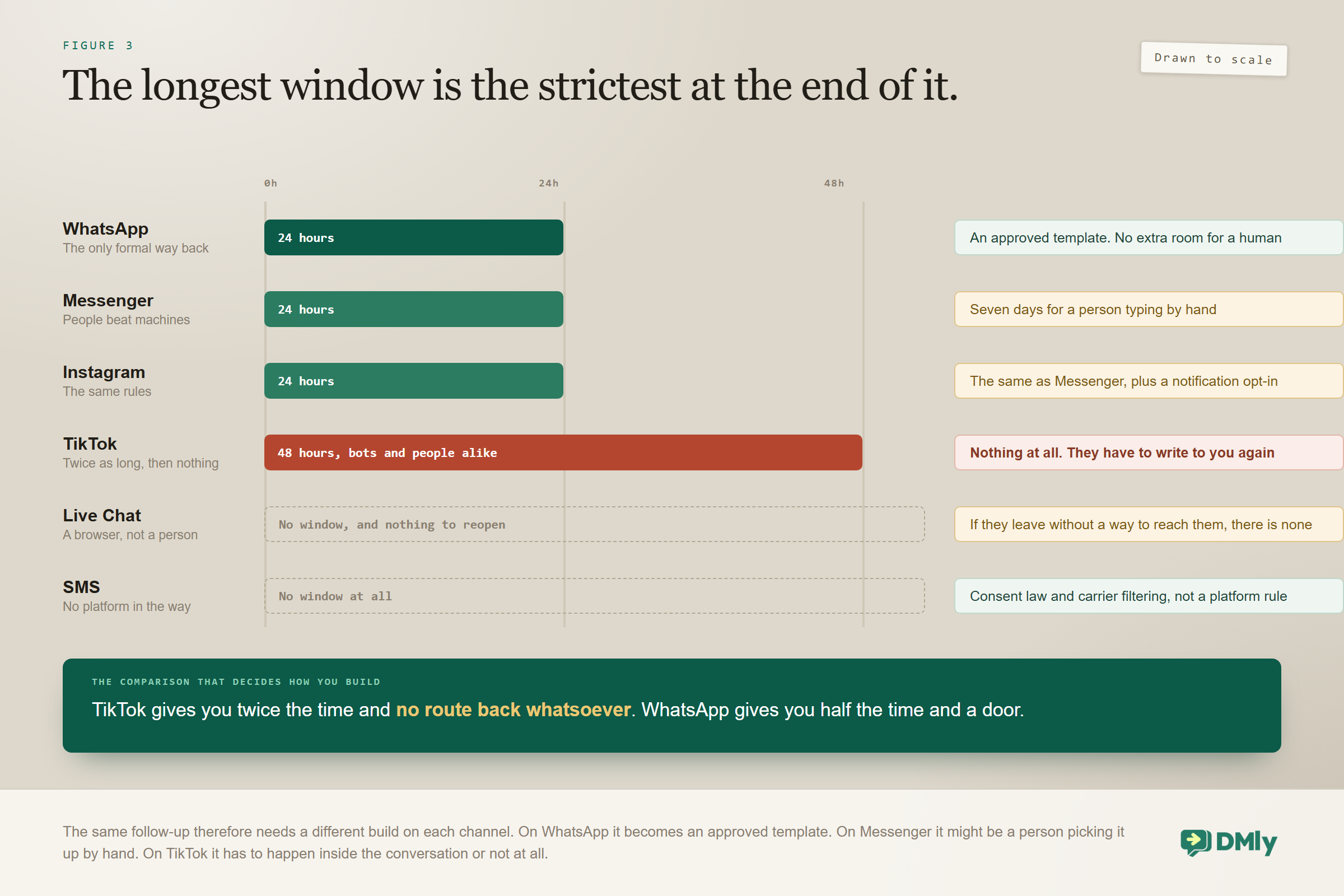
WhatsApp is not the only channel with a window, and if you run more than one the differences decide how you build. The same follow-up genuinely needs a different build on each.
| Channel | The window | Getting back in afterwards |
| 24 hours from their last message | An approved template. No extension for anybody, including a person typing by hand | |
| Facebook Messenger | 24 hours from their last message | No templates. A person typing in the inbox gets up to seven days, and there is a notification opt-in |
| 24 hours, as Messenger | The same as Messenger | |
| TikTok | 48 hours from their last message | Nothing. No templates, no opt-in, no extension for a human, and you cannot start a conversation at all |
| Live Chat widget | None | Nothing to get back into. A visitor is a browser session, so if they leave without giving you a way to reach them there is no conversation to reopen |
| SMS | None | Not applicable. No window, no approval, no queue. The limits here are consent law and carrier filtering rather than the platform |
Two contrasts are worth holding on to. Messenger gives people more room than machines: an agent typing a reply by hand can respond for up to seven days, which is the exact opposite of WhatsApp, where the documentation carries a flat warning that there is no agent extension and it is 24 hours for everyone. And TikTok’s window is twice as long but far stricter at the end of it, because there is no template mechanism at all. Its own inbox says so: agents can reply for 48 hours after the contact’s last message, and then the conversation is genuinely closed until they write again.
How to Tell the Window Is Why Something Failed
Not every message that did not arrive is a window problem, and treating them all as one sends you rewriting templates when the cause was somewhere else entirely. Five things produce a message that never landed, and they need different fixes.
| What you see | The likely cause | What to do |
| A free-form message recorded as failed, to somebody who has not written in over a day | The window closed | Send an approved template instead, or give them a reason to message you first |
| Nothing sent at all, and no failed message either | No approved template exists for that send | Build one and submit it. With a closed window and no template there is nothing to attempt |
| Some recipients in a broadcast got it and some did not | Your messaging tier, or a template Meta has paused | Check the tier against the audience size, and check the template still reads Approved |
| A template that worked last week now reads Rejected | Meta paused it for quality | A pause shows in DMly as Rejected, and it is often the first visible sign of a quality problem |
| One particular contact never receives anything | They are blocked, opted out, or have blocked you on their phone | Check the contact’s own switches before assuming a platform fault |
The distinction in the first two rows is the one to internalise, because it changes what you are looking for. And one timing subtlety on the third row: DMly checks a template still reads Approved at the moment of sending rather than when you scheduled it, but it checks its own stored copy of the status. That copy is kept current, since Meta pushes a verdict when a status changes and DMly re-checks with Meta roughly every ten minutes anyway, so what you see is minutes old at worst. It is still a copy, which leaves a short gap in which DMly holds Approved, sends, and Meta rejects the messages one at a time.
Reopening a Conversation Without a Template
A template is the formal way back in and it is not the only one. The alternative is to give the customer a reason to message you, which reopens the window as though it had never closed.
You cannot reopen it. They can. Anything that prompts them to write is doing exactly that, and four routes are worth having in place before you need them.
- Click to chat links. A link that opens WhatsApp with your number and, if you like, a message already typed. Put it on your website, in your email signature and on your Google listing. Everybody who taps it sends you a message, which opens a fresh 24 hours. Our guide to click to chat links and QR codes covers making them.
- QR codes. The same mechanism on a physical surface: a receipt, a window, a menu, a card. Particularly effective for a business people visit, because the moment to scan is the moment they are standing in front of you.
- Ads that click to WhatsApp. Paid, obviously, but the conversation starts with an inbound message, so it arrives with an open window and no template needed.
- Another channel entirely. If you hold an email address or a mobile number, neither has a window. A short text asking somebody to message you on WhatsApp is a legitimate and often cheaper way to reopen the door.
One route that only works on the Meta channels: On Facebook and Instagram there is a fifth door, and it is not available on WhatsApp. A new comment on one of your posts can open a private conversation, and that conversation is not limited by the 24-hour window. So a comment-to-direct-message automation can reach somebody whose window has been shut for months, which is why those channels reward posting in a way WhatsApp does not. It is worth knowing precisely because it is the one thing the Meta channels can do that WhatsApp cannot.
Businesses that plan for all of this end up needing far fewer marketing templates than they expected, because most of their re-engagement happens through links and codes rather than through sends.
Four Things People Get Wrong
- “My reply resets the clock.” It does not. Only their messages do. A long thread in which you are doing all the talking still closes 24 hours after their last word.
- “The window is about marketing.” It applies to everything. A purely helpful service message is stopped outside the window exactly as firmly as a promotion.
- “I can message anyone who gave me their number.” Having a number is not having an open window. Somebody who never messaged you can only be reached with an approved template, and only if they agreed to hear from you.
- “Templates are a workaround.” They are the intended route, not a loophole. Meta wants messages that customers expect, which is precisely what a booking confirmation or a reminder is.
Why This Protects You Too
It is easy to read the window as an obstacle. It is also the reason the channel still works, and the reason your messages get read at all. The same system that limits you protects your customers from every other business, which is why open rates here remain what they are.
There is a direct self-interest angle as well. Your quality rating falls when people block you or report your messages, and a red rating means Meta may pause your templates or drop your messaging tier. The window keeps businesses from generating the volume of unwanted messages that would trigger exactly that. Staying on the right side of it, and honouring opt-outs, which DMly suppresses automatically on every send, is the same piece of work as keeping your number healthy.
Frequently Asked Questions
What happens if I message someone after 24 hours?
If it is an approved template, it is delivered normally. If it is a free-form message, DMly stops it and records it as failed rather than showing it as sent, and the customer receives nothing. If an automation reaches a step that needs a template while the window is closed and no approved template exists, nothing is sent at all and there is no failure to look at either.
Does my reply reset the 24-hour messaging window?
No. The clock runs from the customer’s last inbound message and only another message from them restarts it. This is the most common misunderstanding on the whole channel, and it explains why a conversation in which you sent the last five messages can still be closed.
How do I reopen a closed 24-hour messaging window?
Send an approved template. If the customer replies to it, the window reopens for a fresh 24 hours and you are back to free-form messaging. That reply is the mechanism, which is why templates that invite a response are more useful than ones that simply announce something. A click to chat link or a QR code does the same job without a template, because the customer is the one who writes.
Is anything about the window changing on 1 October 2026?
Permission is not changing at all. Cost is. From that date Meta charges for service messages, meaning ordinary free-form replies inside the window, and for utility messages sent inside an open window, both of which are free today. The two are not charged on the same terms, though: every business phone number gets 1,000 free service messages a month and is only charged from the 1,001st, while utility templates have no allowance at all and are charged from the first one. Service messages get no volume tiers while utility and authentication keep theirs. The 72-hour free entry point for click-to-WhatsApp ad conversations is unchanged, and none of it applies to the free WhatsApp Business app.
Does the window apply to the WhatsApp Business app?
No. The window is a rule of the WhatsApp Business Platform, the official API that business tools connect through. The free Business app on a phone works differently, which is one of the practical differences between the two routes.
Is the window different on Messenger, Instagram or TikTok?
Yes, and it matters if you run several channels. Messenger and Instagram also use 24 hours but have no template system; instead there is a notification opt-in, and a person typing by hand gets up to seven days. TikTok gives you 48 hours and then nothing at all, since it has no templates and does not let a business open a conversation. WhatsApp is the only one of the four with a formal way back in, and the only one that gives a human no extra room.
Can I use the window to send bulk messages?
No, and that is rather the point of it. A bulk send is by definition outside almost everybody’s window, so it needs approved marketing templates and an audience that opted in. There is not even a message box on a WhatsApp broadcast in DMly for that reason.
One Rule, Most of the Answers
Almost every confusing thing about business messaging on WhatsApp resolves to the 24-hour messaging window. Why your automation sent nothing. Why templates exist at all. Why you cannot message a list you have just imported. Why the channel still has attention worth having.
So learn to ask one question before you build anything: does this message land inside the same conversation, or on a later day? Inside, write what you like, and from October keep it brief because brief is now cheaper. Outside, use a template, and make it something the customer will be glad to receive.
That is the entire discipline. Everything else is detail, and the clock is not yours to wind.
Writing about WhatsApp automation, bookings and growth for local business.
Turn WhatsApp into your busiest channel.
Start free and run message, bookings, payments and reviews in one place.
