
Whappext Review (2026): Bought Once, Updated for Twelve Months
The second year costs nothing. That is the whole argument for a tool like Whappext, and it is the part worth checking before anything else.
Whappext sells a licence rather than a subscription: $125 for one PC, or $399 for a version that generates unlimited licences. Against a platform at $29 a month, the maths looks settled after about four months and unarguable after a year. No recurring bill, no per-message fee, no meter running while you sleep.
Then you read clause 6.3 of their terms. “All license updates are valid for up to 1 year. The software won’t be deactivated or disabled. It will be available to the customers and they can use it as long as it’s working. However, if it requires an update after 1 year, then the customer has to renew the license to get the update.”
Read that carefully, because the operative phrase is “as long as it’s working”. This is a Windows program that automates WhatsApp Web by pairing to it with a QR code. What it automates is not a stable interface; it is somebody else’s website, which changes when they choose. Updates are what keep such a tool alive. After twelve months you still own the software, and you are on your own with it until you pay again, at a renewal price the site does not publish.
A Whappext review is normally organised around a feature list. This one is not. It is organised around the two questions the licence model actually raises: what you are buying, and what year two looks like. The pricing has been re-read from the vendor’s own pages, one claim on the old version of this page turns out to have been generous to Whappext rather than harsh, and the alternative we recommend is our own product, which is disclosed in the section where it appears.
Whappext Review: What You Are Actually Buying
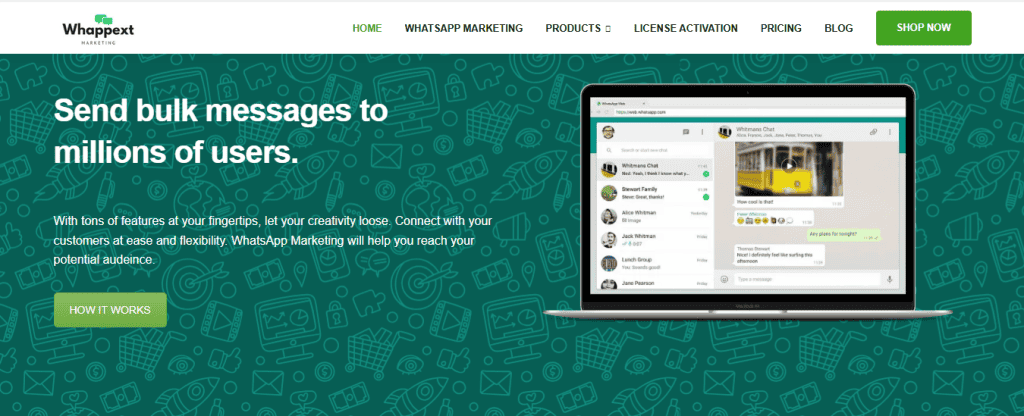
Whappext is a Windows program that pairs to your own WhatsApp account with a QR code and types messages for you. Their own words, from the product page: “It is a desktop application supported for Windows 7 and later versions. It allows you to send thousands of messages to your customers without saving any contact in your phone.” And on setup: “Run the Software: No login required” and “Pair a WhatsApp Account: Pair any WhatsApp account with the software by scanning the QR code in the web WhatsApp section.”
- Windows only, and it needs the .NET framework. Their FAQ: “This software will install in Windows 7 and later versions. The windows must also have the latest Microsoft .net framework installed to run this software.” There is no Mac version, no web version and no phone app.
- It is not on Meta’s WhatsApp Business Platform. The phrases “Cloud API”, “Business API” and “official API” appear nowhere on their site. This is not a criticism, it is a category: the whole product depends on not being on it.
- There is genuinely no per-message cost. Their FAQ, verbatim: “Would I pay extra cost for each message? No, you will only be going to purchase the license. There is no extra cost or hidden charges for each message sent.” That is true and it is the single strongest thing about the licence model.
- Licences are locked to a machine and activated by hand. “Your software will be activated after you provide us the hardware ID in the activation form, and will normally take approximately 24 hours to process.” The activation page says up to 12 hours. Either way, you do not buy this at four o’clock and send at five.
Whappext Pricing: Two Licences, Not the Three This Review Used to List
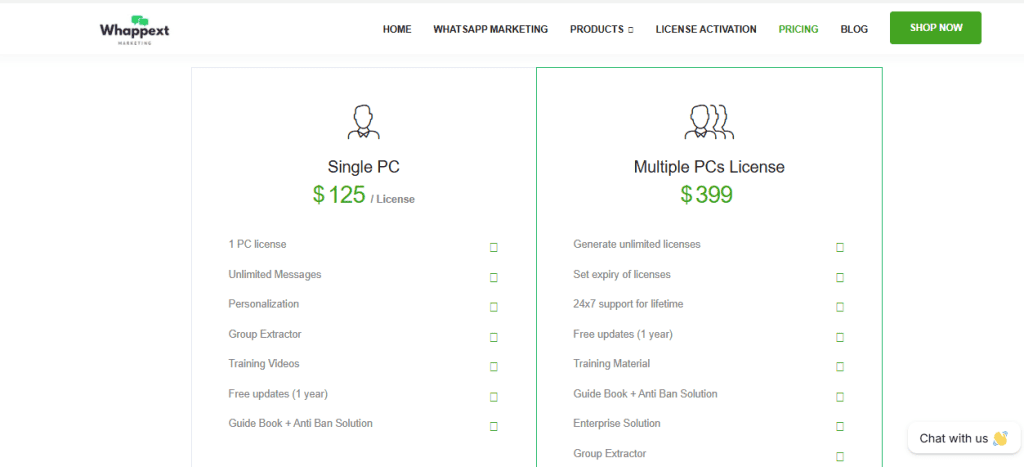
Both published prices are correct and unchanged: $125 for Single PC and $399 for the Multiple PCs License. What the old version of this page had wrong was the number of things you can buy.
| What the vendor sells | Price | What is on the card, in their words |
|---|---|---|
| Single PC | $125 per licence | 1 PC license, Unlimited Messages, Personalization, Group Extractor, Training Videos, Free updates (1 year), Guide Book + Anti Ban Solution |
| Multiple PCs License | $399 | Generate unlimited licenses, Set expiry of licenses, 24×7 support for lifetime, Free updates (1 year), Training Material, Guide Book + Anti Ban Solution, Enterprise Solution, Group Extractor |
“Enterprise Solution” is a bullet, not a plan
The old version of this Whappext review listed an “Enterprise Solution” as a third option with “custom-based” pricing and told you to contact the company. There is no such tier. “Enterprise Solution” is the seventh bullet inside the $399 Multiple PCs License. It appears exactly twice on the whole site, both times as that bullet. There is no enterprise price, no quote form and no contact-sales route to one.
That is the same mistake this blog has now made about five different vendors: a real, published line read as if it were a plan. A slider stop, a per-seat rate, a per-licence rate and a feature bullet all render in the same typeface as a price. Our BotSailor review works through the most extreme version of it.
The site gives three different answers about updates
This is the most important thing on the page and we are going to quote all three rather than pick one.
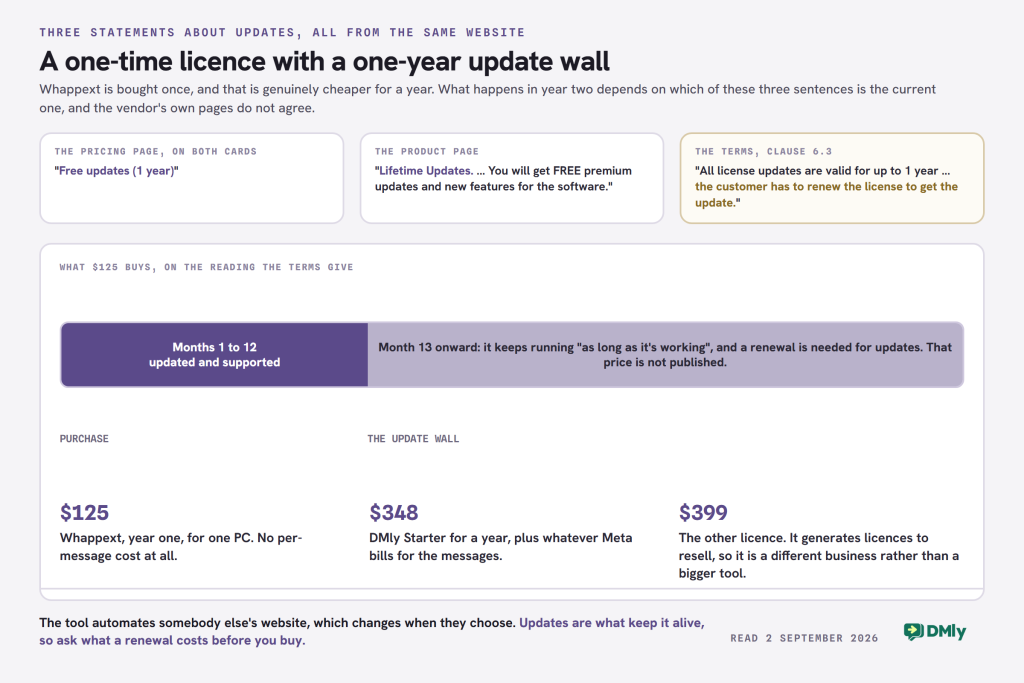
- The pricing page says, on both cards: “Free updates (1 year)”.
- The product page says: “Lifetime Updates. Our professional team works for the betterment of software and comes up with new features that will help you. You will get FREE premium updates and new features for the software.”
- The terms and conditions, clause 6.3, say: “All license updates are valid for up to 1 year. The software won’t be deactivated or disabled. It will be available to the customers and they can use it as long as it’s working. However, if it requires an update after 1 year, then the customer has to renew the license to get the update.”
Those cannot all be true, and we are not going to tell you which one is. The likely explanation is that the product page’s marketing copy is older than the terms, since the terms are the more specific and more recent-sounding document and the pricing page agrees with them. That is an inference, not a finding.
What to do about it: before you pay, email them the three quotations and ask which governs, and ask what a renewal costs. The renewal price is not published anywhere on the site. Get the answer in writing, because their refund policy opens with “All software is non-refundable.”
The break-even, worked honestly in both directions
Against DMly Starter at $29 a month billed yearly, which is $348 a year:
- Year one, Whappext wins clearly. $125 against $348. Even taking the strictest reading of clause 6.3, you get twelve months of a supported, updated tool for about a third of the subscription. That is a real saving and no amount of feature comparison argues it away.
- Year two is the question. On the strict reading you are either paying an unpublished renewal or running an unmaintained program against a website that changes. On the generous reading (“Lifetime Updates”) year two is free and Whappext wins enormously. The gap between those two outcomes is the entire decision, and it rests on which sentence on their site is current.
- The $399 licence changes the shape. It pays for itself against a subscription in fourteen months, and it is not really a bigger version of the $125 product; it is a different business, covered below.
Two costs sit outside that arithmetic on both sides. Whappext has no per-message fee at all, which is a genuine structural advantage. And a subscription platform bills you for Meta’s messages on top of the plan. If you send in real volume, that second one can be larger than either subscription, so price it before you decide: the WhatsApp pricing calculator does it for your country.
The $399 licence is a reselling business, and the table used to deny it
The Multiple PCs License is not “the same thing for more computers”. Its bullets are “Generate unlimited licenses” and “Set expiry of licenses”, and the vendor is explicit about what that is for: “How to become a reseller of this software? Becoming a reseller of this service is easy. You can buy the license generator and sell the licenses at your own price.” The pricing page carries the line “Resell at your own price”.
Our comparison table used to say Whappext offers no white label, and that was too blunt. Checked properly: the words “white label” and “rebrand” appear nowhere on their site, across every page and both sitemaps, so there is no published way to put your own name on the software. But there is a published reseller programme with its own footer-linked activation page, and telling you they offer nothing of the kind would have been wrong.
One practical limit on it, from that same page: the reseller cannot activate anyone themselves. The Reseller Activation Form asks you to “Share the hardware IDs that you want to activate for your clients”, along with your order ID, and says “They will be activated shortly”. So every one of your customers waits on Whappext, by hand, with the same 12 to 24 hour turnaround. That is a real constraint on running it as a business and it is not on any comparison table anywhere.
What Whappext Is Good At
The licence arithmetic above is a caution, not a verdict, and a Whappext review that stopped there would be a poor one. For the job this tool is built for, it does the job.
- Bulk sending with personalisation, from a list you paste in. Import a database, filter it, merge names into the message, send. No contact has to be saved to a phone first, and there is no approval step between writing a message and sending it.
- Number filtering before you send. Checking which numbers are actually on WhatsApp before a campaign is genuinely useful and it is not something the official platform offers you in the same form.
- Group posting and a group extractor. Both licences list a group extractor, which pulls member numbers out of WhatsApp groups you are in. Whether you should do that with the numbers afterwards is a question about consent rather than about software, and it is worth thinking through before you buy a tool whose selling point is that it can.
- Scheduling and auto-replies. Lightweight, but they exist, and for a one-person operation running two campaigns a month they are the whole requirement.
- Multimedia campaigns. Images, video, documents and audio, sent as ordinary WhatsApp messages rather than as approved templates.
One correction to a claim we nearly made here, because it points somewhere useful. The obvious line to write is that groups are the one thing the official route cannot match. That is not true: Meta’s own Cloud API overview lists “Groups: Create, manage, and message WhatsApp group conversations” among its capabilities. What is true is narrower and more useful. DMly’s documentation describes no group messaging feature, so if your distribution genuinely runs through WhatsApp groups, ask any platform you shortlist whether it exposes Meta’s group support rather than assuming it does, and ask us too.
Four Things the Site Does Not Tell You
None of these is hidden. All four are simply absent, and absence is harder to notice than a bad clause.
There is no trial and no demo build
The home page has a “Get Demo” button. It links to the product page. There is no trial download, no time-limited build and no sandbox anywhere on the site, and the only other “demo” is a video on a different product. You cannot try this before buying it, which matters more than usual given that activation is manual and refunds are defect-only.
The refund policy is defect-only, and it names the ban risk
Verbatim, from their refund policy: “All software is non-refundable. We will, of course, nonetheless review return/refund requests on defective software.” The one route to a refund is narrow: “in rare circumstances, where the software fails to run or function properly as described or shown, the customer can generate a refund or exchange request within 15 days of purchasing the software product.”
And the clause that belongs on the pricing page rather than in the refund policy, which is where this page previously said nothing at all:
“The customer cannot claim a refund for the blockage of its own WhatsApp account as we provide the guidelines and instructions for anti-blocking but we do NOT guarantee that their account will not get blocked.”
whappext.com/refund-policy/, read 2 September 2026
That is the honest answer to “is Whappext safe”, and it is the vendor’s own. The old version of this page answered that FAQ by saying Whappext “includes anti-ban positioning” and that businesses “should always consider WhatsApp compliance”, which said less than the vendor does.
On the “Anti Ban Solution” itself: it appears on both pricing cards as the bullet “Guide Book + Anti Ban Solution” and it is never explained anywhere on the site. There is no page for it and no description. The nearest thing to an explanation is on the product page: “WhatsApp Marketing Guide Book. With this useful software, you will get a beneficial training guide for WhatsApp marketing. This will help you to avoid getting your number blocked by sending excessive messages.” Read alongside the refund clause, the sensible reading is that it is written guidance rather than a technical mechanism, and the vendor never claims otherwise.
For what WhatsApp itself publishes about automated bulk sending, and what a blocked number costs you, our WhatSender review sets the two documents side by side. The same reasoning applies to any tool in this category.
“Multi-Channel Support” was our error, not theirs
The old version of this Whappext review listed “Multi-Channel Support” as a Whappext feature and said the platform “mentions support for broader communication workflows beyond basic messaging”. It does not. The words “multi-channel”, “omnichannel”, “SMS”, “Messenger” and “CRM” appear nowhere on their site.
The WhatsApp Marketing licence is WhatsApp only. The vendor does sell other tools, separately licensed: an Instagram bot at $99 to $299, a Facebook extractor at $99 or $299, and a Google Maps extractor at $90 or $199. The last two are lead scrapers rather than messaging channels. So “multi-channel” here means “several Windows programs bought separately”, and two of them do not send anything.
Worth saying plainly that this correction runs against Whappext in the sense that it removes a feature we had credited them with, and for them in the sense that they never claimed it. We invented it.
You cannot find out who you are paying
This is not an accusation and it is easy to verify yourself in two minutes. The site publishes no company name, no legal entity, no address, no country and no governing-law clause. The About and Contact pages return 404 and are absent from the sitemap. The only contact points are two email addresses.
Three further things a careful buyer would notice. Their privacy policy is unedited template text: it says “do not hesitate to contact us through email at Incubator”, names that placeholder company three times where the vendor’s own name should be, and includes the line “An example of a privacy policy can be found at buyproxies.io.” Their terms describe a different product, granting “a term subscription, software as a service (“SaaS”) … as hosted by Service Provider”, which is not what a perpetual Windows licence is. And the testimonials are dated 2019, with several of the reviewer names reading as jokes.
None of that means the software does not work. By every account it does. It means that if something goes wrong with a $399 purchase, you should know in advance what your recourse actually is, and on this evidence it is an email address. That is a reasonable thing to accept at $125 and a different proposition at $399 with clients depending on you.
DMly as the Whappext Alternative, With the Awkward Parts Left In
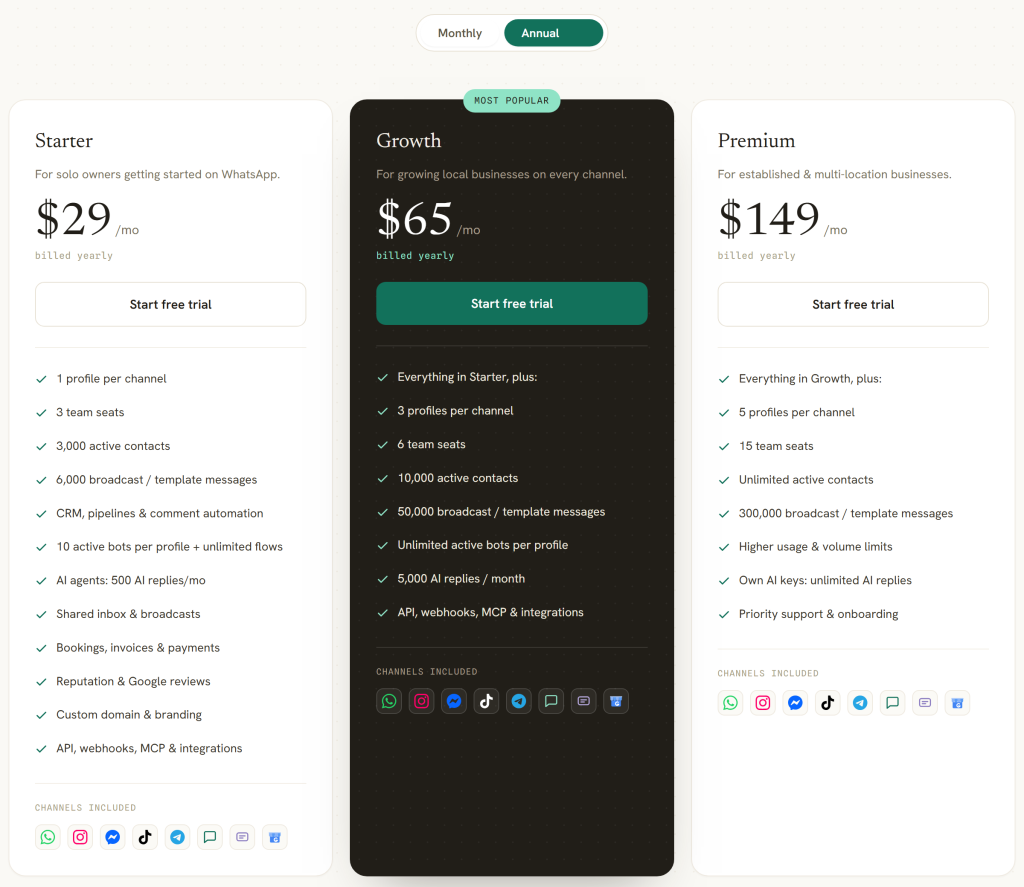
DMly is our product, so treat this section as an argument and check the figures. Every one came from our own pricing page on 2 September 2026. It is also the section where a comparison like this usually stops being useful, because the vendor writing it lists its strengths and calls the other product limited. So this one is organised the other way round: what actually differs, then what we are worse at.
The three real differences
1. It runs without you. A licensed desktop program sends when the machine is on, the program is open and somebody is signed in. A platform sends on a schedule whether anyone is at a desk or not. If your reminders go out at seven in the morning, this is the difference that decides it, and no feature list captures it.
2. Eight channels, not one. DMly connects WhatsApp, Facebook Messenger, Instagram, Telegram, a live chat widget, SMS, TikTok and Google Business Profile. Our own navigation counts them as “7 channels and SMS”, which is the same eight. The old version of this page said five, which dropped SMS, TikTok and Google Business Profile, and it did so directly beside a comparison table that already listed all eight correctly.
One qualification: channels are plan-gated. A plan can restrict which of the eight you may connect and the restriction is enforced when you try. Check the plan panel rather than assuming.
3. The conversation continues somewhere. A bulk sender’s job ends when the message leaves. What follows a reply is where the products separate: a shared inbox with assignment and internal notes, pipeline stages, an AI agent that can tag a contact, write a note, move them along the pipeline, book against your real calendar and hand the chat to a person, and bookings, invoices and Google reviews in the same place. If nothing needs to happen after a reply lands on your own phone, none of that is worth paying for.
Two claims from the old version of this page that were not true
Both were ours, both were vague, and vague is how a claim survives without being checked.
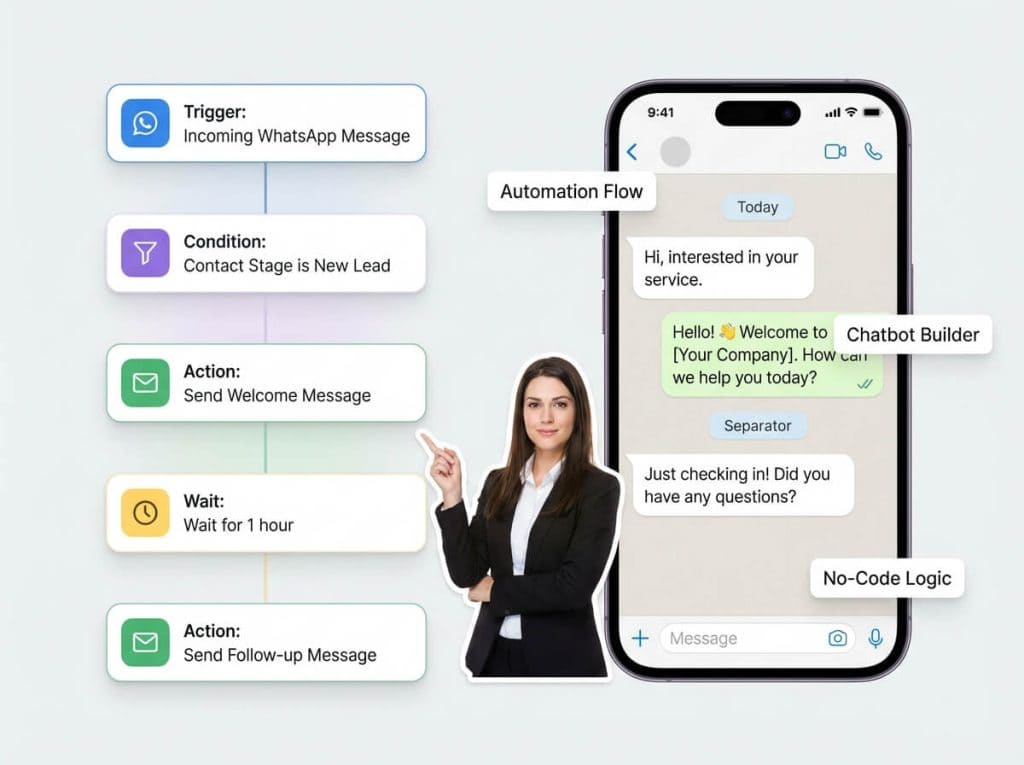
- “Segment audiences dynamically” and “trigger workflows based on customer behavior”. There is no behaviour field in the segment builder. The real set is four basic filters (contact stage, contact tags, excluded tags, days since last activity) and twelve condition fields: lifecycle stage, source, custom field, birthday month and tag under Contact; reachable on a given channel and marketing opt-in under Engagement; and total spend, last purchase, order count, loyalty points and credit balance under Commerce. Commerce conditions count DMly’s own confirmed orders, so a Shopify purchase history is not what they read.
- “Advanced analytics” covering “conversion activity” and “customer behavior trends”. Replaced below with what the reporting actually does and does not do, which is less flattering and more useful.
Six things DMly does worse, or not at all
- There is no one-time price and no free plan. Whappext’s whole proposition is that you pay once. Ours is a seven-day trial with no card and then a subscription, forever. If avoiding a recurring bill is the actual requirement, we do not meet it and no feature comparison changes that.
- You cannot message whoever you like. WhatsApp delivers a free-form message only inside 24 hours of the contact’s last message to you, and outside that window only an approved template goes out. DMly enforces this identically in the inbox, in automations, in broadcasts and in sequences. A desktop sender has no such constraint, and for outbound-only campaigns that constraint is the entire cost of the official route.
- Every plan caps broadcast volume. 10,000 broadcast or template messages a month on Starter, 50,000 on Growth, 300,000 on Premium. Whappext’s licences say “Unlimited Messages” and mean it, because nobody is metering them.
- The broadcast Replies figure is always zero. It appears as a stat card and as the last step of the conversion funnel and nothing counts replies to a broadcast on any channel. Per-template performance is a separate screen and does report a lifetime Replied count, so the number exists; it is just not on the broadcast.
- Delivered and Opened stay at zero on Messenger and Instagram, and the engagement-over-time chart on a broadcast is placeholder data showing the same shape every time. Telegram sends no delivery confirmations at all; SMS reports Delivered but never Opened.
- The inbox has no routing rules. There is round-robin assignment, flow nodes that assign, and an AI agent that can assign or hand over. There is no rules engine that routes by keyword, department or working hours.
On Meta’s fees, our pricing page says: “You pay Meta’s standard per-message rates directly, DMly never adds a fee on top.” Worth checking against anyone else you shortlist, because it is not the norm. What it does not mean is that the messages are free: Meta bills them, which is a running cost Whappext genuinely does not have. The WhatsApp pricing calculator sizes that for your own country and volume, and the country rate card has Meta’s published rates.
Whappext Review Summary: Whappext vs DMly, With the Weak Cells Labelled
One methodological note that changes how you should read this, and that the old table got wrong. Whappext publishes no documentation: no knowledge base, no FAQ page beyond four inline questions, and no feature list longer than eight bullets per licence. So for most features, the honest cell is not “not available” but “not published”, and those are different claims. The table below says which is which.
| Whappext | DMly | |
|---|---|---|
| What it is | A Windows program, paired to your WhatsApp by QR code | A hosted platform on Meta’s WhatsApp Business Platform |
| What you pay | $125 once for one PC, or $399 for the licence generator | $29, $65 or $149 a month billed yearly |
| Updates | “Free updates (1 year)”, then a renewal at an unpublished price. The product page says “Lifetime Updates”; the two do not agree | Included, continuously |
| Per-message cost | None. “There is no extra cost or hidden charges for each message sent” | Meta bills you at its own rate. “DMly never adds a fee on top” |
| Sends when you are away | No. The PC has to be on and the program running | Yes |
| Channels | WhatsApp. Other tools are sold separately and two of them are scrapers | Eight: WhatsApp, Messenger, Instagram, Telegram, live chat, SMS, TikTok, Google Business Profile |
| Group messaging | Group posting and a group extractor | Not published. Meta’s Cloud API lists Groups, but DMly’s docs describe no group feature |
| Team inbox | Not published | Shared inbox with assignment, notes, round-robin |
| CRM | Not published. The word does not appear on their site | Contacts, pipeline stages, lifecycle, 4 filters and 12 condition fields |
| Bookings, invoices, reviews, loyalty | Not published. None of the four is mentioned anywhere on their site | All four, native |
| Reselling | Yes, via the $399 licence generator. “Resell at your own price”. No rebranding published, and you submit client hardware IDs for Whappext to activate | White label with a custom domain, quoted |
| Trial | None. The “Get Demo” button links to the product page | 7 days, no card |
| Refunds | “All software is non-refundable”, defect-only within 15 days, and a WhatsApp block is explicitly excluded | Cancel any time; no refund policy published beyond that |
| Who you are contracting with | Not published. No company name, address, country or governing law on the site | Published |
The row that decides most cases is not any of the feature rows. It is “sends when you are away”, because it is the one difference that cannot be closed by paying more for either product.
What Changes on 1 October 2026, and Why It Argues Both Ways
This affects the WhatsApp Business Platform. It does not affect the free WhatsApp Business app, and it does not affect a licensed desktop program driving your own account. On a page comparing those two things, that asymmetry matters, and it is one of the few places where staying on a bulk sender genuinely saves money.
Two categories of message start being charged, not one. Most coverage reports the first and misses the second. Meta’s own wording:
- “Effective October 1, 2026, Meta will charge on a per-message basis for service messages, consistent with how Meta charges for template messages.” Service messages are the free-form replies you send inside the 24-hour window, and they have been free since November 2024. From the same date each business number also gets 1,000 free service messages a month, which do not roll over, so Meta charges from the 1,001st and a business answering a few hundred customers a month still pays nothing on this side.
- “Effective October 1, 2026, Meta will charge on a per-message basis for utility messages sent in response to users within an open 24-hour customer service window.” For a business sending confirmations and reminders, this second one is usually the bigger bill.
They now scale differently. Meta says: “Meta does not offer volume tiers for service messages. Meta continues to offer volume tiers for utility and authentication messages.” Service cost therefore rises in a straight line with conversation length.
There is a hard deadline first, on 30 September 2026. Every account on the WhatsApp Business Platform needs a payment method on file; from 1 October, accounts without one stop having their service messages delivered. It is set in WhatsApp Manager under the business portfolio’s billing settings.
And one thing you can check yourself. Meta committed to publish the October rates by 1 September 2026, and by 7 September they were up. A service message costs the same as a utility or authentication message in the same market, so 0.0034 USD in North America, 0.0220 in the UK and 0.0067 in Nigeria, with the first 1,000 a month free on every business number. Our running write-up of the change carries the country table.
The honest reading for this page: if your entire use of WhatsApp is outbound campaigns from your own number, none of this reaches you and a licence looks better than it did a year ago. If any part of your business depends on replying to customers at scale, the official route was already the right call and October makes the arithmetic on it, rather than the principle, the thing to redo.
Which One to Choose
Most of the traffic to a Whappext review arrives at this section, so here it is plainly. These are not competing products at different price points. They are different categories, and the choice is usually made by one fact about your business rather than by a comparison.
- Buy Whappext if one person sends campaigns from one Windows machine, to a list you already have permission to message, and nothing needs to happen after a reply arrives. At $125 with no per-message cost, nothing on the official route competes on price in year one. Ask about the renewal first.
- Buy the $399 licence only if you intend to resell, and only after you have asked how quickly they activate your clients’ hardware IDs, because that turnaround is your service level.
- Move to DMly if sending is not the whole job: if replies need to reach more than one person, if the schedule has to run overnight, or if your customers also arrive from Instagram, TikTok or your Google listing. Disclosure again: we make it.
- Do neither yet if you cannot answer what a blocked WhatsApp number would cost you. That is the question underneath this entire comparison, and it is worth ten minutes before either purchase.
For a wider field of alternatives than one product, our roundup of twenty WhatsApp messaging automation tools covers the category with the same price discipline, and the chatbot cost breakdown works through a real month with the messages counted.
Whappext Review FAQs
How much does Whappext cost?
Two prices, both one-time: $125 for a Single PC licence and $399 for the Multiple PCs License, which generates unlimited licences and lets you set their expiry. There is no third tier; the “Enterprise Solution” is a bullet inside the $399 card rather than a plan you can buy. Both include “Free updates (1 year)”, and their terms say a renewal is needed for updates after that, at a price the site does not publish.
Is Whappext safe to use?
The clearest answer is the vendor’s own, from their refund policy: “The customer cannot claim a refund for the blockage of its own WhatsApp account as we provide the guidelines and instructions for anti-blocking but we do NOT guarantee that their account will not get blocked.” The “Anti Ban Solution” on both pricing cards is never explained on the site; the nearest description is a guide book that “will help you to avoid getting your number blocked by sending excessive messages”. So the risk is real, the vendor says so, and the mitigation on offer is advice rather than a mechanism. Whether that is acceptable depends entirely on what losing that number would cost you.
Does Whappext use the official WhatsApp API?
No. It is a Windows desktop application that pairs to your own WhatsApp account by scanning a QR code in WhatsApp Web. The phrases “Cloud API”, “Business API” and “official API” do not appear anywhere on their site. That is why there are no per-message fees, no template approval and no business verification, and it is also why the account doing the sending is your own.
Is there a free trial of Whappext?
No. The home page carries a “Get Demo” button but it links to the product page rather than to a download, and there is no time-limited build anywhere on the site. Licences are locked to a machine’s hardware ID and activated by hand, which their pages say takes 12 to 24 hours. Refunds are defect-only within 15 days, so there is no practical way to try it and change your mind.
Does Whappext support channels other than WhatsApp?
Not within this licence. An earlier version of this page credited Whappext with “Multi-Channel Support” and that was our error: the words multi-channel, omnichannel, SMS and Messenger appear nowhere on their site. They do sell separate Windows tools for Instagram automation and for extracting leads from Facebook and Google Maps, but those are separate purchases and the last two are scrapers rather than messaging channels.
Can I resell Whappext?
Yes. Their answer: “Becoming a reseller of this service is easy. You can buy the license generator and sell the licenses at your own price.” That is the $399 Multiple PCs License, and the pricing page adds “Resell at your own price”. Two limits worth knowing: nothing published lets you put your own branding on the software, and you cannot activate customers yourself. Their reseller activation form asks you to submit your clients’ hardware IDs and says they “will be activated shortly”, so your customers wait on Whappext.
Is DMly better than Whappext?
For a different job, and it is our product so weigh that. Whappext sends messages from one machine for a one-time fee and nothing recurring. DMly costs $29 a month billed yearly and up, and Meta bills the messages on top, but it runs without anyone at a desk, covers eight channels, and gives replies somewhere to land: a shared inbox, a CRM, bookings and invoices. If your requirement is genuinely “send a campaign and stop”, Whappext is cheaper and we will not pretend otherwise.
Does DMly support WhatsApp broadcasts and retargeting?
Yes to both, and the retargeting is more specific than the word usually implies. A broadcast can be created as a retarget campaign against a previous broadcast, targeting recipients by how they engaged with it. Broadcast volume is capped per plan at 10,000, 50,000 or 300,000 messages a month, and the allowance counts every recipient plus every template sent from anywhere else. Two honest limits on the reporting: the broadcast Replies figure is always zero on every channel, and the engagement-over-time chart on a broadcast is placeholder data.
Writing about WhatsApp automation, bookings and growth for local business.
Turn WhatsApp into your busiest channel.
Start free and run message, bookings, payments and reviews in one place.
