
WhatsApp Marketing vs SMS Marketing: Which Converts Better for Local Businesses?
Write one sentence. “Your table is ready, we are holding it for ten minutes.” Now send it to the same customer, on the same phone, on both channels at once. The text arrives. The WhatsApp message is stopped before it goes anywhere, and no amount of rewriting the sentence changes that.
That single asymmetry is why WhatsApp marketing vs SMS marketing is not a contest between two versions of the same thing. They are different instruments with different permission models, and the permission model, not the open rate, decides which one converts. What separates them is who you are allowed to reach, when, and with what.
This guide works through the mechanics rather than the marketing: what each channel demands before it will send, what it can carry, what it genuinely costs now that Meta has changed the pricing, which of six everyday jobs each one wins, and how the answer moves depending on where your customers live. By the end you should be able to point at any message your business sends and say which channel it belongs on, and why.
What this page is, and what sits next to it: This is the allocation decision in WhatsApp marketing vs SMS marketing: which channel for which job. If you have already decided that texting has a place in your business and you want the operating manual, consent rules, segment arithmetic, the five texts worth sending and the DMly setup, that is our guide to SMS marketing automation for small businesses. This page does not repeat it.
The Short Answer on WhatsApp Marketing vs SMS Marketing
WhatsApp converts better when the customer needs to reply, and SMS converts better when the customer needs to act on a single instruction. That is the whole finding. The rest of this article is the reasoning, and the reasoning matters because the exceptions are expensive.
WhatsApp is a conversation channel that also allows broadcasts. Its strengths are two-way exchange, images, buttons, threading and the fact that answering you costs your customer a tap. Its weakness is that reaching somebody who has not messaged you first is heavily gated, and the gate is enforced by software rather than by good manners.
SMS is a delivery channel that does not really do conversation. Its strength is that it reaches essentially any phone, immediately, with no gatekeeper at all. Its weaknesses are that it carries plain text and nothing else, that every character has a price, and that the freedom to send is a platform fact rather than a legal one.
| SMS | ||
| Can you message somebody who has never written to you? | Only with an approved template | Yes |
| Is there a time window? | Yes, 24 hours from their last message | No |
| Approval queue | Yes, for every template | None |
| Media, buttons, carousels | Yes | No, text only |
| Read receipts | Yes | Sent, delivered or failed only |
| Chat links and QR codes to collect opt-ins | Yes | None, the growth tools do not apply |
| Sending limits | Tiered, and the tier moves with your quality rating | 600 per minute per channel |
| Who sets the price | Meta, per message, by category and country | Your gateway, per segment |
Most local businesses that run both well do not treat this as a hedge. They use the two channels for different halves of the same customer relationship, and the allocation below is where nearly all of them end up.
Why the Permission Model Decides WhatsApp Marketing vs SMS Marketing
Every meaningful difference between these two channels traces back to what each one demands before it will carry your message. Get this part clear and the rest of the decision becomes close to mechanical.
What WhatsApp requires
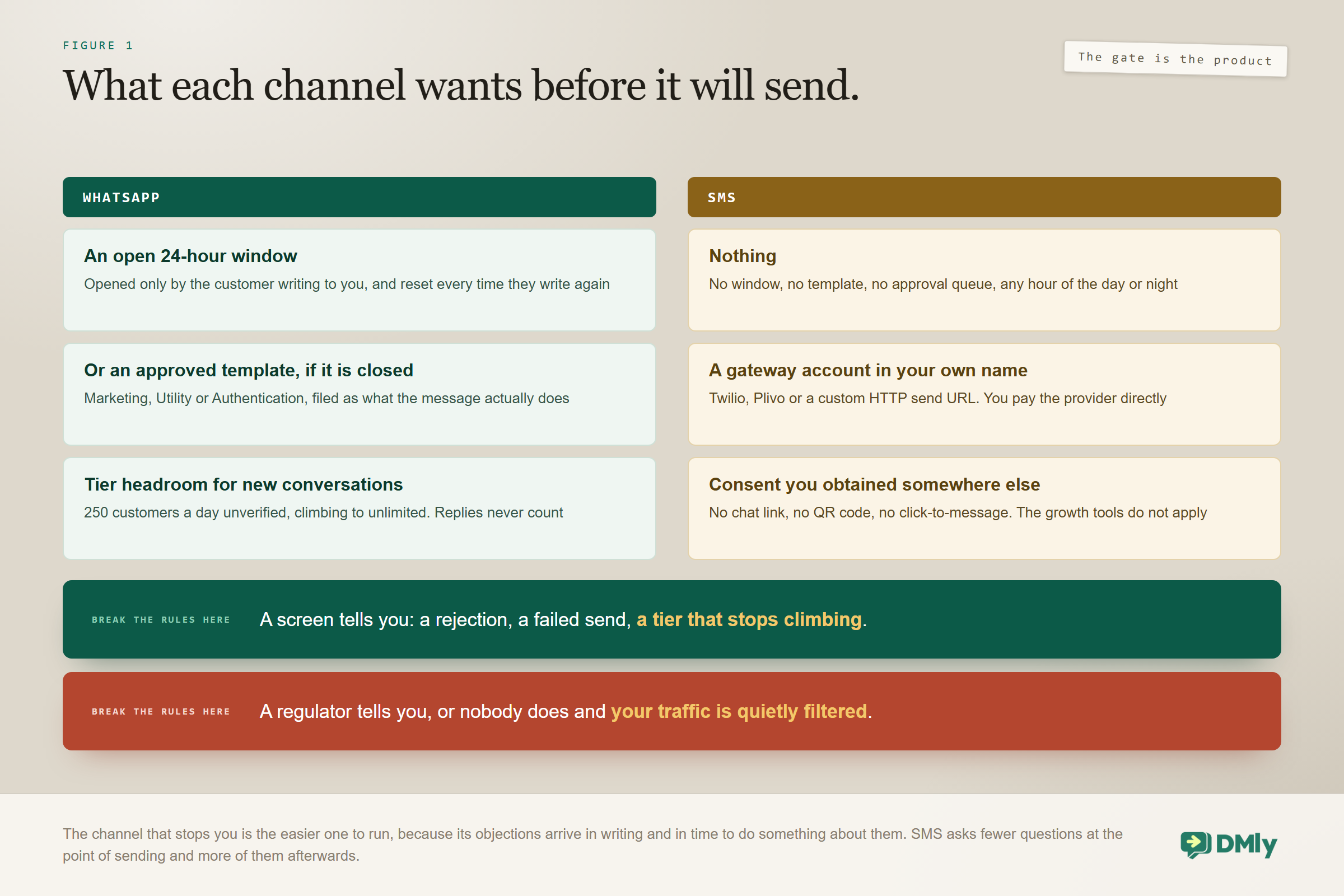
WhatsApp gives you a rolling 24-hour window that opens when a contact messages you and resets every time they message again. Inside it you can write whatever you like. Outside it you can only send a message template that Meta has already approved, and if you have not got one, nothing goes out at all. A free-form send to a closed window is stopped and recorded as failed rather than quietly pretended into a success, which is the single most useful thing about the way DMly handles it.
Templates are a small production process rather than a formality. Each one is filed under Marketing, Utility or Authentication, and the category has to match what the message actually does, because a promotion filed as Utility is a rejection rather than a saving. Our library of WhatsApp Business message templates has wording you can adapt by use case.
On top of that sits a tiered sending limit, and this is where the draft version of the internet gets it wrong. The tier is Meta’s cap on how many different customers you may start a conversation with in any 24 hours, and it never limits replies to people who wrote to you first. An unverified business starts at 250 customers per 24 hours and climbs through 1,000, 10,000 and 100,000 to unlimited as it sends more and keeps its quality up. There is a 50 row, but it is the lowest value the display can show rather than where anybody begins. The full picture is in our guide to quality rating, messaging limits and bans.
The tier is information, not a brake: DMly will happily hand Meta more conversations than your tier allows. Meta is the one that rejects them. That is why a large broadcast on a low tier comes back partially failed rather than being held back or queued, and it is worth knowing before your first big send rather than during it.
What SMS requires
Technically, almost nothing. There is no messaging window and no template approval, so you can text a customer at any hour whether or not they have ever texted you. DMly sends through Twilio, Plivo or a custom HTTP gateway, and once your credentials are in, the channel simply sends.
That freedom is real, and it is also the trap that catches most businesses moving over from email. The absence of a technical gate does not remove the legal one. Consent rules for commercial texting are strict in most markets, the penalties are meaningful, and a carrier that decides your traffic is unwanted can filter you out without telling anybody. WhatsApp enforces its rules with rejections and tier drops you can see on a screen. SMS enforces them with regulators and silent filtering you often cannot.
There is a second requirement nobody mentions until it bites. On WhatsApp you can put a chat link on your website, a QR code on a receipt and a click-to-message button on an ad, and every one of them produces a customer who has messaged you first, which is to say a customer you are then allowed to talk to freely. None of that exists on SMS. The growth tools are greyed out when SMS is the active channel, because they build a chat link and SMS has no equivalent. Every number on your texting list arrived some other way, which is exactly why the consent question is harder to answer on the channel that asks fewer questions.
What Each Channel Can Actually Carry
WhatsApp carries a small interface and SMS carries a sentence, and that changes what a single message can accomplish. It sounds like a formatting difference. It is closer to the difference between handing somebody a form and shouting across a road.
A WhatsApp message can include an image, a document, a video, buttons, quick replies and a carousel of cards. A customer who gets a booking confirmation can tap Reschedule without typing a word. A customer who gets a menu can tap the dish. Every tap is a fact your automation can branch on afterwards.
SMS in DMly is text only. No images, no files, no tappable buttons. If a flow step tries to send media on SMS, only the caption and the link go out as plain text and the media itself does not. Every call to action on SMS is therefore a URL the customer has to decide to open, in a browser, away from the thread. You lose the tap, and you lose the branch that would have followed it.
SMS automation is narrower than WhatsApp, not absent: It is commonly said that you cannot automate SMS properly. That is not what the product does. With SMS as the flow’s channel the Messaging steps shrink to the plain text message and the question step, and the image, video, audio and file steps are not offered. Everything in the Actions group still works: tagging, assigning, handing over to a person, webhooks and the rest. So keyword auto-replies, ask-a-question-and-branch, notify-and-record and hand-over-to-a-human all run perfectly well on SMS. What you cannot build is anything shaped like a picture, a menu of buttons or a carousel.
The practical consequence is easy to hold in your head. A message that needs the customer to choose belongs on WhatsApp. A message that needs the customer to know belongs on either, and SMS is frequently the simpler of the two for it.
Reach, and the Two Records Problem Underneath It
SMS reaches more phones and WhatsApp reaches the right people more richly, but the thing that actually costs businesses money here is neither. It is that the same human being can exist in your workspace twice without you noticing.
Both channels are keyed to a phone number, so on paper the addressable list is identical. In practice SMS lands on any phone that can receive a text, with no app to install and no account to hold, which is why it stays the fallback of choice when something genuinely has to arrive. WhatsApp requires the person to use WhatsApp, which in some markets is close to universal and in others is a minority, and it requires them to have written to you first before you can speak freely.
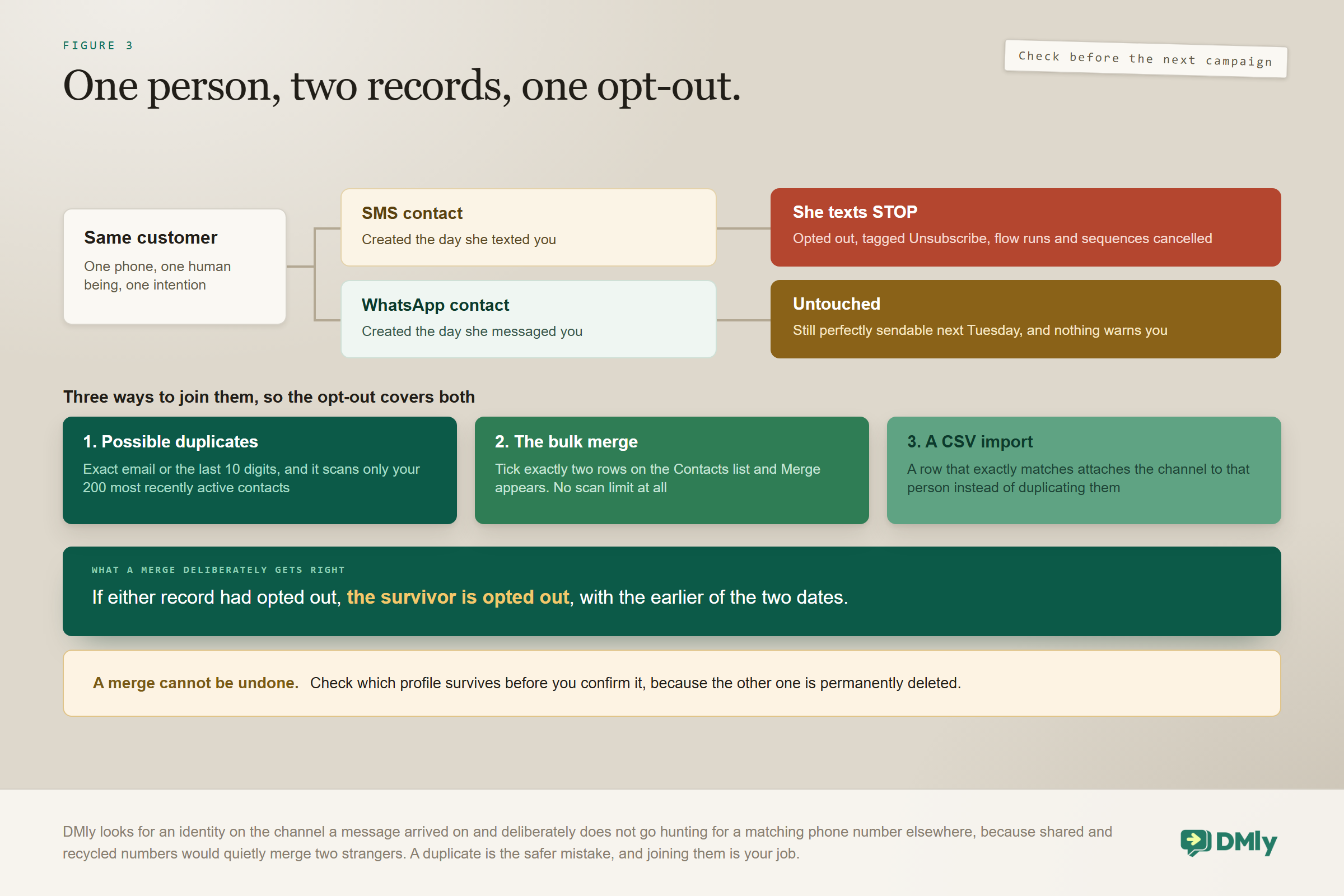
Now the part that catches people out. When a message arrives, DMly looks for an existing identity on that channel. If there is none, it creates a new contact. It does not go hunting through your workspace for a matching phone number or email, and that is a deliberate choice rather than an oversight: shared and recycled numbers would quietly merge two strangers into one profile, and a duplicate is the safer mistake to make. So the customer who texts you on Tuesday and messages you on WhatsApp on Thursday can be two records until somebody joins them.
Three ways to join the two records, in order of effort: Possible duplicates is the suggestion. A three-dot button appears in the profile header only when DMly has spotted a candidate, matching on an exact email or the last 10 digits of the phone number, and it scans your 200 most recently active contacts. That makes it a tidying tool rather than a guarantee. The bulk merge has no such limit: tick exactly two rows on the Contacts list and Merge appears next to Delete. A CSV import does the same job wholesale, because a row whose phone or email exactly matches somebody you already have attaches the channel to that person instead of creating a second copy. A merge cannot be undone, so check which way round it goes first.
Once the records are joined, the Inbox stops treating the customer as two people. A conversation that spans more than one channel gets a Reply on strip above the thread with a pill per channel, each carrying its own unread count, and picking one moves your reply, the messaging-window countdown and the template picker with it. There is a nice detail on the other side of the same feature: a contact you hold a phone number for but have no WhatsApp history with still gets a WhatsApp pill, marked template-required because no window is open yet, and the WhatsApp identity is only created when the message actually sends. That is the bridge from a texting customer to a WhatsApp one, and it is one template wide.
Cost: Why the Per-Message Comparison Misleads, and What Changed in October
The two channels are billed on different units, so a straight price-per-message comparison is close to meaningless. Compare the cost of a completed outcome instead, and then check the comparison again, because cost is the part of WhatsApp marketing vs SMS marketing that changed most recently and half of the received wisdom about it expired on 1 October 2026.
WhatsApp is priced by Meta, by category and by destination country, and the numbers vary enormously between markets. A marketing message to a customer in the United States and one to a customer in India are not remotely the same price. Utility and authentication messages are cheaper than marketing ones, which is the commercial reason category discipline matters rather than just the procedural one. Our page on WhatsApp Business API pricing by country has the actual figures.
SMS is priced by your gateway, per segment, where a segment is a fixed run of characters. Here is the part that costs businesses money quietly: DMly does not count segments, does not cap message length and does not track what a broadcast costs you. Long messages are handed to your provider whole and your provider bills you for however many segments they turn into. A message you thought was one text may be three. Multiply that by four thousand people and it stops being an academic point. Watch the spend in your Twilio or Plivo dashboard, because it is not going to appear in DMly.
What changed on 1 October 2026, and why it moves this comparison: Until that date, the argument for WhatsApp on cost was partly structural: a back-and-forth exchange cost you the message that opened it and nothing more. From 1 October 2026 Meta charges on a per-message basis for service messages, meaning the ordinary free-form replies you send inside the 24-hour window, and for utility templates sent inside that window as well. The two are not charged on the same terms: every business phone number gets 1,000 free service messages a month and is charged only from the 1,001st, while utility templates have no allowance and are charged from the first one. Service messages get no volume tiers either, so your ten-thousandth reply of the month costs what your one-thousand-and-first did. This affects the WhatsApp Business Platform, the API version businesses connect through a provider; the free WhatsApp Business app is unaffected and receiving messages is still free. The whole calculation, with worked examples for a salon and a clinic, is in our guide to the WhatsApp pricing change in October.
So the honest comparison now looks like this.
- For one informational message to a large list, SMS is usually cheaper per person in expensive WhatsApp markets and dearer in cheap ones. Check your own two numbers rather than trusting anybody’s blog, including this one.
- For anything that needs a back and forth, WhatsApp is still cheaper in most markets, but it is now cheaper by arithmetic rather than by structure. Every reply is billed at that market’s utility rate, so four replies cost four times one reply, and folding four short messages into one properly written one cuts the cost to a quarter without shortening what you actually say.
- For anything that fails, WhatsApp is cheaper, because a message that never left costs nothing. On SMS you generally pay to deliver to a number that stopped caring two years ago.
- For reaching somebody who does not have WhatsApp, SMS is the only price on the menu.
One allowance covers both channels: Your DMly plan has a broadcast and template allowance, and it counts every recipient a broadcast is sent to on any channel, plus every template message sent from anywhere else. An SMS broadcast to two thousand people spends two thousand of it, exactly as a WhatsApp one would. Replies inside an open conversation are not counted, and a message that never left, because the window had closed or the contact had opted out, costs you nothing. When the allowance runs out DMly refuses the broadcast at the compose step rather than halfway through the send.
The largest cost in either channel is rarely the per-message rate anyway. It is sending to the wrong people, which is a targeting problem rather than a channel problem, and our guide to WhatsApp broadcasts deals with it directly.
What Do the Conversion Statistics Actually Tell You?
Less than they appear to, and you should be sceptical of any article that leads with them. Almost every published comparison of WhatsApp marketing vs SMS marketing opens on an open rate, and the widely quoted figures for both channels come overwhelmingly from vendors selling one of the two, are rarely defined the same way twice, and almost never control for the fact that the audiences are different.
The structural problem is simple. WhatsApp marketing messages usually go to people who opted in and often to people who have messaged the business before. SMS lists frequently include numbers collected at a till or through a form months ago. Comparing response rates across those two populations tells you about the populations, not about the channels.
Rather than borrowing somebody else’s numbers, measure three things on your own traffic.
- Delivery rate. On WhatsApp, watch failures caused by closed windows and template problems. On SMS, watch the gap between sent and delivered, which is where carrier filtering shows up.
- Reply rate. This is the number that most cleanly separates the two, because replying on WhatsApp costs a tap and replying to a text costs a text.
- Completed action. Bookings made, invoices paid, carts recovered. It is the only number that pays wages, and it is the one most likely to contradict the open-rate story.
Run the same offer on both channels, to comparable segments, for a month, and you will have better data than any published benchmark. Our note on the metrics worth tracking after you automate sets out how to instrument that without drowning in dashboards.
Six Jobs, and Which Channel Wins Each
Rather than a verdict on WhatsApp marketing vs SMS marketing as a whole, here is the allocation most local businesses arrive at after a few months of running both. Take your own list of regular messages and see how many of them land where you expected.
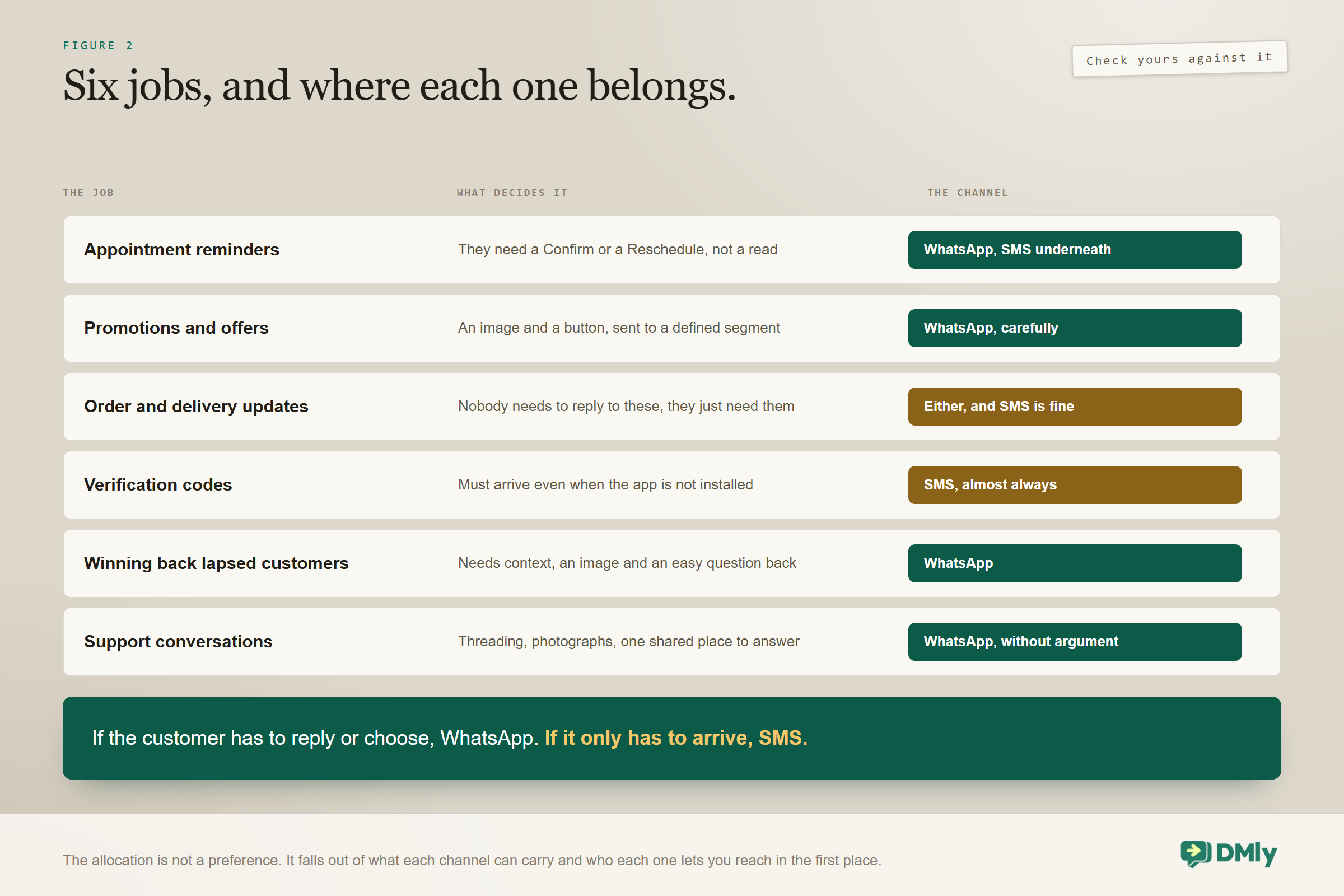
Appointment reminders: WhatsApp, with SMS underneath
Reminders live or die on the customer being able to respond. A WhatsApp reminder with Confirm and Reschedule buttons turns a no-show into a moved booking without either party typing, and in any trade that sells time that is worth real money. The caveat is reach: if the reminder does not arrive, the appointment is still at risk, which is exactly the case for a text underneath it. The scheduling side is covered in our WhatsApp appointment booking guide.
Promotions and offers: WhatsApp, carefully
Marketing templates outperform SMS promotions on engagement in most markets, because the message can carry an image and a button and lands in an app people actually read. The risk is proportionate. Promotional WhatsApp messages are the fastest way to damage a quality rating, because an irritated recipient has a Block button right there, and the damage lands on your reminders and confirmations rather than on the campaign that caused it.
Order and delivery updates: either, and SMS is fine
These are informational, time-sensitive and rarely need a reply. SMS does the job at universal reach. Move them to WhatsApp only when you want the customer to be able to ask a follow-up question in the same thread, which for higher-value orders is often worth the difference.
Verification codes: SMS, almost always
Codes need to arrive on any phone, immediately, with no dependency on an app being installed. WhatsApp has an Authentication template category for exactly this and it works well where penetration is near total, but SMS remains the safer default because it has no failure mode where the customer simply does not have the app.
Winning back lapsed customers: WhatsApp
Bringing somebody back needs more than one sentence. It needs context, usually an image, and an easy way to reply, and it benefits enormously from the customer being able to ask a question rather than having to decide alone. This is the clearest WhatsApp win on the list, and the audience work behind it is in our WhatsApp CRM guide.
Support conversations: WhatsApp, without argument
SMS was never designed to be a support channel. Threading is unreliable, there is no way to send a photograph of the broken thing, and agents lose track of who said what. If you take support enquiries by text today, the highest-return change available to you is moving them into a threaded channel and answering them from one place, which is what our omnichannel inbox guide is about.
The Pattern That Beats Choosing Between Them
The businesses that get the most out of both do not choose; they layer. This is the answer to WhatsApp marketing vs SMS marketing that never appears in the comparison articles, because it is not a comparison. WhatsApp carries the message first because it is richer, better at getting a reply and usually cheaper for a conversation. SMS sits underneath as the layer that catches whatever WhatsApp could not deliver.
The logic fits in a sentence: try the good channel, and when the platform tells you it did not arrive, try the channel that always arrives. That works because DMly records a failed WhatsApp send as failed rather than pretending it succeeded, so the condition is something an automation can genuinely branch on rather than something you have to infer.
The step that makes the layer possible: The Send SMS step works from any flow on any channel, so a WhatsApp flow can text an appointment reminder to somebody who has not opened WhatsApp in days. It defaults to the contact’s phone number and it is deliberately forgiving: if there is no phone number, or the gateway errors, the flow carries on to the next step and records the problem in Logs rather than stopping the conversation. That is the right behaviour for a fallback and the wrong behaviour for a silence you never investigate, so check Logs when a text you expected never arrived. One limitation to design around: you cannot pick which gateway a Send SMS step uses. With more than one connected it takes whichever DMly finds first, so connect only the one you want your flows sending through.
Opt-Out and Compliance on Both Channels
Both channels have opt-out mechanics and they do not cover each other automatically. This is the section to read twice, because it is the one that turns a good campaign into a complaint.
On SMS, DMly handles the opt-out for you, and it runs before anything else: before flows, before automations, before your bot ever sees the message. A text whose whole body is one of stop, stopall, stop all, unsubscribe, cancel, quit, end, opt out or optout marks the contact opted out, tags them Unsubscribe, cancels their active flow runs and sequences, and writes a note in the conversation saying automated messages are suppressed while agents can still reply by hand. The words start, unstop, subscribe, opt in and optin reverse it.
Never ask an SMS customer to reply CANCEL or END: Both are opt-out keywords. A booking flow that says “reply CANCEL to cancel” does not cancel the appointment; it unsubscribes the customer and kills the flow. The match is on the whole message, so “cancel my appointment” is safe and a bare “cancel” is not. Pick a different word, and go and check the SMS flows you already have running.
On WhatsApp the equivalent pressure valve is the Block button, and the consequence is a quality rating that falls rather than a keyword you can count. That is why the two channels feel so different to run. SMS opt-outs are explicit and countable. WhatsApp displeasure is implicit and shows up as reduced deliverability weeks later, on the messages you cared about most.
Then there is the part that gets missed. A customer who texts STOP is opted out on the contact record that received the text. If the same person also exists as a separate WhatsApp contact, that record is untouched, and nothing in the platform stops you sending them a marketing template the following week. Two habits fix it. Join the records deliberately, using the three routes above, because a merge keeps the opt-out: if either profile had opted out, the survivor is opted out, with the earlier of the two dates, and the same is true of a block. And treat an opt-out as a person rather than as a record, excluding anyone carrying the Unsubscribe tag from every campaign on every channel.
One more protection you should not rely on: An opted-out contact is refused at send time even when they are still sitting in the audience, so a broadcast will not actually text them. But the audience-level filter that removes them up front only applies if you turn on the reachable-only option, so a broadcast to a large segment will show individual failures for people who opted out. That is expected behaviour rather than a fault, and it means your delivery report is a worse guide to list health than it looks.
Setting Both Up, and the Two Traps in the SMS Half
The two channels connect very differently, which is itself informative about how each one is governed. WhatsApp goes through Meta and is checked at every step. SMS goes through an account in your own name and is barely checked at all.
WhatsApp connects a number, ties it to a WhatsApp Business Account, submits templates for approval and receives a sending tier that Meta reviews. SMS is not in the Channels list at all, because that path is for social accounts you log in to; it lives in the SMS category on the Integrations page. For Twilio you supply the Account SID, the auth token and either a From number or a Messaging Service SID. For Plivo it is the Auth ID, auth token and sender number. A custom HTTP gateway takes a send URL with tokens for the recipient, the text and the sender, plus the method, an optional authorization header and a Sender ID.
Trap one: nothing sets the webhook for you: After you connect Twilio or Plivo, DMly shows an Inbound and delivery webhook URL. You have to paste it into your provider’s dashboard yourself, as both the inbound-message URL and the delivery-status URL, and until you do, replies never arrive. In Twilio it is on the number under Phone Numbers, Active numbers. In Plivo it is under Phone Numbers, Manage numbers. When somebody tells you their SMS channel is one-way, this is almost always why.
Trap two: a custom gateway connects even when it is wrong: Twilio and Plivo credentials are verified against the provider’s own API, so wrong ones fail immediately with the provider’s error. A custom HTTP gateway is only checked for a non-empty send URL, which means a wrong URL, a wrong method or a bad authorization header connects successfully and only reveals itself on the first send. Watch Logs after connecting one. And remember that a custom gateway is outbound only: replies never reach your Inbox and delivery reports never update a status, so if two-way matters, use Twilio or Plivo.
One last thing that reads as a technical detail and is really a marketing one. The From number, sender number or Sender ID you enter is what appears as the sender on every text you send, from every broadcast and every flow step. To your customers, that value is you. Use a number they will recognise and then keep it, because changing it later means your next text arrives as a new unknown thread on their phone, cut off from every conversation they have had with you.
How the Answer Changes by Market
There is no global winner in WhatsApp marketing vs SMS marketing, and anybody who hands you one is selling something. The right allocation depends heavily on where your customers live, because WhatsApp adoption and SMS economics both vary by an order of magnitude between countries.
Two variables move the answer. The first is how many of your customers use WhatsApp at all, which decides whether the richer channel is available to you or only to some of your list. The second is the price of a WhatsApp message to that country against the price of an SMS segment to it, which decides whether the fallback is a cheap safety net or the main expense. Both numbers are specific to you, and the second one is published: our page on WhatsApp pricing by country is the place to check it rather than guessing from a regional average.
In practice most businesses land in one of three positions. Where WhatsApp is the default way people talk to businesses, it carries almost everything and SMS is kept for delivery-critical alerts to the minority without it. Where SMS is the incumbent and WhatsApp use is real but partial, SMS tends to carry transactional messages while WhatsApp carries conversations with customers who have already written to you. Where both are common, the six-job split above is the sensible default. If you serve customers in more than one of those situations, set the default per market rather than picking a global policy, and let the fallback layer handle the exceptions.
A Decision Procedure You Can Run in Five Minutes
Take any message your business sends regularly and answer these in order, because the first yes decides it. Run it on the ten messages you send most often and WhatsApp marketing vs SMS marketing stops being a debate and becomes a list.
- Does the customer need to reply or choose? If yes, WhatsApp. The buttons and the threading are the entire advantage and this is where they pay for themselves.
- Must it arrive even if the customer does not use WhatsApp? If yes, SMS, or WhatsApp with an SMS fallback behind it.
- Is it a code, a one-line alert or a delivery notice? SMS. It is simpler and it needs nothing WhatsApp offers.
- Is it promotional? WhatsApp, if the recipient has opted in and you have a Marketing template approved. If neither is true, do not send it on either channel yet. Fix the consent first.
- Will it start a conversation somebody has to staff? WhatsApp, and make sure it lands in a shared inbox rather than on one person’s phone.
The Mistakes That Cost the Most
Almost every expensive error in WhatsApp marketing vs SMS marketing comes from treating the two as a preference rather than as two different sets of rules. These are the ones that show up on a bank statement or in a deliverability report months later, when the cause is hard to trace back.
- Treating SMS as unregulated because it is ungated. The absence of an approval queue is a platform fact, not a legal one. The penalty for ignoring consent rules arrives from a regulator rather than as a rejection notice.
- Writing long text messages. DMly does not cap length or count segments, so a carefully worded three-paragraph text bills as several messages per recipient and nothing warns you.
- Asking for a reply of CANCEL or END in an SMS flow. You have just written an unsubscribe button and labelled it something else.
- Assuming an opt-out covers both channels. It does not, unless the two records have been joined. Check before your next campaign rather than after it.
- Connecting Twilio and never setting the webhook. Your texts go out, the replies go nowhere, and the customer concludes you ignored them.
- Sending promotional templates to a cold WhatsApp list. The fastest route to a poor quality rating, and the damage lands on your reminders rather than on the campaign.
- Choosing a channel because a benchmark said so. The benchmark measured somebody else’s list in somebody else’s country.
Frequently Asked Questions
Which converts better, WhatsApp marketing or SMS marketing?
WhatsApp converts better for anything that needs a reply, a choice or a conversation, and SMS converts better for short, urgent, one-way messages that must reach every phone. The difference comes from the permission model and the message format rather than from open rates. Most local businesses use WhatsApp as the primary channel and keep SMS underneath it as a fallback.
Is WhatsApp marketing vs SMS marketing the wrong question to be asking?
For a single message, yes, and that is the useful thing to notice. WhatsApp marketing vs SMS marketing only reads as a contest when you ask it about your business as a whole. Asked about one message, to one customer, in one market, it answers itself in about ten seconds, and the answers taken together are your channel policy. The businesses that do best with both stopped choosing years ago and started allocating.
Can I send an SMS to somebody who has never contacted me?
Technically yes. There is no messaging window on SMS and no template approval, so DMly will send it. Whether you should depends entirely on the consent law in your market, which is considerably stricter than the platform is. Worth noting alongside that: SMS has no chat link and no QR code, so there is no in-product way to collect an opt-in on the channel itself.
Why did my WhatsApp message fail when the same text went through?
Almost certainly because the contact’s 24-hour window had closed and you were sending free-form text rather than an approved template. DMly records that as a failed send instead of delivering it. SMS has no window, so the text went out normally.
Does DMly tell me what an SMS broadcast will cost?
No. DMly does not count segments, cap message length or track broadcast cost. Long messages are passed to your gateway whole and your provider bills you for however many segments they become, so keep messages short and watch the spend in your Twilio or Plivo dashboard. The recipients do count against your DMly broadcast allowance, on any channel, in the same way WhatsApp recipients do.
Is WhatsApp still cheaper than SMS after the October 2026 pricing change?
In most markets where WhatsApp is widely used, yes, and the pricing page has the worked examples. What changed is the shape of the saving rather than its direction. Before 1 October 2026 a whole back-and-forth cost you the message that opened it; now each free-form service reply above a free monthly 1,000 per business phone number is billed per message at that market’s utility rate, with no volume tiers. Under a thousand replies a month, which covers a great many small businesses, the WhatsApp side of that comparison is still free. The practical response is to consolidate replies rather than to move channel, because a considered paragraph costs exactly what a two-word reply costs.
If a customer texts STOP, are they also opted out on WhatsApp?
Not automatically. DMly looks for an identity on the arriving channel and does not match by phone number elsewhere, deliberately, so the STOP lands on the record that received it. Join the two records, or exclude the Unsubscribe tag from every campaign on every channel, so an opt-out on one is honoured on all of them.
Can I run automations on SMS, or is it send-only?
You can automate it, within limits. Inbound texts start and continue flows with keyword matching like any other channel, the question step works, and every Action step works: tagging, assigning, handing over to a person, webhooks. What is missing from the palette is the image, video, audio and file steps, because the channel is text only. Anything built around a picture, a menu of buttons or a carousel belongs on WhatsApp.
How fast can DMly send SMS?
Up to 600 messages per minute per SMS channel, and sends past that are throttled rather than dropped, so a large list simply takes longer to clear. Your provider has its own limits on top of that one.
Where This Leaves You
The question that opens most treatments of WhatsApp marketing vs SMS marketing, which channel is better, has no answer, because the two are not competing for the same job. The useful question is narrower: for this message, to this customer, in this market, which permission model and which format fit?
Answer that once per message type, write the answers down, and you have a channel policy that survives contact with a busy week. Then put SMS underneath WhatsApp rather than beside it, so the small number of cases where the primary channel cannot deliver stop costing you appointments. If the next thing you need is the texting side in detail, that is the SMS marketing automation guide, and if it is the shared inbox that makes running two channels feel like running one, start with the omnichannel inbox guide.
Writing about WhatsApp automation, bookings and growth for local business.
Turn WhatsApp into your busiest channel.
Start free and run message, bookings, payments and reviews in one place.
