
WANotifier Review (2026): There Is No Price, There Is a Slider
WANotifier publishes a table on its pricing page comparing what six other WhatsApp platforms charge for a marketing message in India against the official rate. It is a good idea and more than most vendors do. It also contains a sum you can check in about thirty seconds, so let us do it in public.
We are three paragraphs into a WANotifier review and already doing arithmetic, which turns out to be the right way round for this product. The table gives the official rate as 0.7846 rupees and their own rate as the same figure, a 0 per cent markup. Then, for each competitor, it gives a rupee rate and a markup percentage. Divide any competitor’s rate by the official rate printed two rows above it and you do not get the percentage in the third column. You get one that is consistently about eight to ten points lower. Work backwards from the percentages instead and they all imply a base rate of roughly 0.726 rupees, not 0.7846.
The likeliest explanation is dull and entirely innocent: Meta’s rate moved, the official row was updated and the percentage column was not. Rates change per country several times a year and a hand-maintained comparison table is exactly the thing that goes stale first. We are not going to reprint their competitor figures as facts about those six companies, because we cannot verify them and neither can you from that page.
We are opening a WANotifier review on that sum for one reason. Almost everything interesting about this product is arithmetic rather than features, starting with the fact that WANotifier does not have a price. It has a formula, and the number you pay depends on an input most people have never counted.
Everything in this WANotifier review was read from wanotifier.com on 3 September 2026. We make DMly, which appears later as an alternative, and there is a section that says which readers should buy WANotifier instead.
What WANotifier Is, Before This WANotifier Review Gets to the Money
A WhatsApp-only platform, built around campaigns and notifications, sold on the official WhatsApp Business API with no markup on Meta’s message rates. That is the whole proposition and they make it clearly. The feature menu runs to a shared team inbox, WhatsApp campaigns and transactional messages, chatbots and drip sequences, WhatsApp Flows, click-to-WhatsApp ads capture, a contact CRM with tags and segments, and analytics.
Two things about the company are worth knowing before the price. They describe themselves as an official Meta Tech Partner with onboarding through Meta’s Embedded Signup flow, which is their claim rather than our finding. And they are plainly India-first: the pricing page renders in rupees, the comparison table is in rupees, and the competitors it names are the ones that matter in that market.
One thing they say that is worth repeating because it agrees with what we have found reviewing the desktop senders on this blog: “Some tools in the market may allow you to send free messages by asking you to scan a QR code. These solutions are not authorized by WhatsApp and can get your number permanently banned.” That is accurate, and it is unusual for a vendor to warn about a category rather than a competitor. Our reviews of the Windows bulk senders and of Whatso reached the same conclusion from the other direction.
WANotifier Pricing Is a Formula, Not a Number
This is the single most important thing on the page and it is the thing every review of this product, including our own until today, has got wrong by omission. WANotifier’s three plans do not have a price. They have a price per contact tier, and there are fourteen tiers.
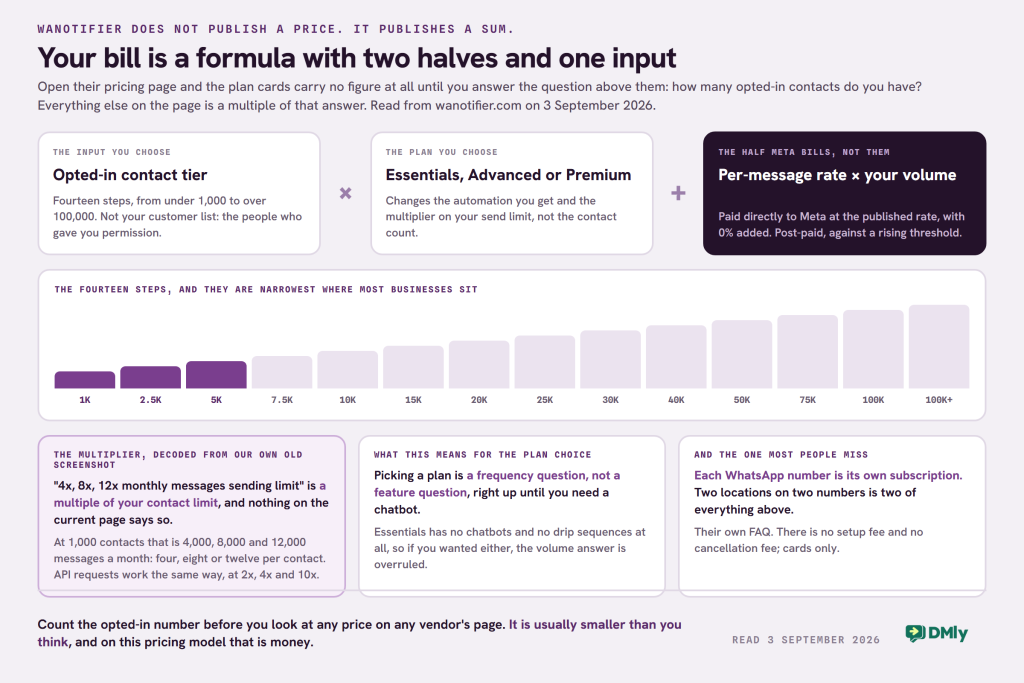
Open their pricing page and the plan cards render with no figure in them at all until you answer the question above them: “How many opted-in contacts do you have?” The choices run: under 1,000, then 1,001 to 2,500, 2,501 to 5,000, 5,001 to 7,500, 7,501 to 10,000, 10,001 to 15,000, 15,001 to 20,000, 20,001 to 25,000, 25,001 to 30,000, 30,001 to 40,000, 40,001 to 50,000, 50,001 to 75,000, 75,001 to 100,000, and over 100,000, which is a call rather than a price.
So your total monthly cost has two parts, and they say so themselves: the WANotifier subscription, which depends on your plan and your contact tier, plus Meta’s per-message charges, billed directly by Meta at their published rate with nothing added. The platform half is pre-paid; Meta’s half is post-paid and charged against a threshold that rises as you spend more. That is a clear model and it is well explained. It is also why no honest review can print “WANotifier costs X”.
What 4x, 8x and 12x actually mean
Their current pricing grid carries a row reading “Monthly messages sending limit: 4x, 8x, 12x” and nothing on the page says four times what. Our own screenshot from May 2026 decodes it, which is the best use we have for an old capture.
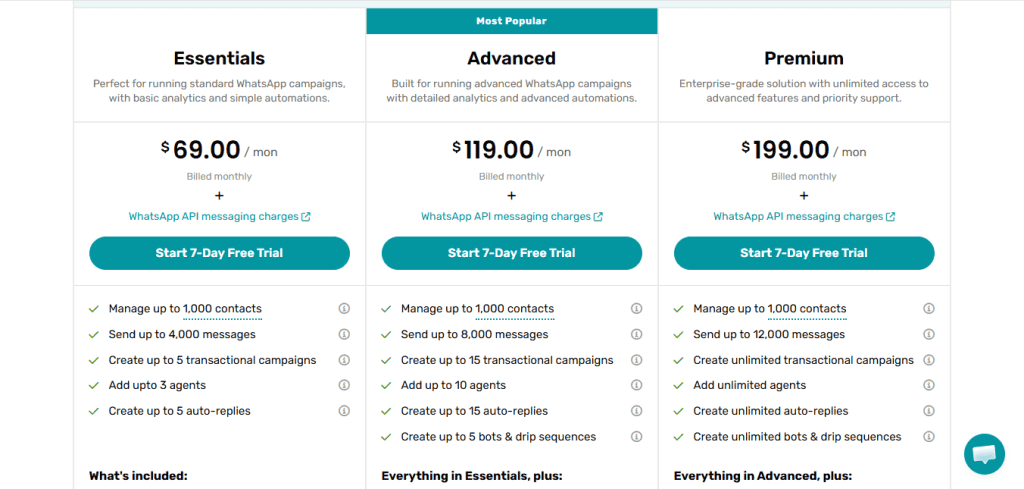
So on Essentials you can send four messages per contact per month, on Advanced eight, and on Premium twelve. That is a genuinely useful thing to know before you pick a plan, and it converts the plan choice from a feature question into a frequency question. If you broadcast weekly, four is already tight. If you broadcast monthly and send order updates in between, four is generous.
The same logic runs through the API limits: monthly REST API requests are capped at 2x your contact limit on Essentials, 4x on Advanced and 10x on Premium. Everything is expressed as a multiple of the one number you chose at the top of the page.
The free plan was withdrawn, and they say when
“We used to offer Free plan earlier but we’ve stopped offering that to new users starting 27th Oct, 2025.” That is their own FAQ, quoted exactly. What replaces it is a 7-day free trial. If you have read an older review promising a free WANotifier tier, that is why it is not there.
Two more billing facts that catch people, both from their own FAQ. Each WhatsApp phone number needs its own subscription plan. You can add several numbers to one account and switch between them, but the plans are per number, so a two-number business is buying two subscriptions. And there is no setup fee for the API, no cancellation fee, and payment is by credit or debit card only.
The Markup Table, and the Sum From the Top of This WANotifier Review
Zero markup on Meta’s message rates is the centre of WANotifier’s pitch, it is repeated at least four times on their pricing page, and their own row in the comparison table is consistent with it. Their rate and the official rate they print are the same number. Nothing in this section disputes that.
What does not reconcile is the percentage column beside the competitor rates. Take any row, divide the competitor’s rupee figure by the 0.7846 printed as the official rate, and the result is roughly eight to ten percentage points below the markup the table states. Work it the other way and every stated percentage implies a base of about 0.726 rupees. Two different official rates are doing work in one table.
There are ordinary reasons for that and the boring one is almost certainly right: Meta changes country rates regularly, and the maintained official figure has moved while the derived percentages have not. We are flagging it rather than reprinting it because a percentage you cannot reproduce from the numbers beside it is not a number you should carry into a purchase, whoever published it, and that includes any table we publish.
The useful version, which works for any vendor and any country:
- Get Meta’s own published rate for your country and the message category you actually send. We keep a country by country rate card and Meta publishes the same figures.
- Ask the vendor for their per-message rate in writing, for the same country and the same category. A vendor claiming zero markup should be able to send you a number identical to Meta’s.
- Divide, and date your answer. Whatever the difference is, it is the markup on that day. Then repeat the check after 1 October, for the reason in the next section.
Two Stale Numbers, and One of Them Is Ours
WANotifier’s FAQ explains WhatsApp’s daily messaging limits and gives a ladder that Meta has retired. It says the limit “starts at 250 messages per day and increases to 1,000 per day once your business is verified on the Meta portal”, then to 10,000, 100,000 and unlimited.
Meta’s current ladder has no 1,000 rung. It runs 250, then 2,000, then 10,000, then 100,000, then unlimited, and the step off 250 is not verification alone: Meta documents it as 2,000 delivered messages outside customer service windows, to unique numbers, within a 30-day moving period, on high-quality templates. Verification is one of three routes off the bottom rung rather than the only one. We wrote that up in detail in our guide to getting WhatsApp API access without Facebook Business Verification.
And here is the part we have to own: DMly’s own documentation still carries a “1,000 customers per 24 hours” row from the same retired ladder. It is a widely copied figure and we are not in a position to be smug about it. The point of naming it here is not to score against WANotifier. It is that a stale platform-side number about Meta’s rules is the most common defect in this entire category, ours included, and the only defence is to check Meta’s own documentation rather than any vendor’s summary of it.
The second dated thing, which will make several numbers on several vendor pages stale at once. On 1 October 2026 Meta starts charging for two categories that are free today: service messages, and utility messages sent inside an open 24-hour window. Nine markets also move to standalone pricing on the same date. Meta published the new rates on 1 September 2026, so the October figures are readable on Meta’s own pricing update page, and a new free tier of 1,000 service messages a month for every business phone number arrives with them. Their FAQ’s line that “some messages (like replies during an open customer service window) are free” is correct today and will need revising in four weeks, along with everyone else’s. Our explanation of the October change walks through what changes and how to price it.
The Word That Decides Your Bill: Opted-In
The question at the top of their pricing page is not “how many contacts do you have”. It is “how many opted-in contacts do you have”, and the difference between those two numbers is often enormous. Since that number picks your tier, and your tier sets both the platform fee and the message allowance, it is worth being precise about it.
An opted-in contact is somebody who has given you permission to message them on WhatsApp. It is not everybody in your customer database, and it is not everybody who has ever messaged you. Meta requires that permission before a business sends a template message, and the platforms in this category all build around it because a list without opt-in is a list that gets your number’s quality rating downgraded and eventually restricted.
Two practical consequences follow, and both cut in the buyer’s favour:
- You are probably in a cheaper tier than you think. A shop with 9,000 people in its point-of-sale system and 1,800 who have actually opted in to WhatsApp is buying the 2,501-to-5,000 tier at most, not the 7,501-to-10,000 one. Count the right number before you look at any price.
- Growing the list moves you up a tier, and that is a good problem with a real cost. The steps are narrow at the bottom, at 1,000 and 2,500 and 5,000, and get wider higher up. If you are running an opt-in campaign this quarter, work out which step you will land on before you run it, not after.
WANotifier’s own capture tools are built around this: click-to-WhatsApp ads capture, website capture, WhatsApp Flows as in-chat forms, and an unsubscribe and re-subscribe system with automatic tagging by delivery status. That last one is a quiet but genuinely good feature. It tags contacts by whether a message reached them, and can unsubscribe on failed delivery, which keeps a dead number from counting against you twice. Our guide to WhatsApp broadcasts explains why opt-in hygiene decides whether a large send lands at all.
How to Price This WANotifier Review Against Your Own Numbers
Six steps, ten minutes, and you will have a figure that no review can give you because no review knows your list. Do this before you compare WANotifier against anything else, because the comparison only means something once both sides are priced for you.
- Count your opted-in contacts, not your customers. That picks your tier, and it is the input every other number depends on.
- Count how many messages each of them gets in a month. Campaigns plus order updates plus reminders, divided by contacts. If the answer is under four, Essentials fits on volume. Between four and eight, Advanced. Above eight, Premium.
- Now check the automation you need against the plan that step two chose for you. If it landed on Essentials and you wanted a chatbot or a drip sequence, the volume answer is overruled: those do not exist on that plan and you are on Advanced regardless.
- Count your WhatsApp numbers. Each one is its own subscription. Two locations on two numbers is two of everything above.
- Add Meta’s side separately. Take your monthly template volume, split it by category, and price it against Meta’s published rate for your customers’ country. That number is the same whichever zero-markup platform you choose, which is exactly why it is the number people forget to include.
- Then add a line for October. Service messages and in-window utility messages become billable on 1 October 2026, and Meta published the rates on 1 September, so you can put a real number in the model. Start from your market’s utility rate, because service messages are priced the same, then take off the first 1,000 service messages a month on each business phone number, which Meta gives you free.
The reason this WANotifier review spends its length on arithmetic rather than screenshots is that the arithmetic is where the decision actually gets made. Two platforms with near-identical feature lists can differ by a factor of three on the same business, purely because one meters contacts and the other meters seats, and no amount of feature comparison will surface that.
What Is Actually in Each Plan
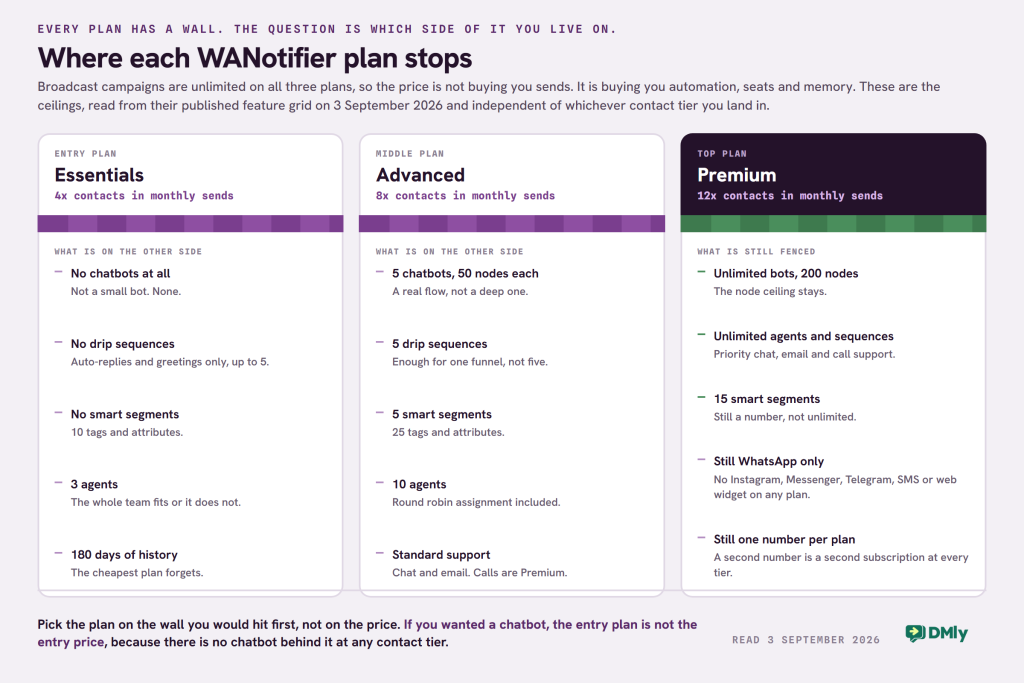
WANotifier publishes a full feature grid, which makes this the easy part. The limits below are per plan and independent of your contact tier, so they are the numbers to check first.
| Essentials | Advanced | Premium | |
|---|---|---|---|
| Monthly send limit | 4x your contact limit | 8x | 12x |
| Agents | Up to 3 | Up to 10 | Unlimited |
| Chatbots | None | Up to 5, max 50 nodes | Unlimited, max 200 nodes |
| Drip sequences | None | Up to 5 | Unlimited |
| Auto-replies | Up to 5 | Up to 15 | Unlimited |
| Transactional campaigns | Up to 5 | Up to 15 | Unlimited |
| Smart segments | None | 5 | 15 |
| Tags and attributes | 10 | 25 | Unlimited |
| Conversation history | Last 180 days | Unlimited | Unlimited |
| Monthly API requests | 2x your contact limit | 4x | 10x |
| Support | Standard chat and email | Standard chat and email | Priority chat, email and call |
Two rows deserve more attention than the rest. The first is chatbots: there are none at all on Essentials, so if you are buying this to automate replies rather than to broadcast, the entry plan is not the plan. The second is conversation history, which is capped at the last 180 days on Essentials. For a business that needs to look up what a customer was told last year, that is a hard limit rather than an inconvenience.
Five Corrections to This WANotifier Review
Three of the five were unfair to WANotifier. A WANotifier review that never mentions the contact tier is describing a different product from the one on sale. This page went live in May 2026 and described a product that has moved and a pricing model it never explained.
| What this page said | What is true, checked 3 September 2026 |
|---|---|
| “Essentials Plan ($69/month)”, “Advanced ($119)”, “Premium ($199)”, presented as the prices | Those are the prices for one contact tier out of fourteen, captured in May 2026. The live page shows no figure until you choose a tier, and renders in rupees |
| “You can’t assign chats to specific team members” | Wrong. Round robin chat assignment to agents is in their published feature grid, along with phone number masking and quick replies |
| “It also includes basic chatbot functionality” | Not on the entry plan. Essentials has no chatbots and no drip sequences at all; both start on Advanced |
| “managing multiple WhatsApp numbers” | True, and incomplete. Each phone number requires its own subscription plan |
| No mention of a free plan either way | There was one. WANotifier withdrew it for new users on 27 October 2025 and replaced it with a 7-day trial. Worth stating because older reviews still promise it |
Where WANotifier Is Strong
- Unlimited broadcast campaigns on every plan. The thing most people buy a WhatsApp tool for is not rationed at all; what is rationed is the volume, through the contact multiplier. That is a cleaner design than capping the campaigns themselves.
- The pricing model is honest about what drives cost. Contacts drive the platform fee and messages drive the Meta fee, and the page explains both, with a calculator that adds them together. Plenty of competitors leave you to discover the second half on your first invoice.
- Coexistence is supported, so an existing WhatsApp Business app number can be connected without starting again, and they list it as a core feature rather than burying it.
- The warning about QR-code tools is the right warning, and putting it on your own pricing page rather than in a blog post takes some nerve.
Where It Stops
- WhatsApp only. No Instagram, no Messenger, no Telegram, no website widget, no SMS. If your enquiries arrive on more than one app, this product will not gather them.
- No chatbot on the entry plan, and a 50-node ceiling on the middle one. Fifty nodes is a real flow but not a deep one.
- 180 days of conversation history on Essentials. The cheapest plan forgets.
- The CRM is a contact manager. Tags, attributes and smart segments, capped by plan. No pipeline, no lifecycle, no deal, no order history.
- Nothing happens after the message. No bookings, no invoices, no payments, no reviews, no loyalty. A campaign tool ends where the campaign ends.
- Per-number subscriptions, which changes the maths for any business running a second location on a second number.
WANotifier vs DMly
These two overlap on broadcasting and diverge on almost everything else, and the honest summary is that one is a channel tool and one is a business system. Both sell official WhatsApp Business API access with no markup on Meta’s rates, so that is not a difference and this page will not pretend it is.
| WANotifier | DMly | |
|---|---|---|
| Channels | WhatsApp only | WhatsApp, Instagram, Messenger, Telegram, SMS, TikTok, LiveChat widget, Google Business Profile |
| Pricing shape | Per contact tier, fourteen steps, plus Meta’s rates | Three fixed plans with published allowances, plus Meta’s rates |
| Published headline price | None until you pick a tier | $29, $65 or $149 a month billed yearly |
| Markup on Meta’s rates | None, stated | None, stated |
| Free trial | 7 days | 7 days, no card |
| Chatbots on the entry plan | None | 10 active bots per profile, unlimited flows |
| AI agents | Not offered | On every plan, with a monthly reply allowance |
| Agents on the entry plan | 3 | 3 team seats |
| Conversation history on the entry plan | Last 180 days | Not time-limited |
| Second WhatsApp number | A second subscription | Profiles per channel: 1, 3 or 5 by plan, extra profile sets $15/mo |
| Bookings | Not part of the product | Services, staff, availability, classes, booking page |
| Invoices and payments | Not part of the product | Invoices, orders, refunds, coupons, subscriptions, gift cards |
| Reviews | Not part of the product | Google review requests and a reputation inbox |
| Where it is stronger | A pricing model that scales smoothly with list size, and unlimited campaigns on every tier | Everything after the message, and seven more channels |
One row genuinely favours WANotifier and it is worth being clear about it. A tiered contact price scales more smoothly than a three-step plan ladder. A business with 12,000 contacts pays a price built for 12,000 contacts, where a fixed-plan competitor makes you jump to the next tier and pay for headroom you do not need yet. If your list is the thing that grows and your requirements are not, that model is better for you and you should say so to any vendor quoting you a flat plan.
Which One to Buy
You broadcast to a large WhatsApp list and do little else
WANotifier, and the tiered contact pricing is the reason. Unlimited campaigns on every plan, a send allowance that scales with your list, and no markup. Pick the plan by counting how many messages per contact per month you actually send: four, eight or twelve.
You want automation more than volume
Skip Essentials entirely. There are no chatbots and no drip sequences on it, so the entry price is not the price you will pay. Compare Advanced against the mid tier of anything else, and check the 50-node ceiling against the flow you actually want to build. Our broadcast guide is worth reading first either way, because opt-in and template rules decide whether a big send lands.
Your customers reach you on more than WhatsApp
This is the clearest fork on the page. WANotifier is WhatsApp only by design and will not gather Instagram DMs, Messenger, Telegram or your website chat. If those are already live, you are buying a second tool alongside it or you are buying something else.
The conversation ends in a booking, an invoice or a review
Then you are shopping for a business system with messaging in it rather than a messaging tool, and that is what DMly is. Start with our guide to official WhatsApp Business API access, because the verification, the display name and the template queue are identical whichever platform you sign up through and that is where most of the delay lives.
Frequently Asked Questions
How much does WANotifier cost?
There is no single figure. The price of each of the three plans depends on how many opted-in contacts you have, across fourteen tiers from under 1,000 to over 100,000, and the pricing page shows no number until you choose one. On top of that you pay Meta’s per-message charges directly, at Meta’s published rate with no markup added. Our May 2026 capture of the smallest tier showed $69, $119 and $199 a month, which is useful for understanding the shape of the model but should not be treated as today’s price. Open their calculator with your own contact count.
Does WANotifier have a free plan?
Not any more. Their FAQ says it plainly: the free plan stopped being offered to new users on 27 October 2025. There is a 7-day free trial instead.
What does the 4x, 8x or 12x sending limit mean?
It is a multiple of your contact limit, not a fixed number of messages. At the 1,000-contact tier that is 4,000 messages a month on Essentials, 8,000 on Advanced and 12,000 on Premium, which works out at four, eight or twelve messages per contact per month. Their monthly API request limits work the same way, at 2x, 4x and 10x your contact limit.
Does WANotifier include chatbots?
Not on the Essentials plan, which lists no chatbots and no drip sequences. Chatbots start on Advanced with a limit of five bots and 50 nodes each, and become unlimited with a 200-node ceiling on Premium. Auto-replies, greeting messages and out-of-office messages are available on every plan and are a different, simpler thing.
Can I use more than one WhatsApp number?
Yes, you can add several numbers to one account and switch between them from the dashboard. Their FAQ is clear that each phone number requires its own subscription plan, so a second number is a second bill rather than a seat on the first one.
Does WANotifier add a markup to WhatsApp message charges?
They state that they do not, in several places on the pricing page, and their own row in their comparison table shows the same rate as the official one they print. DMly makes the same commitment. To verify it for any vendor, get Meta’s published rate for your country and message category, ask the vendor for theirs in writing for the same country and category, and divide. Do it again after 1 October 2026, when Meta’s charging model changes.
Is WANotifier good for a small business?
For a small business whose customers are on WhatsApp and whose main job is sending campaigns and notifications, yes, and the contact-tier pricing suits a growing list better than a fixed plan ladder does. It is a weaker fit if you need automation on the cheapest plan, if you talk to customers on other apps, or if the conversation has to end in a booking or an invoice.
Is this WANotifier review independent?
No. We make DMly, which is listed as an alternative, and the opening section says so. What we can offer instead is a page that shows its working: five corrections to our own earlier version, three of them in WANotifier’s favour, one row of the comparison table that goes to them, and a stale figure of our own named in public rather than left in the footnotes.
Writing about WhatsApp automation, bookings and growth for local business.
Turn WhatsApp into your busiest channel.
Start free and run message, bookings, payments and reviews in one place.
