
Most lists of no-code automation ideas are lists of outcomes. Delight your customers. Never miss a lead. Recover lost revenue. All true, all unbuildable, because not one of them tells you what actually starts the thing.
This list names the trigger for every idea. A trigger is the event that fires an automation, and every automation begins with one, so knowing which trigger an idea needs is the whole difference between a good intention and something that runs on a Tuesday morning without you.
They are roughly ordered by return for a typical local business, and the first five are the ones worth building this week.
If you have never built one, start somewhere else first: This page assumes you can already get from an idea to a published flow. If you cannot yet, our beginner’s guide to no-code WhatsApp automation walks you through five builds end to end with the vocabulary explained, and it is a better first afternoon than this page is. Come back here afterwards, because this is the catalogue you raid once building is no longer the hard part.
The Five No-Code Automation Ideas Worth Building First
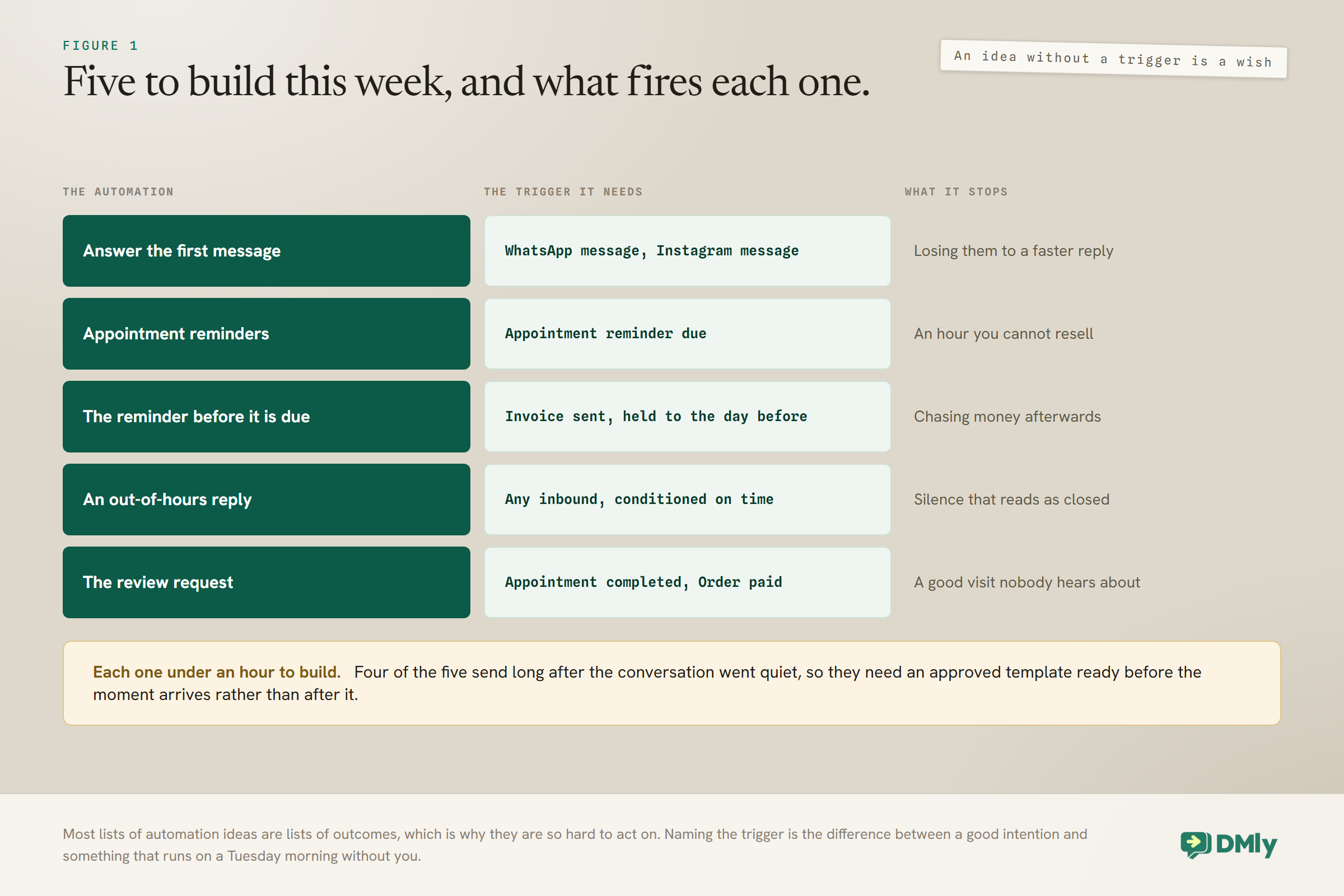
If you build nothing else from this list, build these five. Each one takes under an hour, and each removes a recurring failure rather than adding a nicety.
- Answer the first message instantly. Trigger: WhatsApp message or Instagram message, with no keyword filter. A welcome that acknowledges the enquiry, says when a person will reply, and answers the two questions everybody asks. It buys you hours, and on WhatsApp it opens the 24-hour window that everything else depends on.
- Appointment reminders that actually arrive. Trigger: Appointment reminder due. The highest-return automation in any business that sells time, provided the template is approved before you need it. Our appointment booking guide covers the whole chain.
- The reminder before the invoice is due, not after. Trigger: Invoice sent, waiting until the day before the due date. It converts far better than chasing afterwards, because nobody has yet decided to ignore you.
- An out-of-hours reply that says when. Trigger: any inbound message, conditioned on time. Not “we will get back to you shortly”, which is untrue at eleven at night. A message naming your actual opening time, with the booking link attached.
- The review request while the work is fresh. Trigger: Appointment completed or Order paid, with a delay. Reviews compound, and this is the only automation on the whole list whose benefit grows every month. Our guide to getting more Google reviews automatically has the wording.
Enquiries and First Contact
Every one of these turns an inbound moment into something recorded rather than something remembered. They are the cheapest no-code automation ideas on the page to build, because most of them need no template at all: the customer has just messaged you, so the window is open. They are also the cheapest group to build, because most need no template at all: the customer just messaged you, so the window is open.
- Answer your top ten questions with keywords. Trigger: Message contains a keyword. Price, hours, parking, do you do X. Instant, free, and identical every time, which is exactly what those questions deserve.
- Turn public comments into private conversations. Trigger: Facebook comments, Post or Reel comments or Video comments. Somebody asking how much in public is a lead standing in your shop window. Our guide to comment to DM automation covers the build.
- Treat story replies differently from ordinary DMs. Trigger: Story reply or Story mentions. It is the highest-context inbound Instagram produces, because you know exactly what they were looking at, and most businesses answer it with a generic greeting.
- Tag the source automatically. Trigger: WhatsApp URL, which can be narrowed to one specific growth link or QR code. Where a customer came from is the one field you cannot reconstruct later, and this captures it without anybody being asked.
- Qualify before a human reads it. Trigger: New contact. Two questions, written to contact fields, so whoever picks the conversation up already knows the service and the timing.
- Route by what they asked for. Trigger: a keyword match plus an assignment action. The enquiry about weddings goes to the person who does weddings, at two in the morning, without anybody triaging anything.
- Catch the enquiry that arrives while you are with a customer. Trigger: any inbound, with a wait-until delay. Acknowledge now, reply properly during working hours, and stop feeling obliged to hold the phone.
Booking and Appointments
This is where the money is for anybody who sells time, because an hour you do not sell today cannot be sold tomorrow. Most of these fire from the appointment itself rather than from anything the customer sends.
- Send the booking link at the moment they say yes. Trigger: a keyword, or a handover from an AI step. Send the single-service link rather than the landing page, because they have already chosen and every extra choice loses somebody.
- Confirm the booking with the details and a manage link. Trigger: Appointment booked or Appointment confirmed. It makes the booking feel real, which is one of the quiet causes of a no-show.
- Chase the customer who went quiet mid-booking. Trigger: Customer didn’t reply. A short nudge a few hours later, while the window is still open and it costs nothing.
- Message the no-show without accusing them. Trigger: Appointment no-show. “Sorry we missed you, here is the link to rebook.” A meaningful share of them still want the appointment and are embarrassed rather than uninterested.
- Fill a cancelled slot from a waiting list. Trigger: Appointment cancelled, sending to a small tagged segment rather than to everybody. Speed matters more than reach here.
- Promote from a class waitlist and say what happens next. Trigger: Class seat opened. On a paid class that message is an offer with a deadline rather than a confirmation, which changes how it should be worded. Our class booking guide covers the rest.
- Tell yourself when a class fills. Trigger: Class full. An internal message to you, so you can add a session while the demand is still there rather than discovering it a week later.
- Follow up after the appointment. Trigger: Appointment completed, with a longer delay than the review request. Aftercare, a rebooking prompt, or the thing you always mean to say and forget.
Getting Paid
Chasing money is the job every owner hates and every owner forgets, which makes it the group with the least competition for your attention and the fastest payback. All of these fire from finance events rather than from anything a customer does.
- Send the payment link in the conversation. Trigger: manual, or an automation action. The shortest path there is between agreement and money. Our guide to taking payments on WhatsApp covers the setup.
- Escalate an overdue invoice, twice, then stop. Trigger: Invoice overdue. Two messages with a link, then a human decision. See the callout below, because this trigger has a property that changes how you build it.
- Recover a failed payment. Trigger: Payment failed. The clearest signal in commerce: they wanted to pay and something mechanical stopped them, so acknowledge the machine rather than implying they changed their mind.
- Rescue a failing subscription before it pauses. Trigger: Subscription payment failed. A failed charge is retried two days later, and after three failed attempts the subscription is paused and retrying stops. A message on the first failure usually fixes it; a message after the third is a resurrection.
- Thank them for the payment, and say what happens next. Trigger: Payment succeeded or Invoice paid. The most reliably opened message any business sends, and usually wasted on a receipt nobody needed.
- Recover the order somebody placed and did not pay for. Trigger: Checkout abandoned. On WooCommerce that means an order sitting unpaid for about an hour; on Shopify it fires earlier in the funnel and catches more people. Our Shopify guide covers that side.
Invoice overdue only ever fires once: Overdue is stamped by a nightly sweep, and the trigger fires once per invoice: an invoice cannot go overdue twice. So the two-message chase above is one flow with a delay in the middle, not two automations on the same trigger. People build it the second way, see one message, and conclude the trigger is broken.
Keeping Customers
These are the slow ones, and the only group on the list that gets better every month rather than staying the same. They are also the easiest to overbuild, so take two and leave the rest.
- Tell them when they have earned a reward. Trigger: Loyalty points activity. DMly mints the coupon and spends the points by itself the moment the balance crosses your threshold, with a code unique to that client. Telling them is your automation’s entire job, and without it the scheme is a spreadsheet nobody sees. Our loyalty programme guide covers the design.
- Send a birthday message that is not a discount. Trigger: Birthday / key date. A greeting outperforms an offer, and it costs you nothing but the message.
- Tell somebody their thing is back in stock. Trigger: Product back in stock. They already told you what they wanted by asking for it, which makes this the least intrusive sales message available to you.
- Nudge unused credit before it becomes a complaint. Trigger: Credits low, or a scheduled check on the balance. Reminding people to use what they have already paid for is good for them and it protects the renewal.
- Ask the quiet customer back. Trigger: Scheduled date, recurring, against a segment of people with no visit in your chosen window. Small, specific and opted in, which is the difference between a win-back and a blast.
- Acknowledge a review, good or bad. Trigger: Google review. A reply to a bad one in an hour is worth more than a reply to a good one in a week. Our review automation guide has the ladder.
The Ideas That Need a Template Ready Before You Need It
Roughly half of these no-code automation ideas send more than 24 hours after the customer’s last message, and on WhatsApp that means an approved template or nothing at all. This is the single most common reason a well-built automation appears to do nothing.
The rule is simple and unforgiving. Inside 24 hours of the customer’s last message you can write whatever you like. Outside it you need a template Meta has already approved, and if you have not got one the message is stopped rather than downgraded. Approval usually takes minutes and can take a day, which is exactly long enough to ruin the afternoon you set aside for building.
Get these approved before you build the automations that need them: Reminders, no-show follow-ups, review requests, invoice reminders, failed-payment recovery, subscription rescue, cart recovery, back-in-stock alerts, loyalty rewards, birthdays and any win-back all fire long after the conversation went quiet. Every one of them needs its own approved template, filed in the right category: Utility for anything transactional and Marketing for anything promotional, however helpfully it is worded. Our template library has wording by use case. The enquiry group above is the exception: the customer has just messaged you, so the window is open and plain text is fine.
Which Ideas Matter for Your Trade
The list is the same for everybody; the order is not. What costs you money differs enough by business type that the same five automations are not the right five for every reader.
| Business | Build first | Because |
| Salon or barber | Reminders, rebooking after the appointment, review requests | The diary is the business, and a chair empty on a Saturday cannot be refilled |
| Clinic or dental | Reminders well ahead, recall on a scheduled date, no-show follow-up | Long slots, high value, and recalls nobody remembers to chase |
| Restaurant or cafe | Instant reply, booking confirmations, review requests | Most enquiries are simple and time-sensitive, and reviews drive discovery |
| Gym or studio | Class waitlist promotion, attendance follow-ups, credit reminders | Capacity is the product, and unused credit is churn waiting to happen |
| Trade or home services | Quote follow-up, invoice reminders, payment links | The money arrives late rather than not at all, and chasing it is the whole admin burden |
| Online store | Order shipped with tracking, failed payment recovery, back in stock | Order updates are the most opened messages you will ever send |
| Tutor or coach | Reminders, parent updates, re-enrolment before term end | The revenue cliff is at the end of a term rather than at the end of a session |
Two patterns run through that table. Businesses that sell time should start with reminders, because an unsold hour is simply gone. Businesses that sell things should start with order updates, because those messages get opened and every message you send afterwards benefits from a customer who has replied to you once.
The exception in every column is the instant first reply. Whatever you sell, an enquiry that waits three hours for an answer is usually an enquiry somebody else answered first, and no other automation on this page compensates for that.
Two Rules That Decide Whether Any of This Works
Both are easy to miss, and between them they explain most no-code automation ideas that get built and then appear to do nothing at all. Neither is about your wording.
The first is about what happens when several of your automations could answer the same thing, and it works differently depending on whether a message arrived or something happened.
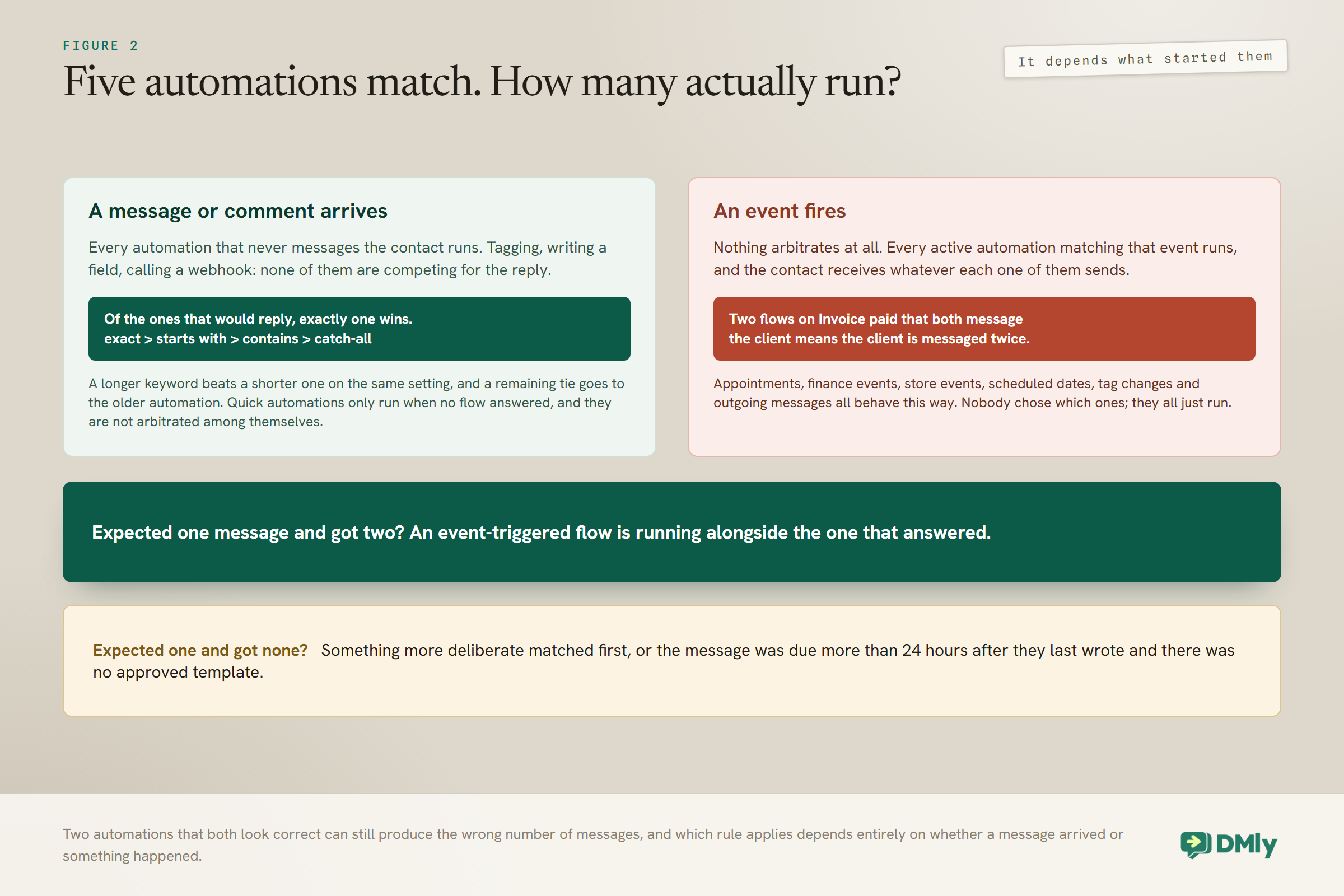
A message gets one reply. An event gets all of them.: When a message or comment arrives, every matching automation that never messages the contact runs, so your tagging, field-writing and webhook flows are not competing for anything. Of the ones that would reply, exactly one wins: an exact keyword beats starts-with, which beats contains, and any keyword at all beats a catch-all. Longer keyword beats shorter on the same setting, and a remaining tie goes to the older automation. Quick automations are a fallback rather than a competitor: they run only when no flow answered, and they are not arbitrated among themselves, so two matching quick automations both reply.
When an event fires, nothing arbitrates at all. Every active automation matching that event runs and the contact receives whatever each of them sends. Two flows on Invoice paid that both message the client means the client is messaged twice. If you are getting two messages where you expected one, an event-triggered flow is almost certainly running alongside the one that answered.
The second rule is the template rule from the section above, and it is worth restating in one line because it governs half this page. Anything sent more than 24 hours after the customer’s last message needs an approved template on WhatsApp, and without one it is dropped rather than delayed. Nobody is told, which is why it presents as an automation that does nothing.
Get both of those right and the rest of this list is configuration. Get them wrong and you will spend a fortnight rewriting messages that were never the problem.
What Order to Build These Automation Ideas In
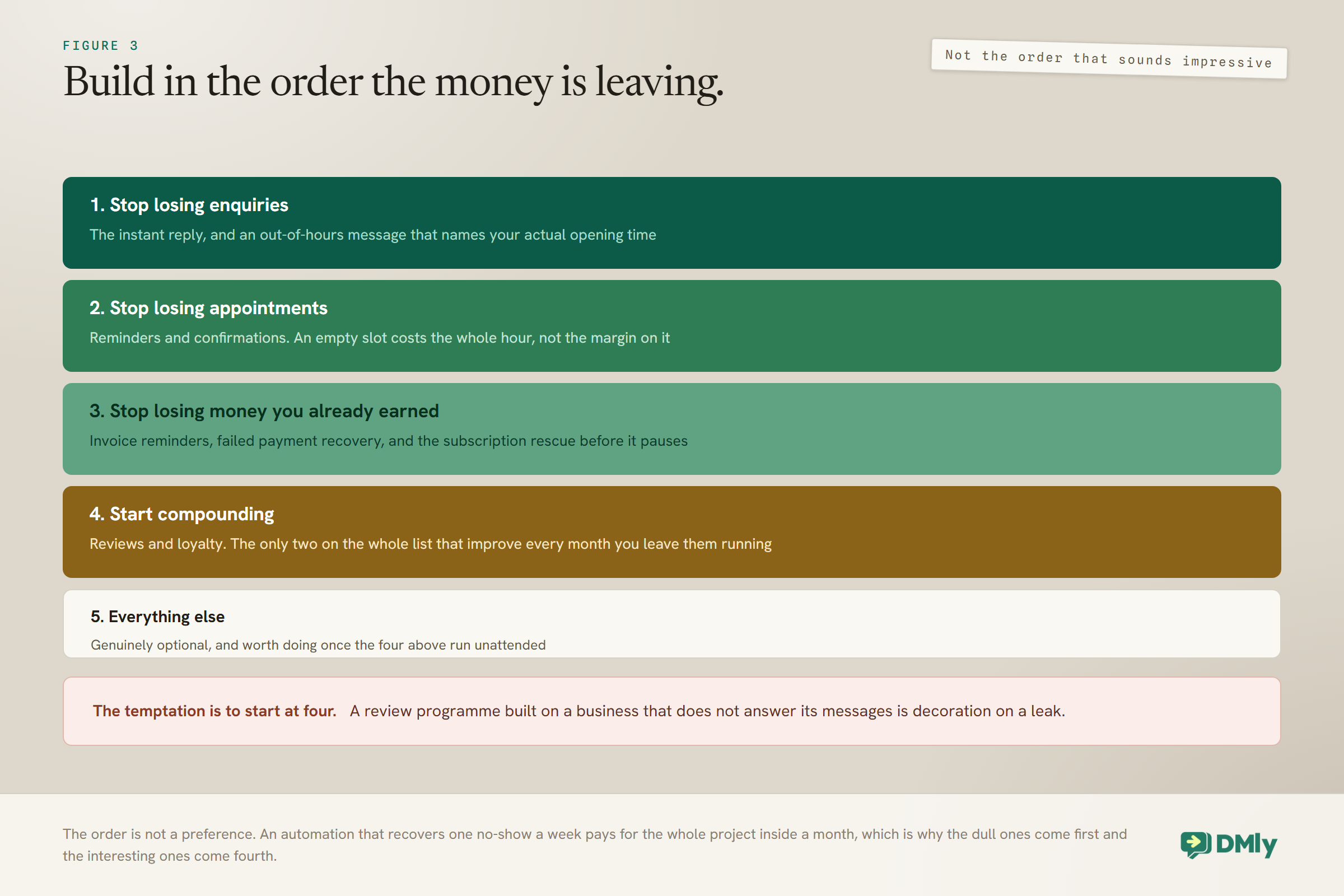
Build in the order of what is currently costing you money, not in the order of what sounds impressive. For most local businesses that order is remarkably consistent.
- Stop losing enquiries. The instant reply and the out-of-hours message. Every unanswered enquiry is somebody who went elsewhere while you were with a customer.
- Stop losing appointments. Reminders and confirmations. An empty slot costs more than the appointment was worth, because the cost is the whole hour rather than the margin on it.
- Stop losing money you have already earned. Invoice reminders, failed-payment recovery and the subscription rescue.
- Start compounding. Reviews and loyalty. Slower to pay back, and the only two on the list that get better every month you leave them running.
- Everything else. Genuinely optional, and worth doing only once the four above are running unattended.
The temptation is to start at step four, because reviews and loyalty are the interesting ones and the others feel like plumbing. Resist it. An automation that recovers one no-show a week pays for the whole project inside a month, and a review programme built on top of a business that does not answer its messages is decoration on a leak.
How to Build Any of These No-Code Automation Ideas
Every idea on this page is the same three-part shape: a trigger, an optional condition, and a message or an action. That is what makes them no-code. You are choosing an event, deciding who it applies to, and writing what happens next.
- Pick the trigger first. Get this right and everything else follows. Get it wrong and no amount of good copy rescues it, because the flow simply never runs.
- Add the guard conditions. Do not message somebody who complained last week, was messaged yesterday, or has opted out. Most automations that embarrass a business are missing a condition rather than containing a mistake.
- Add the delay if the timing matters. A duration for a relative wait, a wait-until when the message should land inside working hours rather than at three in the morning.
- Write the message last. Deliberately last. The wording is the part you will change ten times and the only part that is easy to change.
- Connect every output. A condition needs both its true and false branches connected before the flow will publish, which is the usual reason a finished-looking flow refuses to go live and does not obviously say so.
Automation Ideas Worth Skipping
A list of thirty is only useful if it also says what not to build, because the expensive no-code automation ideas are all the ones that sound good.
- Anything sent to people who never asked to hear from you. It is the fastest way to damage the number your reminders and confirmations depend on, and the damage lands on the messages you cared about rather than on the campaign that caused it.
- A third and fourth chase on anything. Two messages is the limit almost everywhere on this list. Somebody who ignored two is telling you something.
- An automation for a problem you had once. If it did not happen twice this month, a note in your calendar is cheaper and easier to change.
- A clever branching flow before a simple one works. Publish the plain version, watch it for a week, then add the branch you turn out to need rather than the three you imagined.
- Two catch-alls on one channel. Only one of them ever answers, the loser looks broken, and which one loses is not something you chose.
Frequently Asked Questions
Which no-code automation ideas should a small business build first?
The instant first reply, appointment reminders, the pre-due invoice reminder, an out-of-hours message that names your opening time, and the review request after the work. Each takes under an hour and each removes a failure that is costing you money now, rather than adding something nice.
Do I need to know how to code for any of this?
No. Every idea here is a trigger, an optional condition, and a message or action, assembled by choosing from lists and dragging steps. The hard part is not the building; it is picking the right trigger and remembering the guard conditions.
Why did my automation not send anything?
Two causes cover most of it. Either the message was due more than 24 hours after the customer last wrote to you and there was no approved template, in which case it was dropped rather than delayed and nobody was told. Or another automation answered the message first, because only one automation ever replies to an inbound message on a channel.
Why did my customer get two messages?
Almost certainly an event trigger. Nothing arbitrates events: every active automation matching an event runs, and the contact receives whatever each one sends. Two flows on Invoice paid that both message the client will both message the client.
How many automations should a small business actually run?
Fewer than this page might suggest. Three that run unattended and are checked monthly beat fifteen that nobody understands. Pick from the first five, get them right, and add one a month only when something is genuinely costing you.
Do these ideas work on channels other than WhatsApp?
Most of them, with the window rules changing per channel. The enquiry and comment ideas apply on Instagram, Messenger and TikTok; the appointment, finance and store ideas fire from events and are channel-agnostic on the trigger side, though what you can send afterwards depends on the channel and on how long ago the customer last wrote.
Pick Three, Not Thirty
The point of a list this long is not to build a list this long. It is to make it obvious which three things your business loses money on every week, so you can build those and ignore the rest with a clear conscience.
So pick the three that made you wince, get the templates approved before you start, and check them in a month. The best of these no-code automation ideas is whichever one stops the thing that annoyed you most recently, and the worst is whichever one you built because it sounded clever.
Writing about WhatsApp automation, bookings and growth for local business.
Turn WhatsApp into your busiest channel.
Start free and run message, bookings, payments and reviews in one place.
