
WhatsApp Business App vs API: Which Should You Use?
Here is a question you have probably answered already without noticing: when a customer messages your business on WhatsApp, whose phone does it land on? If the answer is “mine”, or “the shop phone by the till”, you have chosen the WhatsApp Business app, and for a lot of businesses that is exactly right. The WhatsApp Business app vs API decision only really comes up on the day that answer stops working.
Usually that day brings one of a few things. A second person needs to answer messages. A booking system needs to send confirmations. A reminder needs to go out at 7am while everyone is asleep. Somebody asks why the Thursday offer never reached half the customer list. None of these is a problem with the app. They are signs that the business has grown past a tool built for one person holding one phone.
This guide compares the two honestly, including the parts that usually get left out: what the free app now does that it could not do a year ago, what the API asks of you in return for what it gives, what each one actually costs from October 2026, and how to keep the app on your phone while you add the API alongside it.
WhatsApp Business App vs API: The Short Answer
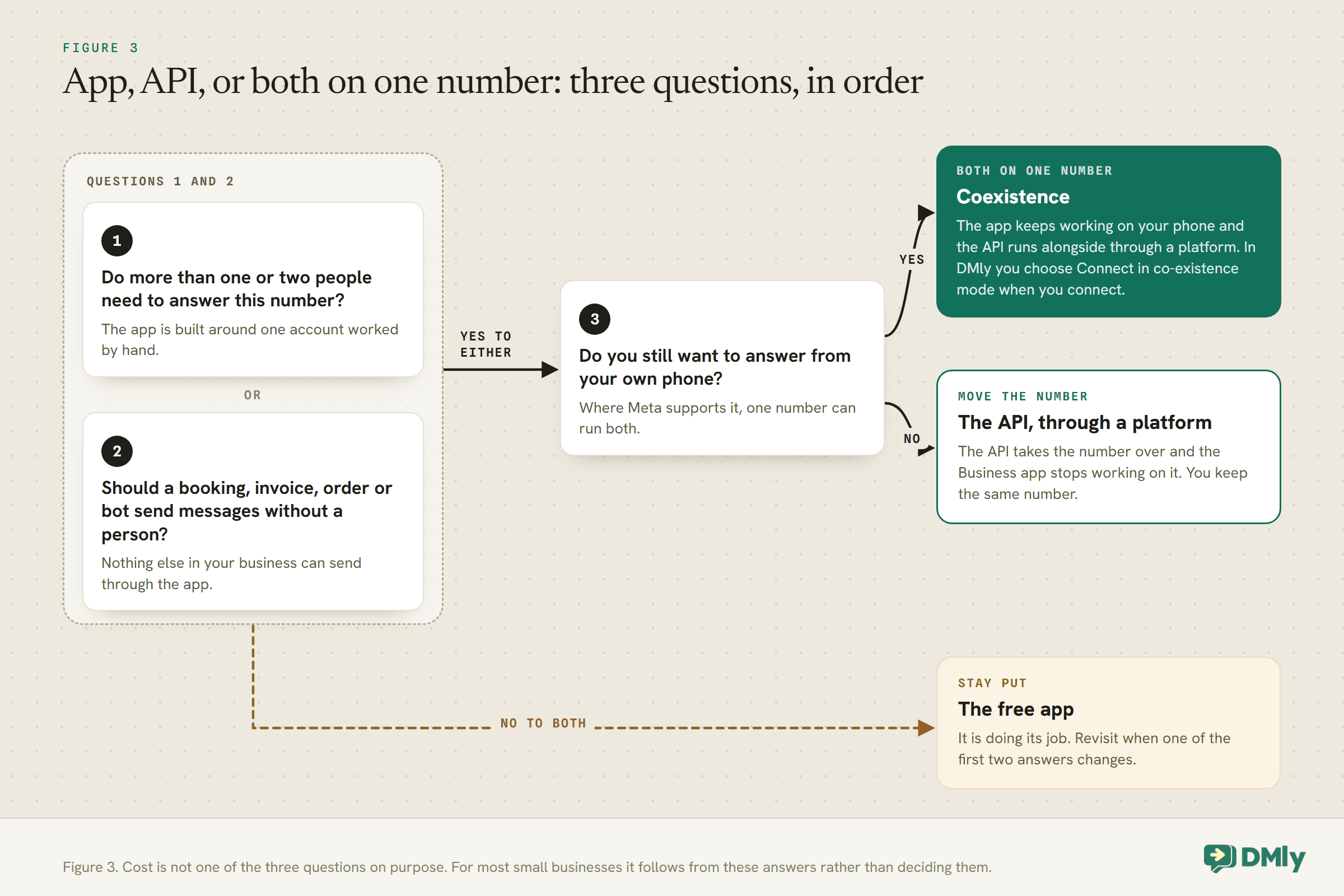
Use the WhatsApp Business app while one or two people answer every message by hand. Move to the WhatsApp Business API when messages need to be sent, sorted or answered without a person holding the phone.
That is the whole WhatsApp Business app vs API decision in one sentence, and everything below is detail. A few quick tests make it concrete.
- Stay on the app if you are a solo practitioner or a very small team, customers message you first and you reply personally, and nothing else in your business needs to send WhatsApp messages on its own.
- Move to the API if more than a couple of people need to work the same number, if a booking, invoice or order system should message customers automatically, if you want a bot or an AI agent to answer out of hours, or if you need proper reporting on who replied and how fast.
- Run both if you like answering from the phone but also want automation and a team inbox. That is what coexistence is for, where Meta supports it, and it is covered further down.
If you want the broader picture first, including the ordinary personal WhatsApp account and when to move between all three, our guide to the three types of WhatsApp accounts covers it. This page is about the head-to-head.
What Each One Actually Is
The app is a product you install. The API is not something you install at all: it is a connection that software uses on your behalf.
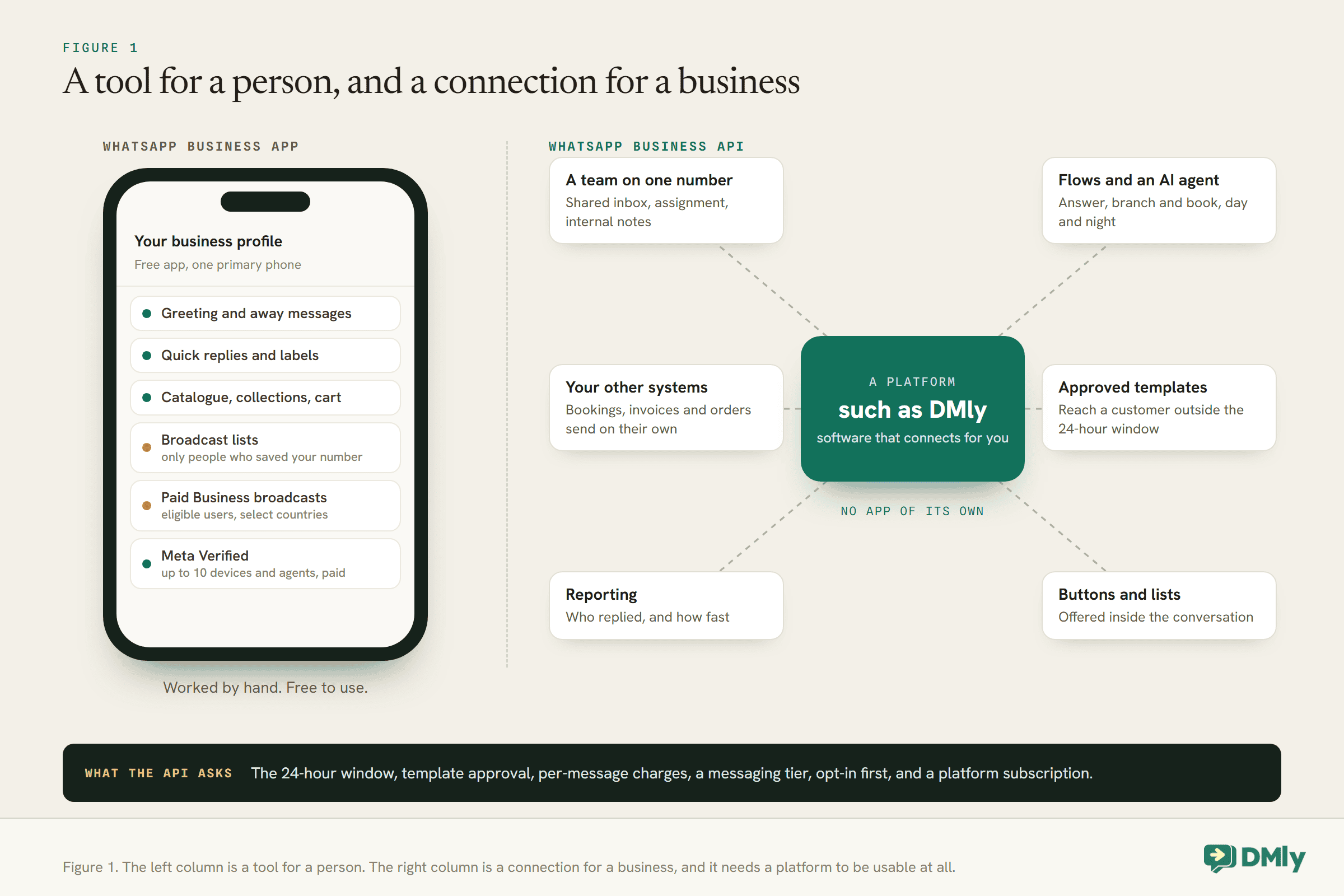
The WhatsApp Business app is a free phone app from Meta. It looks and works much like ordinary WhatsApp, with a set of business tools added on top: a business profile, automatic greeting and away messages, quick replies, labels, a catalogue and a few more. You download it, verify your number, and you are working within minutes.
The WhatsApp Business API, which Meta now calls the WhatsApp Business Platform and whose main form is the Cloud API, has no app of its own. There is nothing to download and no screen to type in. Instead, a piece of software connects to it and sends and receives messages for you. That software is usually a platform like DMly, which gives you an inbox, automation, templates and reporting on top of the connection. Larger companies sometimes build their own.
It is easy to go looking for “the WhatsApp API app” and not find it, because it does not exist. What you choose is a platform, and the platform is what you and your team actually use every day. Our guide to the WhatsApp Business API for small businesses goes deeper on how access works and what to look for in a provider.
What the Free WhatsApp Business App Does Well
More than most comparison articles give it credit for, and in 2026 a little more than it did a year ago.
Start with what you get for nothing. The app gives you a business profile with your logo, description, hours and website, which is what customers see when they tap your name. It sends an automatic greeting when somebody starts a conversation with you and an away message outside your business hours. Quick replies let you save the answers you type ten times a day and drop them in with a shortcut. Labels let you sort conversations into piles such as “new enquiry”, “paid” or “follow up”.
If you sell products, the catalogue works as a small shop window inside the chat. You can group items into collections, share links to them on WhatsApp, Facebook and Instagram, and let customers put several items in a cart and send them to you as a single message.
On reach, the classic tool is the broadcast list: one message sent individually to many contacts at once. Meta’s help page is clear about the catch. A broadcast reaches only the contacts who have saved your number in their phone’s address book. Everyone else on the list simply does not get it, and nothing tells you so.
The newer tool is Business broadcasts. Meta describes these as a way to “message people even if they haven’t saved your number”, with scheduling, buttons such as Book, Order and Call, and insights on how each send performed. They are paid: Meta charges only for messages delivered within five days of sending, at a price set by each recipient’s country code. They are also, in Meta’s words, “available to eligible users in select countries”, so check inside your own app before you plan around them.
Two more things are worth knowing. Meta Verified, a paid subscription for businesses, adds a verified badge, impersonation protection and priority support, and lets you link up to 10 devices and agents to the account. And the app works with ads that click to WhatsApp and with free entry points such as QR codes, short links and the message buttons on your Facebook Page and Instagram profile.
For a solo nail technician in Houston, a tutor in Pune or a tailor in Abuja, that is often everything they need. There is no shame in staying on the app.
Where the WhatsApp Business App Runs Out
The app tends to run out in a few predictable places, and they are about people and systems rather than features.
It is built around a person holding a phone. Linked devices help, and Meta Verified raises the number you can link, but the model is still one account worked by hand. There is no way to route a conversation to the right colleague, see who is already replying, or hand a chat over with a note attached.
Its automation stops at three tools. A greeting, an away message and quick replies are genuinely useful, but that is where the app’s automation ends. It cannot ask a customer which service they want, offer three appointment times, take a booking, or answer a question at 11pm unless a person is awake to do it.
Nothing else in your business can use it. Your booking system cannot send a confirmation through the app. Your invoicing tool cannot send a payment reminder through it. An online shop cannot tell a customer their parcel has shipped. Every one of those messages has to be typed or pasted by a person.
Its reach depends on how you send. Broadcast lists reach only people who saved your number. Business broadcasts get past that where they are offered, but they are a marketing tool, not a way for your systems to send the ordinary day-to-day messages a business runs on.
The history lives on the phone. The conversations are on the handset. If the phone is lost, or the person who holds it leaves, the context goes with them unless you have planned for it.
If none of those describes a problem you actually have, you do not need the API yet. If two or more of them sound familiar, keep reading.
What the WhatsApp Business API Adds, and What It Asks in Return
The API gives you a number that a whole team and your other systems can use. In exchange, it gives you Meta’s rulebook, and the rulebook is not optional.
What it adds, once it is connected to a platform like DMly:
- A team on one number. Several people work the same WhatsApp number from a shared inbox, with conversations assigned to the right person and internal notes kept out of the customer’s view. Our guide to a shared team inbox for WhatsApp covers how that works day to day.
- Automation that holds a conversation. Flows that ask questions, branch on the answers, offer buttons and lists, take bookings and payments, and hand over to a person when they should. On DMly an AI agent is included on every plan, so the flow can also answer open questions in your own words.
- Messages your business sends on its own. A booking confirmation, a reminder the day before, a payment link, a “your order has shipped” update, all triggered by what happened in your business rather than by somebody remembering to type them.
- A way to start conversations. Approved message templates can reach a customer outside the 24-hour window, which is what reminders, receipts and follow-ups need.
What it asks of you in return:
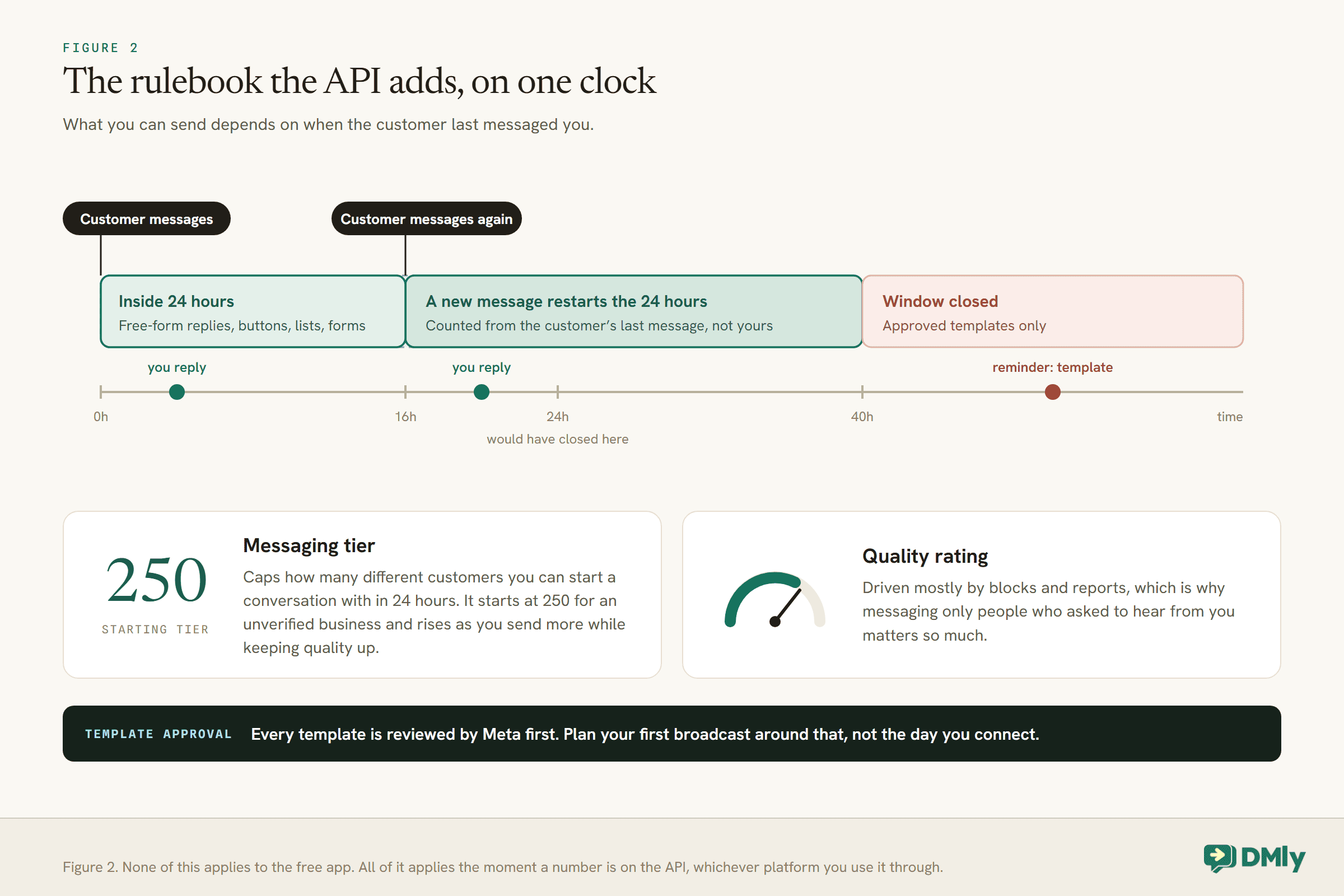
- The 24-hour window. You can send ordinary free-form messages only within 24 hours of the customer’s last message to you. Outside it, WhatsApp delivers approved templates only. Our explainer on how WhatsApp’s 24-hour messaging window works covers the details.
- Template approval. Every template is reviewed by Meta before you can use it, and comes back approved or rejected on Meta’s schedule, not yours. Plan your first broadcast around that, not around the day you connect.
- Per-message charges from Meta, covered in the next section.
- A messaging tier and a quality rating. Meta caps how many different customers you can start a conversation with in 24 hours. The starting tier for an unverified business is 250, and it rises as you send more while keeping quality up. The quality rating is driven mostly by blocks and reports, which is why messaging only people who asked to hear from you matters so much.
- Opt-in before you message anybody. The API is not a way to message a list you bought or scraped. Meta requires opt-in first, and our guide to WhatsApp opt-in covers how to collect it and keep a record.
- A platform subscription. Because the API has no app of its own, you pay for the software you use it through.
WhatsApp Business App vs API: What Each Costs From October 2026
“The app is free and the API is paid” is true as far as it goes, and it hides the part that actually decides your bill.
The app. Using it costs nothing. Business broadcasts, where they are available, are charged per delivered message at a price set by each recipient’s country, and Meta Verified is a paid subscription. Ads that click to WhatsApp cost whatever you spend on the ad.
The API. Meta charges per message, by category and by the country of the person you are messaging. Three of the categories are templates (marketing, utility and authentication), and they are charged when delivered. The fourth, service messages, are the free-form replies you send inside an open window. On top of Meta’s charges you pay for the platform you use the API through.
Two changes on 1 October 2026 matter here, and they pull in different directions:
- Service messages become chargeable, with a free allowance. Every business phone number gets 1,000 free service messages a month, and Meta charges only from the 1,001st. The allowance does not roll over. For a salon or clinic that mostly answers questions, that often means replies still cost nothing.
- Utility messages inside an open window become chargeable, with no free allowance. A booking confirmation sent while the customer’s window is open used to be free and now is not.
The upshot is counter-intuitive but worth holding onto: a business that answers a lot of questions is affected less than one that sends a lot of notifications. Our pillar on the October WhatsApp pricing change covers the whole change, the WhatsApp Business API rate card by country lists the actual rates, and our explainer on service messages versus templates shows how to tell which category a message falls into.
One more free route is worth knowing. When somebody reaches you from a click-to-WhatsApp ad or a Facebook Page button and you reply within 24 hours, Meta opens a 72-hour free entry point window in which the messages you send are free. For businesses that advertise, that can cover a good share of the conversation.
For DMly’s own plans, see the pricing page rather than a figure quoted here, because plan prices and allowances change and the page is the one source that is always current.
App vs API Is Not Always Either-Or: Coexistence
For a lot of businesses the honest answer to “WhatsApp Business app vs API” is both, on the same number, and that is now possible where Meta supports it.
By default, connecting a number to the Cloud API takes it over completely, and the WhatsApp Business app stops working on that number. Coexistence is the alternative. The app keeps working on your phone, and the API runs alongside it through a platform, so your front desk can keep answering from the phone while automation and a team inbox run on the same number.
In DMly, coexistence is a choice you make at the moment you connect. On the connect screen, below the main button, there is a separate section headed Already using the WhatsApp Business app? with its own Connect in co-existence mode button. The rest of Meta’s signup is the same. Once it is connected, three things are worth knowing:
- Messages you send from the phone appear in the DMly inbox too, on the same contact, so the thread stays in one place. They are logged as sent by you and are not routed to your bot or automations, because a person is already handling that conversation.
- Automation can run on the same number as the app. If you would rather the bot stayed quiet whenever you have replied from the phone, turn on Pause the bot when I reply from the phone app. It pauses the bot for that one contact only, and it is off by default.
- Your past chats do not come across. The DMly inbox starts empty and fills from the moment the number is connected. Nothing imports the conversations already on your phone, or your phone’s address book. Keep the phone if you need that history.
Coexistence is a connection choice made once, at signup. Switching a number between modes later means disconnecting and reconnecting it. Meta decides where coexistence is available and which accounts qualify, and our guide to WhatsApp coexistence covers what turns on and what turns off.
Moving From the App to the API Without Losing Your Number
You keep the same number either way. What you choose is whether the phone app keeps working on it.
If you connect in coexistence mode, the app carries on and nothing about your day on the phone changes. If you connect normally, the API takes the number over and the WhatsApp Business app stops working on it. Meta notes that you can still use the number for ordinary phone calls and texts afterwards, since that is your phone line rather than WhatsApp.
Either way, a little preparation saves a lot of frustration:
- Decide about your chat history before you connect. Nothing imports the conversations already on your phone. If you need them, keep the phone and its backup.
- Have access to your Meta Business Manager, and your business documents to hand if your business is not yet verified with Meta.
- If the number is currently on another provider, turn off two-factor authentication in your WhatsApp Business Manager first. DMly’s docs are blunt about it: migrations fail with it still on.
- Write and submit your templates early. The confirmations, reminders and follow-ups you rely on each need Meta’s approval, and approval arrives on Meta’s timetable. Our guide to WhatsApp message templates covers what gets approved.
- Sort out opt-in before your first broadcast. Moving to the API is not a reason to message everybody in your phone’s contacts. Message the people who asked to hear from you.
- Start with one automation, not ten. A greeting that routes new enquiries, or a reminder the day before appointments, is enough to feel the difference. Our WhatsApp Business automation guide covers what to build next.
Three Businesses, Three Answers
The same question gets a different right answer depending on who is asking. Here is how it plays out for three quite different businesses.
These are illustrations rather than case studies, but they show how the WhatsApp Business app vs API choice turns on the three questions in Figure 3.
A solo nail technician in Houston. She books clients by chatting, answers every message herself, and takes payment at the chair. Her greeting and away messages cover the evenings, and quick replies handle the price questions. Nothing else in her business needs to send WhatsApp messages. The app is right for her, and moving now would add rules and costs she gets nothing back for.
A dental practice in Pune with three people on the front desk. Patients message constantly, two receptionists and a practice manager all need to answer, and every appointment deserves a reminder the day before. The app cannot share the number sensibly between three people, and it cannot send reminders on its own. The API is right here, and because the manager still likes answering from her phone during the day, coexistence lets her keep doing that while the reminders and the shared inbox run through a platform.
An online boutique in Lagos. It sells through Instagram and WhatsApp, sends a weekly new-arrivals message, and needs to confirm orders and chase unpaid ones. The weekly message is the tempting reason to stay on the app, but broadcast lists only reach people who saved the number, and paid Business broadcasts are not offered everywhere. Order confirmations and payment reminders also need to go out without somebody typing them. The API fits better, with marketing templates for the weekly message sent only to people who opted in. Our guide to sending bulk WhatsApp messages officially covers how to do that without putting the number at risk.
Mistakes to Avoid
- Assuming the API means giving up the app. Where Meta supports coexistence, it does not. Check before you decide.
- Assuming the API makes every reply expensive. From 1 October, each number gets 1,000 free service messages a month. For most small businesses, replying to customers is not where the bill comes from.
- Moving to the API and messaging your whole phone book. Messaging people who never asked to hear from you is a reliable way to damage your quality rating.
- Expecting a broadcast list to reach everyone. It reaches only people who saved your number. If half your list never replies, that may be why.
- Choosing a platform you cannot leave. Your number should stay yours. Our API guide covers what to check before you sign with any provider.
- Connecting before your templates are ready. The number can be live in minutes, but a reminder cannot go out until Meta approves its template.
Frequently Asked Questions
What is the difference in the WhatsApp Business app vs API?
The app is a free phone app you install and use by hand. The API, also called the WhatsApp Business Platform, has no app of its own: software such as DMly connects to it and gives you a shared inbox, automation, templates and reporting. The app suits one or two people answering by hand; the API suits a team, automation and messages sent by your other systems.
Is the WhatsApp Business API free?
No. Meta charges per message by category and by the recipient’s country, and you also pay for the platform you use it through. From 1 October 2026, every business phone number gets 1,000 free service messages a month before charges start, and utility messages sent inside an open window become chargeable.
Can I use the WhatsApp Business app and the API on the same number?
Yes, where Meta supports coexistence. In DMly you choose Connect in co-existence mode when you connect the number. The app keeps working on your phone, and messages you send from it appear in the DMly inbox on the same contact.
Will I lose my chats if I move to the API?
Your past conversations stay on your phone. Nothing imports them into a platform’s inbox, which starts from the moment the number is connected. If you connect without coexistence, the app stops working on the number, so keep the phone and its backup if you need that history.
Can the WhatsApp Business app send messages to people who have not saved my number?
Broadcast lists cannot: they reach only contacts who have saved your number. Meta’s paid Business broadcasts can, but they are available only to eligible businesses in select countries and are charged per delivered message.
Do I need business verification to use the API?
Not necessarily to start. An unverified business begins on a messaging tier of 250 customers in 24 hours for conversations it starts. Have your business documents ready anyway, because DMly’s connection steps ask for them if your business is not already verified with Meta.
How many people can use the WhatsApp Business app?
The app is one account on a primary phone, with linked devices. Meta Verified raises that to up to 10 devices and agents. For a team that needs assignment, notes and reporting, the API through a shared inbox is the better fit.
The Question You Already Answered
Go back to the question at the top: when a customer messages your business, whose phone does it land on? If that answer still works, if one or two people can keep up and nothing else needs to send messages, the free app is doing its job and you can stop reading comparisons.
If the answer has started to hurt, because messages wait for the one person who can see them, because reminders depend on somebody remembering, or because your booking system cannot talk to your customers, then the WhatsApp Business app vs API question has already been answered for you. The only decision left is whether you keep the app alongside it, and where Meta supports coexistence, you do not have to give it up.
Writing about WhatsApp automation, bookings and growth for local business.
Turn WhatsApp into your busiest channel.
Start free and run message, bookings, payments and reviews in one place.
