
What Is Conversational Commerce? Definition, Examples and How to Start

Conversational commerce is selling through a conversation: a customer finds out about something, asks questions, chooses, pays and gets updates inside a chat, on WhatsApp, Instagram, Messenger or a chat window on your website, instead of working through a website checkout on their own. The person on your side of the chat can be you, a member of your team, a simple bot or an AI assistant, and usually it’s a mix.
The phrase is older than most people think. In January 2016, Chris Messina, a product designer who was then working at Uber, published a post with a confident headline: 2016 would be “the year of conversational commerce.” He predicted that people would talk to brands over Messenger, WhatsApp and the rest, that it wouldn’t much matter whether a human or a bot was answering, and that payments would happen right there in the chat.
Ten years on, it’s fair to mark his homework. Some of it came true in a way he’d recognise. Some of it is still only half true, and the half that isn’t true is exactly where small businesses get tripped up. So that’s how this guide works. We’ll look at what conversational commerce means today, the forms it takes, how it differs from social commerce and ordinary ecommerce, examples from real kinds of business, what you can actually do inside each chat app right now, how to start, and the risks nobody puts on the brochure. Then, at the end, we’ll grade the prediction.
What Is Conversational Commerce? A Plain Definition
Conversational commerce is any sale where a chat moves the customer from interest to purchase. The test is simple: if you took the conversation away, would the sale still happen the same way? If the answer is no, because the customer needed a question answered, a size checked, a price confirmed or a link sent, then the chat did the selling.
That covers more than you might expect. A florist who takes an order over WhatsApp and sends a payment link is doing conversational commerce. So is a skincare brand whose customer taps a product card in a chat, adds it to a cart and pays. So is a restaurant whose AI assistant takes a delivery order, totals it and hands it to the kitchen. And so is a salon whose client books, pays a deposit and gets a reminder, all in one thread.
What it isn’t: a chat bubble on your website that only collects an email address and promises someone will “get back to you.” That’s lead capture. Useful, but nothing is being sold in the conversation.
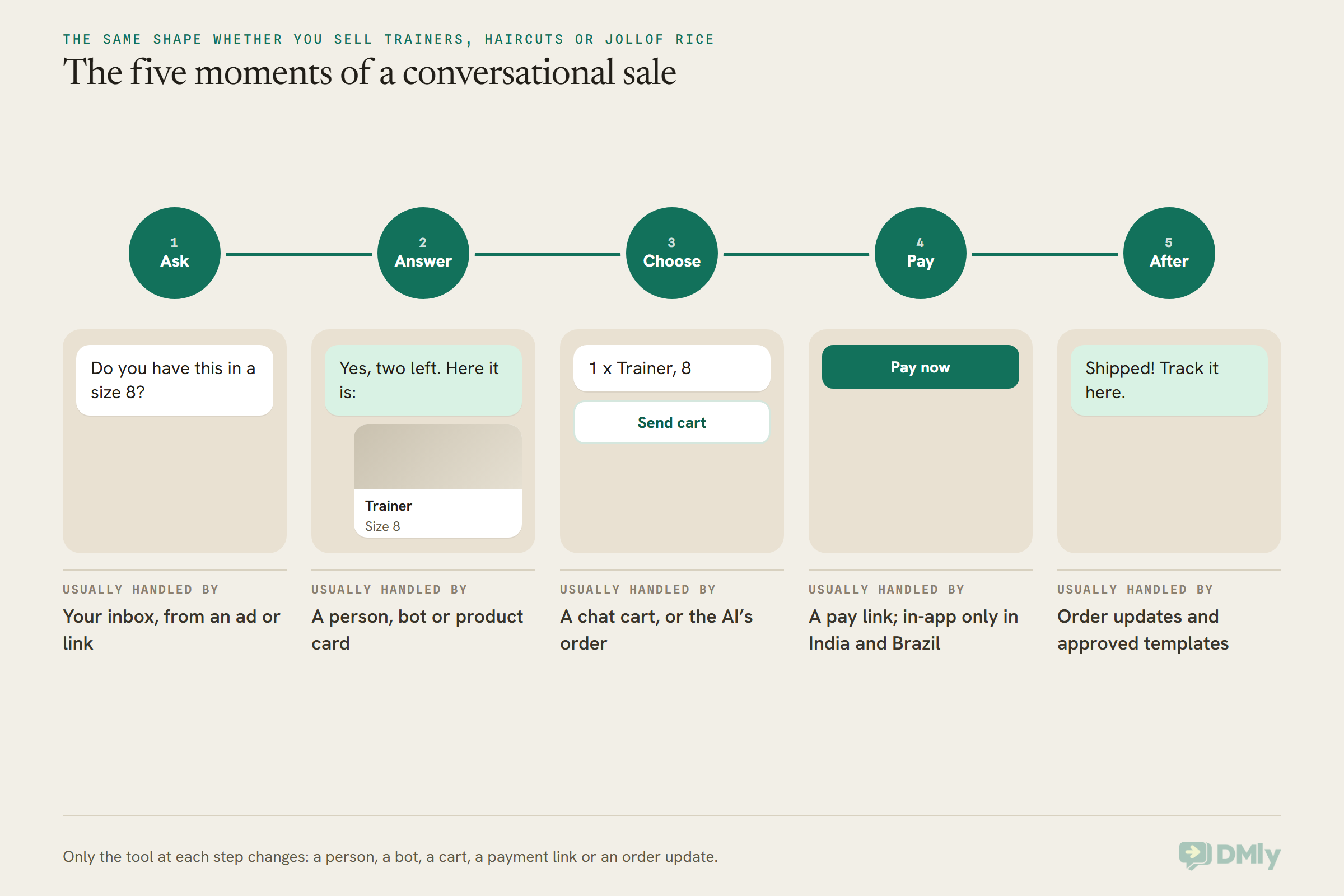
Most conversational sales pass through the same five moments, whatever the business:
- Ask. The customer starts the conversation, from an ad, a link, a QR code, your Instagram bio or a past order.
- Answer. You (or your bot) reply with what they need: a price, stock, a photo, an available time.
- Choose. They pick the thing: a product added to a cart, an order built line by line, a booking slot.
- Pay. They pay, usually through a payment link that opens a secure checkout and brings them back to the chat.
- After. They get the confirmation, the “your order has shipped” message, the reminder and, later, the reason to come back.
You don’t need all five to be automated to call it conversational commerce. Plenty of businesses do every step by hand on the free WhatsApp Business app and do perfectly well. Automation earns its place when the same questions arrive fifty times a day, or when a sale is lost because nobody answered for three hours.
The Seven Forms: Chat Selling, Bots, AI, Carts, Payments and Updates
Conversational commerce takes seven common forms: a person selling in chat, rule-based chatbots, AI assistants, live chat on a website, catalogues and carts inside the chat, payments in or from the chat, and order updates afterwards. Most businesses use two or three of these together, and the mix matters more than any one of them.
1. A person selling in the chat
The oldest form and still the most common. You, or someone on your team, answers messages, sends photos and prices, and closes the sale. It’s warm and flexible, and customers like it. Its limit is you: it stops when you sleep, and it doesn’t scale past a few dozen chats a day without a shared inbox and some help.
2. Rule-based chatbots
A bot that works from buttons, menus and keywords. Someone types “menu” and gets the menu; taps “Track my order” and gets asked for an order number. These bots are predictable and cheap to run, which is exactly why they’re good at the boring, repeated half of selling. They’re poor at anything a customer phrases in a way you didn’t plan for.
3. AI assistants
An AI assistant reads what the customer actually wrote and replies in natural language, from your own price list and policies. The newer ones can do more than chat: they can search your products, build an order as the customer talks, work out the total and hand it to your team. The risk is the obvious one, an assistant that sounds confident about a price it made up, so the setup matters more than the model. We cover that in the risks section below.
4. Live chat on your website
A chat window on your site that lands in the same inbox as your other messages. It’s the form that catches people already shopping on your website and about to leave because one question went unanswered. Its weakness is that a website visitor is anonymous until they tell you who they are, and once they close the tab you usually can’t message them again.
5. Catalogues and carts inside the chat
On WhatsApp, you can show products right in the conversation: a whole catalogue, one product, or a short list. If you switch the cart on, customers can add items and send you the cart as an order without ever opening a browser. This is the form most people picture when they hear the phrase, and it’s covered in detail in our guide on how to create a WhatsApp Business catalog that gets approved.
6. Payments in or from the chat
This is where the gap between the idea and the reality is widest. In a couple of countries, WhatsApp lets a customer pay without leaving the app. Almost everywhere else, the conversation happens in the chat and the payment happens on a secure checkout page that opens from a link, then sends the customer back. Both count. The customer doesn’t care which, as long as it’s quick and safe.
7. Order updates and the after-sale
The confirmation, the “out for delivery” message, the answer to “where is my order?”, the cash-on-delivery check, the reorder nudge. This is the quiet half of selling in chat, and for an online store it’s often where the chat pays for itself, because every “where is my order?” answered automatically is one less email or phone call.
What about voice?
Messina’s 2016 post included voice in his definition, and voice assistants that order for you do exist. For a small business today, though, the conversation is overwhelmingly typed, tapped and sent from a phone. If someone tells you that you need a voice ordering strategy before you have a reliable reply on WhatsApp, they’re selling you the wrong thing first.
Conversational Commerce vs Social Commerce vs Ecommerce
Ecommerce is selling through your own website checkout, social commerce is selling inside a social feed, and conversational commerce is selling through a one-to-one conversation. They overlap all the time, and the useful way to tell them apart is to ask where the customer decides and where they pay.
A pair of trainers can travel through all three. Someone sees them in an Instagram Reel (social commerce), taps through to chat and asks if they come in a wider fit (conversational commerce), then pays on your website checkout from a link you sent (ecommerce). Nobody needs to pick a camp. What you do need is to know which part of the journey each channel is doing for you.
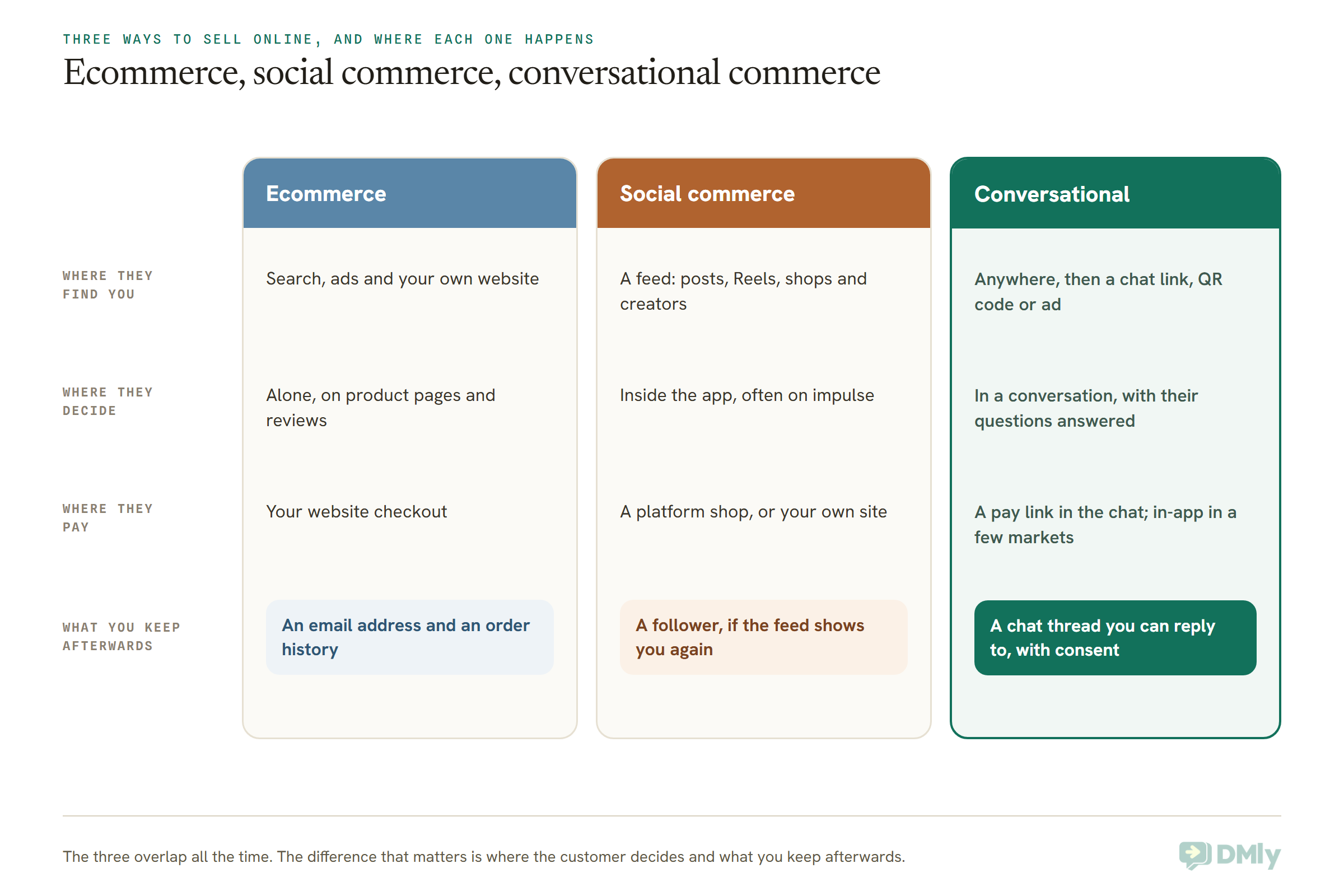
That last row is the one to think about. A sale through your website leaves you an email address. A sale through a social feed leaves you, at best, a follower whose feed may or may not show you again. A sale through a conversation leaves you a thread, and on WhatsApp, with the customer’s permission, you can message that thread again weeks later with an approved template. That’s why conversational commerce tends to win on repeat business more than on first purchases.
One caution on the comparison. Social commerce features inside Instagram and Facebook vary a lot by country and change often, so check what Meta’s Commerce Manager offers in your market before you plan around a feed shop. The conversation side is more stable: the messaging rules for each app are documented and change on announced dates.
Conversational Commerce Examples by Type of Business
The best conversational commerce examples are ordinary: a booking paid in the chat, a cart sent from a catalogue, a food order taken by an assistant, a custom order settled by bank transfer. The six below are illustrative businesses, not case studies, and each one uses features you can set up today.
A salon in Atlanta: booking and deposit in one thread
A client messages to ask about a silk press on Saturday. The reply offers the open times as buttons, she picks one, and because the service is set to take payment before booking, she gets a payment link for the deposit. In DMly, a pay-before booking holds the slot for 15 minutes while she pays, then confirms on its own. Her reminder arrives in the same thread. Our guide to setting up WhatsApp payments and where they break walks through the deposit side.
One US-specific catch: WhatsApp does not currently deliver marketing templates to US phone numbers. Confirmations and reminders are fine, because they’re utility messages, but a “we have a gap on Friday, 20% off” blast to US clients won’t arrive. In the US, the promotional side of selling in chat happens when the customer messages first.
A skincare brand in Bengaluru: catalogue, cart and cash on delivery
A customer taps a click-to-WhatsApp ad, gets the catalogue in the chat, adds two serums to the cart and sends it. A flow thanks her, quotes the total in rupees and sends a Pay now button through the brand’s Razorpay account. If she’d ordered cash on delivery on the brand’s Shopify store instead, a confirmation message asks her to confirm before the parcel is dispatched, which is the cheapest fix there is for orders nobody intended to pay for. Our WhatsApp for D2C guide covers the brand side of this in more depth.
India is also one of the two countries where WhatsApp itself can take the payment, through Meta’s Payments API with UPI apps, cards, NetBanking and wallets. We’ll come back to what that means and why most small brands still use a link.
A restaurant in London: an AI assistant takes the order
“Two chicken burgers, one with no onions, and a large fries, for delivery to SE15.” An AI assistant searches the menu, builds the order line by line, asks for the address, works out the delivery fee for that area and shows the full total. Then it hands the order to staff to confirm. That last part is a choice: the assistant can be allowed to confirm orders and send a payment link itself, but it’s sensible to start with a human approving each one. Our guide to WhatsApp automation for restaurants covers the reservation and repeat-visit side too.
A bakery in Lagos: a custom cake paid by transfer
A customer sends a photo of a birthday cake she likes and asks for one with a different name on it. The baker quotes in naira, raises an invoice from the chat and shares the pay link. Because the bakery uses Paystack, the link can open straight onto a one-time bank account, so the customer pays by transfer from her banking app and the invoice settles itself when the money lands. Paystack’s Pay with Transfer works in Nigeria and Ghana. For a business that prefers its own account, DMly can send the bank details with an “I’ve paid” button that staff confirm.
A boutique in Manila: Instagram DMs that turn into orders
Most of this shop’s sales start as comments and DMs on Instagram. An AI shopping assistant answers “do you have this in medium?”, shows the matching pieces as cards in the DM and builds the order. Instagram has a firm limit that shapes the whole setup: automated messages can only go out within 24 hours of the customer’s last message (a person typing in the inbox gets up to 7 days), and there are no templates to restart a conversation later. So the pay link goes out while the customer is still chatting, not tomorrow.
A homeware shop in São Paulo: two ways to pay
Brazil is the other country where Meta documents payments inside WhatsApp, with Pix codes, payment links, Boleto and one-click card payments. A shop that wants that native experience needs a developer or a provider built on Meta’s Payments API. A shop that just wants paying customers can send a Mercado Pago link from the chat today, and the customer pays on Mercado Pago’s own checkout. Same sale, different plumbing.
What Works in Chat Today on WhatsApp, Instagram and Messenger
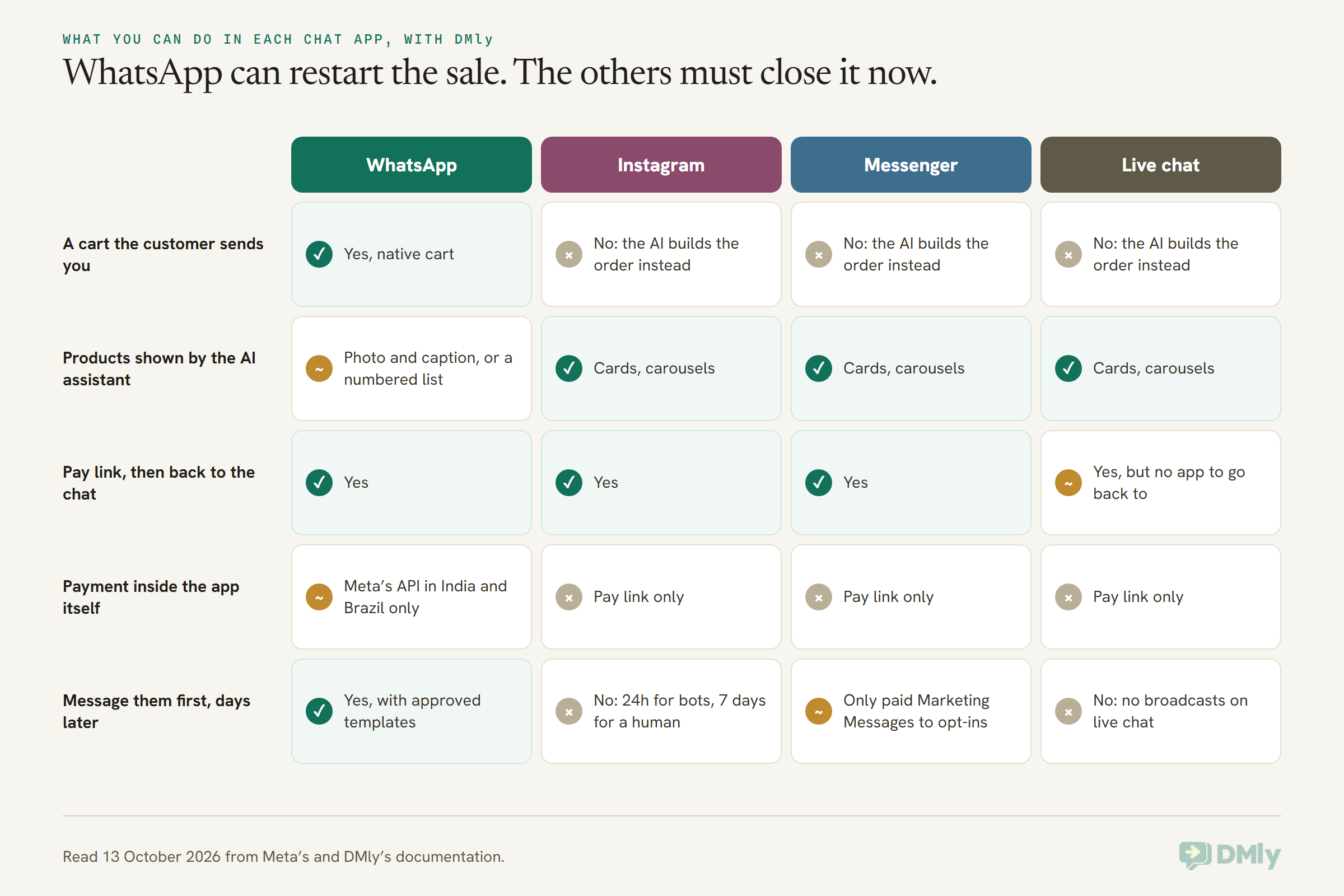
Today, WhatsApp is the most complete app for conversational commerce: it has a native catalogue, a cart customers can send you, product messages, and in India and Brazil, payments inside the chat. Instagram and Messenger are excellent for starting and answering sales conversations, but they’re reply channels: you can’t reliably restart a conversation days later, so the sale has to close while the customer is there.
WhatsApp: catalogue, cart and order messages
On the WhatsApp Business Platform (the API, not the free app), your products live in a catalogue you build in Meta’s Commerce Manager and connect to your WhatsApp Business Account. Meta reviews items automatically. From there you can send products in several shapes:
- A catalogue message with a View catalog button, so the customer can browse everything.
- A single-product message showing one item with its image and price.
- A multi-product message with up to 30 products, grouped into sections.
- A product carousel of up to 10 cards the customer swipes through.
When the cart is switched on, the customer can add up to 99 of each item and send you the cart as an order. A few rules surprise people: there’s one cart per chat thread, a sent cart can’t be edited (the customer sends a new one instead), and you can’t send a customer a cart yourself. Also, on the API, the cart icon doesn’t appear in the chat header the way it does on the free Business app, so it helps to tell customers how to order.
Our full guide to selling products on WhatsApp goes through the catalogue, the cart and the checkout in detail.
WhatsApp: where native payment actually exists
This is the most misreported part of conversational commerce. Meta documents a Payments API for two countries:
- India. Customers pay through any UPI app on their phone, and with cards, NetBanking and wallets, after the business sends an order details message. A deeper integration that also handles refunds and payment status is available only with certain gateways (Razorpay, PayU, Billdesk and Zaakpay). India also has checkout button templates that let customers buy without leaving WhatsApp, for businesses and customers with Indian numbers.
- Brazil. Customers pay with dynamic Pix codes, payment links, Boleto or one-click card payments. Meta notes that WhatsApp doesn’t reconcile payments for you: the business matches each payment to its order with its payment provider.
Meta’s developer index also lists a section for Mexico, but when we went to read it on 13 October 2026 the pages weren’t available, so we’re not counting it. Everywhere else, including the US, the UK, Nigeria and the Gulf, payment works the way it does for most businesses everywhere: a link to a secure checkout page. Our guide to sending WhatsApp payment links covers that route end to end.
Instagram and Messenger: great at the first conversation
Instagram and Messenger are where a lot of conversations start, from a Reel, a comment or an ad. They support rich replies, buttons and carousels, and comment-to-DM, where a comment opens a private conversation. What they don’t have is anything like WhatsApp’s approved templates, so:
- Automated messages can only reach someone within 24 hours of their last message.
- A person replying from the inbox gets up to 7 days, under Meta’s human agent rule.
- Messenger has one extra route, paid Marketing Messages to people who opted in, billed to your Meta ad account. Instagram doesn’t.
The practical result: on Instagram and Messenger, close the sale in the session. Send the pay link while the customer is still talking to you, and if they’d like updates afterwards, invite them to continue on WhatsApp.
How to Start Selling in Chat: Seven Steps
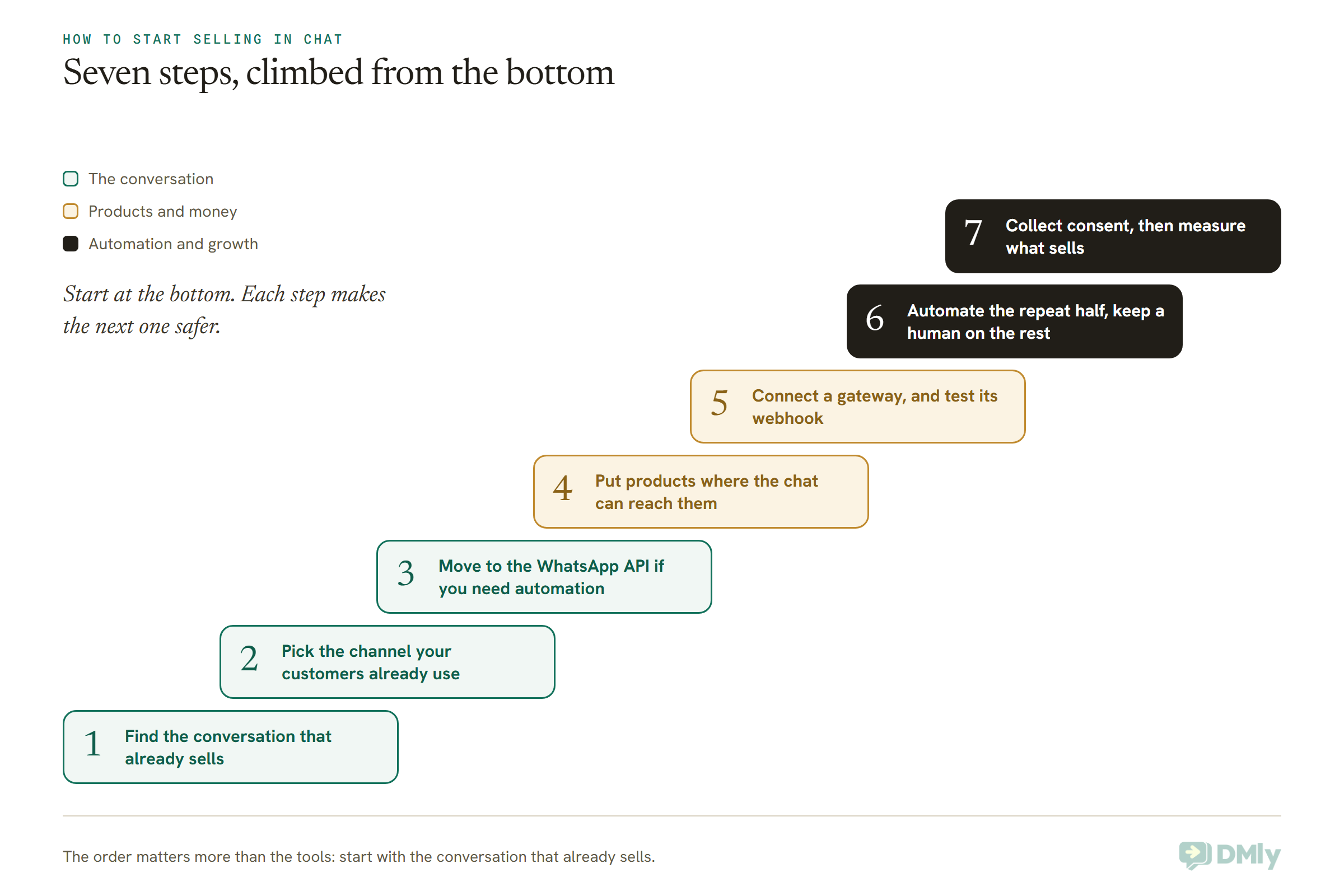
To start with conversational commerce, find the conversation that already sells for you, put it on the channel your customers use, then add products, payment and automation one piece at a time. The order matters. Businesses that start with the fanciest part, usually an AI bot, tend to automate a sale they never understood.
Step 1: Find the conversation that already sells
Scroll back through last month’s chats. Which questions come before a purchase? “Is it in stock?”, “Do you deliver to…?”, “How much for two?”, “Can I book Saturday?” Write down the five most common. Those are your sales conversation. Everything you build should make those five faster, not add new ones.
Step 2: Pick the channel your customers already use
Look at where your own customers message you today, not where an article says they should. For many businesses in India, Nigeria and Brazil that’s WhatsApp; for many US local businesses it’s Instagram DMs, text and the website chat as much as WhatsApp. Don’t move customers to a channel because a tool supports it. Meet them where they already message you, and connect the channels to one shared inbox so nothing gets lost between them.
Step 3: Move to the WhatsApp API if you need automation
The free WhatsApp Business app is fine for selling by hand, and it has a simple catalogue of its own. But carts that trigger a checkout, AI assistants, order updates from your store and shared team inboxes all run on the WhatsApp Business Platform, also called the API, through a provider such as DMly. You can keep using the app on the same number in some setups, so it isn’t all or nothing.
Step 4: Put your products where the chat can reach them
There are three places your products can live, and it’s worth being clear which one does what:
- Meta’s catalogue, built in Commerce Manager, is what WhatsApp shows in the chat and what the cart uses.
- Your products in DMly (Offerings, then Products) hold your own prices, tax and stock, and they’re what the AI assistant sells from and what orders and invoices are built from. The AI Catalogue Builder can turn a pasted menu or product list into a draft you review, up to 30 products at a time.
- Your Shopify or WooCommerce store, if you have one, syncs its products, customers and the last 90 days of orders, so order updates and “where is my order?” answers come from real data.
Keep the product IDs (SKUs) consistent across them. It’s the thread that ties a cart line in the chat to the item on your shelf.
Step 5: Connect a payment gateway, and its webhook
A payment link needs a gateway. DMly connects Stripe, PayPal, Paystack, Flutterwave, Monnify, Razorpay, MyFatoorah and Mercado Pago. Choose which one takes the money under Finance, then Settings, then Gateways, in the Charge through setting. Then do the step everybody skips: add the webhook address in your gateway’s own dashboard, and send yourself a small real payment to check it. Without the webhook, a customer can pay successfully and your records will still say unpaid.
Step 6: Automate the repeated half, keep a human on the rest
Start with the flows that answer the same thing every time: the cart checkout, the order status lookup, the booking confirmation. Then, if you want an AI assistant taking orders, start it in the mode where it builds the order and a person confirms it. Watch a few weeks of real orders before you let it confirm and send payment links on its own.
Step 7: Collect consent, then measure
Ask customers whether they’d like updates and offers on WhatsApp, and record the answer. You’ll need that consent before you send marketing messages, and our guide to WhatsApp opt-in and how to prove it explains what counts. Then measure the few numbers that tell you if this works, which we cover below.
What DMly Has Built In for Selling in Chat, and What It Doesn’t
DMly is a conversational commerce platform for small businesses: one inbox for WhatsApp, Instagram, Messenger, live chat and more, with products, orders, invoices, payment links, bookings and automation built around it. Here’s what each part of the five moments looks like in it, and where it stops.
Selling from the WhatsApp catalogue
On your WhatsApp channel, Bot Setup has a Commerce tab with two switches: Show catalog and Enable cart. They write straight to your number’s settings at Meta. In a flow, the Catalog / Product step sends the full catalogue, one product or a list. When a customer sends a cart, it appears in the inbox and starts any flow on the Cart order received trigger, which can quote the items and the total and then send a Pay now button with the Request Payment step. The ready-made WhatsApp Cart Checkout template wires all of that, including a fallback to a person if the link can’t be made.
Two honest limits. If DMly can’t process a cart (empty, wrong currency, a product it doesn’t recognise, or no cart flow published yet), it pauses the bot on that chat and hands the cart to your team. And a WhatsApp cart doesn’t create an order under Finance or take anything off your stock count; the payment is the record. If you track stock in DMly, create the order for what sold.
Taking orders with an AI assistant
This is the newest piece. In Finance, AI Ordering Settings let you turn on AI ordering, set your currency and time zone, any service or delivery fee, which of pickup, delivery and dine-in you offer, and delivery zones with their own fees. Each product can get ordering rules: the unit it’s sold in, allowed quantities, variants like sizes or cuts, and add-ons like extra cheese with their own price. Then you install the AI Food Ordering Assistant or AI Shopping Assistant template, choose an AI provider if your plan lets you choose one, and publish.
As the customer orders, a draft order builds itself in Finance, then Orders. By default, the assistant submits it for your team to confirm, pauses itself, tags the conversation and leaves a note linking to the order; nothing is charged and no stock is taken until someone acts. If you choose to, you can let it confirm orders the customer has approved after seeing the full quote, and send a payment link for them. A few guardrails are built in: the assistant never treats a blank price, tax or fee as zero, it can’t give discounts, and an order only counts as paid when the payment is recorded, not when the customer says so or sends a screenshot.
Getting paid
Payment links come from the gateway you connect, and they open that gateway’s own secure checkout. After paying, the customer lands on a short page that thanks them and sends them back to the WhatsApp, Messenger, Instagram or Telegram conversation the link came from. You can send a link against an invoice, for a booking, or for any amount from the inbox. For the full mechanics, including what happens with part payments, see our guide to WhatsApp payment links. DMly doesn’t use WhatsApp’s native in-chat payments, so in India and Brazil your customers pay through the link rather than inside WhatsApp itself.
Online stores: Shopify and WooCommerce
If you sell on Shopify or WooCommerce, connecting the store lets store events start conversations: an order confirmation, an abandoned checkout nudge about an hour after a checkout goes quiet, a back-in-stock alert, and a “where is my order?” bot that looks the order up and sends the status with a tracking link. There’s also a cash-on-delivery confirmation flow that writes the customer’s answer back onto the store order. Our Shopify WhatsApp automation guide covers the setup, and our guide to WhatsApp marketing for ecommerce and D2C brands covers the campaigns around it. One thing to know: synced store orders don’t appear in DMly’s own Orders screen. They power the automations, not a second order list.
Where DMly is the wrong choice
- You want a hosted online shop. DMly has no storefront of its own. The shop front is Meta’s catalogue in the chat, or your own website.
- You need native in-chat payment in India or Brazil. That runs on Meta’s Payments API, which DMly doesn’t use; you’d need a provider or developer that builds on it.
- You sell on marketplaces only. If every sale happens on a marketplace’s own checkout and you can’t message those customers, conversational commerce has little to work with.
DMly starts with a 7-day free trial with no card, and you pay Meta’s WhatsApp rates directly with no markup on top.
The Risks: Opt-In, the 24-Hour Window and What Each Message Costs
The three risks that catch businesses new to conversational commerce are messaging people who never agreed to it, missing the 24-hour reply window, and not knowing what each message costs. All three are manageable once you know they exist.
Opt-in and the rules on marketing
On WhatsApp, you need a customer’s permission before you message them, and marketing messages need it most of all. People who feel spammed block and report, and that damages your number’s standing with Meta. Meta also limits how many marketing templates each person receives from businesses, and if a customer has had enough recently, your message is held back (you’ll see error 131049); wait at least 24 hours before trying again. And remember the US rule above: marketing templates aren’t delivered to US numbers at all right now.
The 24-hour window
When a customer messages you on WhatsApp, a 24-hour window opens in which you can reply freely. After it closes, you can only send pre-approved templates. That matters for selling in chat in a specific way: store events, abandoned checkouts and stock alerts usually happen outside the window, so those flows have to start with an approved template or they won’t be delivered. On Instagram and Messenger there are no templates to fall back on, which is why the sale has to close in the session.
What each message costs from 1 October 2026
WhatsApp charges per delivered message on the API, and two things changed on 1 October 2026:
- Service messages (your free-form replies inside the 24-hour window) are now charged. Each business phone number gets 1,000 of them free every month, and Meta charges from the 1,001st.
- Utility messages sent inside an open window, like an order confirmation while the customer is still chatting, are now charged too. These were free from July 2025 until 1 October.
Some things stay free. When a customer reaches you from a click-to-WhatsApp ad or a Page button, all messages are free for 72 hours. The free WhatsApp Business app isn’t affected at all. Most small businesses will stay inside the 1,000 free service messages; a busy store sending order confirmations will feel the utility change more. Our guide to the WhatsApp pricing change on 1 October has the detail. Messenger’s paid Marketing Messages are billed separately, to your Meta ad account.
AI that sounds sure and is wrong
An assistant that invents a price, promises a delivery area you don’t serve, or tells a customer a dish is allergen-free is worse than no assistant. The fix is mostly setup: give it real prices and real fees, leave unknowns blank so it hands over rather than guessing, keep “hand over to a human” switched on, and start with staff confirming every order. DMly’s ordering templates deliberately ship with confirmation and payment switched off for that reason.
Payments you can’t see
“I’ve paid, here’s a screenshot” is the oldest trick in chat selling. Treat an order as paid only when the payment is recorded from your gateway. That depends on the webhook from Step 5, which is why it’s worth testing with real money before your first customer pays.
How to Tell If Selling in Chat Is Working
Conversational commerce is working when more conversations end in a payment, faster, without more of your time. You don’t need a dashboard of thirty numbers. Watch these five for the first two months:
- Conversations that end in a sale. Out of every ten people who asked a buying question, how many paid?
- Time from first message to payment. If it’s falling, the chat is removing friction.
- Pay links sent versus paid. A big gap usually means the checkout page, the currency or the timing is wrong, not the customer.
- Chats handed to a person. Each one tells you something the bot or the assistant couldn’t handle. Fix the top three reasons each month.
- Repeat purchases from people who bought in chat. This is where selling in chat earns its keep, because you have a thread to come back to.
In DMly, the Finance report shows money in for any period, and each automation shows how many runs started, finished and failed at each step, which is the quickest way to see where customers drop out of a checkout flow.
Frequently Asked Questions
What is conversational commerce in simple terms?
Conversational commerce is selling through a chat. The customer asks, gets answers, chooses and pays inside a conversation on WhatsApp, Instagram, Messenger or your website’s chat, with a person, a bot or an AI assistant on your side.
Is conversational commerce the same as social commerce?
No, though they often work together. Social commerce happens in a social feed, where people discover and sometimes buy from posts and shops. Conversational commerce happens in a one-to-one chat. A Reel that leads to a DM, which leads to a pay link, uses both.
Can customers pay inside WhatsApp?
Only in some countries. Meta documents payments inside WhatsApp for India (UPI apps, cards, NetBanking and wallets) and Brazil (Pix, payment links, Boleto and one-click cards). Everywhere else, and with DMly in every country, the customer taps a payment link, pays on the gateway’s secure page and comes back to the chat.
Do I need a chatbot to do conversational commerce?
No. Plenty of businesses sell by hand in chat. A bot or AI assistant helps once the same questions arrive many times a day, or when you’re losing sales out of hours. Start by automating the repeated questions and keep a person on the rest.
Do I need a website?
Not necessarily. A WhatsApp catalogue, a cart and payment links can run a small shop without a website. A website still helps with trust and search, and if you already have a Shopify or WooCommerce store, the chat can sit on top of it for order updates and recovered checkouts.
Is conversational commerce only for big brands?
It suits small businesses better than most channels, because the advantage is a personal reply, not a big budget. A salon, a bakery or a two-person boutique can do it well with a free app, and move to automation when the volume justifies it.
How much does conversational commerce cost?
On the free WhatsApp Business app, nothing beyond your time. On the API, you pay a platform such as DMly, from $29 a month billed yearly, plus Meta’s per-message rates. Since 1 October 2026 that includes service replies beyond 1,000 a month per number and utility messages sent inside the 24-hour window.
Is it safe to let an AI take orders?
It can be, with the right setup. Give it your real prices and fees, let it hand anything uncertain to a person, and start with staff confirming each order before you allow it to confirm and send payment links itself.
Conversational Commerce Ten Years On: The 2016 Prediction, Graded
Back to Chris Messina and his headline. Here’s how three of his predictions about conversational commerce have held up.
“It won’t matter whether a human or a bot is answering.” Mostly right. Today’s AI assistants can search a menu, build an order and quote a total in a way the 2016 bots couldn’t. But the businesses doing this well have learned the opposite lesson too: it matters a great deal that a person can step in, and that the bot knows when to let them. Grade: B+.
“Payments will happen in the chat.” Half right. Native in-chat payment exists on WhatsApp in India and Brazil, and the rest of the world mostly pays through a link that opens a checkout and comes back. The customer barely notices the difference, which suggests the prediction was right about the experience and wrong about the plumbing. Grade: C+.
“Finding the business will be the hard part.” Right, and still right. The conversation is easy once it starts. Getting it started, with an ad, a QR code on the counter, a link in your bio or a past customer who said yes to updates, is where most of the work is. Grade: A.
So here’s the short version for your own business. Conversational commerce isn’t a new channel to build from scratch. It’s the conversations you’re already having, made faster, joined up with your products and payments, and kept open so the customer can come back. Start with the five questions your customers ask before they buy, answer them in the chat they already use, and send the pay link while they’re still there.
Writing about WhatsApp automation, bookings and growth for local business.
Turn WhatsApp into your busiest channel.
Start free and run message, bookings, payments and reviews in one place.
