
Best Booksy Alternatives for Salons and Barbershops in 2026
Before you start comparing Booksy alternatives, think about your Friday regular. He’s sat in your chair every other week for six years. Same skin fade, same lineup, same argument about football. Last month he changed phones, lost your number, opened the Booksy app, typed “barber near me”, found your profile and booked.
To you, he’s the most loyal client you have. To Booksy, if Boost is switched on, he may be a client booking you for the first time. Booksy charges a one-time 30% of a Boost client’s first visit, up to $100. Its own pricing page tells you to send existing clients your profile link so you aren’t charged for them. That advice tells you something: on Booksy, the route a client takes in can matter as much as how long they’ve known you.
That’s not a scandal. Boost is optional, it’s clearly priced, and plenty of barbers say it pays for itself. But it’s the kind of detail that decides whether Booksy is still the right home for your shop. In this guide, we’ll look at what Booksy costs in 2026, read straight from its own pages, how the Boost fee works out on real prices, when staying on Booksy is the smart move, and the alternatives that suit each kind of shop: solo barbers, owners with employed barbers, shops full of booth renters, walk-in shops and shops whose clients book in their DMs.
What Are the Best Booksy Alternatives in 2026?
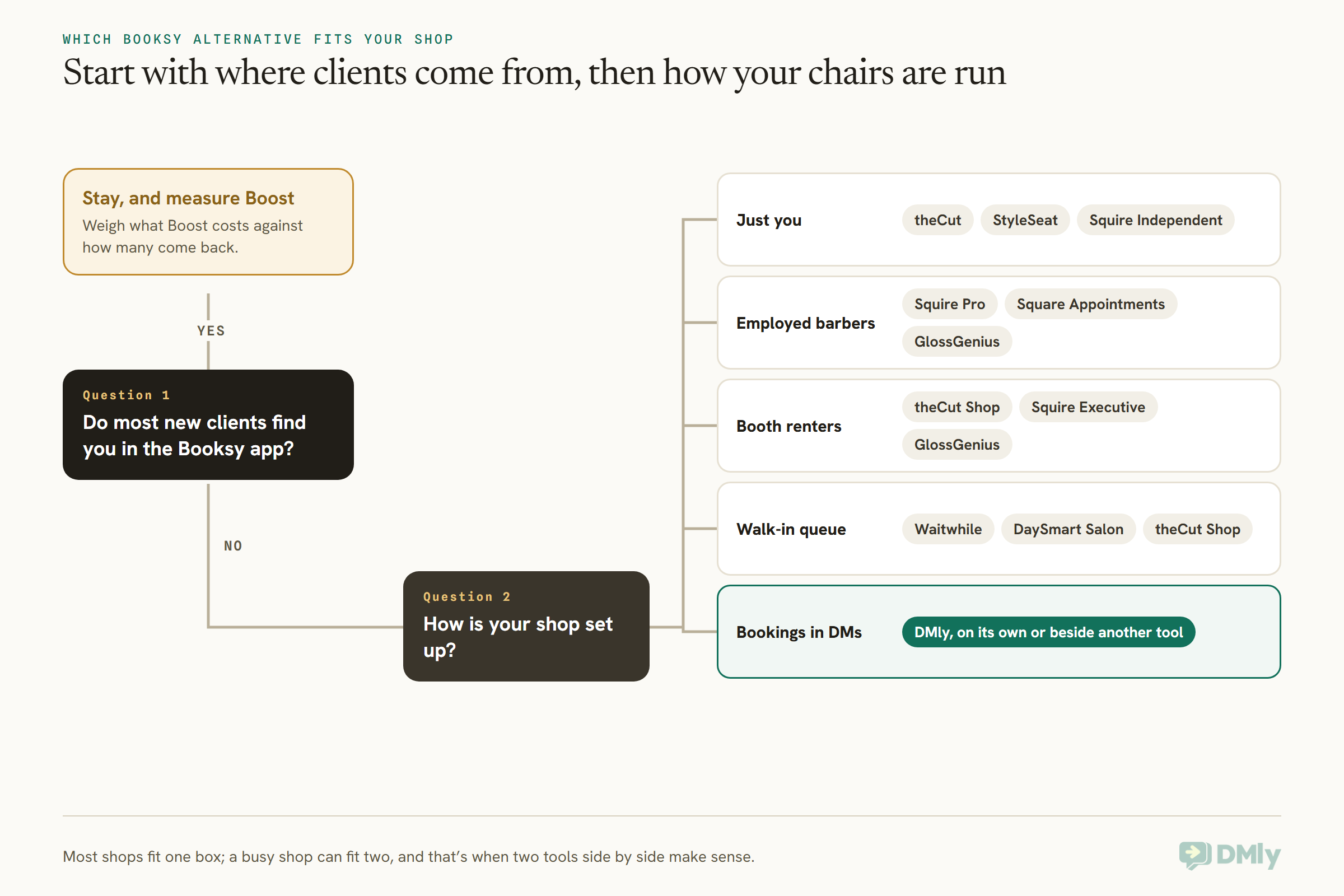
The best Booksy alternatives depend on how your shop is set up: theCut or StyleSeat for a solo barber, Squire or Square Appointments for an owner with employed barbers, theCut’s Shop plan or Squire Executive for a shop of booth renters, Waitwhile or DaySmart Salon for a walk-in queue, and DMly if your clients already book and ask questions on WhatsApp or Instagram. If most of your new clients really do come from the Booksy app, the honest answer may be to stay.
Here’s the same answer laid out by shop, with the reason in one line.
| Your shop | Look first at | Why |
| Just you, one chair | theCut, StyleSeat, Squire Independent | $0 to $30 a month, built for one barber’s book |
| Owner plus employed barbers | Squire Pro, Square Appointments, GlossGenius | One price for the shop, not one per barber |
| Owner plus booth renters | theCut Shop, Squire Executive | Both list booth rent tracking or collection on their pricing pages |
| Walk-ins all day, a queue at the door | Waitwhile, DaySmart Salon | A real waitlist or check-in kiosk, not just a calendar |
| Clients book in WhatsApp or Instagram DMs | DMly | Bookings, deposits and reminders inside the chats you already answer |
| New clients mostly arrive through the Booksy app | Stay, and manage Boost carefully | Nothing on this list replaces Booksy’s marketplace |
Every price on this page was read on the vendor’s own website on 13 October 2026. Prices are in US dollars unless we say otherwise. Several of these companies price differently by country, so check the page from where you are before you decide.
How Much Does Booksy Cost in 2026?
In the US, Booksy costs $29.99 a month plus tax, with every feature included, and $20 a month for each additional team member. That’s from Booksy’s US pricing page, read on 13 October 2026. There’s a 14-day free trial with no card needed, no contract, and you can cancel any time.
Here’s what that one price includes, according to Booksy:
- Unlimited bookings. Booksy says it never charges your clients a booking fee, and the client app is free for them.
- Reminders and confirmations, always free, plus 2,000 free marketing texts a month.
- Email marketing, waitlists, forms and liability waivers, gift cards, memberships and packages, and Reserve with Google.
- No-Show Protection: deposits taken at booking and cancellation fees charged to a card on file, set as a percentage of the service. Standard processing fees apply.
Then come the costs that sit on top of the subscription. Payment processing on Booksy’s US page is 2.69% + $0.30 for mobile payments and keyed-in cards, 2.49% + $0.10 on the Booksy Card Reader and 2.49% + $0.20 for Tap to Pay. Next-business-day payouts are free, and 30-minute payouts cost 1.5%. If you want a terminal, the Stripe Reader S710 is $299 and the M2 is $53.10, both plus shipping.
Booksy pricing in the UK
Booksy’s UK page is built differently. It’s £40 a month plus VAT, with £5 a month for each extra user, a 7-day free trial, and card fees of 1.29% + 20p + VAT for mobile payments and 0.99% + 20p + VAT for Tap to Pay. So a UK shop pays more for the first chair and much less for every chair after it. Boost works the same way in the UK, at 30% of the first visit, but with a £5 minimum, and the UK page doesn’t print a maximum.
What a four-chair shop pays Booksy
Take a shop with the owner and three barbers, all on one Booksy account. In the US, that’s $29.99 plus three extra users at $20, so $89.99 a month plus tax before a single card is tapped. In the UK, it’s £40 plus £15, so £55 a month plus VAT. Hold on to those numbers, because they’re what every alternative below gets compared against.
The Booksy Boost Fee, Worked Out on Real Prices
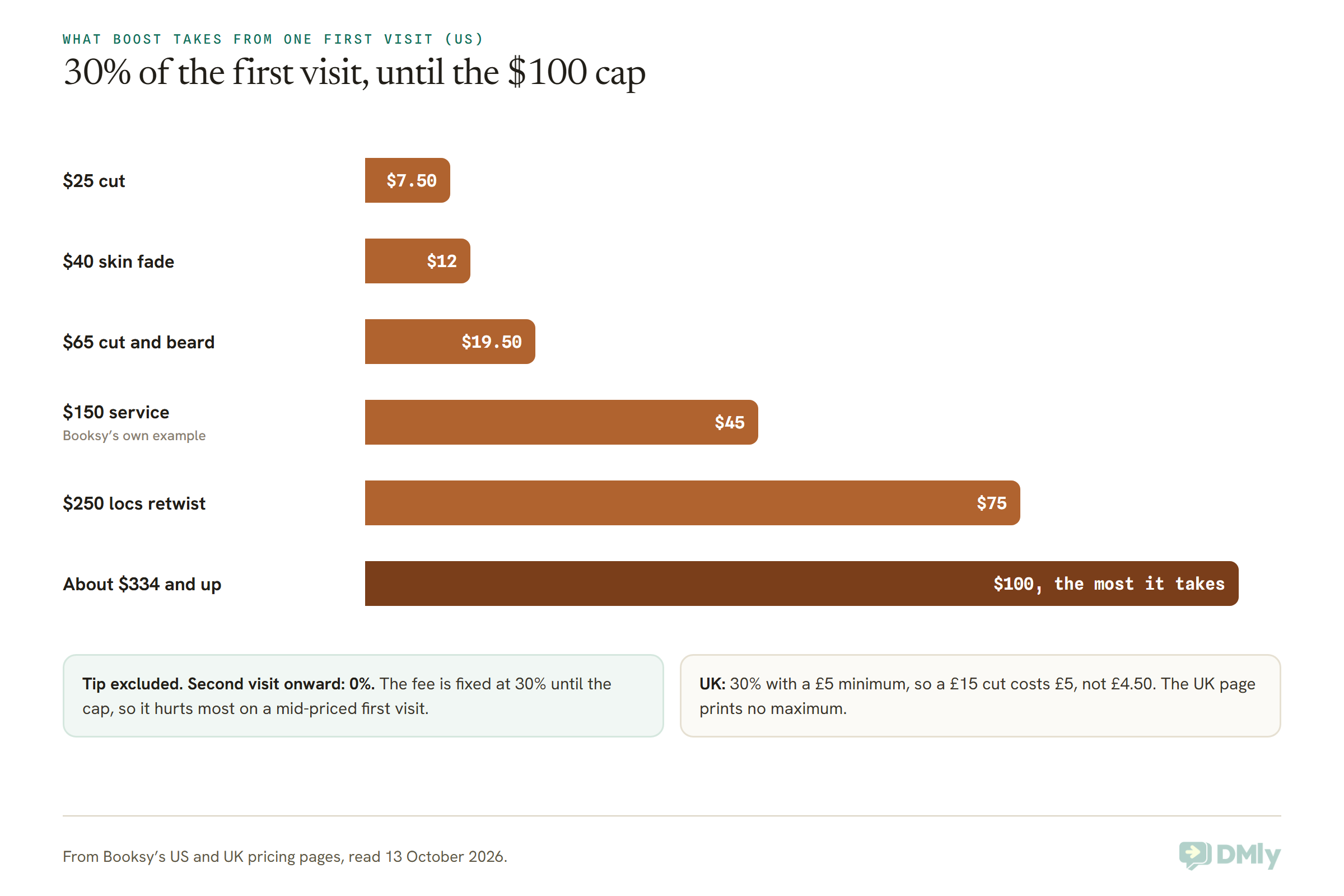
Booksy Boost is free to switch on and has no monthly fee; instead, Booksy takes a one-time 30% of a new client’s first visit while Boost is on, capped at $100 in the US. From the second visit on, Booksy takes nothing, and the tip is never part of the fee. Boost gives you better placement in the Booksy marketplace, a spot in recommended galleries and a “Booksy Recommended” badge.
Booksy’s own example is a client who comes in once a month for a $150 service: $1,800 a year, for a one-time fee of $45. That’s real arithmetic, and for a genuinely new client who sticks, it’s a good deal. The question is what it costs on your price list, and on clients who weren’t really new.
Three things that decide whether Boost is worth it
1. Who counts as “new”. Booksy charges for clients who book you for the first time while Boost is on. Its own FAQ tells you to share your Booksy profile link with your clients and encourage them to book through it, so you aren’t charged for them. That’s sensible advice, and it also tells you the fee follows the route in. If a long-time regular you’ve only ever booked by phone finds you through the app, ask Booksy in writing how that visit is treated before you assume either way.
2. Whether the new client comes back. The $45 on a $150 service is cheap if that client returns twelve times. It’s expensive if they come once, because a one-off client found through an app is the most likely kind to never return. Track your Boost clients’ second visits for a couple of months. That one number tells you more than any marketing page.
3. What else is in the bill. Boost doesn’t replace the subscription or the card fees. On a $40 first visit paid by Tap to Pay, the shop pays the $12 Boost fee plus 2.49% + $0.20 in processing, about $1.20, so a little over $13 of that $40 goes before rent and products.
None of this makes Boost bad. It makes it something to measure. A lot of the shops that start looking at Booksy alternatives haven’t fallen out with Booksy at all. They’ve just never added up what a first visit costs them.
When Staying on Booksy Is the Right Call
Stay on Booksy if its marketplace is genuinely where your new clients come from, and if you’re mostly a one- or two-chair shop. Booksy says 44 million clients worldwide book on it. None of the alternatives below claims an audience that size on its pricing page (StyleSeat’s says 2M+ clients), and several have no marketplace at all.
Booksy is also a fair deal on features. Everything is in one price, reminders are free, and 2,000 marketing texts a month is generous for a small shop. If you’re solo, $29.99 for all of that is hard to beat on value. And Boost is a switch: you can turn it off and keep the rest.
So before you move, answer three questions honestly:
- Where did last month’s new clients come from? If you can’t say, ask each new face. Booksy app, Instagram, Google, a friend, walking past.
- What did Boost cost you last quarter? Add up the fees, then check how many of those clients came back for a second visit.
- What is the per-user charge doing to your bill? At $20 per extra barber in the US, a growing team is where Booksy gets expensive fastest.
If the answers are “the app”, “not much” and “we’re a small team”, you probably don’t need a Booksy alternative. If they’re “Instagram and walk-ins”, “more than I thought” and “we just hired”, keep reading.
Booksy Alternatives for a Solo Barber
For one barber with one chair, the strongest Booksy alternatives are theCut, StyleSeat and Squire Independent, which cost $0 to $30 a month against Booksy’s $29.99. Each takes a different view of how new clients should be paid for.
theCut: free for barbers, built around the barber’s own book
theCut is a booking app made for barbers and their clients. Its Free plan costs $0 and covers your booking link, no-show protection and in-app mobile payments. Pro is $25 a month and adds client blasts, text-message appointment updates (Free sends push and email), no-show policies you can set per client, and free client discovery. Payment processing is 2.75% on both. There’s a 30-day Pro trial with no card.
Discovery is where theCut differs from Booksy. On the Free plan, theCut charges $10 per client it finds for you in its app. On Pro, that’s included. Compare a $40 first visit: $12 on Booksy Boost, $10 on theCut Free, nothing extra on theCut Pro.
Pick it if you want a barber-first app with a free starting point and a flat discovery fee. Think twice if you also do colour, nails or treatments, because theCut is made for barbering and its pricing is in US dollars.
StyleSeat: one low price, paid for new clients through growth fees
StyleSeat is a marketplace and booking app, and the closest like-for-like Booksy alternative on this list. Its pricing page shows $19 a month after the free trial, labelled a limited-time rate for new pros that you keep if you join while it runs, or $199 a year. It covers “stylists and salons with up to 15 chairs”, with staff calendars at no extra seat cost.
Payments are free during the trial, then 1.9% for six months. After that, StyleSeat’s page says standard processing rates apply, without printing them. New clients come through its marketplace and its New Client Connection promotion, and StyleSeat says its growth fees are charged only against revenue it generates for you. The pricing page doesn’t print that fee rate, so ask for it in writing before you compare it with Boost.
Pick it if you want a marketplace like Booksy’s at a lower monthly price, especially with a small team. Think twice if you need the exact cost of a marketplace client before you sign up, because it isn’t on the page.
Squire Independent: a barbershop system, at solo size
Squire is barbershop software from top to bottom, and its Independent plan for one barber is $30 a month (CA$45, £20, €25 or A$39). It includes online booking, no-show protection, automated email and text reminders, Squire’s AI-assisted marketing feature and a branded app. There’s a 14-day free trial.
One line on Squire’s pricing page will matter to some barbers: “Your clients won’t be sold or shown to other businesses.” Squire is built around your own clients, not a shared marketplace.
Pick it if you plan to grow into a shop and want to start on the system you’ll grow with. Think twice if you rely on an app to bring you strangers, because Squire’s pitch is the opposite.
Booksy Alternatives for a Shop With Employed Barbers
If you employ your barbers, the best Booksy alternatives charge one price for the shop rather than one per barber: Squire Pro at $50 a month, Square Appointments at $0 or $49 per location, and GlossGenius Gold at $56 for up to nine staff. On Booksy, each extra barber adds $20 in the US.
Squire Pro and Executive: flat per shop, made for barbershops
Squire’s Pro plan is $50 a month for a single-location shop (CA$65, £30, €35, A$69). It adds multiple barber accounts, Google and Instagram booking, shop management with a waitlist, a dedicated onboarding specialist, client transfer and promo codes. Executive is $150 a month per shop and adds unlimited email and text marketing, a Google reviews booster and commission and rent collection. Titan, for multi-location brands, is $250 per shop.
The line that matters most for a growing shop is in Squire’s FAQ: it charges a flat monthly fee per shop, and adding or removing barbers doesn’t change it. Squire’s processing rates aren’t on its pricing page, and the three bigger plans start with a demo rather than a self-serve trial.
Pick it if you run a proper barbershop with several chairs and want software that speaks your language. Think twice if you want to see card fees in writing before a sales call.
Square Appointments: a price per location, and the hardware to go with it
Square Appointments in the US has three plans, priced per location: Free at $0, Plus at $49 a month and Premium at $149. All three include unlimited staff calendars. In-person card fees are 2.6% + 15c on Free, 2.5% + 15c on Plus and 2.4% + 15c on Premium. Online payments are 3.3% + 30c on Free and 2.9% + 30c on the paid plans, and a card on file or a keyed-in card is 3.5% + 15c.
For a barbershop, the useful line is that cancellation policies, no-show fees and a waitlist start on Plus. Square’s bigger strength is everything around the chair: card readers, a full point of sale, product sales and payroll as a separate add-on.
Pick it if you want one price for the whole shop and a proper till for products and walk-in payments. Think twice if Booksy’s app is where your new clients come from. Square does have a marketplace, Square Go, a free US app that lists barbershops and salons with online booking turned on and charges nothing per booking, but it’s iPhone only for now and doesn’t take payments in the app yet.
GlossGenius: a flat price up to nine staff
GlossGenius has three plans for beauty businesses. Standard is $28 a month ($24 billed annually), Gold is $56 ($48 annually) for “businesses up to 9 staff”, and Platinum is $168 ($148 annually) for teams of ten or more. Card processing is a flat 2.6%, with no extra charge for Tap to Pay, card on file or keyed entry, and there’s a 14-day trial with no card.
GlossGenius is more salon than barbershop in feel, but its flat 2.6% is simple, and its plan comparison lists separate bank accounts for booth renters, which we’ll come back to.
Pick it if you’re a mixed salon and barbershop that wants one clean price and one clean card rate. Think twice if you have ten or more people, where Platinum’s $168 a month changes the maths.
DaySmart Salon: priced by user, with a walk-in kiosk
DaySmart Salon starts at $29 a month for one user. Deluxe is $69 for three users, Deluxe Growth is $149, Premium is $199 for six users, and Premium Growth is priced on request. Extra users are $9 a month each from Deluxe up. Its plan table lists a Kiosk Walk-In Manager, Instagram and Facebook booking and online deposits, and commission tracking appears on Premium Growth. Every plan has a two-week free trial.
Pick it if you want a traditional salon system with a walk-in kiosk and room to add payroll later. Think twice if you want text marketing, which starts at the $149 Deluxe Growth plan.
Booksy Alternatives for Booth Rental Barbershops
For a shop full of booth renters, the Booksy alternatives that put booth rent on their pricing pages are theCut’s Shop plan, which lists booth rent tracking and reminders for $0, and Squire Executive, which lists commission and rent collection at $150 a month per shop. GlossGenius lists separate bank accounts for booth renters.
Booth rent changes the question. When your barbers rent their chairs, they’re running their own businesses inside yours. Each of them usually wants their own client list, their own payouts and their own booking link. You, as the owner, want to see the shop’s calendar, collect rent on time and keep the front of the shop looking like one place.
Here’s how the tools on this page handle that, based only on what their pricing pages say:
- theCut Shop ($0 for the owner) lists staff onboarding, multiple shops, full team visibility, booth rent tracking and reminders, and creating appointments for your barbers. Each barber runs their own theCut barber account, on Free or Pro.
- Squire Executive ($150 per shop) lists commission and rent collection, on top of everything in Pro.
- GlossGenius lists separate bank accounts for booth renters in its plan comparison. Check which plan includes it before you sign up.
- Booksy’s pricing page doesn’t mention booth rent. Ask Booksy directly how it handles renters before you assume it does or doesn’t.
A quick way to see the difference in cost: if three renters each keep their own Booksy account in the US, that’s three subscriptions at $29.99 plus tax, paid by the renters. On theCut, they could each stay on the Free plan while you run the shop on Shop for $0. Who pays for software is part of your rental agreement, so settle it in writing either way.
Booksy Alternatives for a Walk-In Barbershop
If your shop runs on walk-ins, a booking calendar isn’t enough: you need a queue, and Waitwhile and DaySmart Salon are the Booksy alternatives here that list one, as a virtual waitlist and a check-in kiosk. theCut’s Shop plan also lists assigning walk-ins to whichever barber is free.
A barbershop with a “walk-ins welcome” sign has a different problem from a salon. The calendar might be half empty at 10am and there might be six people on the bench at 4pm. What those people want to know is how long the wait is, and whether they can go and get a coffee without losing their place.
Waitwhile: the queue, without the booking system
Waitwhile is a queue and booking tool used well beyond barbering. Its Free plan covers one location and 50 visits a month. Starter starts at $31 a month for one location and 250 visits, Business starts at $55, and Enterprise is custom. Annual billing saves 20%. It lists a waitlist module, a self check-in kiosk, a TV display that shows the queue in the shop, two-way messages and AI wait-time estimates. A visit counts both bookings and waitlisted parties.
Pick it if your shop lives on walk-ins and you want customers to join the line from their phones. Think twice if you need payments, deposits and client history in the same place, because Waitwhile is a queue first. Most shops pair it with something else.
DaySmart Salon’s Kiosk Walk-In Manager, covered above, is the other route: walk-ins check in at a screen, inside a full salon system.
Which Booksy Alternatives Charge You for New Clients?
Booksy, theCut, StyleSeat and Fresha all charge something when their app finds you a client; Square’s Square Go app lists US shops for free; and the pricing pages of Squire, GlossGenius, DaySmart, Waitwhile and DMly list no per-client marketplace fee, so with those you bring every client yourself. That’s the trade: discovery costs money, and no discovery costs effort.
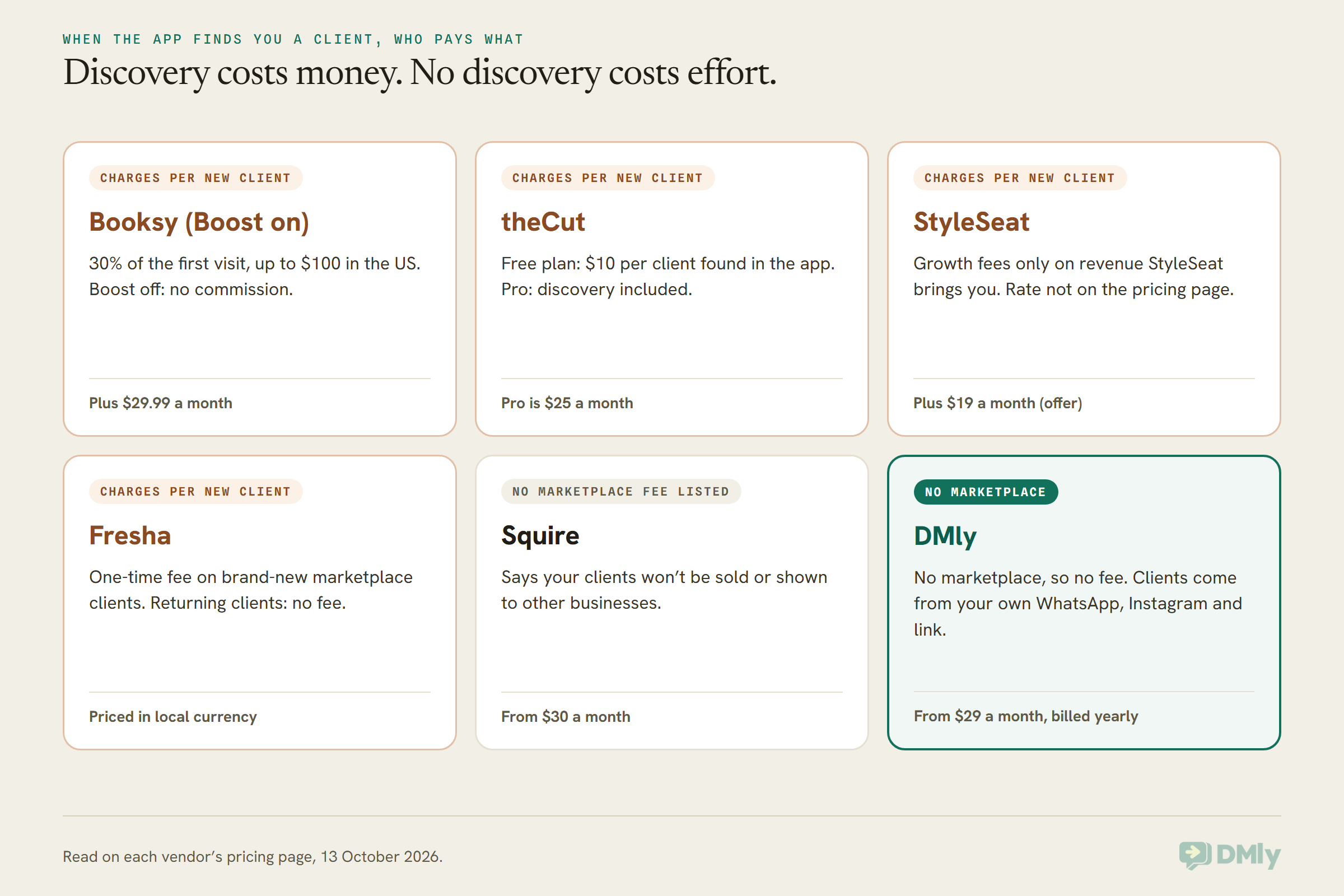
Fresha deserves its own note, because it’s the other big marketplace in this space. It’s priced per bookable team member in your local currency, and it charges a one-time fee only on brand-new clients who find you through the Fresha marketplace, never on returning clients. If you’re weighing Fresha as well, our guide to the best Fresha alternatives for salons and spas covers it in full.
Vagaro is the other name people mention. Its pricing page refused our request on 13 October 2026, so we haven’t priced it here rather than repeat someone else’s figure. Check vagaro.com directly.
Cheaper Than Booksy? What a Four-Chair Barbershop Pays
For a four-chair barbershop with the owner and three employed barbers, billed monthly, the software price runs from $0 (Square Appointments Free, or theCut with everyone on its free plans) to $150 (Squire Executive), with Booksy at $89.99 plus tax and most shop-wide plans between $19 and $56. That’s software only. Card fees, marketplace fees, texts and WhatsApp messages come on top, and on a busy shop the card rate can matter more than the subscription.
| Tool and plan | Four chairs, per month | How it’s counted | Card rate (in person, where published) |
| StyleSeat | $19 | One price, up to 15 chairs (limited-time rate) | 1.9% for six months, then not printed |
| Square Appointments Free / Plus | $0 / $49 | Per location | 2.6% + 15c / 2.5% + 15c |
| Squire Pro | $50 | Per shop, any number of barbers | Not on the pricing page |
| GlossGenius Gold | $56 ($48 annually) | Up to 9 staff | Flat 2.6% |
| DMly Starter | $39 ($29 yearly) | 3 team logins; barbers need no login to be booked | Your own gateway’s rate |
| DaySmart Salon Deluxe | $78 | 3 users included, $9 per extra user | Not on the pricing page |
| Booksy | $89.99 + tax | $29.99 plus $20 per extra user | 2.49% + $0.10 on Booksy’s reader |
| theCut Free or Pro | $0 to $100 | Owner’s Shop plan free; each barber $0 (Free) or $25 (Pro) | 2.75% |
| Squire Executive | $150 | Per shop, adds rent and commission collection | Not on the pricing page |
How we worked these out, so you can check them against your own shop:
- Booksy: $29.99 plus three extra users at $20. In the UK it’s £40 plus £15, so £55 plus VAT.
- DaySmart Salon: Deluxe at $69 includes three users, plus $9 for a fourth. Ask DaySmart whether a barber who never logs in counts as a user.
- theCut: $0 if all four barbers stay on Free, $100 if all four take Pro. Most shops land somewhere between.
- DMly: the Starter plan includes three team seats, which are logins for the people who answer chats. A barber can be bookable without a DMly login at all, so a four-chair shop where only the owner and one front-of-house person answer messages fits on Starter.
- Waitwhile isn’t in the table because it’s a queue, not a full booking system. Add its $31 Starter price to whichever tool you pair it with.
Is DMly a Good Booksy Alternative for a Barbershop?
DMly is a good Booksy alternative if your clients already book by WhatsApp or Instagram message and you want bookings, deposits, no-show fees and reminders to happen inside those chats; it’s the wrong choice if you depend on a marketplace, need booth-rent billing or want a card reader and till. We make DMly, so here’s both sides, starting with the one that matters most.
Plenty of barbershops don’t get most of their bookings from an app. They get “you free at 4?” on WhatsApp, a DM under an Instagram reel, or someone in the doorway. DMly is built for that. It’s a shared inbox for WhatsApp, Instagram, Facebook and more, with a booking system, payments and automation inside it. Our guide to WhatsApp automation for salons shows the whole client cycle, and the same pieces work for a barbershop.
What a barbershop would use every day
- Booking in the chat. A client messages, and a flow or the AI assistant offers real times and books them. Our walkthrough of a WhatsApp booking bot for a hair salon builds exactly that, and the same build works for cuts and fades.
- A booking page for your bio. DMly gives you a public booking page in 16 languages that you can drop into your Instagram bio, your Google profile or a QR code on the mirror. Our guide to building an online booking page walks through it.
- Walk-ins, booked by hand. From the Calendar, New appointment lets you search for the client or create a new one in the same box, pick the barber and service, and set the start time in 15-minute steps. Add their number and they’re in your client list for next time.
- Deposits and no-show fees. A service set to Pay before booking can take a deposit of 1% to 99%. Any service can carry a no-show fee, charged when you mark the booking a no-show. Our guide to reducing salon no-shows with deposits and WhatsApp reminders covers how to set them so regulars don’t feel punished.
- Standing appointments. A booking can repeat Every 2 weeks (or daily, weekly or monthly) for up to 52 dates, which suits the client who has had the same Friday slot for years. Our guide to rebooking salon clients automatically covers the clients who don’t book that far ahead.
- Tips on the payment link. With Collect tips at checkout switched on under Finance settings, a booking’s payment link shows tip buttons before the client pays.
- Barbers without logins. A staff member can be bookable with their own hours and services without ever logging in to DMly, so you only pay for seats for the people who answer messages.
- Reviews and records. Every client keeps one record with their bookings, payments and conversations, which is what our guide to a WhatsApp CRM for salons is about. With your Google Business Profile connected, you can ask for a Google review after the cut, as covered in getting more salon Google reviews automatically.
DMly’s plans are $29, $65 and $149 a month billed yearly, or $39, $79 and $199 monthly, with 3, 6 or 15 team seats. Every plan includes bookings, payments, the inbox and AI replies, and there’s a 7-day trial with no card. WhatsApp’s own message charges are paid to Meta with no markup from DMly. The details are on our pricing page.
Where DMly is the wrong choice
Be honest with yourself about these before you try it. Each one is a real reason to pick something else, or to run DMly beside another tool.
- You need a marketplace. DMly has no consumer app and no marketplace. Nobody will discover your shop inside DMly. If Booksy’s app fills your Tuesdays, keep it.
- You run a booth-rent shop and want rent collected for you. DMly has no booth-rent feature. You can bill anyone with invoices or a recurring plan, but there’s nothing built for renters’ separate books or payouts. theCut Shop or Squire Executive fit better.
- You need a card reader and a till. DMly takes payment through links from the gateway you connect, such as Stripe, PayPal, Paystack, Flutterwave or Razorpay. It doesn’t sell card readers or run a point of sale. Square or Booksy’s own reader are built for that.
- Your shop runs on a walk-in queue. You can add walk-ins to the calendar by hand, but DMly has no queue screen, no check-in kiosk and no wait-time display. Waitwhile does.
- You want payroll or commission tracking. DMly doesn’t do either. Squire Executive, DaySmart’s top plan and GlossGenius’s higher plans list them.
- Your clients are in the US and you want WhatsApp promotions. Meta doesn’t currently deliver marketing templates to US phone numbers. Reminders and replies to clients who message you still work, but a “we’ve got openings Saturday” blast won’t reach US numbers on WhatsApp.
Plenty of shops end up with two tools: a marketplace or a till for what it does well, and DMly for the conversations. That’s a perfectly good answer.
Booksy Alternatives Outside the US and UK
Outside the US and UK, the best Booksy alternative is often the tool that works with how clients already contact you, which in much of the world means WhatsApp. Booksy’s business site offers versions for the US, the UK, Ireland, South Africa, France, Poland, Spain, Brazil and Germany. India, Nigeria, the Gulf and Southeast Asia aren’t on that list.
That doesn’t mean barbers there can’t use Booksy. It means the marketplace, the thing that justifies Boost, may be thin or absent where you are. Here’s how the choice tends to look by market:
| Where | What usually decides it | Worth a look |
| United States | Marketplace reach, booth rent, card fees | Booksy, StyleSeat, theCut, Squire, Square |
| United Kingdom and Ireland | Per-user price and card fees | Booksy (£5 a user), Squire (£20 to £90), Fresha |
| Canada and Australia | A published local price | Squire (CA$ and A$ on its page) |
| India | WhatsApp bookings, Razorpay payments | DMly |
| Nigeria | WhatsApp bookings, deposits by Paystack, Flutterwave or Monnify | DMly, Fresha |
| UAE and Saudi Arabia | WhatsApp, Arabic booking page, MyFatoorah | DMly |
| Philippines, Malaysia, Singapore | Bookings over WhatsApp, Messenger and Instagram | DMly |
A barber in Lagos taking a ₦5,000 deposit on a Saturday slot, a gents’ salon in Dubai with an Arabic booking page, and a Bengaluru unisex salon confirming every appointment on WhatsApp all have more in common with each other than with a Booksy shop in Atlanta. If that’s you, start with how your clients message you, and choose software that fits that.
How to Leave Booksy Without Losing Your Regulars
To leave Booksy safely, turn Boost off first, get your client list out, set up the new tool, send regulars your new link, and only cancel Booksy once every future booking on it has happened. Here’s that in order.
- Switch Boost off. Do it the day you decide to move, so you don’t pay first-visit fees on clients you’re about to move anyway.
- Get your client list. Before anything else changes, find out from Booksy’s help center or support how to export your clients, and save the file. Names and phone numbers are what you need most.
- Note your future bookings. Make a list of every appointment already booked on Booksy, with dates. These stay where they are; you’ll honour them on Booksy.
- Build the new shop. Services, prices, barbers and hours. On DMly, contacts and services can be imported from a CSV file, while staff, working hours and booking rules are set up by hand. Don’t recreate past appointments in a new system that sends confirmations, or old clients will get messages about cuts they had months ago.
- Set your deposit and no-show rules again. Our guide to accepting appointment deposits or full payment at booking helps you choose between a deposit and full payment.
- Tell your regulars, one message at a time if you can. A short, personal “we’ve moved our bookings, here’s the new link” lands better than a blast. Pin the link in your Instagram bio and put a QR code at the mirror.
- Run both for a few weeks. Keep Booksy open until the last booking on your list has passed, then cancel. Booksy says there’s no commitment and you can cancel any time.
The one thing that doesn’t move is your Booksy reviews. They stay on Booksy. Start asking for Google reviews from day one on the new system, so your reputation follows you somewhere you own.
Frequently Asked Questions
What are the best Booksy alternatives for barbers?
For a solo barber, theCut (free, or $25 a month on Pro), StyleSeat ($19 a month on its current offer) and Squire Independent ($30) are the closest fits. For a shop, Squire Pro ($50 per shop), Square Appointments ($0 or $49 per location) and GlossGenius Gold ($56) charge one price whatever the number of barbers. For shops whose clients book in WhatsApp or Instagram DMs, DMly. All prices were read on each vendor’s site on 13 October 2026.
How much does Booksy cost per month in 2026?
In the US, $29.99 a month plus tax, plus $20 a month for each additional team member. In the UK, £40 a month plus VAT, plus £5 per extra user. Card processing, Boost fees and any card reader are extra.
How does the Booksy Boost fee work?
Boost is free to switch on with no monthly fee. When a client books you for the first time while Boost is on, Booksy charges a one-time 30% of that first visit, up to $100 in the US, excluding the tip. From the second visit, Booksy takes nothing. In the UK, there’s a £5 minimum and the page prints no cap. Booksy advises sending existing clients your profile link so you aren’t charged for them.
Is there a free alternative to Booksy?
Yes. theCut’s Free plan costs $0 for barbers, with 2.75% on card payments and $10 per client it finds for you in its app, and its Shop plan for owners is also $0. Square Appointments has a $0 plan per location. Waitwhile has a free plan for a queue of up to 50 visits a month at one location.
Which Booksy alternative is best for booth renters?
theCut’s Shop plan lists booth rent tracking and reminders at $0 for the owner, and Squire Executive lists commission and rent collection at $150 a month per shop. GlossGenius lists separate bank accounts for booth renters. Booksy’s pricing page doesn’t mention booth rent, so ask Booksy directly.
What’s the best booking app for a walk-in barbershop?
For a true queue, Waitwhile, which has a virtual waitlist, a check-in kiosk and a TV display, with a free plan and paid plans from $31 a month. DaySmart Salon lists a Kiosk Walk-In Manager inside a full salon system. theCut’s Shop plan lists assigning walk-ins to whoever’s free.
Will I lose my clients if I leave Booksy?
Not if you plan it. Turn Boost off, get your client list out before you cancel, keep Booksy running until your existing bookings have passed, and send regulars your new link personally. Your Booksy reviews stay on Booksy, so start collecting Google reviews on the new system straight away.
Can DMly replace Booksy for a barbershop?
For a shop whose bookings come through WhatsApp, Instagram and walk-ins, yes: DMly handles booking in the chat, a booking page, deposits, no-show fees, reminders, standing appointments and tips on the payment link. It doesn’t replace Booksy’s marketplace or consumer app, booth-rent billing, a card reader or a walk-in queue, so some shops run DMly alongside another tool.
Choosing Between Booksy Alternatives: The Regular, Recounted
Go back to your Friday regular. On Booksy, with Boost on, the way he found you again could matter as much as the six years he’s been coming in. That’s not unfair. It’s just how a marketplace counts. It counts routes, not relationships.
Every one of these Booksy alternatives counts him differently. On theCut Pro or Squire, he’s simply your client, and nobody takes a cut of his fade. On Square or GlossGenius, he’s a card payment at a published rate. On StyleSeat, he’s free unless StyleSeat brought him. On DMly, he’s the message at the top of your WhatsApp that says “usual time Friday?”, and the booking happens right there in the reply.
So the right choice isn’t the cheapest name in a table. It’s the tool that counts your clients the way you do. If most of them arrive through an app, stay where the app is. If they walk in, rent a chair or message you first, pick the Booksy alternative built for that, and start the trial on a quiet week.
Writing about WhatsApp automation, bookings and growth for local business.
Turn WhatsApp into your busiest channel.
Start free and run message, bookings, payments and reviews in one place.
