
How to Recover WooCommerce Abandoned Carts With WhatsApp
A shopper fills a basket, browses a little more, and closes the tab. On a hosted platform that moment is reported as an abandoned checkout and you can act on it. On WooCommerce, as far as your automation is concerned, nothing happened at all. No order was created, no status changed, and there is nothing for anything to hear.
What WooCommerce gives you instead is narrower and better. WooCommerce abandoned carts, for the purposes of recovery, are orders that reached pending and then sat there for about an hour without being paid. The shopper went all the way to placing the order and stopped at the money.
That distinction runs through this whole page. It means you see fewer of them, it means the ones you see are much warmer, and it means you can do something for them that no basket reminder can do: send a payment link for an order that already exists.
What Counts as One of Your WooCommerce Abandoned Carts
An order in pending status, held for about an hour, is what gets treated as an abandoned checkout. That is a derivation from your order table rather than a report from your checkout page, and it sits inside a fixed mapping the whole integration runs on.
| WooCommerce status | Treated as |
| pending, for about an hour | Abandoned checkout |
| processing | Paid |
| completed | Shipped |
| failed | Failed payment |
| cancelled and refunded | Themselves |
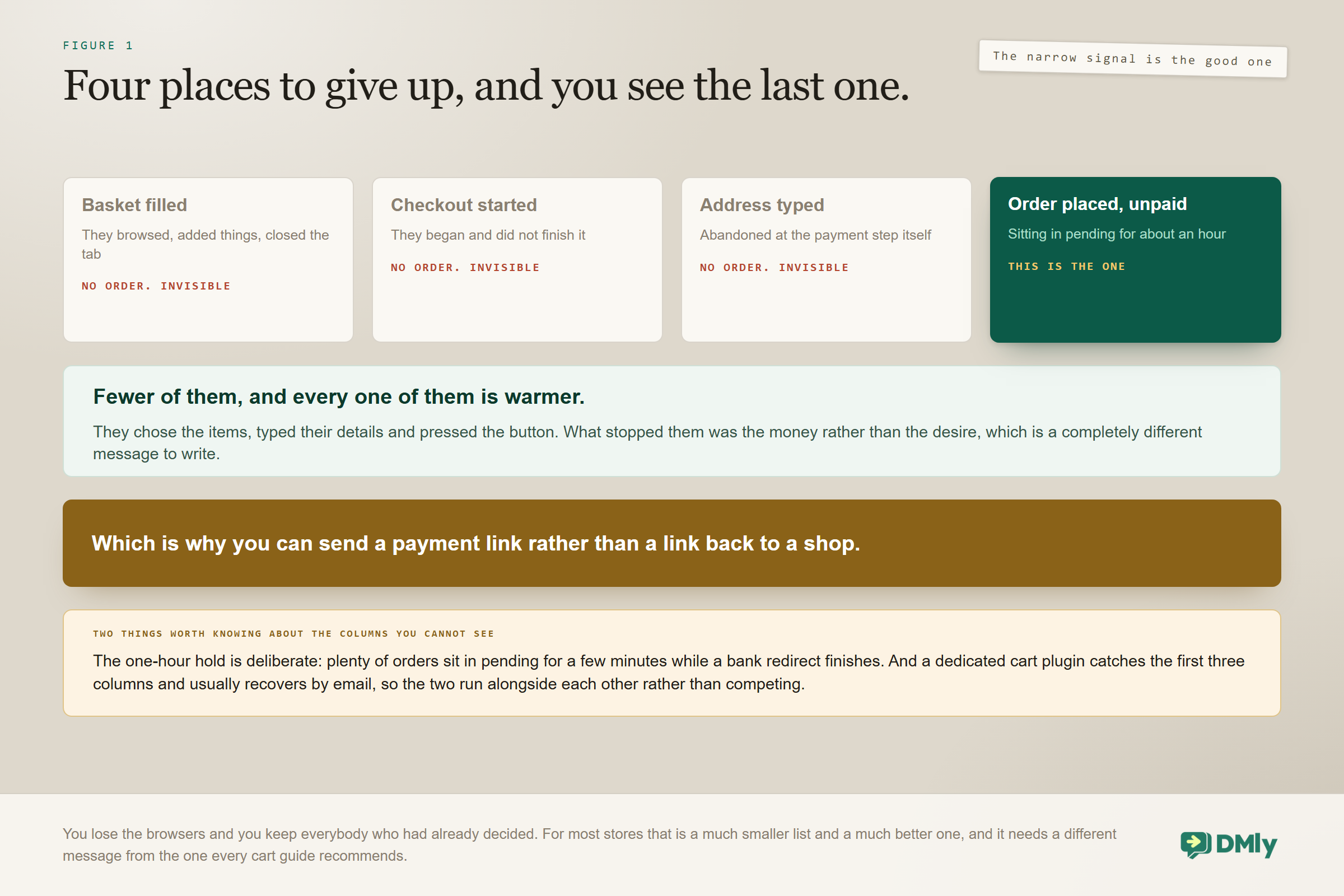
The one-hour delay is doing real work. Plenty of orders sit in pending for a few minutes while a bank redirect completes or somebody goes to find their card, and messaging those people would be premature and faintly alarming. An hour is long enough that genuine payment journeys have finished and short enough that the customer still remembers what they were doing.
The WooCommerce Abandoned Carts You Will Never See
Anything abandoned before the order was placed is invisible to this, and for most stores that is the larger number. A basket filled and a tab closed, a checkout started and not finished, an address typed and abandoned at the payment step: none of those create a pending order, so none of them reach you.
That is a real limit and it is worth sizing rather than ignoring, because if your recovery ambitions were built on the number of people who fill baskets, they need adjusting before you build anything. Three honest options for the invisible ones.
- A dedicated cart-abandonment plugin. It captures earlier in the funnel and usually recovers by email. It solves a different problem from this one, and the two coexist perfectly well.
- On-site capture. An exit-intent offer or a chat widget that catches somebody before they leave and gives you a way to reach them at all.
- Accept it. Recovering placed-but-unpaid orders is a good return on very little work, and for a lot of stores it is all that is needed.
The contrast with a hosted platform is worth stating plainly, because it cuts both ways. Shopify fires a real checkout event earlier in the funnel and catches more people, at the cost of catching colder ones. Our Shopify automation guide covers that side of the fence.
Why These People Are Worth More
Somebody with an unpaid order chose the items, entered their details and pressed the button. WooCommerce abandoned carts are, by construction, the warm end of the funnel rather than the wide end. They are several steps past a browser who wandered off, and everything about the recovery should reflect that.
- You know exactly what they wanted. Not a basket snapshot: an order, with line items, a total and an order number.
- You almost certainly have their details. Checkout collected them, which quietly solves the identity problem that sinks most cart recovery before it starts.
- There is something concrete to complete. An order exists. This is not an invitation to shop, it is an invitation to finish.
Which is why the message should not read like a cart reminder. Somebody who placed an order and did not pay usually hit a specific obstacle: a card declined, a bank app that would not open, a payment method they did not have to hand. Address the obstacle rather than the desire. “Still thinking about these?” is the wrong question to ask somebody who had already stopped thinking and started paying.
The Second Path: Failed Payments
WooCommerce reports a failed status, which becomes a failed-payment event you can automate. That gives you a second recovery path next to the abandoned-order flow, and it is a good one. (Shopify stores get the same Payment failed trigger, fired when a sale, authorization or capture fails.)
A failed payment is the least ambiguous signal in ecommerce. The customer definitely wanted to buy and something mechanical stopped them. Treat it as a separate automation from the abandoned-order flow, because the audiences barely overlap and the messages have nothing in common.
- An unpaid pending order may be indecision, distraction, or a payment method somebody went to fetch and did not come back with. Nudge gently.
- A failed payment is a technical failure the customer probably watched happen. Acknowledge it, do not imply they did anything wrong, and give them another way to pay.
In both cases, send a working way to pay rather than sending somebody back to a checkout that has just refused them. Which brings us to the thing this kind of recovery can do that basket recovery cannot.
The Payment Link Advantage
Because the abandoned thing is an order rather than a basket, you can attach a real payment request to it. That is a materially better recovery message than a link back to a checkout, and it is the single strongest reason to run this on WooCommerce.
Two routes, and which you use depends on how much structure the order deserves.
| Route | What the customer gets | Use it when |
| An amount-mode payment link | A checkout for the order total, in the conversation, with no invoice behind it | Fast, no paperwork, most recoveries |
| An invoice | An itemised document plus a pay link that tracks the balance due | Higher-value orders, or business customers who need the document |
The amount-mode link can be minted from the Inbox, from a flow node or as a quick automation action, so it drops into a recovery sequence without any ceremony. The invoice route adds a document the customer can open and forward, and its pay link follows the balance due rather than the original total, which matters the moment any part payment happens. Our guides to taking payments on WhatsApp and sending invoices from a conversation cover both.
Check which gateway your recovery links are actually using: The Default payment gateway card at Finance, then Settings, then Gateways ships on First connected gateway, and DMly prefers no brand of its own. Leave it on that default and the link is minted on the gateway you connected first, meaning the earliest one still connected, whichever brand it happens to be. That has two consequences worth planning around. Connect a second gateway expecting new links to use it and they will not, until you name it in Charge through. And disconnect whichever one is minting and the next-earliest silently takes over. If somebody connected a provider to test with two years ago, your recovery money may be arriving somewhere nobody is watching.
And the Catch That Comes With It
The payment link is the best thing about recovering on WooCommerce, and it comes with two problems that both end with a customer being chased after they paid you. Neither is difficult to prevent and neither announces itself.
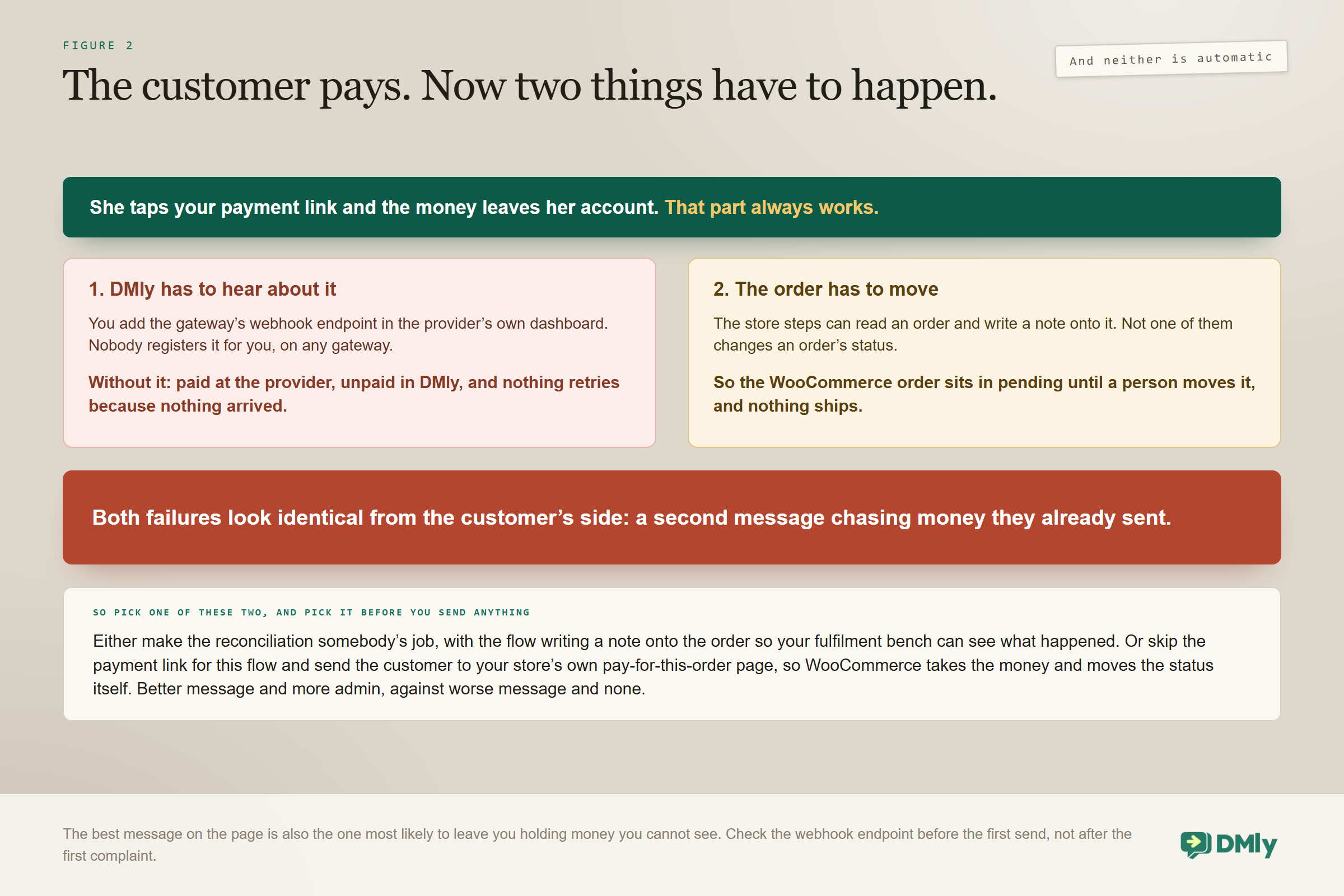
Nobody registers the gateway’s webhook for you: For every gateway, you have to add the webhook endpoint yourself in the provider’s own dashboard. Without it, the customer is charged, the provider shows the payment, and DMly shows it as never having happened. The documentation puts it exactly right: a webhook problem does not lose the client’s money, it loses DMly’s knowledge of it. And nothing retries, because nothing arrived. In a recovery sequence that is the worst failure available to you, because message two then goes out to somebody who has just paid. Fix the endpoint and new payments reconcile on their own, but the ones that already went through will not backfill themselves.
The second problem is quieter and it is about your store rather than your messaging. DMly’s store steps can find an order, send its status, send a checkout link, send a product, sync the contact, create a discount code and write a note onto the order. There is no step that changes an order’s status. So when somebody pays your recovery link, the money lands in DMly’s ledger and the WooCommerce order carries on sitting in pending until a person moves it.
That leaves you two sensible choices, and the wrong answer is to not choose. Either accept the reconciliation and make it somebody’s job, with the flow writing a note onto the order so your fulfilment bench can see what happened, or skip the payment link entirely for this flow and send the customer back to your store’s own pay-for-this-order page, so WooCommerce takes the money and moves the status itself. The first is a better message and more admin. The second is a worse message and no admin. Pick on volume.
Identity and Permission, Briefly
The same chain governs every recovery message on every platform, and it is worth checking before you blame your copy. This section is deliberately short, because none of it is specific to WooCommerce.
Store customers are matched to contacts by phone number first, then email, at the moment the automation fires, so a checkout that captured only an email will match only a contact already holding that exact address. Collect a phone number at checkout if you possibly can, because it is the primary key and on WhatsApp it is the only thing that makes the message possible.
And because somebody who abandoned an order has almost certainly never messaged you, there is no open 24-hour window, so the first message needs an approved template filed as Marketing. Filing it as Utility to save money is the most common category rejection there is. Whether a phone number captured at a checkout amounts to consent to receive marketing on WhatsApp is a legal question in most markets rather than a platform one, and the answer is yours. Sending to people who did not expect it moves your quality rating, and the damage lands on the order confirmations you send everybody else, which our guide to quality rating and messaging limits covers.
The Protection You Get for Free
A customer who bought after abandoning is skipped by the trigger itself, which removes the most embarrassing failure in cart recovery without you building anything. That is worth knowing, and it is not the whole defence.
It protects the first message. It has no opinion about what happens once a multi-step sequence is already running, and twenty minutes after your first nudge is exactly when these people pay. So build the explicit stop as well: a condition before each later message that checks the order is still unpaid. Don’t add an Unsubscribe Contact step on the Order paid event to end the run: in DMly that is a full opt-out from all your messages, and no flow step takes someone out of a single sequence, so keep the follow-ups inside the flow where the condition can catch them. Belt and braces is proportionate here, because the cost of getting it wrong is a customer screenshotting your message to complain that they have already paid.
Test that specifically, and test it twice. Abandon an order, receive the first message, pay it, and confirm the second never arrives.
Timing the WooCommerce Abandoned Carts Sequence
Because these customers got further than a basket abandoner, the timing is tighter than generic cart advice. They were trying to pay an hour ago. They do not need three days of persuasion.
| Message | Timing | What it says |
| First | Shortly after the hour elapses | Your order is held, and here is a way to complete the payment |
| Second | Around 24 hours | Address the obstacle: card trouble, another way to pay, an offer of help |
| Then stop | After that | Unpaid at 48 hours is a decision rather than a delay |
Two messages is right here rather than three. These are people who already committed, so the ones who ignore two have generally changed their mind or bought somewhere else, and a discount at that point teaches your customers to abandon orders deliberately. The craft of writing the messages themselves is in our post on follow-ups that convert abandoned carts into revenue; what is specific here is the framing, which is that this is a held order rather than a basket.
Building the Flow, Step by Step
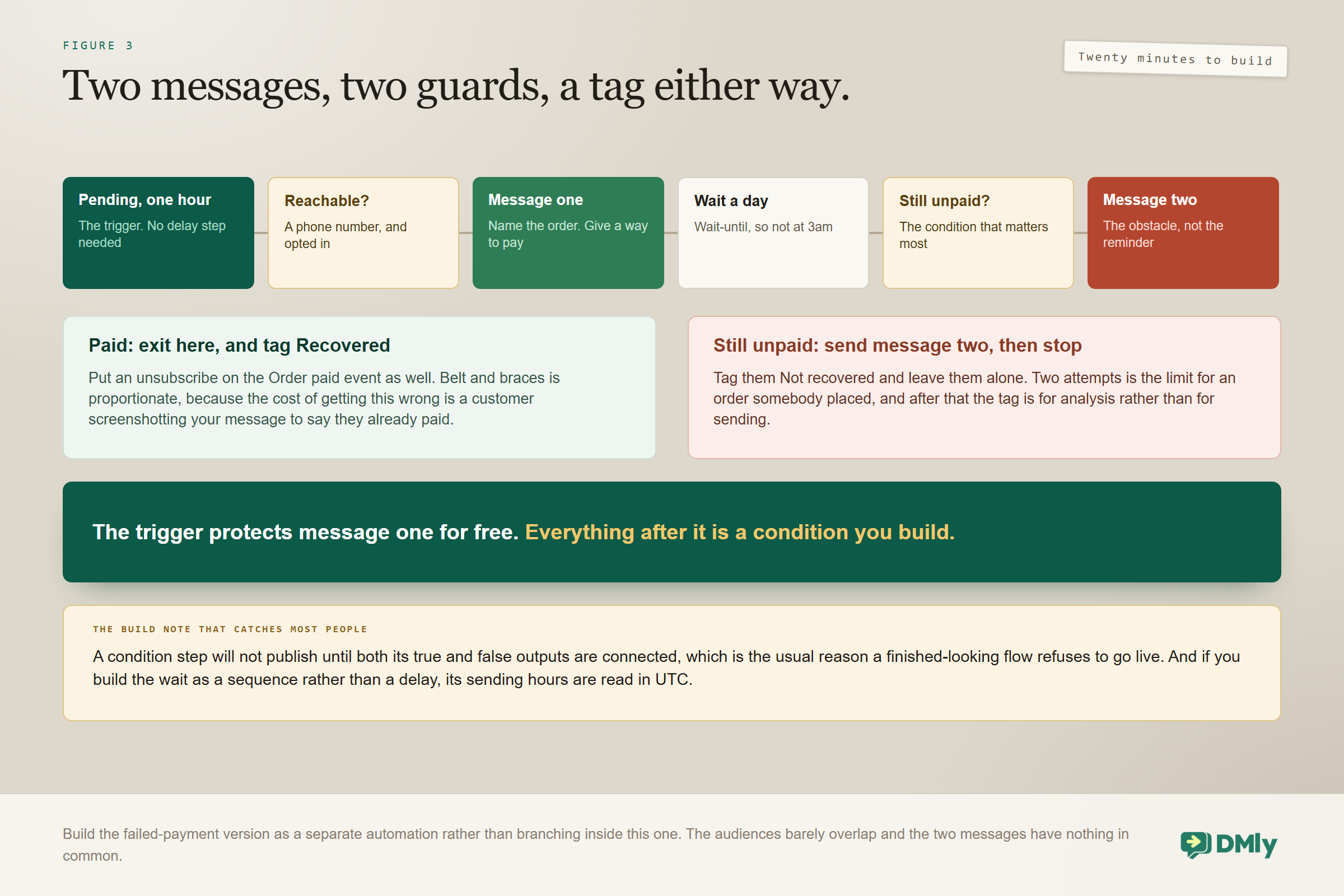
The whole recovery is one flow with a guard on each message, and it takes about twenty minutes. Build the failed-payment version as a second, separate automation rather than branching inside this one.
- Trigger on abandoned checkout. It fires once the order has sat in pending for about an hour, so there is no delay step to add at the front.
- Check the contact is reachable. A condition on whether you hold a phone number and whether they are opted in. Anyone failing exits immediately and quietly.
- Send message one. An approved Marketing template naming the order and carrying a way to pay it.
- Wait about a day. Use a wait-until rather than a plain duration if you would rather the second message did not land at three in the morning.
- Check the order is still unpaid. The condition that matters most on the whole page. If it is paid, exit here.
- Send message two. Different wording. Address the obstacle rather than repeating the reminder.
- Tag the contact either way. Recovered or not recovered, so that in three months you can see what happened without reconstructing it.
Two build notes worth having before you start: A condition step needs both its true and false outputs connected before the flow will publish, which is the usual reason a finished-looking flow refuses to go live and the error does not obviously say so. And if you build the wait as a sequence rather than as a delay inside the flow, remember its sending hours are read in UTC rather than in your local time, which is how a carefully scheduled morning message ends up arriving overnight.
What to Do With the Ones Who Never Pay
An unpaid order that stays unpaid is still information, and most stores throw it away. The person told you what they wanted, at what price, on what day, and then did not complete. That is a better signal than most of what sits in a marketing list.
Tag them at the end of the flow, and then decide what the tag is actually for.
- A price signal. Somebody who abandoned at the payment step twice on the same product is telling you something quite specific about your price or your delivery cost.
- A future audience. When that product goes on offer or comes back in stock, this is a small, high-intent group who already tried to buy it. Provided they opted in, that is a genuinely welcome message rather than a broadcast.
- A checkout diagnostic. If the same payment method keeps failing, or the same country keeps abandoning, that is a store problem rather than a messaging problem, and no sequence will fix it.
Tags are workspace-level and they persist, which makes them the right instrument for a decided fact like this one. Building an audience from them later is a segment question, covered in our CRM guide. What not to do is keep messaging them. Two attempts is the limit for an order somebody placed and abandoned, and after that the tag is for analysis rather than for sending.
Testing WooCommerce Abandoned Carts Recovery
Every item here has caught somebody out, and the last two are the ones people skip. Do the whole list on your own store before you point it at real traffic.
- Place a real order on your own store and do not pay it. Leave it in pending.
- Wait out the hour and confirm the abandoned checkout treatment fires and matches the right contact.
- Check the payment link opens, charges the correct total, and lands in the gateway account you expect rather than the one somebody connected first.
- Pay it, and then check two things: that DMly recorded the payment at all, which is the gateway webhook working, and what happened to the order in WooCommerce, which is the reconciliation question.
- Confirm the second message never sends after that payment.
- Trigger a failed payment and confirm the separate flow fires with its own wording.
- Place an order with an email you do not hold and watch it match nobody, so you recognise the symptom in your own logs.
- Confirm the Salesbot webhooks still exist in your WordPress admin, because their absence produces exactly the same silence as having no automation at all.
The Numbers Worth Watching
Five numbers, and one of them should always be zero. Our note on the metrics worth tracking after you automate covers how to instrument them without drowning in dashboards.
- Pending orders that became paid after a message. The headline number, and on placed-but-unpaid orders it is usually healthier than generic cart benchmarks suggest.
- Failed payments recovered. Tracked separately, because it is a different problem with a different fix and a different message.
- Orders with no matched contact. Your ceiling on everything else.
- Messages sent after payment. This one should be zero. Anything else is a broken exit condition or a missing gateway webhook, and the two look identical from the outside.
- Opt-outs following recovery messages. The cost of sending marketing templates to people who never asked for them.
Mistakes Worth Avoiding
Four of these produce the same visible outcome, which is a customer being chased for money they have already handed over. They are the failures that make WooCommerce abandoned carts feel like a bad idea when in fact the build was wrong.
- Not adding the gateway’s webhook endpoint. They pay, the provider shows it, DMly does not know, and nothing retries.
- Assuming a paid link updates the WooCommerce order. No store step changes an order’s status. Somebody has to move it, or you will not ship.
- Trusting the trigger’s skip to cover a whole sequence. It protects the first message and nothing after it.
- Not checking which gateway mints your links. On the default Charge through setting the earliest connected one wins, and disconnecting it silently promotes the next.
- Writing a basket reminder. These people had stopped browsing and started paying. Address the obstacle.
- Sending three messages, or a discount on the second. Two is the limit for an order somebody placed, and an early discount teaches deliberate abandonment.
- Filing the template as Utility. A recovery message is marketing however helpfully it is worded.
- Expecting to see basket abandoners. Nothing before a placed order exists as far as this is concerned.
Frequently Asked Questions
Why can I only see some of my WooCommerce abandoned carts?
Because WooCommerce has no checkout object, so recovery is derived from your order table: an order that sits in pending, created and never paid, for about an hour. A shopper who filled a basket and never placed an order created nothing to derive from, and is invisible to it. A dedicated cart plugin captures earlier in the funnel and the two can run alongside each other.
Can I send a payment link instead of a checkout link?
Yes, and it is the main advantage of recovering on WooCommerce. Because an order already exists, you can send an amount-mode payment link for its total from the Inbox, a flow node or a quick automation action, or raise an invoice whose pay link tracks the balance due. Just read the next answer before you build it.
My customer paid and DMly still shows nothing. What happened?
Almost certainly the gateway webhook is not set up. DMly does not register it for you: you add the endpoint in the provider’s own dashboard. Without it the customer is charged, the provider shows the payment, and DMly never hears about it, and nothing retries because nothing arrived. Fix the endpoint and future payments reconcile themselves.
Does paying the link mark the order paid in WooCommerce?
Not by itself. DMly’s store steps can read an order and write a note onto it, and there is no step that changes an order’s status. So either make the reconciliation somebody’s job and have the flow write a note onto the order, or send the customer to your store’s own pay-for-this-order page so WooCommerce takes the money and moves the status itself.
Will the sequence chase somebody who has already paid?
The trigger will not fire at all for a customer who bought after abandoning, so the first message is safe. Anything after that is your job: keep the follow-ups inside the flow with a still-unpaid condition before the second message. Don’t unsubscribe the contact on Order paid, because in DMly that opts them out of everything you send.
How is this different from failed-payment recovery?
They are different events and should be different automations. An unpaid pending order might be indecision or distraction. A failed payment is a technical refusal the customer watched happen, and it deserves an acknowledgement and a different way to pay rather than a nudge. Both fire from WooCommerce, and Shopify fires both too.
How many recovery messages should I send?
Two. These are people who already placed the order, so the ones who ignore two have generally decided or bought elsewhere. A third message, or a discount on the second, mostly teaches your regular customers that abandoning an order is worth money.
Recover Orders, Not Baskets
The thing to hold on to is that this is not cart recovery with a different logo on it. You are messaging people who filled in their address and pressed the button, about an order that exists, with a total you can charge. That deserves a different message from the one every guide recommends, and it converts better than the benchmarks those guides quote.
So build the two messages, put the still-unpaid condition between them, check the gateway webhook before you send anything at all, and decide now who moves the order in WooCommerce when the money arrives. Do that and WooCommerce abandoned carts stop being the thing you cannot see and start being the small, warm list you can actually do something about.
Writing about WhatsApp automation, bookings and growth for local business.
Turn WhatsApp into your busiest channel.
Start free and run message, bookings, payments and reviews in one place.
