
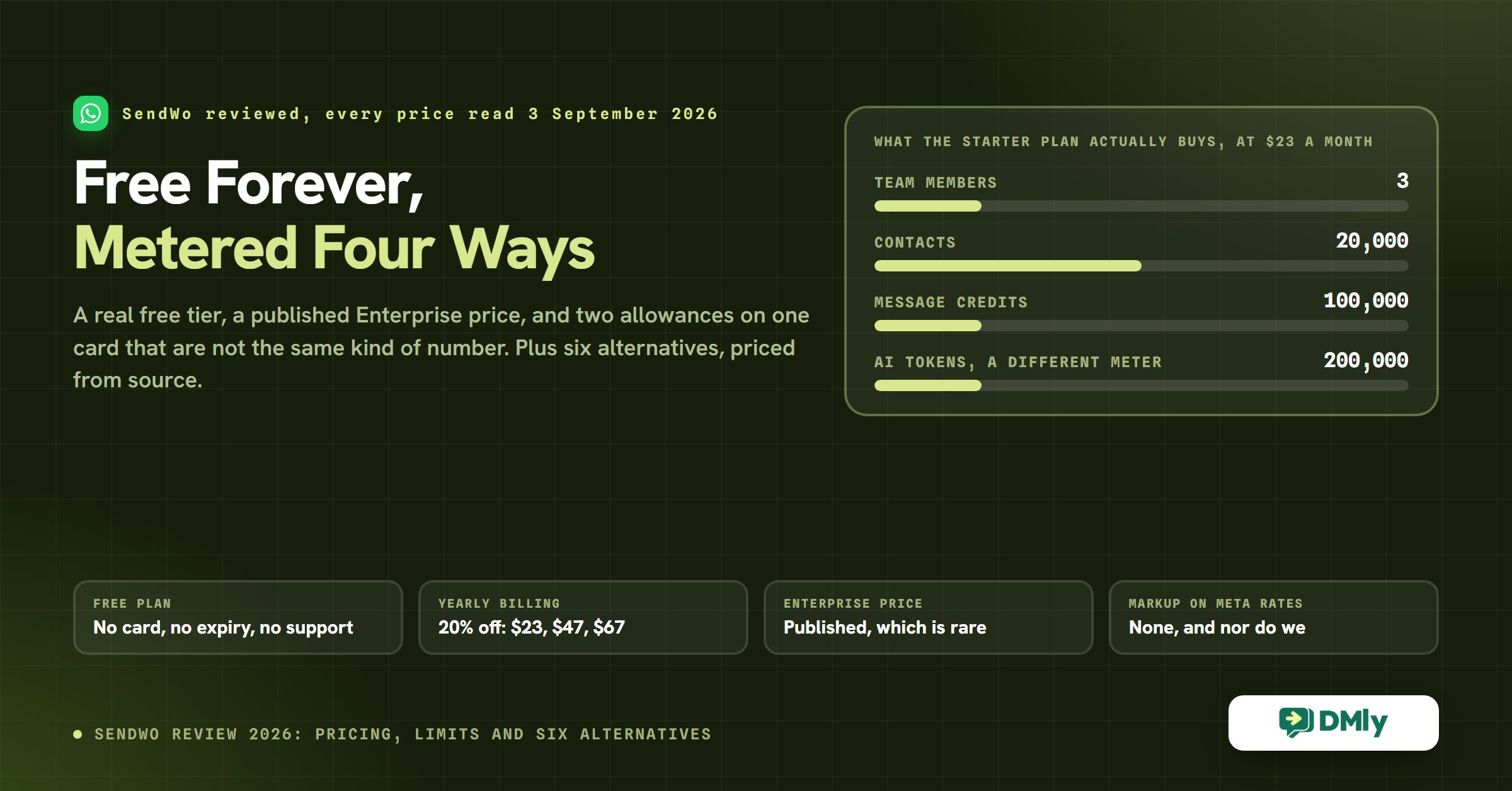
SendWo Review (2026): Free Forever, Metered Four Ways
On SendWo’s pricing page there is a savings calculator. You pick a country, a competitor and a monthly conversation volume, and it shows you four rows: marketing, utility, service, and authentication. The service row is fixed at zero on both sides, for every competitor and every country.
That row is correct today and stops being correct on 1 October 2026. From that date Meta begins charging for service messages, and for utility messages sent inside an open 24-hour window, which are two categories that cost nothing right now. Every WhatsApp savings calculator on the market has the same zero in it, including any we might build, because they were all built against the current model.
We are opening a SendWo review on somebody else’s calculator because it is the most useful thing on their pricing page and because it makes the point this whole comparison turns on: the platform fee is the part everyone compares, and it is almost never the part that decides your bill. What decides your bill is which unit a vendor counts, and the eight platforms on this page count six different things.
So this SendWo review does two jobs. First, an honest account of what SendWo is, what it costs monthly and yearly, and where it runs out, all read from their own site on 3 September 2026. Second, the alternatives priced from each vendor’s own pricing page on the same day, with the units they bill in placed side by side.
We make DMly, which is one of the alternatives. That is disclosed here rather than in a footnote, and there is a section further down that says plainly which of these platforms beats us on which job.
What SendWo Is, and Who It Is Built For
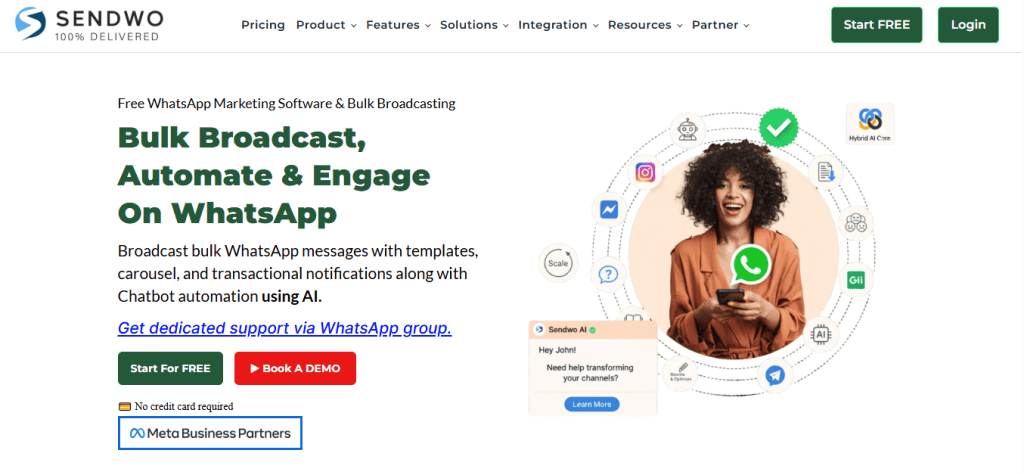
SendWo is a WhatsApp-first platform with a genuinely free tier and an unusually direct pricing page. It sells broadcasts, an AI chatbot builder, a shared inbox, flows and forms, an ecommerce catalogue, and chatbots for Instagram, Facebook Messenger, Telegram and a website widget alongside WhatsApp. Their own home page describes the product as bulk broadcast, automation and engagement on WhatsApp, and carries a Meta Business Partners badge.
Two things about the shape of the business are worth knowing before the feature list, because they explain most of what follows.
- Support is a paid feature, and they say so directly. The free plan has none. Their own answer to why is worth quoting because it is more candid than most: they list four support channels, note that “all these support systems involve a real human agent, no AI involved”, and say that human resource allocation is the reason support sits behind a paid plan. You can disagree with the policy, but it is stated rather than hidden.
- Paid support is delivered in a WhatsApp group. Not a ticket queue with a group bolted on: a dedicated WhatsApp group is the headline support channel on Starter, Pro and Enterprise, with ticketing added on Pro and above and an SLA only on Enterprise. For a small team that is often faster than email. For a business that needs an audit trail, a WhatsApp group is not one.
SendWo Pricing: What This SendWo Review Missed the First Time
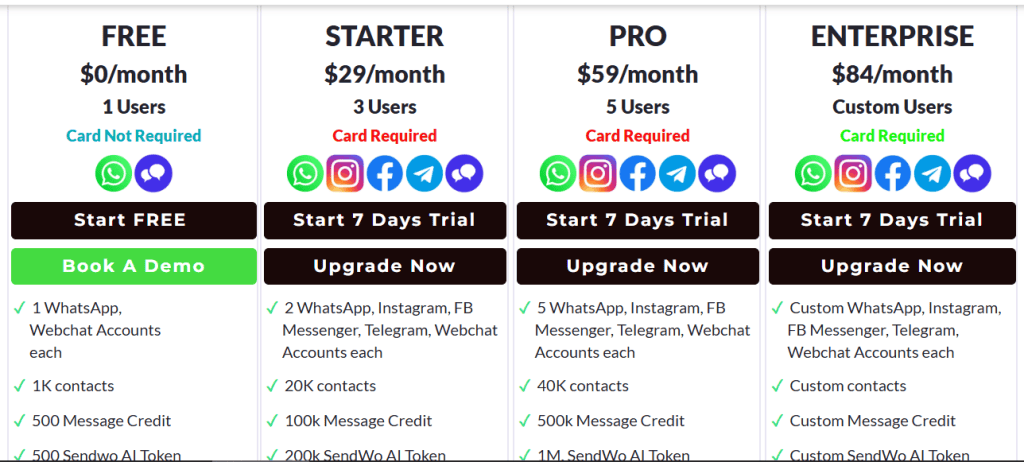
The earlier version of this SendWo review quoted only the monthly prices, which made the platform look about 20 per cent more expensive than it is. SendWo runs a monthly and yearly toggle, and yearly billing takes 20 per cent off every paid tier. Both sets of figures are below, read from their pricing page on 3 September 2026 and cross-checked against the price attributes in the page itself.
| Plan | Monthly | Billed yearly | Users | Contacts | Message credits | AI tokens |
|---|---|---|---|---|---|---|
| Free | $0 | $0 | 1 | 1,000 | 500 | 500 |
| Starter | $29 | $23 | 3 | 20,000 | 100,000 | 200,000 |
| Pro | $59 | $47 | 5 | 40,000 | 500,000 | 1,000,000 |
| Enterprise | $84 | $67 | Custom | Custom | Custom | Custom |
The free plan is real, and here is exactly what fits in it
A free-forever tier with no card is rare in this category, and it is the single best reason to look at SendWo before anything else. It is not a trial that expires. What you get is one user, one WhatsApp account and one webchat account, 1,000 contacts, 500 message credits, 500 AI tokens, live chat visibility for 10 customers, the AI bot with replies and training, and the website widget.
What you do not get on the free plan, according to their own comparison grid: comment automation, click-to-WhatsApp ads, WhatsApp group support, ticketing support and any SLA. Instagram, Facebook and Telegram accounts start at Starter. So the free tier is a place to learn the product and run something small, and it is honestly described as exactly that.
The practical test is 500 message credits. If you send one broadcast a month to 400 people, you are inside it. If you send weekly to 400 people, you are outside it in week two. Work out your monthly send volume before you decide the free plan is enough, because that is the number that moves you to Starter, not the feature list.
Message credits and AI tokens are two different meters, and confusing them is expensive
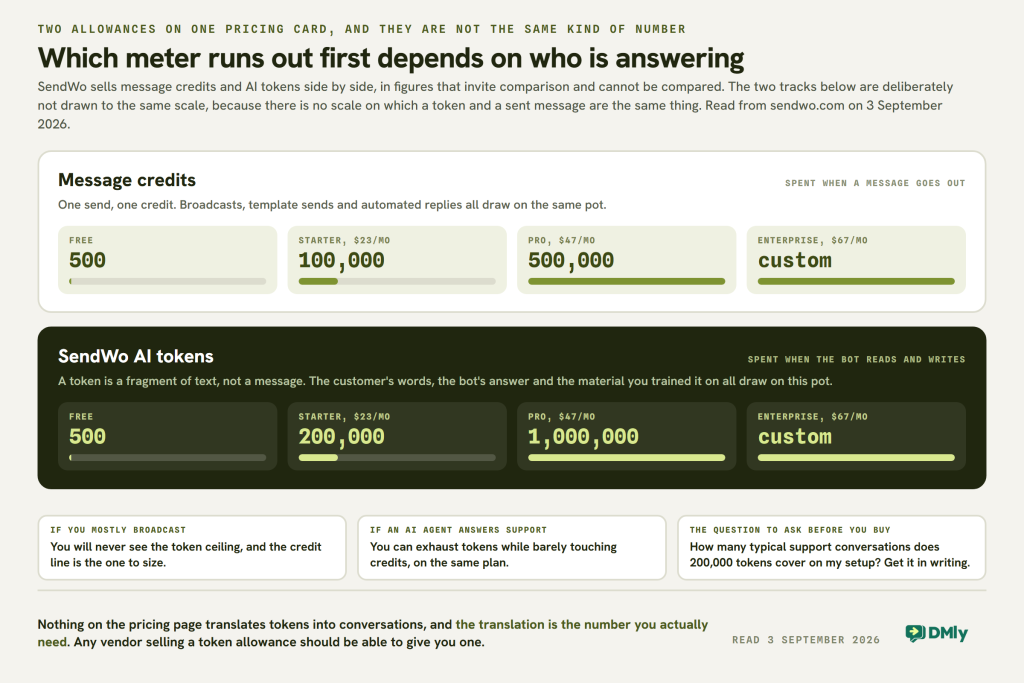
This is the part of SendWo pricing that catches people, and it is not explained anywhere on their pricing page. The plans carry two separate allowances that sound similar and drain in completely different ways.
- Message credits are consumed by the messages you send: broadcasts, template sends, automated replies. Starter gives you 100,000 of them, Pro 500,000. For most small businesses this is the allowance that never runs out.
- AI tokens are consumed by the AI bot thinking. A token is a fragment of text, not a message, and both the customer’s message and the bot’s reply consume them, as does whatever knowledge you have trained it on. Starter gives you 200,000 tokens and Pro gives you a million, which sound enormous next to the message credits and are not comparable numbers at all.
The practical consequence: a business running plain broadcasts and template sends will never see the AI ceiling, and a business running an AI agent on inbound support conversations can reach it while barely touching the message credits. Before you pick a tier, ask SendWo how many typical support conversations 200,000 tokens covers on your setup, and get the answer in writing. It is a fair question and any vendor selling a token allowance should be able to answer it.
The Enterprise tier has a published price, which almost none of them do
Credit where it is due: SendWo’s Enterprise plan costs $84 a month, or $67 billed yearly, and the number is printed on the page. Every other platform on this comparison puts “Custom” or “Talk to Sales” in that column. The limits are custom, the price is not, and that is a genuinely unusual piece of transparency in this market.
What Enterprise buys over Pro, from their own grid: custom users, accounts, contacts, message credits and AI tokens, unlimited ecommerce catalogue capacity, advanced workflows, a support SLA, priority customer support, and the dedicated WhatsApp support group. The old version of this page said Enterprise was “$84/month and up” and that businesses might have to negotiate. The “and up” was ours, not theirs.
The Zero-Markup Claim, Checked
SendWo says it adds no markup to Meta’s per-message rates, and so do we, so this is not a difference between the two products. It is worth spending a section on anyway, because it is the largest variable cost in running WhatsApp at scale and because the way vendors talk about it is where a buyer gets misled.
Here is the mechanic in plain terms. WhatsApp messages are billed by Meta, per message, at a rate that depends on the recipient’s country and the category of the message: marketing, utility, authentication or service. A platform either passes that rate through to you untouched, or resells it with a margin on top. Both are legitimate business models. What matters is that you know which one you are on, because a 15 per cent margin on a five-figure annual message bill is real money and it does not appear on the pricing page.
SendWo’s position is stated four ways on their pricing page: “0% markup on official WhatsApp API pricing”, “Pay Directly to Meta”, “SendWo does not add hidden markup on top of official WhatsApp Business API pricing”, and a claim that you can save up to 35 per cent against tools that do add one. Our position is the same and is stated on our own pricing page: you pay Meta’s rates directly and we add nothing.
What their calculator assumes about everybody else, and how to check it
SendWo’s savings calculator lets you pick a competitor, and it applies a fixed markup percentage to that competitor’s messages. Those percentages are SendWo’s own assumptions about six other companies, and they are the number that produces the savings figure the calculator shows you.
We are not going to reprint them as facts about those six companies, because we have not verified any of them and neither can you from that page. What we can tell you is how to check the one that matters to you, which is more useful than a number either way:
- Look up Meta’s own published rate for your country and message category. We keep a country by country rate card for exactly this, and Meta publishes the same figures itself.
- Ask the vendor for their per-message rate for the same country and category, in writing. Some publish a rate card openly. Wati, for example, links one from its pricing page.
- Divide. The difference is the markup, whatever anybody’s calculator says it is. If the vendor will not give you a rate, that is also an answer.
This matters more than usual right now, because the rates themselves are about to move.
The row in every calculator that expires on 1 October
On 1 October 2026 two categories that are free today become billable: service messages, and utility messages sent inside an open 24-hour window. Nine markets also move to standalone pricing on the same date: Bangladesh, Iraq, Nepal, Sri Lanka, Kazakhstan, Kuwait, Morocco and Oman, plus Ukraine.
Meta published the new rates on 1 September 2026, so an October bill can be worked out now rather than guessed. Service messages cost the same as utility and authentication messages in your market, and every business phone number gets the first 1,000 service messages of each month free. Our explanation of the October pricing change walks through what changes and how to price it.
What this means for SendWo’s calculator, and for every calculator like it: the service row goes from zero to a real number, and it is the row most support-heavy businesses fill up. If you are choosing a platform on cost this month, run the numbers again in October before you commit to an annual plan. That is not a criticism of SendWo, whose calculator is accurate for the current model and more transparent than most. It is a criticism of buying an annual plan four weeks before the pricing model underneath it changes.
Where SendWo Is Genuinely Strong
Four things it does better than most of the platforms it competes with, stated without hedging, because a SendWo review that only lists gaps is not much use to anybody.
- The cost of finding out is zero. Free forever, no card, real channels, real AI bot. Most competitors on this page give you seven days and then a payment form. If you have never run WhatsApp automation before and want to learn what a broadcast and a flow actually feel like, this is the cheapest classroom in the category.
- The pricing page tells you the limits before you sign up. Users, contacts, message credits, AI tokens, channel counts, flows, catalogues and support tier are all in one grid. That sounds like a low bar until you go and read four competitors’ pricing pages in a row.
- Broadcast volumes are large for the money. 100,000 message credits on a $23 plan is a lot of headroom, and if broadcasting is the main job you came for, that is the number that matters. Volume is only half of it, mind: our guide to WhatsApp broadcasts covers the opt-in and template rules that decide whether a large send actually lands.
- Coexistence is supported. Their FAQ says you can link an existing WhatsApp Business number to the API through WhatsApp coexistence rather than deleting the account first, with setup help on a paid plan. That is a genuine practical relief for a business that has been running a WhatsApp Business app number for years and does not want to lose the chat history.
Where SendWo Runs Out: The Limits This SendWo Review Should Have Led With
The honest limits, and none of them are “it is not as good as ours”. These come from reading their published feature grid and their own FAQ, not from a competitor comparison sheet.
- No support on the free plan at all. Not slower support: none. If something breaks during your WhatsApp API setup, which is the single most fiddly thing a new user does, you are on the tutorials and the community. That is a defensible policy and it is also the reason the free plan is not a place to run anything you depend on.
- Ticketing starts at Pro and an SLA starts at Enterprise. On Starter, at $23 a month, your support channel is a WhatsApp group. That is fast and informal, and it is not a record you can point at later.
- Flow counts are low at the bottom. Two WhatsApp flows on Free, five on Starter, ten on Pro. If your plan is a flow per service or a flow per campaign type, you will hit that ceiling before you hit any of the volume ones.
- The AI token allowance is the real ceiling on an AI-led setup, for the reason set out above, and it is not translated into conversations anywhere on the site.
- It is a messaging platform, not a business system. There is no appointment calendar with staff and availability, no invoicing with a paid and partly paid state, no review collection, no loyalty or gift cards. Their appointment booking is a flow that captures a booking request, which is a different thing from a calendar that knows who is working on Thursday.
Six Corrections to This SendWo Review
This SendWo review has been live since May 2026 and needed correcting in six places. Two of the six were unfair to SendWo and one of them was a claim about our own product.
| What this page said | What is true, checked 3 September 2026 |
|---|---|
| Prices given as $0, $29, $59 and “$84 and up”, monthly only | There is a yearly toggle taking 20 per cent off: $23, $47 and $67. The page was quoting the expensive half |
| “Enterprise Plan ($84/month and up)” needing negotiation | $84 monthly or $67 yearly is a published, fixed price. The “and up” was ours |
| DMly “connects WhatsApp, Instagram, Messenger, Telegram, and Webchat” | Eight channels, not five. SMS, TikTok and Google Business Profile were missing |
| “Many users highlight SendWo’s responsive support team” | Removed. Unattributed sentiment with no source we could show you. What we can show you is their published support policy, which is in the section above |
| An image caption that set our brand name in all capitals | Corrected. The blog spelling is DMly, and it is now spelled that way in the caption and in the alt text |
| Competitor prices for six alternatives, none dated | All re-read from each vendor’s own pricing page on 3 September 2026, with the billing unit named. One of the six cannot be priced by us at all, and that section says why |
The Thing Nobody Compares: What Each Platform Actually Counts
Eight platforms, six different billing units, and this is where the real cost difference lives. Two plans at the same headline price can differ by a factor of five once your volume is real, purely because one counts seats and the other counts conversations.
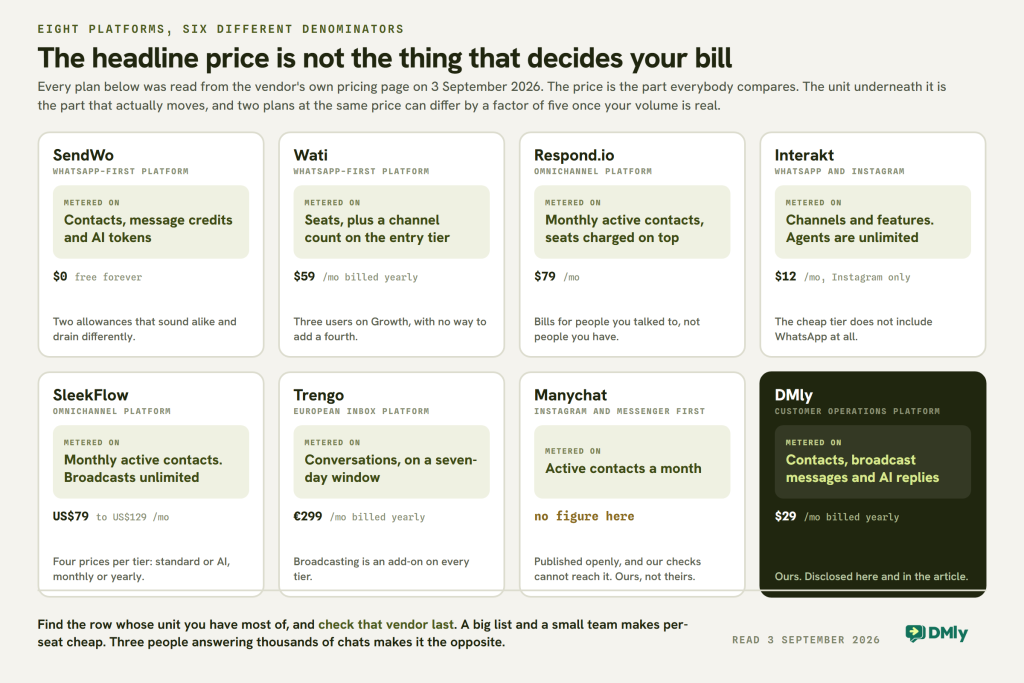
Read that as a shopping instruction rather than a table. Find the row whose unit you have most of, and check that vendor last. If you have a big list and a small team, a per-seat platform is cheap for you and a per-contact platform is expensive. If you have three people answering thousands of conversations, the reverse. Nobody’s pricing page tells you this because nobody’s pricing page knows your shape.
SendWo vs DMly, With the Rows That Go Against Us Left In
These two products overlap more than most pairs on this blog, so the comparison is narrower and more honest than usual. Both are WhatsApp-first, both pass Meta’s rates through without markup, both do broadcasts and chatbots and a shared inbox across the same core channels. The differences are at the edges, and the edges are where you should decide.
| SendWo | DMly | |
|---|---|---|
| Entry price | Free forever, no card | $29/mo billed yearly, after a 7-day trial with no card |
| Mid tier | $47/mo billed yearly (Pro) | $65/mo billed yearly (Growth) |
| Markup on Meta’s message rates | None, stated | None, stated |
| Billing unit | Contacts, message credits and AI tokens | Contacts, broadcast messages and AI replies |
| Channels | WhatsApp, Instagram, Messenger, Telegram, webchat | Those five plus SMS, TikTok and Google Business Profile |
| Support on the entry tier | None on Free. WhatsApp group from $23 | Email and chat on every paid plan |
| Ticketing and SLA | Ticketing on Pro, SLA on Enterprise | Priority support on Growth and above |
| Bookings | A flow that captures a booking request | Services, staff, availability, group classes, public booking page, client portal |
| Invoices and payments | WhatsApp payments in a flow | Invoices with a partly paid state, orders, refunds, coupons, subscriptions, gift cards, expenses |
| Reviews | Not part of the product | Google review requests and a reputation inbox |
| Loyalty | Not part of the product | Points, plans and credits, memberships |
| White label | Agency partner programme | Agency layer with your own brand, domain and Stripe account |
| Published Enterprise price | Yes, $84 or $67 | No. Whitelabel and Enterprise are quoted |
The short version, and the verdict this SendWo review lands on. If the job is “message my customers on WhatsApp and a few other apps, cheaply, starting today”, SendWo is a strong answer and free is hard to argue with. If the job is “run the business through those conversations”, meaning the booking, the invoice, the review and the repeat visit all live in the same place as the chat, that is a different product and it is the one we build. Our guide to what a WhatsApp CRM actually is is the fairest description of that difference, and it is not a sales page.

The SendWo Alternatives, Priced From Source
Every figure in this part of the SendWo review was read from the vendor’s own pricing page on 3 September 2026, and every one names the unit it is billed in. Where a vendor shows a monthly and a yearly rate, both are given, because quoting only one is how comparisons get made unfair. One vendor is here with no price at all, and the reason is explained rather than papered over.
Wati: billed per seat, and the seat is the thing to count
Growth is $59 a month billed annually, or $69 monthly, and it connects any one channel with three users included and no option to add more. Pro is $119 annually, $149 monthly, with five users and additional users at $39 each per month. Business is $279 annually, $349 monthly, five users, additional users at $89 each per month.
Watch the add-ons, because several things that are included elsewhere are priced separately here: automation triggers at $40 a month, AI co-pilot credits at $30 a month, Shopify integration at $4.99 a month, additional WhatsApp numbers at $29 a month each, and a custom subdomain at $50 one-time. Wati also links a message rate card from the pricing page, which is more than most do.
Who it suits: a small team with a big list. Three users at $59 is good value if three users is genuinely enough. The moment you need a fourth on Growth, you are moving to Pro, which is double. We have written up the wider field in our roundup of Wati alternatives.

Respond.io: billed per monthly active contact, with the seats bolted on
Starter is $79 a month, or $948 a year against a $1,188 list. Growth is $159 a month, $1,908 a year against $2,388. Advanced is $279 a month, $3,348 a year against $4,188. Enterprise is quoted. There is a 7-day free trial with no card.
Seats are extra on top: five users on Starter with more at $12 a month, ten on Growth at $20, ten on Advanced at $24. The headline unit is monthly active contacts, meaning the people you actually talked to that month rather than the size of your database, which is a genuinely fairer meter for a seasonal business and a worse one for a support team that talks to everybody.
Who it suits: teams that need workflow automation, developer APIs and multiple workspaces, and are pricing a platform rather than a tool. It is the most expensive entry point on this page by a wide margin.
Interakt: cheapest entry on the page, and the entry tier is Instagram only
Starter is $12 a month and includes Instagram only, which is the detail that makes or breaks the comparison, because a $12 WhatsApp platform is not what is on offer. Growth is $55 a month plus taxes and includes both WhatsApp and Instagram. Advanced is $69 a month plus taxes. Enterprise is on request. Billing is monthly, quarterly at 8 per cent off, or yearly at 20 per cent off.
Agents are unlimited on every tier, which is unusual and is the strongest thing about their pricing. Two costs sit outside the plan: WhatsApp AI Agents are a $74.99 add-on available on Growth and Advanced, and the Sales CRM is a separate product at 2,499 rupees a month plus taxes with five agent seats included, more at 499 rupees each, 100 free AI messages and $0.011 per AI message after that.
Who it suits: a business with a lot of people answering messages, because unlimited agents removes the meter that hurts most elsewhere.
SleekFlow: four prices per tier, and you have to know which one you are reading
SleekFlow prices each tier on two axes at once: standard or AI variant, and monthly or yearly. That produces four numbers per tier, and the page shows all of them near each other. Rather than guess which is which, here is the honest span: Pro runs from US$79 to US$129 a month and Premium from US$249 to US$349 a month, with the low end being yearly billing on the standard variant and the high end being monthly billing on the AI variant. Enterprise is quoted.
Pro starts from 500 monthly active contacts and three user accounts; Premium from 1,000 contacts and ten accounts. Broadcasts, flow builder usage and contact storage are unlimited on both. Their own pricing page currently carries a banner reading “WhatsApp API pricing rises on 1 Oct 2026”, which is the same change described earlier on this page.
Who it suits: teams that want unlimited broadcast volume and are comfortable being metered on contacts instead. Ask which variant a quote refers to before you compare it with anything.
Trengo: billed per conversation, on a seven-day window
Boost is 299 euros a month billed annually, or 349 euros monthly, with ten users and 6,000 conversations a year, which is 500 a month. Pro is 499 euros annually, 599 euros monthly, with twenty users and 18,000 conversations a year, or 1,500 a month. Enterprise is quoted.
Their definition of a conversation is the important part, and they publish it: any reply to an inbound or outbound message within a seven-day window, with anything outside that window starting a new one. That is a different unit from Meta’s 24-hour window and from everybody else on this page. Two things to note before comparing the headline: the price is in euros, and broadcasting is an add-on on every tier, including Enterprise. Voice calling is also an add-on below Enterprise.
Who it suits: European support teams with a lot of agents and a predictable conversation volume. If broadcasts are your main use case, the add-on line changes the maths. There is a longer account of the product in our Trengo review.
Manychat: the row with no number in it, and why
Manychat publishes its prices openly and any person with a browser can read them. We cannot, and that is a limitation on us rather than a criticism of Manychat. Their pricing page returns a Cloudflare bot check to our requests, on every path, and the correct response to a check designed to confirm a human is asking is to stop, not to find a way round it. So this page carries no Manychat figure.
We will not fill the gap from a software directory either. Directories keep republishing prices long after a vendor’s own site has changed, and we have caught that on this blog before: our Whatso review found a starting price still being carried by two large directories after the website attached to it had stopped resolving entirely.
What survives without a figure is the structural part, and it is the part that decides whether Manychat is even a candidate. Manychat meters active contacts per month rather than seats or channels, it has a genuinely free tier, and it is built around Instagram and Messenger comment-to-DM automation first, with WhatsApp added rather than assumed. We reached the same conclusion about a different vendor on our RapBooster review, which is where this convention for missing prices was worked out. If your growth engine is Instagram comments, it is a serious option and you should go and read the price yourself. Ten seconds of your time beats a number we copied from somewhere else.
How to Pick, in Four Questions
Answer these before you look at another pricing page. They are ordered by how much money each one moves.
- How many people answer messages? If the answer is more than five, seat-priced platforms get expensive fast and unlimited-agent pricing is worth a lot. If the answer is one or two, ignore this entirely.
- How many different people do you talk to in a month? Not how big your list is: how many you actually message. That is the number the contact-metered platforms bill you on, and most people guess it too high.
- Is the AI answering, or are you? An AI-led setup is metered on tokens or replies and can hit a ceiling that a broadcast-led setup never approaches. Get the allowance translated into conversations before you buy.
- Does the conversation end in a booking, an invoice or a review? If yes, you are shopping for a business system with messaging in it, and the messaging-only tools will need a second product bolted alongside. If no, the messaging-only tools are cheaper and simpler and you should buy one.
One thing worth doing whoever you choose: read how official WhatsApp Business API access actually works first. The verification, the display name, the messaging tier ladder and the template approval queue are identical whichever platform you sign up through, and most of the frustration new users blame on a platform belongs to that process instead. If several inboxes are already in play, our guide to running one inbox across channels covers the routing side.
Frequently Asked Questions
How much does SendWo cost?
There is a free forever plan at $0 with no card required. Paid plans are Starter at $29 a month or $23 billed yearly, Pro at $59 or $47, and Enterprise at $84 or $67. Yearly billing takes 20 per cent off. Paid plans require a card and include a 7-day trial. Meta’s per-message WhatsApp charges are separate and SendWo says it adds no markup to them. Prices read from sendwo.com on 3 September 2026.
Is the SendWo free plan actually free?
Yes, and it does not expire. It covers one user, one WhatsApp account and one webchat account, 1,000 contacts, 500 message credits, 500 AI tokens and live chat visibility for ten customers. The two things it does not include are the other channels, which start at Starter, and support of any kind, which SendWo states plainly. You will still pay Meta directly for the WhatsApp messages you send.
What is the difference between SendWo message credits and AI tokens?
Message credits are spent when the platform sends a message. AI tokens are spent when the AI bot reads and writes text, so both the customer’s message and the bot’s answer draw on them, as does the material you trained it on. They are not comparable numbers even though they sit next to each other on the pricing card. A broadcast-led business runs out of message credits first, and an AI-led business runs out of tokens first.
Does SendWo add a markup to WhatsApp message pricing?
SendWo states in four places on its pricing page that it charges 0 per cent markup on official WhatsApp Business API pricing and that conversation charges are paid to Meta separately. DMly makes the same commitment. The way to verify it for any vendor is to look up Meta’s published rate for your country and message category, ask the vendor for their rate in writing for the same country and category, and compare the two.
Is SendWo good for WhatsApp marketing?
For broadcasting specifically, yes. 100,000 message credits on a $23 plan is generous, the campaign tools are the core of the product, and click-to-WhatsApp ads support is included from Starter upward. Where it is weaker is depth of automation beyond a flow, reporting beyond delivery, and anything that happens after the message, such as a booking or an invoice.
What are the best SendWo alternatives?
It depends entirely on which unit you get billed in, which is why this SendWo review prices each one by its meter rather than its headline. Wati if you have a small team and a big list. Interakt if you have a lot of agents, because agents are unlimited on every tier. Respond.io if you need workflow depth and developer access and have the budget. SleekFlow for unlimited broadcast volume metered on contacts. Trengo for a European support team, remembering that broadcasting is an add-on. Manychat if Instagram comment automation is your growth engine. DMly if the conversation needs to end in a booking, an invoice or a review.
Should I buy an annual plan before October 2026?
Be careful. On 1 October 2026 Meta starts charging for service messages and for utility messages sent inside an open 24-hour window, and nine markets move to standalone pricing. Meta published the new rates on 1 September 2026, including a free monthly tier of 1,000 service messages for every business phone number. The platform subscription is not what changes, but the message bill sitting on top of it is, and every savings calculator currently in the market including SendWo’s assumes service messages are free. Run the numbers again against the published rates.
Is this SendWo review independent?
No. We make DMly, which is listed as an alternative, and it says so in the opening section. What we offer instead is checkability: every SendWo claim in this SendWo review comes from sendwo.com, every competitor price from that vendor’s own pricing page on 3 September 2026, and every DMly claim from our own published documentation and pricing. Three rows of the comparison table go against us, and they are still in it.
Writing about WhatsApp automation, bookings and growth for local business.
Turn WhatsApp into your busiest channel.
Start free and run message, bookings, payments and reviews in one place.
