
Service Messages vs Templates: What You Are Actually Being Charged For
Scroll back through any WhatsApp thread with a customer who booked something last week. There is a message telling them the booking is confirmed. There is one telling them how much the treatment costs. There is one saying the stylist is running ten minutes behind. Same thread, same day, same person, roughly the same number of words, and on screen they are three identical green bubbles with two blue ticks underneath. From 1 October 2026 they are three separate products on Meta’s price list, and one of them is a service message, which for most small businesses will still cost nothing.
The problem is that nothing in WhatsApp tells you which is which. There is no little label on the bubble. Your customer certainly cannot tell. And until this autumn it did not matter, because two of the three were free.
This guide is about that line. Not the pricing change itself, which we cover in full in our guide to the WhatsApp pricing change on 1 October, and not the three template categories, which have their own guide. Just the boundary: what makes a message a template, what makes it a service message, what each one costs, and how you work out which of them your own business is sending all day without noticing.
If you use the free green WhatsApp Business app, this is not about you: Everything on this page describes the WhatsApp Business Platform, the API version that businesses reach through a provider like DMly. The free app you downloaded onto a phone has no per-message pricing, no categories and no bill, and nothing here changes that. A quick test: if you have never connected your number to a provider or to Meta’s API, you are on the free app, and you can read this out of curiosity rather than concern.
The Only Line That Really Matters: Template or Not
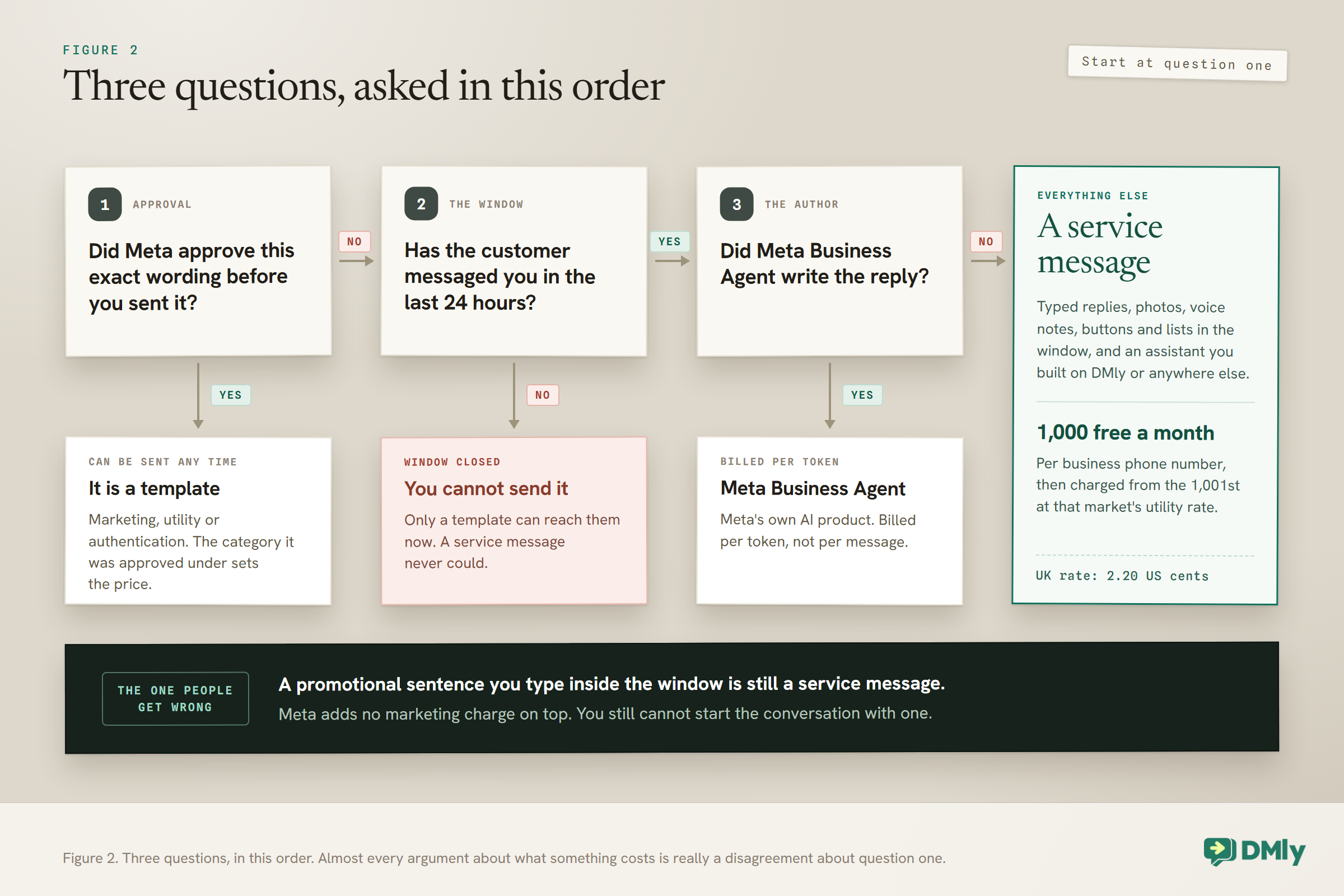
Meta sorts every message you send into five categories, but the first fork in the road is much simpler than that: did the message go through a pre-approval process, or did somebody just write it? Everything else follows from the answer.
A template is a message you wrote in advance, submitted to Meta, and had approved before you were allowed to send it. It has a name in your account. It has placeholders where the customer’s name and the appointment time drop in. You cannot change a word of it without resubmitting it. In exchange for that ceremony, a template is the only kind of message you may send to somebody who has not messaged you recently.
A non-template message is everything else. Free text you typed. A photo of the colour swatch. A voice note. A price list you pasted in. A reply your automation sent as ordinary text. Nobody approved any of it, and you can write whatever you like, because there is a hard limit on when you are allowed to send it at all.
Meta’s own wording draws the line at exactly that point. In its documentation, template messages are described as the only message type that can be sent outside a customer service window, and non-template messages can only be sent inside one. The approval is the price of being able to reach out; the window is the price of not having to get approval.
The 24-hour window, in one sentence: When a customer messages you, a 24-hour clock starts, and during that clock you may send whatever you like in whatever format you like. When it expires, you are back to templates only, and it restarts from zero every time they write again. If that mechanic is new to you, our guide to the 24-hour messaging window covers what opens it, what closes it and what you can do when it has shut.
What a Service Message Actually Is
A service message is any non-template message you send that is not powered by Meta’s own AI product. That is not a paraphrase; it is very close to Meta’s own definition, and it is deliberately broad.
Meta’s documentation puts it as plainly as this: any non-template message that is not powered by Meta Business Agent is a service message. So the category is not defined by what the message says, or by how helpful it is, or by whether a person or a robot produced it. It is defined by what it is not. If it did not go through template approval, and Meta’s own agent product did not write it, it is a service message.
Which means all of the following are service messages, every one of them:
- You typing “yes, we have Saturday at 2” into the reply box.
- Your automation answering an opening-hours question with a block of plain text.
- An AI assistant you built, on DMly or anywhere else, replying in your words.
- A photo, a PDF price list, a voice note, a location pin.
- A message with three tappable buttons on it, or a list menu, sent inside the window rather than as an approved template.
- A promotional sentence you typed by hand, which is the one that surprises people. More on that below.
The one carve-out is Meta Business Agent, Meta’s own conversational AI product, which became a separate category on 1 July 2026 and is billed per token rather than per message. If you are running your assistant through DMly, or OpenAI, or anything else that is not Meta’s own agent platform, your assistant’s replies are service messages. Meta’s documentation is explicit that businesses using a third-party AI solution pay the AI provider separately and pay Meta for delivery, which is worth remembering when you compare the running cost of a WhatsApp chatbot across providers.
What a Template Actually Is, and Why That Is Not the Same as Marketing
People use “template” and “marketing message” as though they mean the same thing, and that single confusion causes most of the mispricing you will see this month. A template is a delivery mechanism. Marketing is one of three categories a template can be assigned.
Every approved template carries a category: marketing, utility or authentication. The category is not decorative. It sets the price, and it can be reassigned by Meta if your content does not match the label you asked for. We have a full guide to how the three template categories work and what belongs in each, and it is worth reading before you submit anything new, because a booking confirmation approved as marketing costs several times what it should.
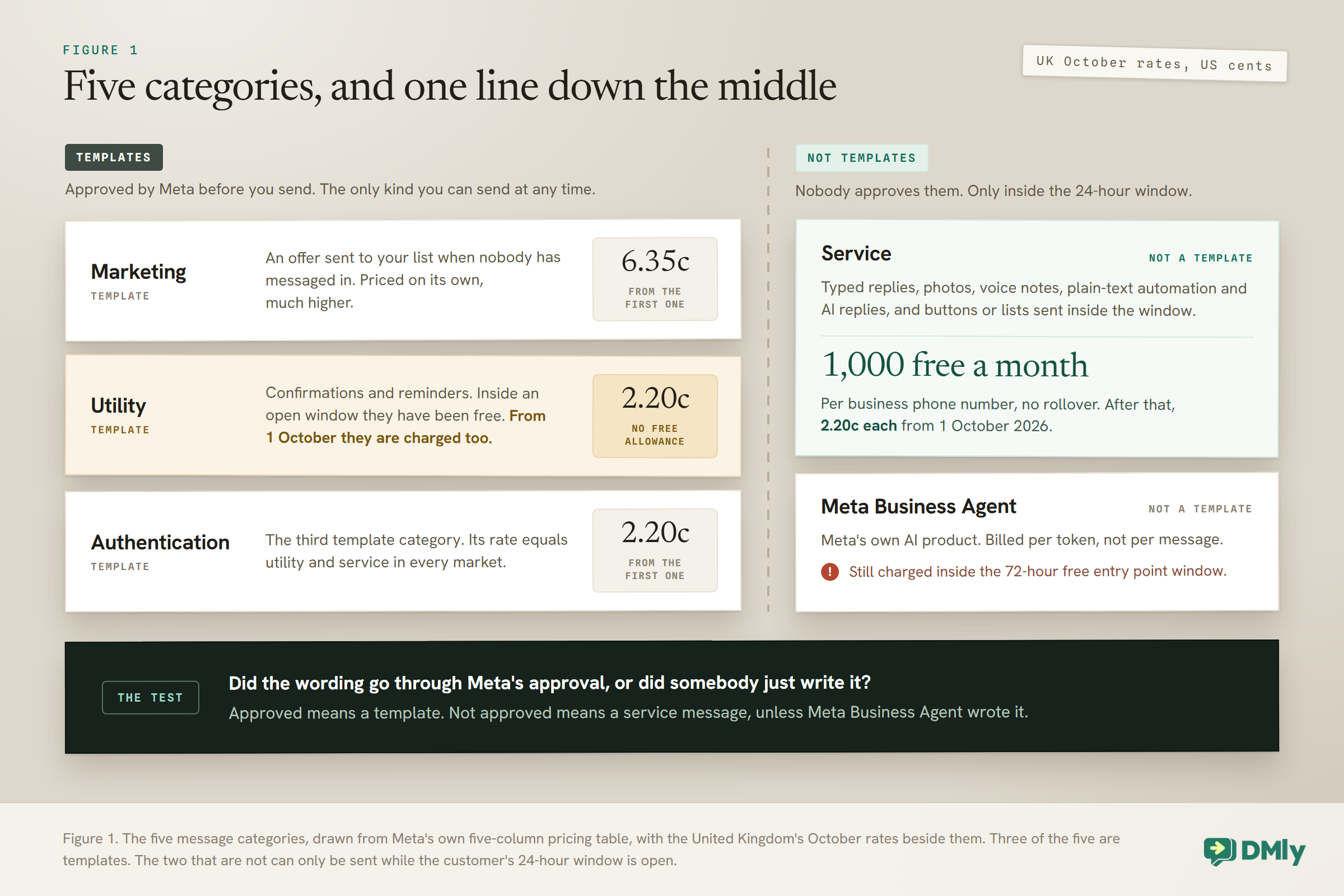
For this page, the only thing you need is the shape of it: three of the five billing categories are templates, and two of them are not.
What a Service Message Costs From 1 October, and What a Template Costs
Here is the part that makes the distinction worth learning: a service message and a marketing template sent to the same customer, on the same day, in the same country, differ in price by a factor of two and a half to nine. Meta publishes a rate card per currency, and the October card carries a Service column for the first time.
The rule is simple and it is the same in every market: the service rate equals that market’s utility rate, which equals its authentication rate. Marketing sits on its own, much higher. Reading from Meta’s October USD card:
- United Kingdom. Service, utility and authentication 2.20 US cents. Marketing 6.35 cents.
- United States and Canada. Service, utility and authentication 0.34 cents. Marketing 2.50 cents.
- India. Service, utility and authentication 0.14 cents. Marketing 1.18 cents.
- Nigeria. Service, utility and authentication 0.67 cents. Marketing 5.16 cents.
- Brazil. Service, utility and authentication 0.68 cents. Marketing 6.25 cents.
- Germany. Service, utility and authentication 5.50 cents. Marketing 13.65 cents.
Your own market may not be on that shortlist, and the numbers can move quarterly, so check them against our country-by-country rate card rather than assuming. The pattern holds everywhere though: the non-template side of the line is the cheap side.
Two modifiers sit on top of those rates and both matter more than the rates do.
Service messages come with a free monthly allowance. Every business phone number receives 1,000 free service messages a month, and Meta only charges from the 1,001st. They do not roll over and they reset each month. Roughly 33 replies a day, which is more than a lot of local businesses send.
Utility templates do not. Inside the window they were free, from 1 October they are charged, and they are charged from the very first one. For a business that sends a confirmation and two reminders per booking, that is the line item to look at.
The one nobody is reporting: a promotional message you type is not a marketing charge: Meta’s documentation says that only one charge applies per message, and adds, in its own words, that this also applies to non-template messages with promotional content, on which Meta does not additionally apply a marketing template charge. In plain terms: if a customer messages you and you reply inside the window with “we have 20 per cent off colour this week”, that falls on the service side and is priced as one. In the United Kingdom that is 2.2 cents rather than 6.35.
Read the limit of that carefully before you rebuild your marketing around it. You still cannot start the conversation. The 24-hour window still governs when a non-template message may be sent at all, and Meta’s own rules on unsolicited promotion and on your quality rating have not moved an inch. What this does mean is that if somebody is already talking to you, mentioning the offer is not a separate marketing spend.
How to Tell Whether Your Flow Is Sending a Service Message
The fastest way to audit this is not to read your messages, it is to read your automation, because the builder names the categories for you without saying so. Every messaging tool makes the same split somewhere, and once you know it is there you cannot unsee it.
In the DMly flow builder the palette is grouped, and the grouping is the answer. The Messaging group holds Send Message, Send Image, Send Video, Send Audio, Send File and Ask Question. Every one of those puts a non-template message in front of the customer, which means every one of them falls on the service side. The WhatsApp group is where Send Template lives, alongside Buttons Message, List Message, CTA URL, WhatsApp Form and the catalogue steps.
That grouping is not itself a price list, and the WhatsApp group mixes both sides of the line, so the rule to carry is Meta’s, not the palette’s: Send Template is the only step in the builder that produces a template. A buttons message or a list menu delivered inside an open window is a non-template message and lands on the service side, which is why those steps are worth reaching for when a conversation is already live.
Three more places the answer is written down:
- Your inbox tells you by what it refuses. In DMly, once the 24-hour window has closed the reply box stops accepting a free-form send and the template picker takes its place. If you can type and send, you are sending a service message. If you are being made to pick from a list of approved messages and fill in the blanks, you are sending a template. The form icon behaves the same way and greys out when the window shuts.
- Your delivery webhooks say it outright. Every message status webhook from Meta carries a pricing object, and inside it a category and a billable flag. A free in-window reply today reads
"billable": falsewith typefree_customer_service; a charged one from October reads"billable": truewith typeregularand categoryservice. If your provider or your own integration stores these, you already have the audit and do not need to guess. - Meta’s own analytics count them separately. The Pricing Analytics API takes a pricing category, and SERVICE is one of the accepted values, so you can pull a count of service messages for any date range and any of your business numbers.
Five Places Businesses Get This Line Wrong
Every one of these has a real cost attached, and four of the five push the bill up rather than down.
1. Assuming an automated reply is cheaper than a typed one. It is not. Meta prices the message, not the author. A bot that answers “sure, what day suits you?” and a human who types the same words produce the same service message at the same rate. If you have been reassuring yourself that automation is free because nobody is being paid to type, October removes that.
2. Sending a confirmation as a template when the window is wide open. This is the expensive one, and it is now the default behaviour of a lot of booking flows. A customer books in chat, so the window is open, and the flow fires an approved utility template to confirm it. From 1 October that template is charged, while the same words as plain text would land in the service bucket and quite possibly inside the free thousand. There are good reasons to keep the template, which we come back to below, but “it is free anyway” is no longer one of them.
3. Treating buttons as a template feature. Buttons and list menus exist on both sides of the line. A template can carry buttons, and a plain interactive message inside the window can too. If the customer is already talking to you, the interactive message is the non-template route.
4. Splitting one message into four so it feels chatty. When non-template messages were free this cost nothing and read beautifully. Now each of those four bubbles is its own service message and its own line on the bill. That is a whole subject of its own and it is where the largest savings sit for anyone running WhatsApp automation at any scale.
5. Believing a service message can be used to reach out. It cannot, and it never could. Meta’s October documentation is explicit that there is no change to when a service message can be sent: only inside an open 24-hour window, which opens and resets with each customer message. The pricing changed. The permission did not.
One Salon Thread, Priced Line by Line
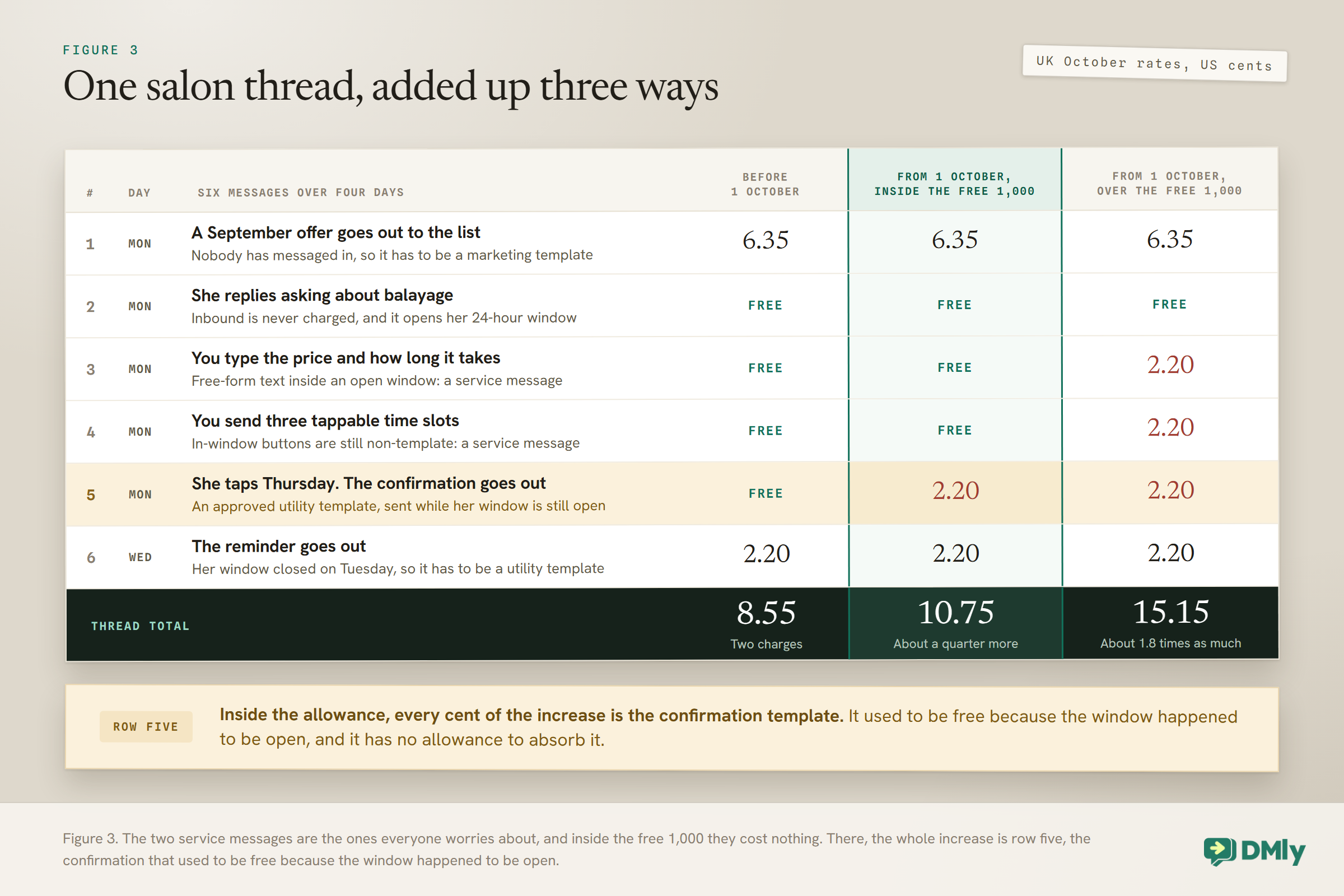
The clearest way to see the two sides is to take one ordinary week with one customer and put a number beside every bubble. This is a United Kingdom salon, so we are using Meta’s October UK rates: 2.20 US cents for service, utility and authentication, and 6.35 cents for marketing.
Six messages go out over four days:
- Monday. A September offer goes out to the list. Nobody has messaged in, so this has to be an approved marketing template. 6.35 cents.
- Monday, twenty minutes later. She replies asking about balayage. Inbound messages are never charged, and this opens her 24-hour window. Nothing.
- Monday. You type the price and how long it takes. Free-form text inside an open window. Charged as service. 2.20 cents, or nothing if you are under 1,000 this month.
- Monday. You send three tappable time slots. An interactive buttons message inside the window is still a non-template message. Charged as service. 2.20 cents, same allowance.
- Monday. She taps Thursday, and the confirmation goes out as your approved utility template. The window is open, but from 1 October that no longer matters. 2.20 cents, with no allowance to absorb it.
- Wednesday. The reminder goes out. Her window closed on Tuesday, so this has to be a template regardless. Utility. 2.20 cents.
Add it up three ways and the shape of the change appears.
Before 1 October, only the marketing template and the out-of-window reminder were charged: 6.35 plus 2.20, so 8.55 US cents for the whole thread.
After 1 October, if you are over the free allowance, all five outbound messages are charged: 15.15 cents, about 1.8 times as much.
After 1 October, if you are inside the free allowance, which most single-site salons will be, the two service messages cost nothing and you pay 6.35 plus 2.20 plus 2.20, so 10.75 cents. About a quarter more than before, and every penny of the increase came from the confirmation template that used to be free in the window.
When a Template Is Still the Right Answer
Reading all of the above, the obvious conclusion is to replace every in-window template with plain text, and that conclusion is wrong about half the time. Templates buy you four things that free-form text cannot.
They survive the window closing. This is the big one. A confirmation sent as plain text works only while the customer’s clock is running. If your flow waits for a payment, or checks stock, or asks a member of staff to approve something, the message may go out an hour later than you expect, and by then the window may have shut. A template sends either way; free-form text simply fails.
They are the only thing you can schedule. Every reminder that goes out the day before an appointment is, by definition, outside the window that the original booking conversation opened. Our guide to WhatsApp appointment reminders covers the timing, but the pricing consequence is short: a reminder is always a template and there is no version of this change that alters that.
They render better. Headers, footers, buttons, a document attached to the top. A template can look like a receipt. Plain text looks like a person typing, which is sometimes what you want and sometimes exactly not.
They are auditable. If a dispute ever arises about what you told a customer, an approved template with a version history is a stronger record than a line somebody typed.
The honest rule of thumb: if the message must arrive no matter what, use a template. If it is part of a live conversation and would look odd arriving cold, use plain text. Cost is now a tiebreaker, not the deciding factor.
What to Check Before the Month Turns
Four things, and the first one is not optional.
Add a payment method to your WhatsApp Business Account by 30 September. Meta’s own wording is that any Solution Provider or directly-integrated business without a payment method on file by that date will have service message delivery stopped when the charge begins on 1 October. Its main pricing page now narrows that: without a payment method, service messages inside the free 1,000 are still delivered, and the ones after it are not. That is not a billing inconvenience, it is your replies not arriving once the allowance is used. If a provider handles billing on your behalf, ask them to confirm in writing that it is covered.
Count your two piles separately. Not “how many messages do we send”, which tells you nothing now, but how many typed and automated replies, and how many templates. If your replies are comfortably under 1,000 a month per number, the service half of this change is a rounding error for you and the templates are the whole story.
Look at every template that fires while a conversation is live. Booking confirmations, order confirmations, payment received messages, “we have got your enquiry” acknowledgements. Each of those has just gone from free to charged. Some should stay templates for the reasons above. Some are honestly just an acknowledgement, and could be a plain reply or could disappear entirely.
Check whether anything is sending twice. A flow that sends a confirmation and an automation that also sends one used to cost nothing extra. Now it is two charges per booking, every booking, forever.
Frequently Asked Questions
What is a WhatsApp service message?
A service message is any message you send that was not pre-approved as a template and was not produced by Meta’s own Business Agent product. Typed replies, photos, voice notes, plain-text automation replies and in-window interactive messages all qualify. They can only be sent inside the 24-hour window that opens when your customer writes to you.
Is a service message the same thing as a free-form message?
In practice, yes. “Non-template message” is Meta’s technical phrasing, “free-form” is what most providers call it in their interface, and “service” is the billing category those messages fall into. Since July 2026 there has been one exception: a non-template message produced by Meta Business Agent is billed as a Meta Business Agent message instead.
How much does a service message cost?
It depends on the country your customer’s number belongs to, and it always equals that market’s utility and authentication rate. On Meta’s October USD card that is 0.34 US cents for the United States and Canada, 2.20 cents for the United Kingdom, 0.14 cents for India and 0.67 cents for Nigeria. Every business phone number also gets 1,000 free service messages a month before any of that applies.
Do I get 1,000 free templates as well?
No. The free monthly allowance covers the service category only. Utility, marketing and authentication templates are charged from the first one, and that is the single most important asymmetry in this change.
Are the free 1,000 per business or per phone number?
Per business phone number, and they reset monthly with no rollover. A business running two numbers has two separate allowances.
If I reply with an offer, am I charged the marketing rate?
No. Meta’s documentation says only one charge applies per message, and that promotional content inside a non-template message does not attract an additional marketing charge. A promotional reply inside an open window is billed at the service rate. What has not changed is that you cannot start that conversation with a non-template message.
Does a longer message cost more?
No. The charge is per delivered message, not per character, so four short bubbles cost four times what one longer message costs. That is the arithmetic behind most of the savings available to a chatty automation.
My chatbot sends the replies, not a person. Is that still a service message?
Yes, unless it is running on Meta Business Agent specifically. An assistant you built on DMly or connected through OpenAI produces ordinary non-template replies, and you pay your AI provider separately for the thinking and Meta for the delivery. Meta says as much in its own comparison of the two models.
Can I reply for free if I use buttons instead of text?
Buttons do not change the category. An interactive message sent inside the window is a non-template message, so it is priced exactly like plain text. The reason to use buttons is that they get answered, not that they are cheaper.
What happens to messages sent from a click-to-WhatsApp ad?
The free entry point window is unchanged. When somebody arrives from a click-to-WhatsApp ad and you reply within 24 hours, marketing, utility, authentication and service messages are all free while it is open: 72 hours on Meta’s business pricing page, up to 7 days on its developer pricing page, which also no longer mentions Facebook Page buttons. Meta’s table marks one exception: Meta Business Agent messages are still charged inside that window, because the token cost applies regardless.
Will in-window utility templates start counting toward my volume discount?
Unresolved, and worth watching. Meta’s tiering rules say only charged messages accrue toward volume tiers, and its published list of what does not count still names utility templates delivered inside an open customer service window. Those become charged on 1 October, and Meta has not yet updated the list either way. If you send enough utility templates to be near a tier boundary, ask your provider rather than assuming.
Where can I see how many service messages I have actually sent?
Meta’s Pricing Analytics API accepts SERVICE as a pricing category and returns a volume and a cost for a date range and a business number. Your delivery webhooks also carry a pricing object on every message, with a category and a billable flag, which is the more precise record if you or your provider store them.
Writing about WhatsApp automation, bookings and growth for local business.
Turn WhatsApp into your busiest channel.
Start free and run message, bookings, payments and reviews in one place.
