
Best WhatsApp Business Use Cases: 15 Ways to Grow Sales and Serve Customers
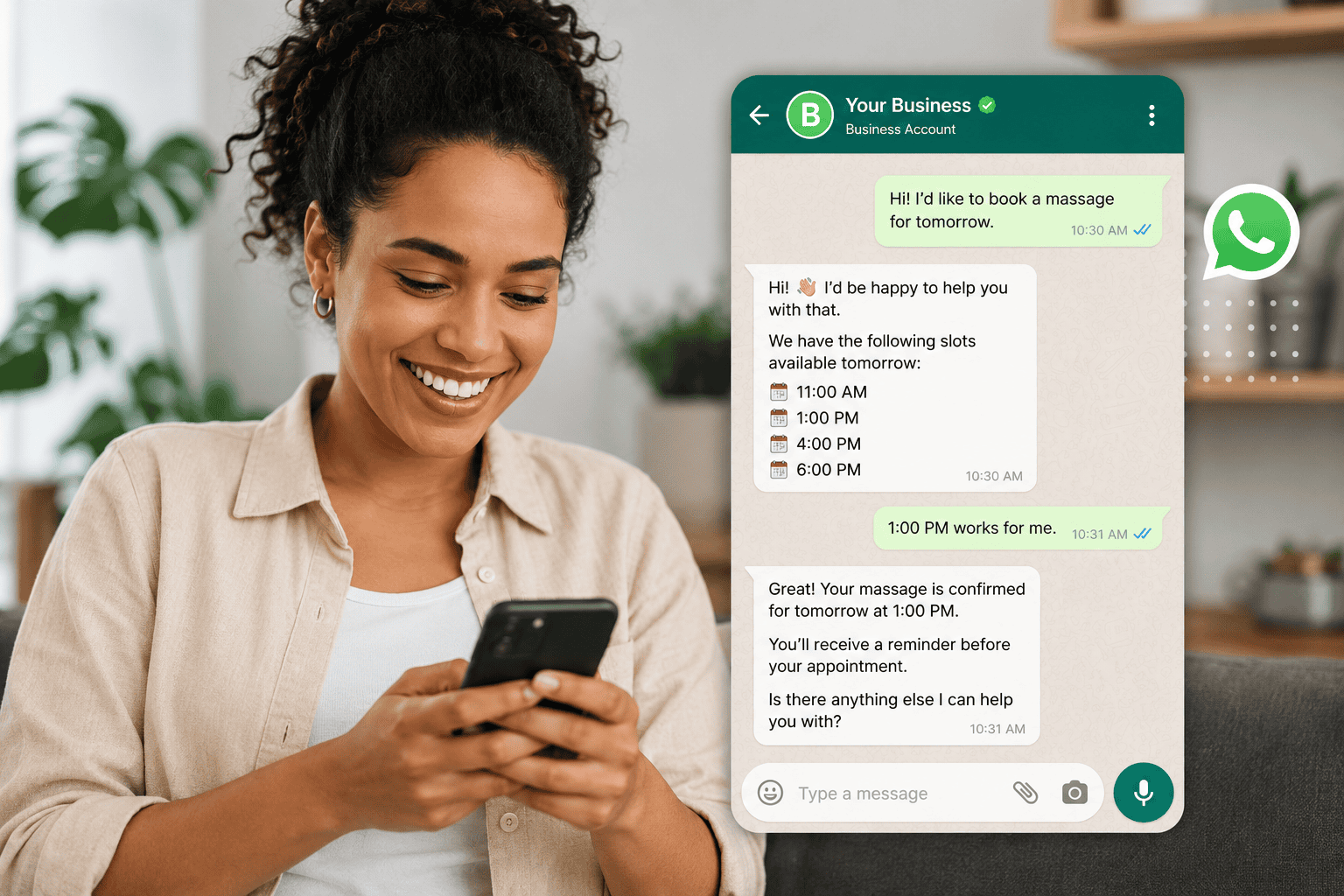
You almost certainly use WhatsApp for work already. You answer questions on it, confirm orders on it, and send the odd promotion from it. What you probably do not have is a process: something that still works on the Tuesday you are short-staffed and forty people message at once.
That is the point where ordinary chat starts to cost you money rather than save it. Enquiries get buried under order updates. Your team types the same four answers all day. The follow-up nobody owned never happens. And the promotion goes to everyone, including the people who bought the thing last week.
The best WhatsApp Business use cases cover much more than customer support. Businesses can capture leads, qualify prospects, recover abandoned purchases, book appointments, send targeted broadcasts, collect payments and bring previous customers back.
This guide runs through fifteen WhatsApp Business use cases across marketing, sales and support, with what each one takes to build and, just as usefully, what stops it. Some of them you can switch on this afternoon. Two of them need permission from the customer that you have to earn first, and the guide says which.
Why WhatsApp Business Use Cases Work at All
WhatsApp already has something most business channels spend years trying to build: customer attention. People use it throughout the day, which makes it a natural place to ask a question, check an order, book an appointment, or speak with a business.
It also works across different stages of the customer journey. Marketing teams can send targeted broadcasts, sales teams can follow up with leads, while support teams can use automation and shared inboxes to manage incoming questions.
Connect WhatsApp to a CRM that keeps the conversation on the customer record and the history stops disappearing into one employee’s phone when they leave.
The WhatsApp Business Platform takes this further with features such as message templates, interactive messages, Flows, and product catalogues. Businesses can build structured journeys while still giving customers the familiar experience of a WhatsApp conversation.
For many businesses, that is the attraction. WhatsApp becomes the place where interest turns into a conversation, the conversation ends in something, and the relationship carries on afterwards.
One inbox, eight sets of rules
Before any of the use cases below, know that the eight channels do not behave alike. It is easy to read “manage them all in one inbox” as “the same rules apply to all of them”, and that is where campaigns go wrong. WhatsApp gives you 24 hours from the customer’s last message and no extension. Messenger and Instagram look more generous at seven days, but that seven days covers only a reply a person types by hand: anything automated, including every broadcast, gets the same 24 hours. TikTok gives you 48 hours and takes no broadcasts at all. Telegram, SMS and the website chat widget have no window whatsoever.
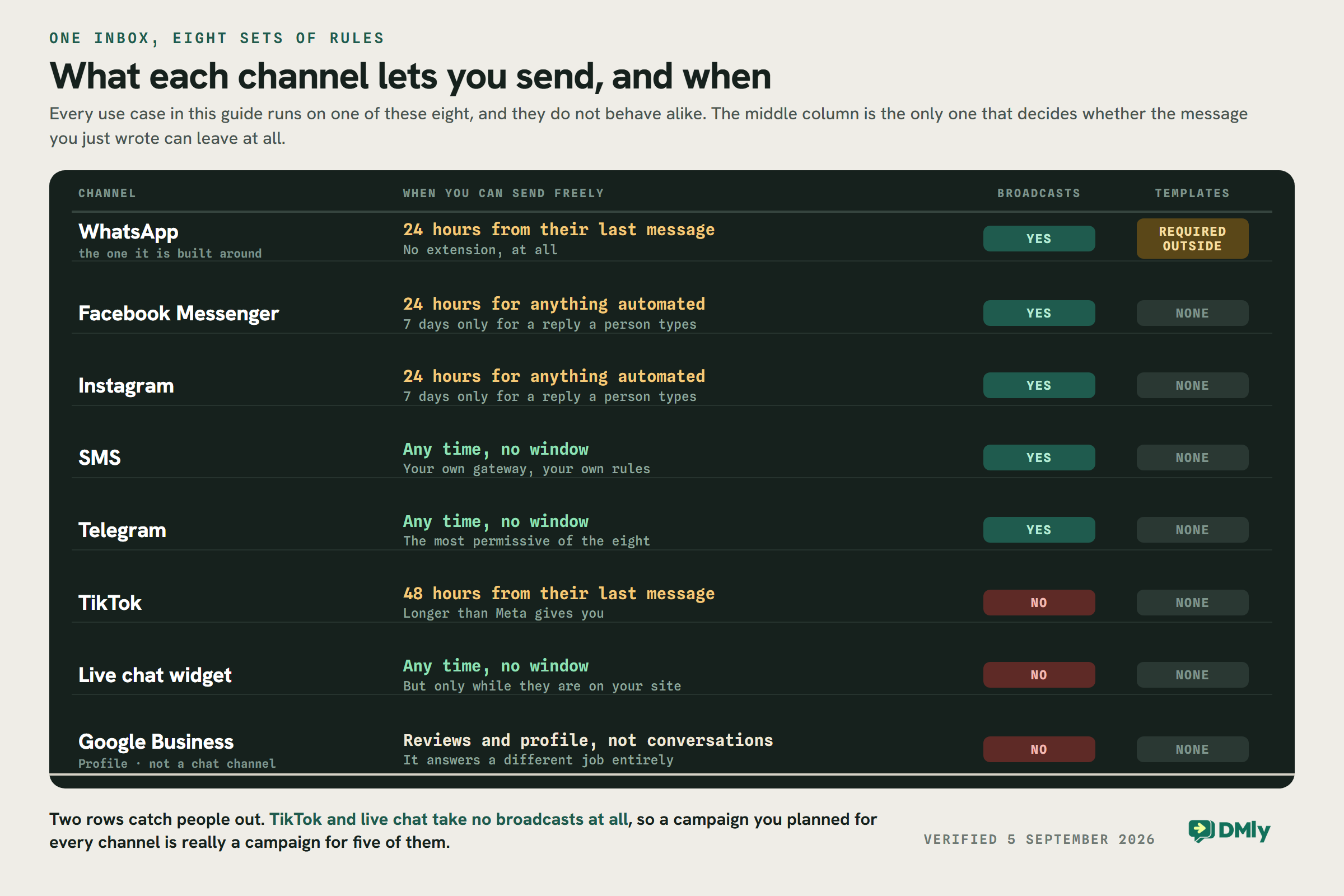
The practical consequence is worth holding onto: a campaign you planned for every channel is really a campaign for five of them, because TikTok and the live chat widget cannot receive one. Plan the channel before you write the message.
15 Best WhatsApp Business Use Cases
Fifteen is a lot to hold in your head, and sorted by industry it stays a list. Sorted by what the conversation is actually for, it collapses into four jobs: answering things you have answered before, qualifying an enquiry, finishing a transaction, and going back to someone who has gone quiet. They get harder in that order, and the last one is the only one that needs the customer’s permission.
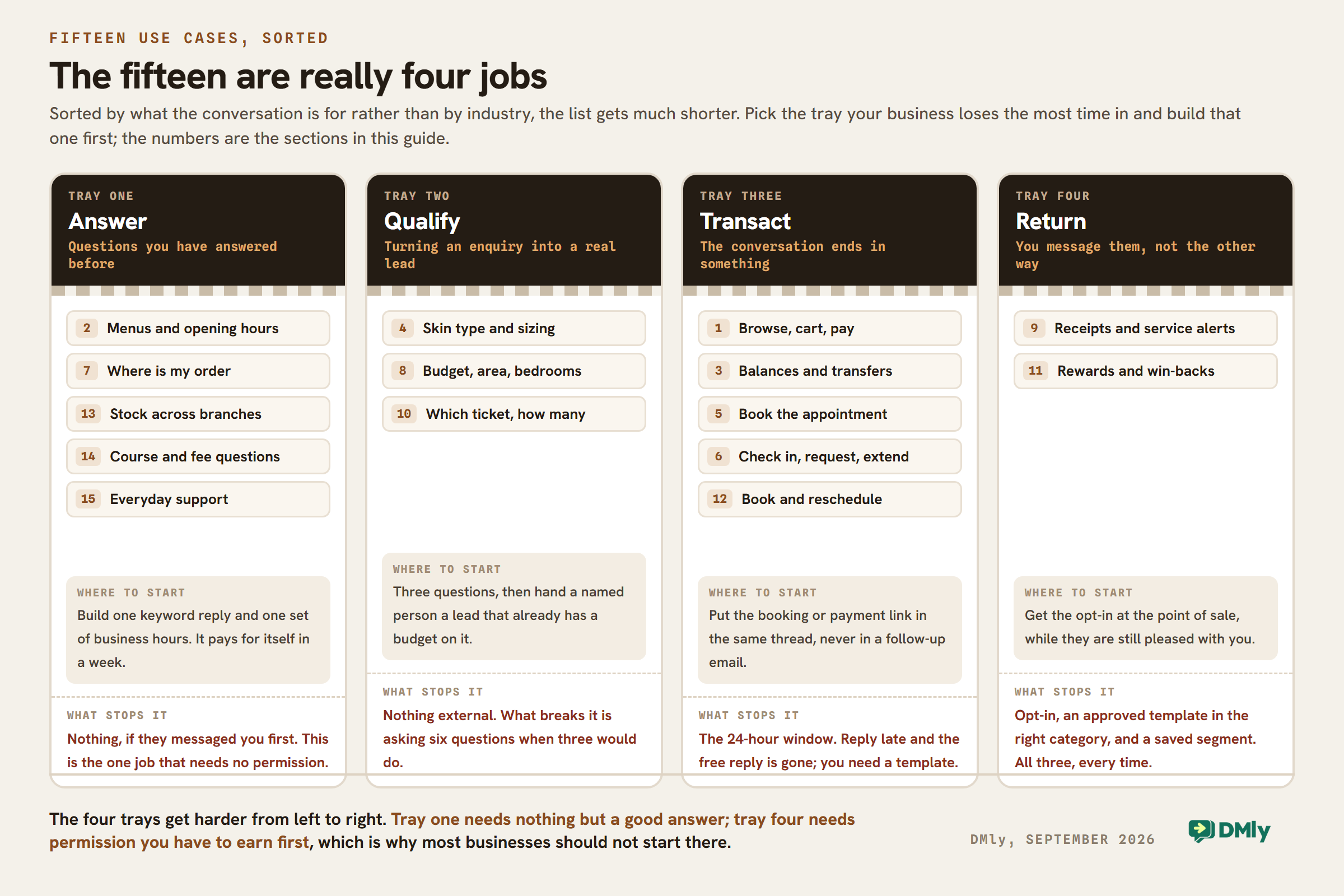
Pick the tray your team loses the most hours in and build that one first.
1. E-Commerce Shopping and Sales
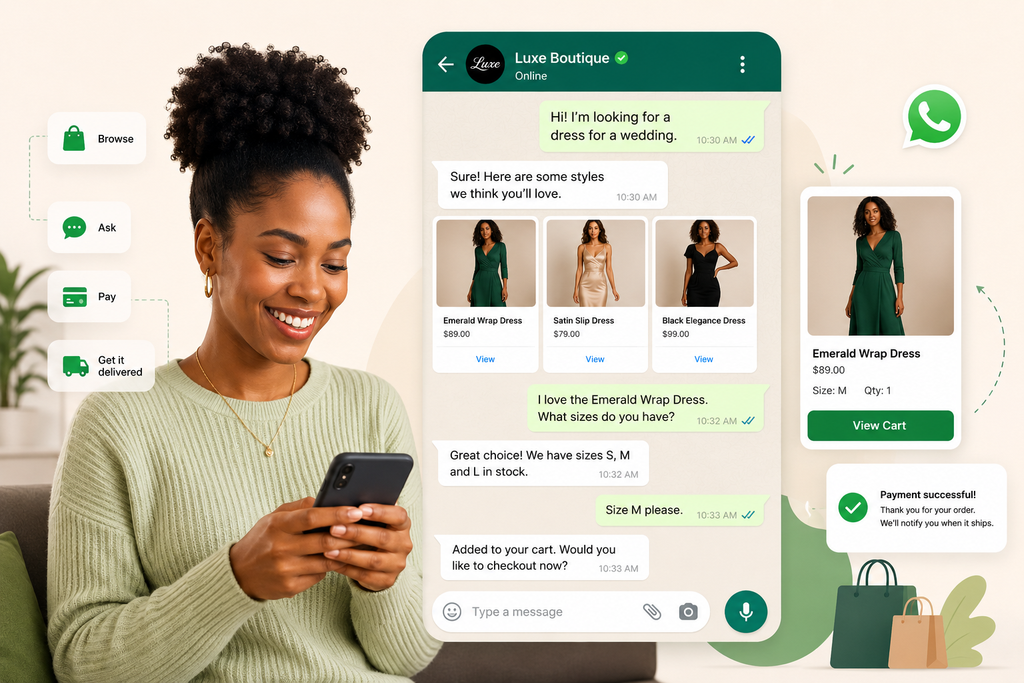
WhatsApp can turn product discovery into a conversation.
Instead of sending every shopper to a website and hoping they find what they need, businesses can let customers browse products, ask questions, get recommendations, and move towards a purchase through chat.
Product catalogues and interactive messages can make that experience much more structured than a typical back-and-forth conversation.
Imagine someone messaging a clothing store:
- Customer: “Do you have this dress in a size 12?”
- AI: “Yes. Size 12 is currently available in black and navy. Would you like to see both?”
The conversation can continue into product selection and the next step towards checkout. Afterwards, WhatsApp can still be used for order confirmations, delivery updates, and future offers.
The selling itself is a whole build of its own, and we have written it up end to end: how the catalogue, the cart and the payment link fit together, including the bit nobody expects, which is that a sent cart does not move your stock.
2. Restaurant Orders and Food Delivery
Restaurants can use WhatsApp for much more than answering “Are you open?”
Customers can ask about the menu, place an order, confirm collection or delivery details, and receive updates without making a phone call. Automation can handle common questions about opening hours, menu items, availability, locations, and order information, while staff step in when necessary.
It earns its keep fastest for restaurants trying to own the relationship instead of renting it from a delivery marketplace that keeps the customer and the margin. We go deeper on orders, reservations and repeat visits in the restaurant guide.
That relationship continues after the meal. A restaurant could send a relevant offer to opted-in customers, request a Google review, or announce that a popular weekend special is available again.
3. Banking and Financial Services
WhatsApp has also become a customer-service channel for banks, fintech companies and other financial businesses.
Depending on the service and security requirements involved, customers can use WhatsApp to check information, receive transaction notifications, get help with common account questions and navigate certain financial services.
A useful real-world example is Absa Group. Its WhatsApp banking services have included functions such as balance enquiries, beneficiary management, transfers and purchases of airtime or data in supported markets.
The appeal is convenience. Instead of a menu tree and a hold queue for a routine enquiry, the customer asks in an app they already have open.
One thing to be straight about before you build anything sensitive on it. Personal WhatsApp is end-to-end encrypted. A conversation with a business running on the WhatsApp Business Platform is not, in the sense most people mean. Meta’s own documentation is explicit: the message is encrypted from the customer’s phone to the Cloud API, and then the Cloud API decrypts it and forwards it to the business, holding it at rest for up to 30 days. Meta manages the keys on the business’s behalf. That is perfectly normal for a hosted service and it is fine for balances, statuses and appointment times. It is the reason serious financial work still ends with the customer being handed off to an authenticated app, and the reason you should never ask for a full card number, a PIN or a password in a WhatsApp thread.
4. Personalized Beauty and Fashion Shopping
Buying beauty or fashion products often involves questions that a standard product page can’t answer particularly well.
A skincare shopper might ask: “My skin gets oily but is also sensitive. Which cleanser should I choose?”
A fashion customer might want a particular size, color, or something that works with an item they already own.
WhatsApp gives brands room to turn those questions into guided shopping conversations. AI can ask a few relevant questions, suggest suitable products and answer common queries about ingredients, sizing, availability or product use.
Customer segmentation can make later communication more useful too. A skincare business could group customers by concerns such as dryness or hyperpigmentation, while a fashion retailer might segment by previous purchases or product interests.
Instead of sending the same promotion to the entire WhatsApp list, the business can send offers and product updates that make sense for each group.
This is the use case where the pieces have to work together or not at all: the AI conversation that asks the questions, the tag it writes, the segment built from that tag, the broadcast that uses it, and a person who can step in. Get those five talking and the personal touch survives your tenth thousand customer.
5. Healthcare Appointment Booking and Reminders
Booking a healthcare appointment doesn’t always need to start with a phone call.
A clinic can let patients begin the process through WhatsApp. Someone might send:
Patient: “I’d like to see a dentist tomorrow.”
The automated response can guide them through the appropriate booking process and show available slots, for example 10:30am, 1:00pm or 4:15pm. Once the appointment is booked, WhatsApp can also be used for confirmations, reminders, and rescheduling.
For a busy dental practice or physiotherapy clinic, that is most of what reception does all morning. Reminders, recalls and patient messaging have rules of their own, and a clinic should read those before automating anything a patient might reply to.
6. Hotel and Hospitality Guest Services
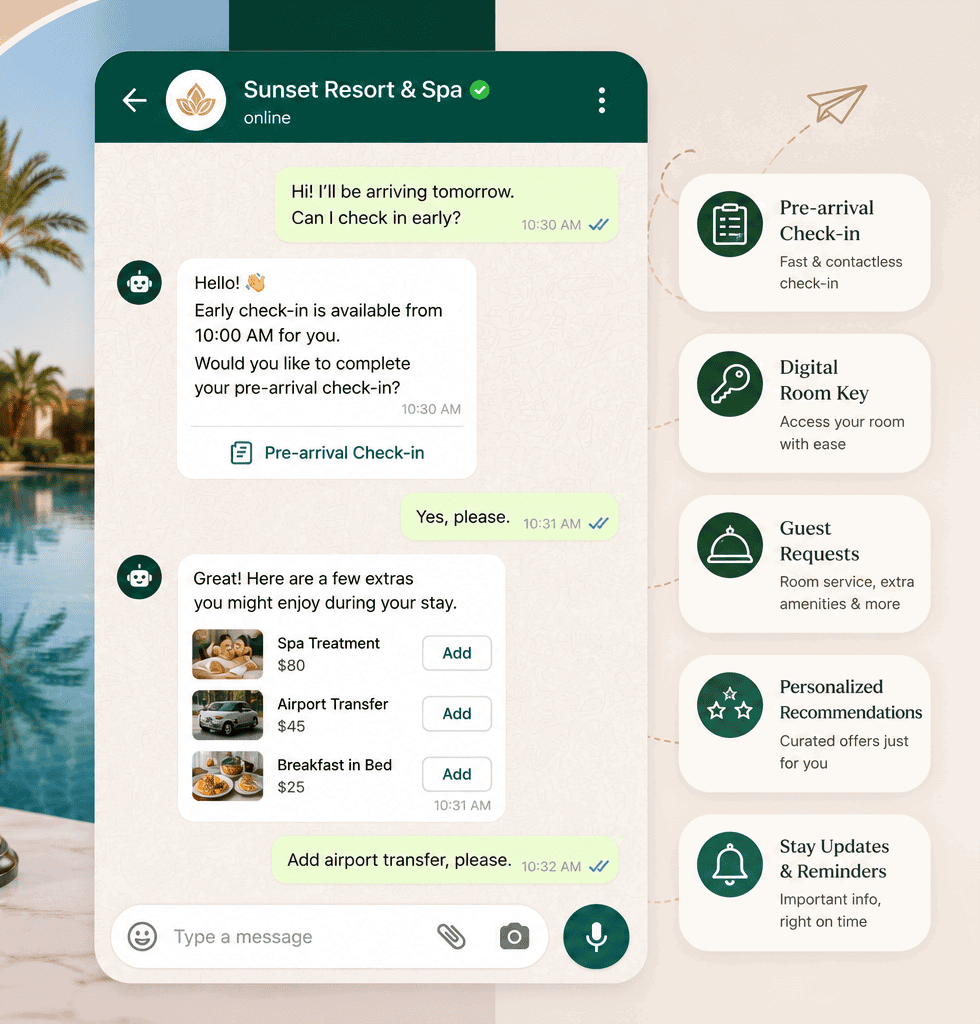
A hotel’s WhatsApp relationship with a guest can start days before they reach reception.
After a booking, the hotel could send arrival information and provide access to its digital check-in process. The guest might then use the same conversation to ask about airport transfers, breakfast times, late checkout, spa availability, or room upgrades.
During the stay, requests become simple:
Guest: “Can we get two extra towels in room 412?”
AI: “Of course. I’ve passed your request to housekeeping.”
Hotels can also adapt messages to the guest and location. A property in Dubai, for example, might provide information about prayer facilities, nearby mosques or halal dining when relevant rather than sending every guest the same generic welcome pack.
The result is a useful communication line that can cover pre-arrival, the stay itself and post-checkout follow-up.
7. Logistics and Delivery Tracking
“Where is my order?” is exactly the kind of repetitive question WhatsApp automation can handle well.
Businesses can send customers transactional updates as an order moves through fulfilment:
Order confirmed → Payment received → Dispatched → Out for delivery → Delivered
If there’s a problem, the customer can reply to the same conversation rather than hunting for a support email address or calling a delivery center.
This can be useful behind the scenes too. A shared inbox gives authorized staff one place to see customer conversations, while automation can handle predictable updates and route delivery problems to someone who can resolve them.
For an online fashion retailer processing hundreds of orders, that means fewer individual “Has my parcel been sent?” conversations for staff to answer manually.
8. Real Estate Lead Qualification and Viewings
Property enquiries often arrive with almost no useful information:
“Hi, is this still available?”
A good WhatsApp workflow can turn that message into a qualified lead before an agent gets involved.
An AI assistant might ask: “Sure. Are you looking to buy or rent?”
Then:
“Which area are you interested in?”
“What’s your budget range?”
“How many bedrooms do you need?”
Once those details are collected, the prospect can receive relevant listings, property photos, or viewing information. A qualified buyer looking for a three-bedroom home in Manchester with a £450,000 budget is far easier for an agent to help than an anonymous “Is this available?” enquiry.
Estate agents can start these conversations from a website button, a social profile or a QR code on the board outside. Lead generation is the one job where WhatsApp’s rules are on your side, because the customer messaging first is exactly what opens the window.
9. Transactional Messages and Service Notifications
Not every useful WhatsApp message needs to sell something.
Businesses can use WhatsApp for transactional communication such as receipts, booking confirmations, payment notifications, order updates, appointment reminders and service alerts.
A utility company, for example, could send:
“We’re carrying out planned maintenance in your area between 10am and 1pm tomorrow. Your service may be temporarily interrupted.”
A wholesaler could use the channel differently. A returning trade customer requesting a quote might be identified from their customer record, matched with the correct pricing and sent an appropriate quotation for confirmation.
This is where connecting WhatsApp with other business systems becomes particularly useful. Instead of staff manually finding customer information and copying it into messages, the conversation can trigger the appropriate workflow.
DMly’s CRM, automation, API and webhooks connect the conversation to the customer record and to whatever else you run, and the shared inbox catches everything automation should not be answering. If you want the CRM half in detail, what a WhatsApp CRM actually is covers it.
10. Event Ticketing and Booking
WhatsApp can make event registration feel more like a conversation and less like filling out a long form.
Someone interested in a conference, workshop, or local event could message the organizer and immediately get the date, venue, ticket options and pricing. They can then choose the appropriate ticket and be directed through registration and payment.
For example:
Attendee: “How much are tickets for Saturday?”
AI: “General admission is £25 and VIP is £45. Which would you like?”
After registration, WhatsApp remains useful. Organizers can send the attendee their confirmation, event reminders, venue information and last-minute updates through the same channel.
Tag contacts by event and by ticket type as they register, and the day-before update goes to the people attending rather than to everyone you have ever met. That tag is also what the segment behind the broadcast is built from, which is the sequence described further down.
11. Customer Loyalty and Retention
Loyalty programs only work when customers remember they exist.
WhatsApp gives businesses a convenient way to keep customers informed about rewards, available perks, member offers and upcoming opportunities to buy again without requiring them to repeatedly check another app.
A coffee shop, for example, might send:
“Hi Maya, you’ve earned a free drink on your next visit. It’s available until 30 September.”
A beauty retailer could take things further by segmenting customers according to previous purchases and sending relevant replenishment reminders or product offers.
Retention workflows don’t necessarily need a traditional points program either. A salon could contact clients who haven’t booked for eight weeks, while a restaurant could send a special menu to customers who previously showed interest in similar events.
What makes this land is the history behind the message, not the message. A loyalty programme on WhatsApp has rules that decide what you are allowed to send, and they are worth knowing before you promise anybody points.
12. Salon and Beauty Appointments
WhatsApp is particularly well suited to businesses where customers often have questions before booking.
Someone considering a hair treatment might first ask about the price, how long it takes and which stylist is available. Instead of answering those questions manually and then sending the customer somewhere else to book, the journey can happen through a connected workflow.
For example:
Customer: “Do you have any nail appointments after work tomorrow?”
AI: “Yes. We currently have appointments at 5:30pm and 6:45pm. Which works better for you?”
Once booked, the salon can send an automated reminder and provide an easy way to reschedule.
Broadcasts also fill cancellations. Rather than announcing an empty 3pm to everybody, the salon sends it to the people who have that service done. The whole booking half, from availability to reminders to taking the money, is in the WhatsApp appointment booking guide.
13. Supply Chain and Inventory Communication
WhatsApp Business use cases aren’t limited to conversations with consumers.
Wholesalers, distributors, retailers and field teams can use the channel to coordinate stock availability, orders, deliveries and operational updates.
Imagine a retailer with 20 branches. Instead of each location independently messaging head office to ask if an item is available, an automated workflow could provide approved inventory information or route the request to the correct team.
Suppliers could receive order-related notifications, while sales representatives can use WhatsApp to keep customers informed about stock changes or fulfilment.
14. Education and Course Enrolment
A prospective student rarely goes straight from seeing an advert to paying for a course. There are usually questions in between.
“When does the course start?”
“Are classes online?”
“Can I study part-time?”
“How much is tuition?”
Schools, tutors, training companies and education platforms can use WhatsApp automation to answer these repetitive questions immediately and guide prospective students towards the appropriate course or enrolment process.
A workflow might look like:
Instagram ad → WhatsApp enquiry → Course questions answered → Suitable program suggested → Registration → Reminder
Existing students can use the channel too. Businesses can send class reminders, schedule changes and relevant course updates to opted-in students.
For an independent tutor it is simpler still: a parent asks about maths, the assistant gives the available sessions and the price, and the thread ends in a trial lesson. Where courses run to a timetable and a pass of ten classes, building a class booking system on credits is the shape you want.
15. Customer Service and Support
Customer support is one of the most obvious WhatsApp Business use cases, but automation can make it much more useful than simply giving customers another number to message.
AI can handle predictable questions such as:
“Where is my order?”
“What time do you close?”
“Can I change my appointment?”
“Do you have this product in stock?”
Customers get an immediate answer where possible, while more complicated problems can be handed to a support agent.
A shared inbox also solves another common problem. Instead of support conversations living on individual employees’ phones, the team can see and manage them together.
DMly puts that shared inbox, the AI agents and the routing on one contact record, so the same system answers the routine questions, assigns the rest, and hands over cleanly when the model reaches its limit. Building the support agent itself and running a shared inbox with seats and assignment are each their own job.
And support doesn’t always have to end with an answer. Someone asking whether a particular laptop is suitable for video editing, for example, could receive product information, ask follow-up questions and eventually move towards a purchase.
How to Put These WhatsApp Business Use Cases Into Action With DMly
Knowing what WhatsApp can do is one thing. The bigger challenge is turning an idea such as “automate appointment reminders” or “qualify leads on WhatsApp” into a workflow your team can use every day.
DMly brings WhatsApp messaging, automation, AI, contacts, broadcasts, appointments, invoices and payments into one platform. Here’s how businesses can put those pieces together.
1. Connect Your WhatsApp Business Account
Start by connecting your WhatsApp Business account. There is a decision hiding in this step that is easy to get wrong: the three kinds of WhatsApp account are not interchangeable, and the catalogue, cart and template features in this guide need the Business Platform rather than the free app.
Once connected, WhatsApp becomes part of the same workspace as your other supported channels. Your team can manage incoming conversations through the shared inbox rather than relying on one employee’s phone.
Customers who reach you on Instagram, Messenger, TikTok, Telegram, SMS or the chat widget on your site land in the same place, threaded onto the same contact. Just remember the rules differ per channel, as the board above sets out.
2. Organize Your Contacts
Next, decide who you are talking to. Tags are the labels you apply; segments are the saved audiences built from them. You need both, and in that order, because the broadcast step later takes a segment and will not take a tag.
A salon might have segments for:
- New leads
- Existing clients
- Hair customers
- Nail customers
- Customers due for another appointment
- Previous promotion recipients
An estate agent might organize contacts by buyer or renter, preferred location, budget, or property interest.
Good segmentation becomes particularly useful once you start automating follow-ups and sending broadcasts.
3. Build Your WhatsApp Automations
Now you can turn repetitive conversations into workflows.
The automation builder is where the use cases above stop being ideas. Both worked examples below are ordinary flows, not custom work.
For example:
New property enquiry → Ask budget → Ask location → Ask number of bedrooms → Tag qualified lead → Assign to agent
Or:
Appointment booked → Confirmation → Reminder → Appointment completed → Google review request
AI agents can also handle routine questions and help move conversations forward. When a customer needs something more complicated, the conversation can be handed to a person in the shared inbox.
4. Create Your WhatsApp Message Templates
Any WhatsApp message you start, rather than reply to, needs an approved template once the 24-hour window has closed. Not sometimes: always.
DMly lets you create and manage templates for the messages your business sends regularly.
Meta files every template into one of three categories, and it reviews against the one you pick. This matters more than it sounds:
Utility covers things that follow from something the customer already did: appointment confirmations, order updates, delivery notifications, payment receipts.
Authentication is one-time passcodes and nothing else.
Marketing covers offers, back-in-stock alerts, event promotions and win-backs. Pick honestly. A promotion filed as Utility is not a clever saving, it is a rejection, and the commonest reasons templates get refused are exactly this: marketing content submitted as Utility, promotional wording inside a Utility template, and a body that is mostly placeholders with too little real text. If you would rather start from something that has already been through this, we keep a library of WhatsApp template wording you can copy.
Creating reusable templates also means your team isn’t rewriting the same messages whenever a campaign or automation runs.
5. Send Targeted Broadcasts
Now you can send to a group rather than to everyone. There is one thing about this step that catches almost everybody, so it is worth knowing before you open it. The broadcast wizard’s first step asks a single question, and it has no filters of its own: no tag picker, no pipeline stage, no custom field. You pick one saved segment by name, or you retarget an earlier broadcast. So the tags you carefully applied in step two do not send a broadcast on their own; a segment built from them does, and you build that under Contacts before you start the wizard.
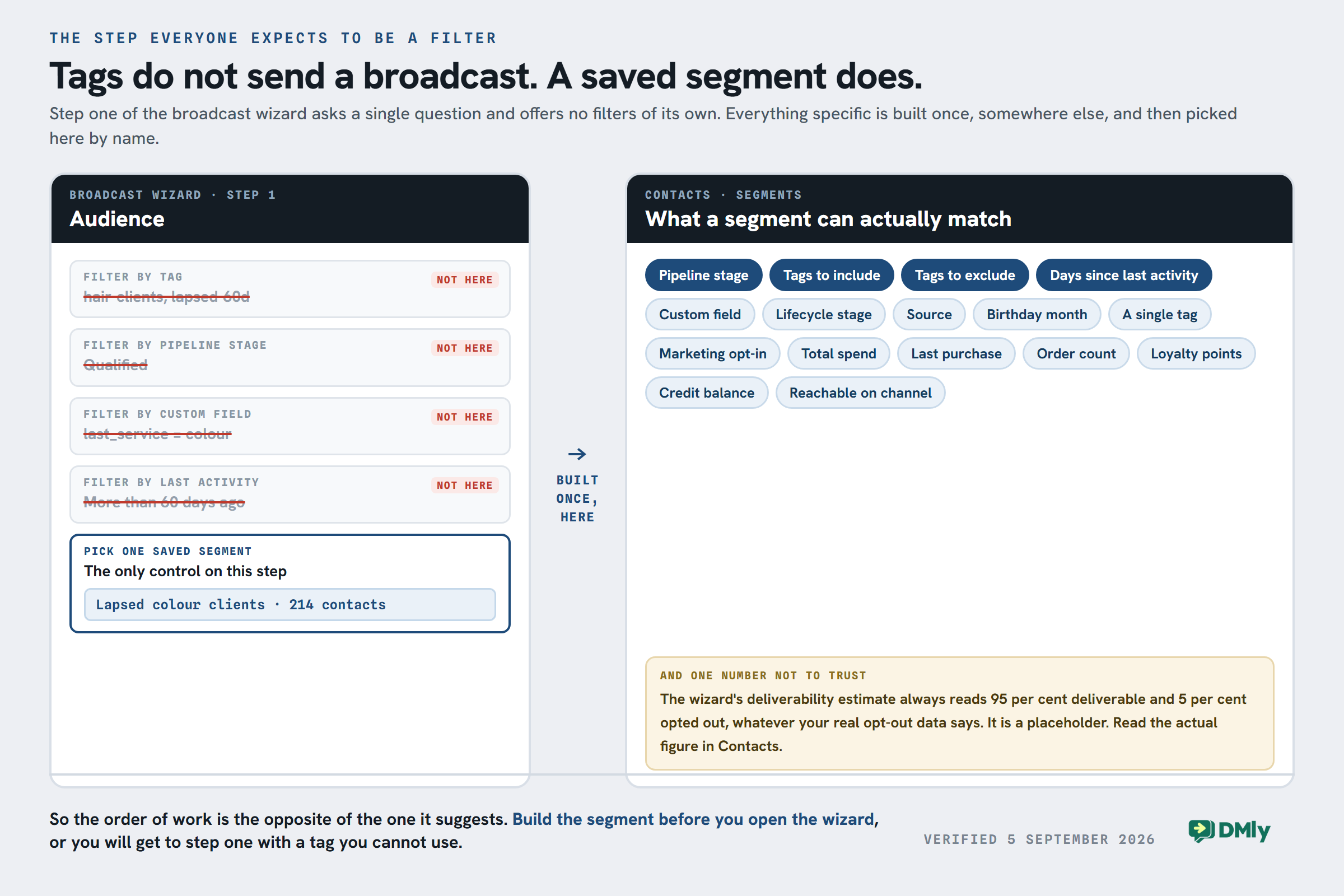
The segment builder itself reaches a long way: pipeline stage, tags to include and exclude, days since last activity, and then a rule builder covering custom fields, lifecycle stage, source, birthday month, marketing opt-in, total spend, last purchase, order count, loyalty points and credit balance. Build it once and it stays useful.
And one number on that screen not to trust. The wizard shows a deliverability estimate beside your audience. It always reads 95 per cent deliverable and 5 per cent opted out, whatever your actual opt-out data says, because it is a placeholder rather than a calculation. Read the real figure in Contacts. Opted-out contacts are blocked at the moment of sending either way, so nobody gets a message they refused, but the estimate will not tell you how many that is.
You can choose existing contacts or retarget recipients of an earlier broadcast based on their engagement, including people whose messages were sent, delivered, read, replied to, sent but not replied to, or failed.
That opens up more useful follow-ups.
A gym, for example, could send a trial offer and later retarget people who read the original broadcast but didn’t reply instead of messaging everyone again.
Broadcasts can go immediately or be scheduled. One useful detail if you schedule: the recipient list is expanded when it sends, not when you build it, so a contact who arrives in between still gets it. Two channels are missing from all of this, and it is better to find out here than on the day: broadcasts do not exist on TikTok or on the website chat widget. Our guide to opt-in, templates and timing for WhatsApp broadcasts covers the rest.
6. Connect Conversations With Bookings and Payments
Some WhatsApp conversations are supposed to end with an action.
Someone asking about a massage wants an appointment. A customer discussing a service may need an invoice. A restaurant enquiry might turn into a booking.
Appointments, invoices and payments live in the same place as the conversation, so the next step happens in the thread instead of in an email your customer will not open. The money is collected on your own payment gateway, which is also where it lands: DMly mints the link and reads the result.
For example:
WhatsApp enquiry → Questions answered → Appointment booked → Reminder → Invoice → Payment → Follow-up
The customer gets one connected experience, while your team has much more context about what happened before.
7. Keep Human Support in the Loop
Automation shouldn’t mean customers can never reach a person.
The shared inbox is where a person takes over when the AI agent or the flow reaches something it should not be answering. Every customer-facing agent needs that escape hatch wired before it goes live, not after.
That could be a complicated support issue, a high-value sales lead or simply a customer who says:
“I’d rather speak to someone.”
Because the previous messages are already there, the employee taking over can see the conversation instead of making the customer start again.
Which WhatsApp Business Use Cases to Build First
The best WhatsApp Business use cases have one thing in common: they give the conversation somewhere useful to go.
A product question can become an order. An enquiry can become an appointment. A delivery notification can prevent a support call. And a previous customer can receive a relevant message that brings them back.
DMly helps businesses build those journeys without treating WhatsApp as a separate island. With AI agents, automation, a shared inbox, contact segmentation, broadcasts, appointments, invoices and payments, businesses can manage much more of what happens before, during and after the conversation in one place.
Frequently Asked Questions
What Are the Most Common WhatsApp Business Use Cases?
Some of the most common uses include customer support, appointment booking, order updates, delivery tracking, lead qualification, marketing broadcasts, event reminders and sales conversations.
The right use cases depend on the business. A salon may focus on appointments and reminders, while an online retailer may get more value from product enquiries, order updates and repeat-purchase campaigns.
Can WhatsApp Business Be Automated?
Yes. Businesses using the WhatsApp Business Platform can automate parts of their customer communication, subject to Meta’s messaging rules.
Can I Use WhatsApp Business for Marketing?
Yes, but customers should have opted in to receive marketing messages from your business, and Meta’s rules for business-initiated messaging apply.
Instead of sending every promotion to your full contact list, segmentation can help you target customers based on relevant information or previous engagement. DMly also lets businesses retarget recipients based on how they interacted with an earlier broadcast.
How Can Small Businesses Use WhatsApp Business?
Small businesses can start with simple workflows that remove repetitive work. A salon could automate appointment enquiries and reminders. A restaurant could answer menu and opening-hours questions. An estate agent could collect a new lead’s budget and property preferences before an agent takes over.
You don’t need to automate every conversation at once. Start with the interactions your team repeats most often.
Writing about WhatsApp automation, bookings and growth for local business.
Turn WhatsApp into your busiest channel.
Start free and run message, bookings, payments and reviews in one place.
