
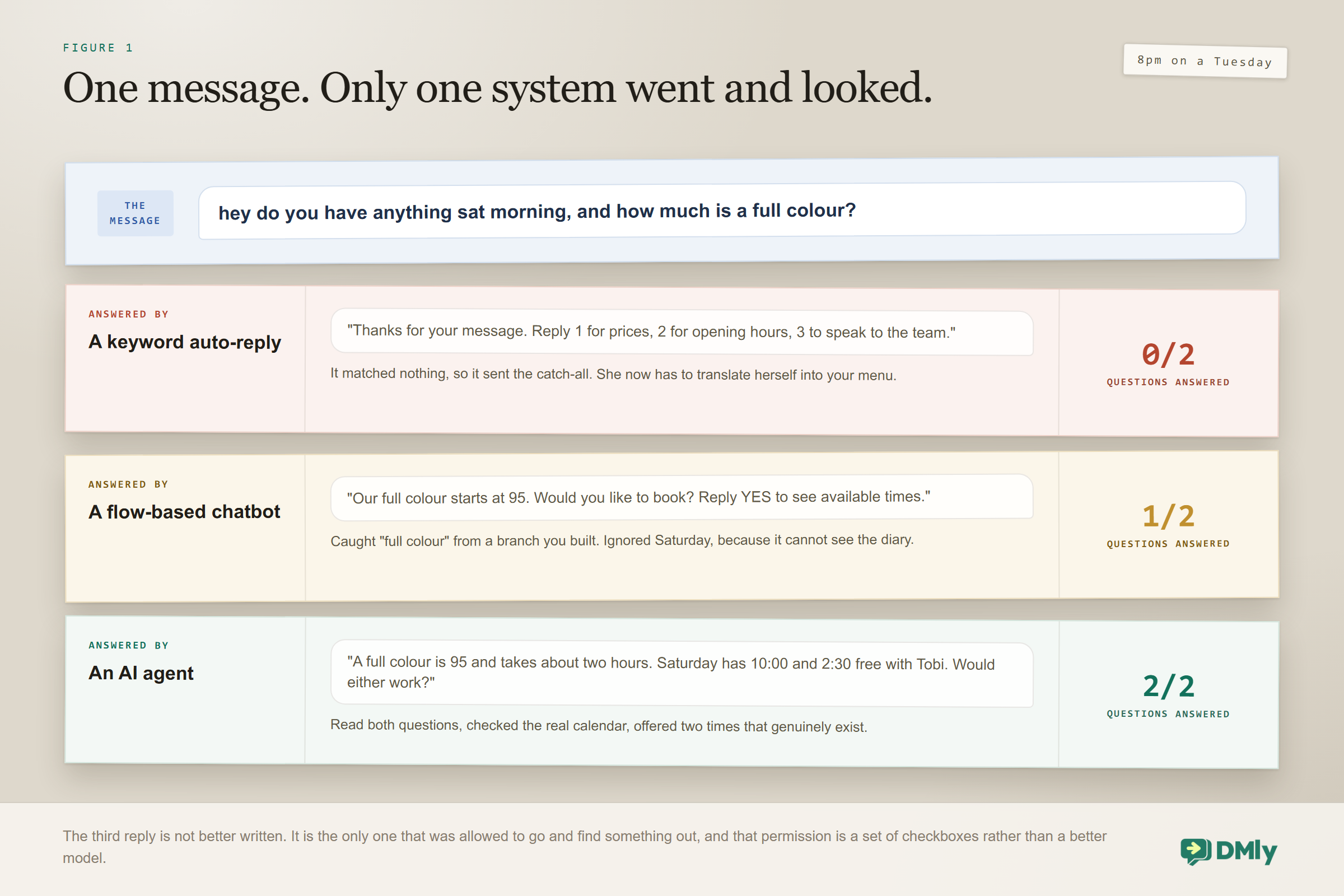
A customer writes this at eight o’clock on a Tuesday evening: “hey do you have anything sat morning, and how much is a full colour?” Two questions in one sentence, informally phrased, containing no keyword anybody planned for.
Here is what each of the three systems businesses actually run on WhatsApp says back, which settles the AI agent vs chatbot question faster than any definition.
| What answered | What it said | What actually happened |
| A keyword auto-reply | “Thanks for your message. Reply 1 for prices, 2 for opening hours, 3 to speak to the team.” | It matched nothing, so it sent the catch-all. Two clear questions ignored, and the customer now has to translate herself into your menu |
| A flow-based chatbot | “Our full colour starts at 95. Would you like to book? Reply YES to see available times.” | Better. It caught “full colour” and answered from a branch you built. It ignored Saturday, because no branch handles two questions at once, and it cannot see the diary |
| An AI agent | “A full colour is 95 and takes about two hours. Saturday has 10:00 and 2:30 free with Tobi. Would either work?” | It answered both questions, checked the real calendar and offered times that genuinely exist. It did not follow a path; it decided to look two things up and then wrote a reply |
The third reply is not better because the writing is better. It is better because that system was allowed to go and find out. That is the whole of AI agent vs chatbot, and everything below is detail on it, including the part almost nobody explains: how you run both at once without them fighting over who answers.
What a Chatbot Actually Is, and Why It Is Not Obsolete
A chatbot follows rules you defined in advance: if the message matches this, send that. The simplest version is a keyword auto-reply. The more capable version is a flow, where you draw a decision tree with branches, buttons and conditions, and the customer travels down whichever path their answers select.
Chatbots have real virtues that get lost in the excitement about AI, and it is worth naming them plainly before anybody talks you out of using one.
- They are completely predictable. That matters enormously when the message carries a price, a policy or a commitment you can be held to.
- They cost nothing per message beyond the messaging itself, because no model is being called.
- They are auditable. When a customer says they were told something, you can point at the exact box in the flow and see what it sends.
For confirmations, reminders and receipts, a rule is not a poor substitute for intelligence. It is the correct tool, and reaching for an AI agent there is a downgrade dressed up as an upgrade. Building those well is the subject of our no-code WhatsApp automation guide.
Their limitation is exactly the one the example showed. A chatbot can only handle what you anticipated, and customers are inexhaustibly creative about phrasing. Every sentence you did not think of lands in the fallback branch.
What an AI Agent Actually Is
An AI agent uses a language model to interpret the message, and tools to act on your systems. The interpretation half is what most people mean by AI: it understands “anything sat morning” without you having listed that phrasing anywhere. The tools half is what makes it an agent rather than a chat interface, and it is the part that gets skipped in almost every explanation.
DMly’s own documentation puts it in four words: switching on tools lets the assistant act, not just answer. In practice those tools cover reading the contact record, setting custom fields, adding and removing tags, moving someone along your pipeline, listing your services, checking genuine availability, creating a booking, rescheduling or cancelling one, and handing the conversation to a person.
The single most common gap between what people think they deployed and what they deployed: An agent can only act through the tools that were switched on, and ticking a tool is not the same as using it: the prompt is what makes the assistant reach for one. An agent with no booking tools cannot book, however confidently it discusses booking, and an agent with booking tools and a prompt that never mentions them will guess at times instead of checking. Both failures produce a conversation that reads perfectly.
AI Agent vs Chatbot, Side by Side
Read the AI agent vs chatbot comparison as a list of trade-offs rather than a scoreboard, because three of these rows are places the chatbot wins outright.
| Chatbot | AI agent | |
| How it decides | Rules and branches you drew | A model interprets each message |
| Unexpected phrasing | Falls to the catch-all | Usually handled |
| Can it look things up? | Only what the flow was wired to fetch | Yes, through the tools you switch on |
| Can it act on your systems? | Through explicit flow steps | Yes, and it chooses when |
| Predictability | Total | High, not absolute |
| Auditability | You can point at the box | You read the transcript afterwards |
| Running cost | Effectively none per message | Model usage, metered or on your own key |
| Best at | Confirmations, reminders, receipts, menus | Open questions, qualifying, booking, support |
AI Agent vs Chatbot: Which Does Your Business Need?
Most businesses need both, and the honest test per job is whether you can write down every acceptable answer in advance. If you can, use a rule. If you cannot, you need an agent.
Use a chatbot or a flow when the message is triggered by an event rather than by a question. Appointment confirmations, reminders, payment receipts, review requests, order updates. These have one correct wording, they have to be reliable, and there is nothing to interpret. Automating them well is most of the value in our WhatsApp business automation guide, and none of it needs AI at all.
Use an AI agent when a human is currently reading the message to decide what to do. Answering questions from a price list, qualifying an enquiry, finding a slot that works, dealing with the sixty phrasings of “are you open”. If a person is the interpreter today, that is the job an agent takes over, and our guide to WhatsApp AI chatbots for small businesses covers the wider case for it.
The combination almost every business lands on: An AI agent at the front, handling whatever arrives in whatever words. Rule-based flows behind it, firing the confirmations, reminders and receipts on events. The agent handles ambiguity; the flows handle certainty. Trying to make either do the other’s job is where both get a bad reputation.
Sorting Your Own Messages Into the Right Layer
The fastest way to settle this for your own business is not to think about it in the abstract, it is to take the last fifty messages you received and sort them. Here is what that sorting usually produces, and it is a more useful answer than any comparison table.
| The message | Where it belongs | Why |
| “What time do you close today?” | Exact keyword rule | One correct answer, asked constantly, and free to answer a thousand times |
| Appointment confirmed, reminder, receipt | Event-triggered flow | Nobody asked a question. A fact happened and a fixed message follows it |
| “Do you do gel on natural nails and how long does it take?” | The agent | Two questions in one sentence, and the answer lives in your material rather than in a branch |
| “Can I move Thursday to next week sometime?” | The agent, with booking tools | It has to read the diary before it can say anything true |
| Your refund policy, word for word | Rule-based message | Must be identical every time, and you have to be able to point at the box |
| “hi” | Exact keyword rule | The single most common message any business receives, and a rule answers it instantly for nothing |
| “im not happy with what happened on saturday” | The agent, handing straight over | Not because the agent should answer it, but because it should recognise it and fetch a person |
| Tagging everyone who mentions a competitor | A silent flow | It never messages anybody, so it runs alongside whatever answered |
Two patterns fall out of doing this with real messages. The first is that far more of your traffic is rule-shaped than people expect, usually somewhere around half, and every one of those is a message you are currently paying a person or a model to handle. The second is that the messages which genuinely need an agent are the ones where a human is currently reading them to decide what to do, which is exactly the test from the previous section, arrived at from the other direction.
Do the sorting before you build anything. It takes half an hour, it tells you whether you need an agent at all, and it produces the keyword list for layer one as a by-product.
How Both Run in One Workspace Without Fighting
This is the mechanism nobody explains, and it is what turns AI agent vs chatbot from a choice into a layout. If you take one technical thing from this page, take this one.
A customer who sends one message gets one bot answer, however many automations match it. Out of every active flow-builder automation on that channel whose trigger and keywords match, DMly starts two different things:
- Every matching automation that never messages the contact. A flow that only tags, updates a field, syncs a CRM or calls a webhook is not competing for the reply, so all of those run. DMly works this out for itself: a flow with no step that puts anything in front of the contact is treated as quiet.
- Exactly one of the automations that would reply. The most deliberate match wins.
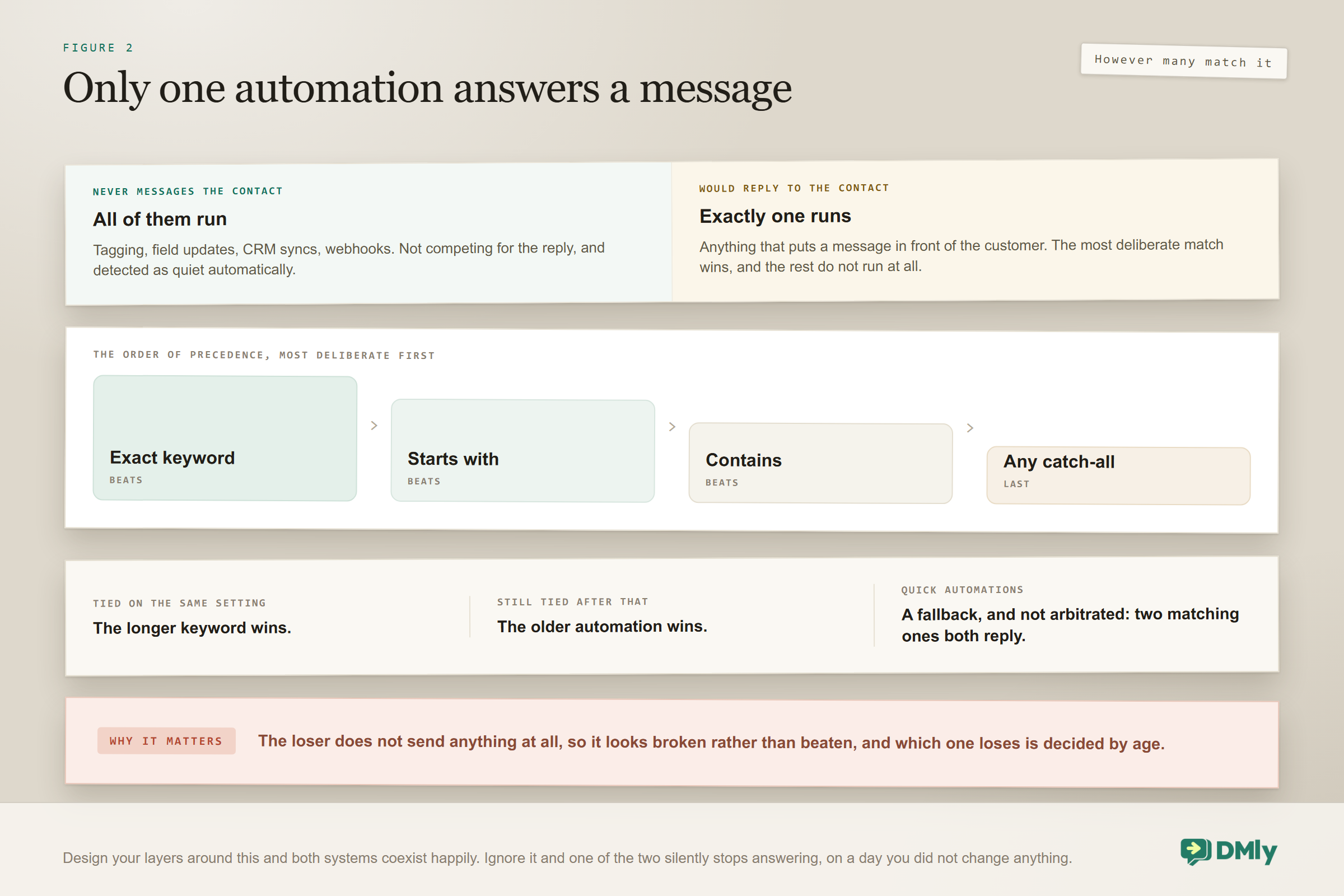
The order of precedence is specific and worth memorising, because it is what lets you design the layers on purpose. An exact keyword beats “starts with”, which beats “contains”, and any keyword at all beats a catch-all. On the same setting, a longer keyword beats a shorter one. And if it is still tied, two catch-alls for instance, the older automation wins.
So the practical design is: put your top ten questions behind exact or starts-with keywords, then let a catch-all route everything else to the assistant. The predictable questions get an instant, free, identical answer every time, and the agent only ever sees what you could not anticipate.
Why two catch-alls is worth fixing even though nobody gets a double reply: The loser does not send anything at all. It just quietly never runs, so it looks broken rather than beaten, and which of the two loses is decided by age rather than by you. If a bot you built has mysteriously stopped answering, check whether something else on the same channel is now answering everything.
Three qualifications keep this from biting you.
- Event triggers are not arbitrated at all. Contact events, dates, store events, payment events and conversation-closed triggers start every active automation that matches, and the customer receives whatever each of them sends. Two flows on Invoice paid that both message the client means the client is messaged twice. If you are seeing double sends, look here before you blame the assistant.
- Quick automations are a fallback, not a competitor. They run only when no flow answered the message, and here is the part that surprises people: they are not arbitrated among themselves. Two matching quick automations both reply.
- A flow can opt out of being the answer. The setting Runs quietly (never counts as the reply) lets a flow run alongside whichever one replies. Tick it for a flow that does send something but should not be the answer, such as one that notifies your team and drops a one-line acknowledgement, or one whose message goes somewhere else entirely.
The checkbox only pushes one way: Ticking Runs quietly forces a flow quiet. Clearing it does not force a flow to count as the reply; it just hands the decision back to DMly. And it changes nothing at all for an automation started by an event, because those never compete in the first place.
What an AI Agent Still Cannot Do
The honest limits matter as much as the capabilities, because nearly all the disappointment comes from expecting the wrong things. Five constraints define the edges.
It can only act through the tools you switched on. The most common gap between what a business thinks it deployed and what it actually deployed, and worth checking before anything else when an agent underperforms.
It cannot see what it has not been given. Internal notes your team writes on a conversation are never shown to the AI. That is the right default for privacy, and it means the assistant does not know the history your colleagues have been quietly building.
Its memory of the conversation is bounded. It reads the recent messages, twelve by default and up to fifty, not the entire relationship. Plenty for most exchanges; worth knowing for a customer returning after three weeks.
It knows your instructions, not your intentions. If the prompt does not say to hand over on complaints, it will cheerfully attempt one. Nothing about a model supplies commercial judgement you did not write down.
It is the wrong place for exact legal or contractual wording. Anything that must be word-perfect every time belongs in a rule-based message, where you can point at the box and prove what was sent.
None of these is a reason to avoid agents. They are the reasons good deployments pair an agent with rules and a person, rather than treating it as a replacement for either.
Two Loop Guards You Get for Free
The obvious worry about a system that can act is that it triggers itself, and there are two documented guards against exactly that. Both are worth knowing because they let you build things you would otherwise be nervous about.
A flow’s own sends never fire an outgoing-message trigger. So a flow that reacts to your outbound messages cannot start itself again off the message it just sent, which is what makes that whole family of automations safe to build.
A flow’s own field writes never fire Field changed. The User Input step, the Sync Contact step and the AI node’s own field updates are all excluded, so an agent that sets a custom field cannot trigger the automation that was watching that field.
Neither guard covers everything, and neither saves you from a genuine loop between two different flows, but between them they remove the two mistakes people make first.
Does an AI Agent Cost More to Run?
Yes, and usually less than people expect. A rule-based flow costs nothing per message beyond the messaging itself, because no model is called. An AI agent consumes model usage on every reply: replies on DMly’s shared AI count against your plan’s monthly allowance, or you connect your own provider key and the replies become un-metered by DMly on the plans that allow it, with the provider billing you directly.
Two things keep this modest in practice. Agent conversations are short when they are built well, a question and two or three exchanges. And most of what a small business sends is still rule-based traffic, which costs nothing extra. The larger line on the bill is nearly always the messaging rather than the model, which our breakdown of what a WhatsApp chatbot costs goes through, with current plan prices on the pricing page.
How to Tell What a Vendor Is Actually Selling You
Because the words have blurred, almost everything on the market now calls itself an AI agent. Four questions cut through it, and they are worth asking on any demo.
- “Can it look something up in my system, live, during the conversation?” Ask them to show it checking real availability or a real customer record, not a scripted demo. If the answer involves an integration project, you are being sold a chat interface with a roadmap attached.
- “What happens when somebody phrases it in a way you did not plan for?” Type something awkward yourself during the demo. A rule-based system will fall to its catch-all, which is perfectly fine if that is what you are buying. You should simply know that is what you are buying.
- “What does it do when it is not sure?” The correct answer is that it says so and hands over to a person. If the honest answer is that it guesses, that is a liability pointed at your customers.
- “What does a reply cost, and who bills me?” Model usage is either bundled into a plan allowance or billed by the provider against your own key. Both are reasonable. Not knowing which is not.
The pattern to watch for is a product that answers beautifully and cannot do anything. It demos superbly, because a demo is a conversation, and it disappoints in month two, because a business is transactions.
Inside One Platform, This Is a Step Choice, Not a Product Choice
The framing that makes all of this practical is that you are not choosing a product, you are choosing a step. In DMly both live in the same flow builder: a rule-based automation is triggers, conditions and message steps, and an agent is an AI Reply step with a prompt, a model and a set of tools switched on.
You can drop an AI Reply step into the middle of an otherwise rule-based flow, which is how most genuinely useful automations end up built: a deterministic opening, an interpreted middle, a deterministic close. Three configuration facts follow from that, and they are the ones to know before you build either.
- Tools are switched on per node, not per workspace, so two agents in the same workspace can have completely different permissions.
- The prompt determines whether the agent uses the tools it has. Enabling a tool is necessary and not sufficient.
- There are guard rails by design. A reply can use up to eight tool-calling rounds, and a conversational AI step stops replying after forty turns.
The Two Conditions That Decide Whether Either One Runs At All
Neither an agent nor a chatbot answers anybody unless two separate things are true, and they are easy to confuse for one thing. A trigger is only considered when the automation is Active and it has a published version.
Saving a draft changes nothing for your customers. An automation can be switched on, showing green in the list, with a flow that was never published, and it will answer nobody. Publishing also opens a fresh draft behind the live version, so whatever you edit next is the next version and the live one keeps running until you publish again.
That last detail explains the most common “my edits are not reaching customers” report there is. You are almost certainly editing the draft of an already-published flow, and autosave has been faithfully saving it to a version nobody is using.
Frequently Asked Questions
Is the AI agent vs chatbot question really a choice?
Less often than the framing suggests, and the difference between them is not quality of writing. A chatbot follows a path you drew in advance, so it can only handle what you anticipated. An AI agent interprets the message and then acts through tools, so it can go and look something up in your calendar or your contact record mid-conversation and answer from what it found. A very well-written chatbot and a very badly configured agent can produce identical transcripts right up to the moment somebody asks a question you did not plan for.
Can I run both at the same time?
Yes, and most workspaces should. Only one automation answers a given message, and the most deliberate match wins: an exact keyword beats starts-with, which beats contains, and any keyword beats a catch-all. So put your predictable questions behind keywords and let a catch-all route the rest to the agent. Flows that only tag, sync or call a webhook do not compete at all and run alongside whichever one answered.
Why has one of my bots stopped answering?
Most likely something else on the same channel now answers the same thing and beat it. When two automations both reply to everything, the older one wins and the newer one silently never runs, which looks like a broken bot rather than a beaten one. The other common cause is that the automation is Active but its flow was never published, which is a separate condition from being switched on and shows nothing unusual in the list.
Which is cheaper to run?
A rule-based chatbot, comfortably. It costs nothing per message beyond the messaging itself, because no model is called. An agent consumes model usage on each reply, either against your plan’s monthly allowance on the shared AI or billed directly by your own provider if your plan lets you connect a key. In practice the gap is smaller than people expect, because agent conversations are short and most of what a small business sends is still rule-based.
Will an AI agent send two replies by mistake?
Not for a message it answered, because only one automation ever answers a message. Double sends nearly always come from event triggers, which are not arbitrated at all: every matching automation runs and the customer gets whatever each of them sends. Two flows on Invoice paid that both message the client will message the client twice. The other source is quick automations, which run as a fallback when no flow answered and are not arbitrated among themselves.
Can an AI agent trigger itself in a loop?
Not by the two obvious routes, both of which are guarded. A flow’s own sends never fire an outgoing-message trigger, so a flow cannot restart itself off the message it just sent. And a flow’s own field writes, including the AI node’s own updates, never fire Field changed. Neither guard protects you from a genuine loop between two different flows, so a wait step and a sensible condition are still worth having.
Do I need an AI agent if my questions are always the same?
Probably not, and that is a real answer rather than a modest one. If you can write down every acceptable reply in advance, a rule gives you the same words every time, at no per-message cost, with a box you can point at when somebody disputes what they were told. Reach for an agent at the point where a person is currently reading messages in order to decide what to do with them.
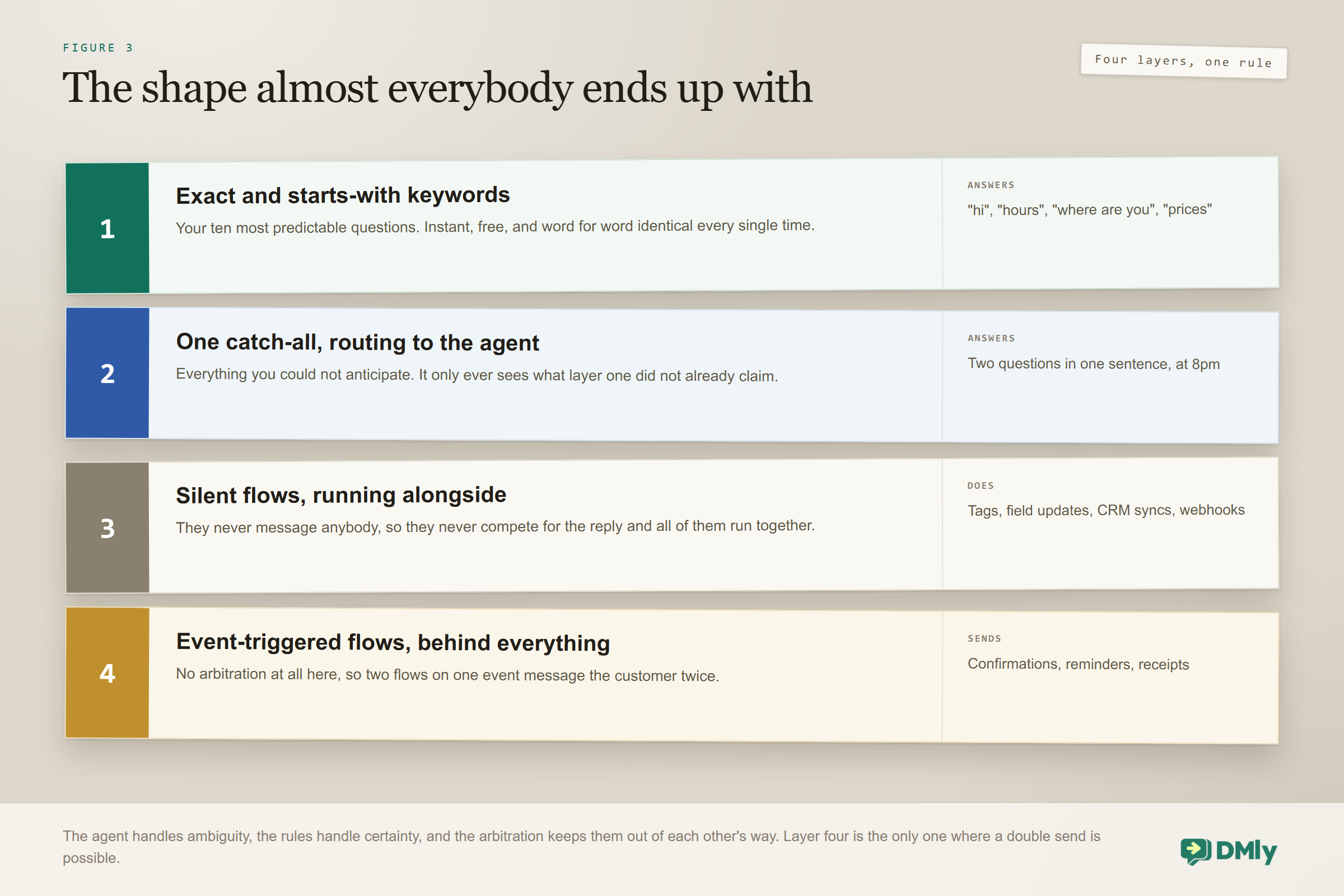
Rules for the messages with one right answer, an assistant for everything you could not anticipate, and one arbitration rule keeping them out of each other’s way.
Stop Asking AI Agent vs Chatbot, Ask What the Message Needs
The AI agent vs chatbot question is the wrong shape, because it treats two tools as competitors when they answer different kinds of message. A confirmation has one correct wording and should never be improvised. A Tuesday-night enquiry with two questions in it cannot be anticipated and should never be forced through a menu.
So stop treating AI agent vs chatbot as a purchase decision and treat it as a layout. Put keywords in front of the questions you can predict, an assistant behind them for the ones you cannot, silent flows alongside both to keep the records straight, and event-triggered flows behind all of it for the messages that fire on facts rather than on questions. Then the only interesting question left is which of your messages belongs in which layer, and that one you can answer in an afternoon with a list of the last fifty things customers actually sent you.
Writing about WhatsApp automation, bookings and growth for local business.
Turn WhatsApp into your busiest channel.
Start free and run message, bookings, payments and reviews in one place.
