
Chatfuel Alternative 2026: A Free Plan, and a Limit With No Number
Under the price on Chatfuel’s pricing page, in the smallest type on the screen, sits one sentence: “Usage limits apply. See plan limits for details.”
Follow that link and you find the thing that actually decides whether your assistant keeps answering customers. It is a fair use allowance on AI processing, it is measured per billing period, and Chatfuel publishes no number for it anywhere. What the page does publish is what happens when you cross it: “your bot pauses. Your AI assistant stops replying to incoming messages until the limit resets.”
So the headline price is the easiest to read on this blog, and the monthly bill behind it is one of the hardest to forecast. That is the honest shape of Chatfuel in September 2026, and it is the reason people go looking for a Chatfuel alternative in the first place. Every figure below was read at source on 8 September 2026: the pricing page, the plan limits page, the terms of use, and Chatfuel’s own page about what Meta changes on 1 October.
A warning about the version of this page you may have read before. It quoted a Business plan at $23.99 a month and an Enterprise plan at $400, with extra conversations at about two cents each. Chatfuel has since replaced that whole structure. Those numbers are withdrawn below, and the correction is not in our favour on every point: Chatfuel now has something DMly does not, which is a genuinely free plan. If you are weighing a Chatfuel alternative on price alone, start with that fact rather than with ours.
What Chatfuel Is in September 2026
Step zero, before any claim about a vendor: check that the vendor is still there. Checked on 8 September 2026, chatfuel.com returns 200 on the root, on robots.txt, on the sitemap and on the pricing page, and serves a real, current product rather than a holding page. Its English sitemap lists more than 450 pages. The company behind it is 200 Labs, Inc., trading as Chatfuel, at 490 Post Street in San Francisco, and its terms of use carry an effective date of 1 August 2026. This is a live, actively maintained business.
Chatfuel automates conversations on Instagram, Facebook Messenger, WhatsApp and a website widget, with an AI assistant it calls Fuely at the centre of the product. It also runs a set of TikTok automation pages and describes itself there as an Official TikTok Business Partner. Around the assistant sit a shared inbox for when a person needs to take over, a visual flow builder, keyword replies, comment and story reply automation, broadcasts, contact segmentation and a template library. It says it is trusted by more than 150,000 businesses and it is a Meta Business Partner and WhatsApp Business Solution Provider.
One structural thing matters more than any feature, and you will not find it on the marketing pages. Chatfuel currently runs two platforms. There is the current one at panel.chatfuel.com, and there is a legacy Dashboard. Chatfuel’s own October page says the legacy Dashboard “does not get our Meta credit line, and it will not support Meta’s new AI platform”, and it gives businesses still on it a dated instruction. If you are an existing Chatfuel customer, that paragraph is the most important thing on their website this month, and it is covered further down.
Chatfuel Pricing in 2026, Read From the Pricing Page
There are two plans on the pricing page and one of them is free. Chatfuel Light costs nothing, takes no card, and is not a trial. Chatfuel’s own list of what it includes reads: Instagram, Facebook and WhatsApp automations, a shared inbox for customer conversations, automated replies and the flow builder, contact management and segmentation, and ready-made templates.
The paid plan is called AI PRO, and here the page does something worth slowing down for. It opens with the billing toggle already set to Yearly, prints $49 in large type, and puts the words “USD per month” underneath. Read quickly, that is a forty nine dollar monthly plan. Read the page’s own data and it is not.
| Plan | Billed yearly | Billed monthly | Card required |
|---|---|---|---|
| Chatfuel Light | Free | Free | No |
| AI PRO | $49 a month | $69 a month | Free trial, then yes |
So the number almost every comparison article quotes for Chatfuel, ours included until today, is the annual rate presented as a monthly one. If you want to pay month to month, the plan is $69. That is a forty per cent difference on the same product, and it is the single most common way a software price gets misquoted.
None of this is hidden. The toggle is right there and the discount is labelled. It is simply the default view, and defaults are what people quote. Anyone writing about Chatfuel pricing, ourselves included, should be reading both sides of that toggle.
There Is a Second Chatfuel Price List, and It Is Still Live
Chatfuel’s WhatsApp product page publishes different plans at different prices from its pricing page. On chatfuel.com/whatsapp, read the same day, the pricing block reads “Business from $69” and “Enterprise from $400”, describing Enterprise as being for businesses “seeking a tailored plan, priority support, and a dedicated bot-builder specialist”. Neither plan name appears on the pricing page at all.
We are not going to tell you which of those two pages is right, because we cannot know. What we can tell you is what each one says, on what date, and what to do about it: before you sign anything, ask Chatfuel in writing which plan you are buying, at which billing period, and what the renewal rate is. The same question is worth asking any vendor whose site carries two price lists, and three of the last five vendors reviewed on this blog did.
The old $400 Enterprise figure on this page came from that WhatsApp page, and it is still published, so it stays in the table below as a live quote rather than being deleted. The $23.99 Business price and the two cents per extra conversation are a different matter: neither appears anywhere we could find on Chatfuel’s site today, so both are withdrawn.
| Where it is published | What it says | Read on |
|---|---|---|
| chatfuel.com/pricing | Chatfuel Light free; AI PRO $49 a month billed yearly, $69 billed monthly | 8 September 2026 |
| chatfuel.com/whatsapp | Business from $69; Enterprise from $400 | 8 September 2026 |
| Pricing page data, not displayed | An older question and answer set describing conversation counting and an over-limit adjustment fee | 8 September 2026 |
| This page, before today | Business $23.99; Enterprise $400; about $0.02 per extra conversation | Withdrawn |
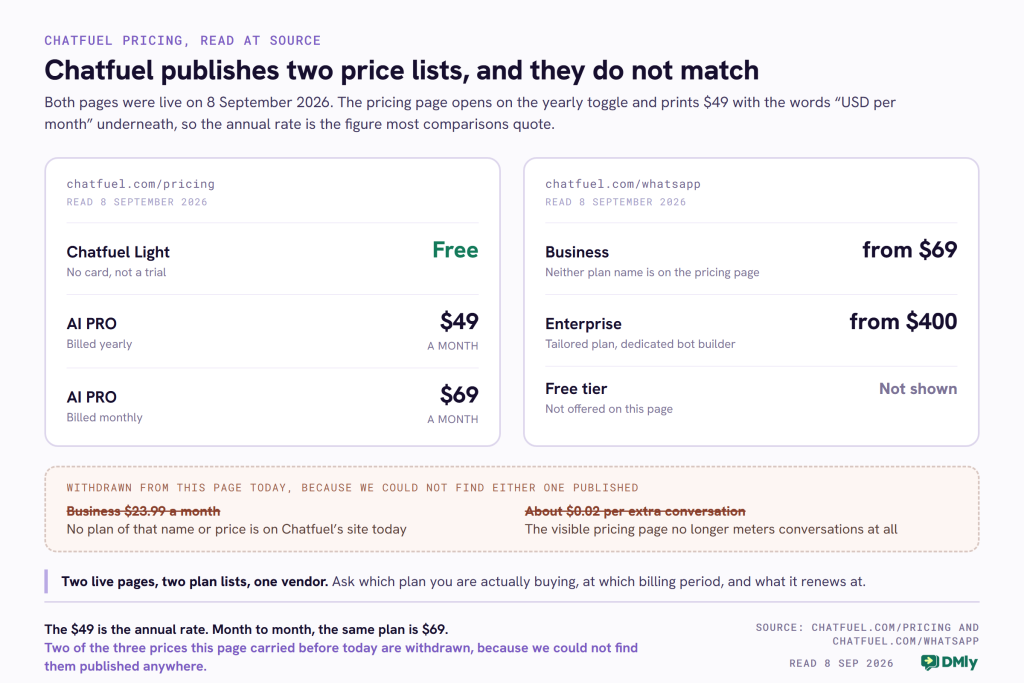
The third row of that table deserves a sentence of its own. The pricing page still carries an older set of questions and answers in its underlying data that the page does not display. They describe a different billing model from the one on screen: “A paid plan provides you with a number of conversations”, and “If you go over your plan’s limit we will charge an adjustment fee. This is done at the end of each month. The fee is based on how many new conversations your bot had over your limit.” Another defines a conversation as “one written exchange between a user and a bot, or a user and a Live Chat admin”, closing after 24 hours of silence.
The likeliest explanation is the dullest one: a redesign replaced the visible plan cards and the old answers stayed in the page’s content file. We are not suggesting they are the live terms. But they are the only place on Chatfuel’s public site that explains what happens when you go over a limit in money rather than in a pause, and that makes them worth reading before you buy. Ask whether AI PRO carries a conversation count, and what the adjustment fee is if it does.
What the Terms Add That the Pricing Page Does Not
Reading the contract keeps paying off, and it did again here. Chatfuel’s terms of use, effective 1 August 2026, add three things a buyer would want and the pricing page does not mention.
- Renewals are not at the price you signed up on. The terms say a paid service “will be automatically extended for successive renewal periods of the same duration as the subscription term originally selected, at the then-current non-promotional rate”. If the 29 per cent annual discount is promotional, that sentence is the one to ask about.
- Cancelling mid-term does not get your money back. You keep the service to the end of the period you have paid for, and the terms say plainly that you “will not be eligible for a prorated refund of any portion of the subscription fee paid for the then-current subscription period”.
- There is a refund route, and it is not on the pricing page. The terms say you can ask for a refund through the Chatfuel dashboard or by email, and that it will be processed within 30 days. The unpublished question set adds a shape for it: refund if you cancel within three days on monthly billing, or 30 days on annual.
There is one more thing in the pricing page’s data, and it is a real product rather than a plan. Chatfuel publishes rough starting prices for having a bot built for you, described as estimates that depend on the size of the job: from $100 for gathering feedback or re-engagement, from $150 for customer support, FAQs or appointment scheduling, from $200 for lead generation, lead qualification or payment processing, and from $500 for sales. If you have no time to build the thing yourself, that is a published starting point, which is more than most vendors give you.
The Limit That Decides Whether Your Bot Answers
This is the part of Chatfuel a small business needs to understand before anything else, because it is the part that can stop your customers getting a reply.
The plan limits page is generous where you would expect a cap. Your plan “includes unlimited active contacts”, and it “covers unlimited active contacts and unlimited messages”. Keyword replies, button flows, broadcasts and any automation that does not use AI are “unlimited regardless of volume”. If you have a big contact list and a simple bot, none of this will ever touch you.
The cap sits somewhere less obvious. What is metered is the AI processing behind each reply, and it is metered as a fair use allowance per billing period. AI processing happens, in their words, “whenever your assistant generates a reply, classifies an incoming message, or runs an AI-powered automation”.
What consumes the allowance is not the number of customers who message you. It is how much your assistant has to read before it can answer. Chatfuel names three things: your knowledge base, your additional instructions, and the conversation history with the person it is replying to. Their example is exact: “A knowledge base with 50,000 characters takes more to read than one with 5,000.” A thirty message conversation costs more than a three message one. So, as they put it, “two businesses on the same plan can use very different amounts of their fair use allowance”.
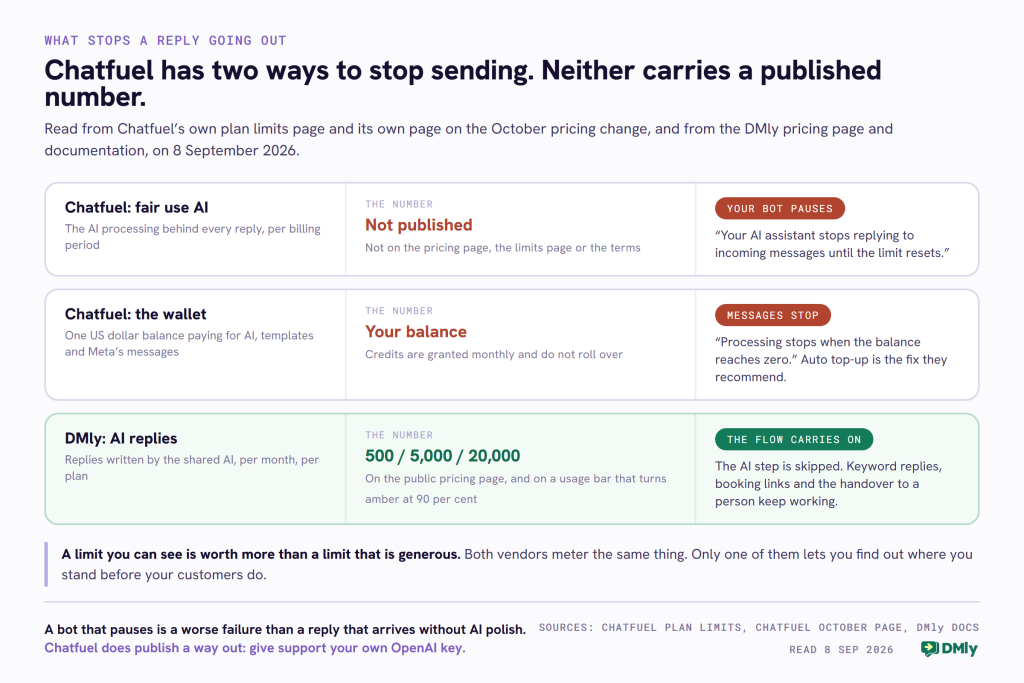
That is a fair and well explained design, and Chatfuel explains it better than most vendors explain anything. The gap is that there is no number. Not on the pricing page, not on the plan limits page, not in the terms. You cannot forecast it, and you cannot check how close you are before it happens.
Here is what happens when you reach it, quoted from their page: “If your usage exceeds your fair use limit for the billing period, your bot pauses. Your AI assistant stops replying to incoming messages until the limit resets.”
You then have three published options. Renew your plan early, which “resets immediately” and starts a new billing period on the day you do it. Wait for your normal renewal date. Or contact support and hand over your own OpenAI API key, after which “fair use AI limits don’t apply”. Chatfuel also says that if you think you hit the limit wrongly, contact support and they will review it.
Read that middle option the way a salon owner would. It is Saturday, your assistant has stopped answering the people asking whether you have a slot this afternoon, and the two ways to fix it today are to pay for another month now or to send your OpenAI key to a support inbox. Neither is unreasonable. Both are decisions you would rather make on a Tuesday than on a Saturday, and a published number would let you.
How the Same Limit Works in DMly
DMly meters the same thing and publishes the number. Every plan includes a monthly allowance of AI replies on DMly’s shared AI: 500 on Starter, 5,000 on Growth and 20,000 on Premium. Those figures are on the public pricing page, in the comparison grid, before you buy anything.
Inside the product they are on a Usage panel under Billing, showing your figure against your limit with a bar underneath. The bar turns amber once you pass 90 per cent and red at 100. On a plan that meters active contacts, DMly also raises an in-app alert at 90 per cent and again at 100, which everyone in the workspace sees in the notification bell.
The behaviour at the limit is the difference that matters on a busy Saturday. In DMly, when the allowance runs out, the AI Reply step stops generating new replies and the flow carries on to whatever comes after it rather than failing. Your keyword replies still fire, your booking link still goes out, your handover to a person still happens. What you lose is the written-by-AI answer, not the automation.
DMly also has the same escape hatch, with a plan condition attached. Connect your own OpenAI, Claude, Gemini or DeepSeek key and replies on it are unlimited and never counted, billed to you by your own provider. On DMly that option is on Premium only. Chatfuel publishes the same route as a support request with no plan condition stated, which on this specific point is the better deal.
An honest limitation on our side, since we are being exact about theirs. DMly’s Usage panel runs two different clocks and the panel does not shout about it. The AI replies figure resets at the start of each calendar month. The broadcast and template allowance resets on your billing anniversary, not on the first. If you subscribed on the 18th, those two numbers empty and refill on different days, and it is easy to check one and assume the other.
The Second Meter: the Wallet That Pays Meta
Every WhatsApp platform bills you twice, once for the software and once for the messages, and the second bill is usually the bigger one. What differs between vendors is who collects it. Chatfuel collects it, and says so clearly.
From their own October page: “Chatfuel, in one bill. We open a credit line with Meta on your behalf, so Meta invoices us for your messages and you keep paying us the way you do today. You never set up billing with Meta directly and you never watch two invoices.”
For a business owner who does not want to configure a payment method inside Meta Business Manager, that is a genuine convenience and it is worth paying something for. Here is the mechanism it comes with, all of it published by Chatfuel:
- Your plan carries a wallet in US dollars with credits included. AI, templates and Meta’s message charges all come out of the same wallet, and the billing page breaks charges down by day and by type.
- Credits do not roll over. They are granted for the month, so there is no benefit in holding them back.
- Processing stops when the balance reaches zero, and messages stop going out until you top up. Chatfuel recommends setting an auto top-up so this does not happen mid-conversation.
- Your WhatsApp Business Account has to be in US dollars, and it must not already have another payment method or another provider’s credit line attached to it.
- Detaching the credit line stops your messaging. Their words: if you remove it in your own Business Manager, “Meta blocks messaging on that WhatsApp Business Account until billing is set up again”. They add that if you want to leave, tell them first and they will sequence it so your number keeps working.
Publishing that last point is to their credit. Plenty of vendors would leave a customer to discover it. It is still a dependency, and it is the one to think about before you connect your number rather than after.
DMly works the other way round. You set up billing with Meta yourself and Meta charges you directly, at Meta’s published rate, with no fee added by us. That is two invoices instead of one, and it is more setup on day one. What you get for it is that the billing relationship for your own WhatsApp number stays yours, and the per-message rate you pay is the one on Meta’s public rate card, which anyone can check.
Neither model is the right one for everybody. The question that separates them is simple: would you rather have one bill and a dependency, or two bills and a rate you can verify? If you want to see what the message side actually costs before you decide, our WhatsApp rate card by country lists Meta’s own numbers per market.
What Changes on 1 October, and Why the Date on the Page Matters
Two things become chargeable on WhatsApp on 1 October 2026, and one of them comes with a free allowance that changes the answer completely for a small business. All of this was read on Meta’s own pricing documentation on 8 September 2026.
- Service messages become chargeable, with the first 1,000 a month free. Meta’s wording, marked new on their page: “every business phone number will receive 1,000 free service messages; Meta will only charge as of the 1,001st service message delivered. These free service messages do not roll over if not used in a specific month and reset monthly, for each business phone number.” A service message is a plain reply you send inside the 24 hour window after a customer messages you.
- Utility templates sent inside that same open window become chargeable, with no free allowance at all. Those are your booking confirmations, reminders and order updates. For most local businesses this is the change that actually lands on the bill.
- Service rates match utility and authentication rates in every market, and the October rate cards are published in sixteen currencies. There are no volume discounts on service messages; utility and authentication keep theirs.
Verified October rates per message, in US dollars: North America 0.0034, India 0.0014, Nigeria 0.0067, Brazil 0.0068, the United Kingdom 0.0220, Germany 0.0550.
Put a real business through it. A salon takes 200 bookings a month and sends each customer three typed replies and three templates: a confirmation, a reminder and a follow up. That is 600 service messages, which is under the free thousand, so the service side costs nothing. It is 600 utility templates, which at the North American rate is $2.04 and at the United Kingdom rate is $13.20. The honest headline for a business that size is that the service side costs you nothing and the templates are the bill.
That stops being true above a thousand service messages a month. A clinic with 400 appointments and six typed replies each sends 2,400, so 1,400 of them are billable. The allowance is per business phone number, so a second number gets its own thousand. The full breakdown of the October change works four business sizes through it with the arithmetic shown.
Check the Date on Any Vendor’s October Page, Including Ours
Chatfuel publishes its own explainer of the October change, and on the two changes themselves it is accurate and clearly written. It is also dated “Last updated 17 August 2026”, and it says: “Meta publishes the exact rates on 1 September. We will update this page that day and write to every customer with what the change means for their own account. We are not going to guess before then, and you should be sceptical of anyone who does.”
That was the right call in August. Read on 8 September, the rates are published, and the page still carries the August date and no rates. It also does not mention the 1,000 free service messages, which is the single fact that decides whether a business like the salon above pays anything at all on the service side.
We were in exactly the same position and we are not going to pretend otherwise. Our own flagship page on the October change was missing the free tier until 7 September 2026, when it was rewritten with the allowance, the published rates and four worked examples. A page that was right in August can be wrong in September, and this one was.
So the practical advice is not about Chatfuel. It is this: before you trust any provider’s October guidance, look for the date on it, and check whether it mentions the free thousand. If it does not, the numbers in it are describing a more expensive October than the one that is coming.
The Deadline Existing Chatfuel Customers Should Not Miss
Buried in the same page is a dated instruction for anyone still on Chatfuel’s legacy Dashboard. In their words, Dashboard does not get the Meta credit line, so you either move to panel.chatfuel.com, which they say is free and assisted, or you “stay on Dashboard and attach your own payment method to your WhatsApp Business Account in Meta Business Manager before 1 October. If Meta cannot charge you, your messages stop going out.”
That sits alongside Meta’s own deadline: a business or provider without a payment method on file by 30 September 2026 has its service messages stopped. If you are on Chatfuel today, the thing to do this week is find out which platform your account is on. Chatfuel says moving does not touch bots you already have running, and that you can run both side by side before switching your number.
Three Months of History, and the Mirror Image on Our Side
Under a heading in the terms asking how long a message history is kept, Chatfuel answers in two sentences: “Anything you or your customers post, share, store, or otherwise provide through the Services is kept by Chatfuel for 3 months. This restriction is applied to both active or terminated accounts.”
Read the second sentence again, because it is the one that matters. This is not a rule about what happens after you leave. It applies while you are a paying customer.
The old version of this page criticised Chatfuel for having a thin CRM. That was a vague complaint and it has been withdrawn. This is the sharper, provable version of the same concern: it is not that the customer record is shallow, it is that the conversation behind it has a stated shelf life. If your business needs to look at what a customer asked for last winter before you quote them this winter, that clause is the one to ask about.
Two honest qualifications. The clause is about content provided through the service, which reads most naturally as message content rather than as your contact list, and Chatfuel has not been asked to clarify it here. And a retention limit is not automatically a bad thing: a business with a data minimisation obligation may want old messages gone, and this does it without anyone having to remember.
Which is exactly where DMly fails in the opposite direction, and our own documentation says so. DMly keeps a contact and their whole conversation until somebody deletes them, and there is no retention policy you can configure to age data out for you. Nothing expires on its own. If you have an obligation to hold customer messages for only so long, you are doing that by hand. Deletion, when you do it, is permanent and immediate: no soft delete, no undo, and the contact’s conversations, invoices, payments and bookings go with them.
One more limitation worth knowing before you rely on either platform for a formal data request: DMly’s contact CSV export is a round-trip file for the importer, not a subject access export. It leaves out the email address and the message history. Build a full “everything you hold on me” response from the contact’s profile or the API instead.
Neither vendor is better here. One decides retention for you, the other leaves it entirely to you. Ask both the same question before you commit: how long will my conversations still be readable, and who decides?
Where Chatfuel Is the Better Buy
A comparison page that never picks the competitor is an advertisement. Here is where Chatfuel wins, on facts you can check on their site today.
- It has a free plan and we do not. Chatfuel Light costs nothing, takes no card and is not time limited, and it includes Instagram, Facebook and WhatsApp automations, the shared inbox, the flow builder, contact management and templates. DMly has a seven day trial with no card and then a paid plan. If your budget this quarter is zero, that is the honest answer and it is not us.
- One bill for the message charges. Chatfuel’s credit line means you never configure billing inside Meta Business Manager. If setting up a payment method against a WhatsApp Business Account is the step that has stopped you before, this removes it.
- Your own AI key without a plan upgrade. Chatfuel publishes the own-key route as a support request with no plan condition stated. In DMly it is a Premium capability.
- Unlimited contacts on the free plan and the paid one. Chatfuel’s limits page says your plan includes unlimited active contacts. DMly publishes 3,000 active contacts on Starter and 10,000 on Growth, and removes the cap only on Premium. In fairness to us, crossing that DMly figure does not block a new contact or an inbound message, it raises a gauge and an alert. It is still a ceiling on the page where Chatfuel has none.
- A published price for having it built for you. Bot building starts from $100 to $500 depending on the job. Most vendors make you ask.
If what you want is an AI assistant on Instagram, Facebook and WhatsApp, and you would rather not think about Meta’s billing at all, Chatfuel is a reasonable answer, the free plan makes it a cheap thing to test, and you do not need a Chatfuel alternative yet.
Where DMly Fits Better as a Chatfuel Alternative
The case for DMly is not that it does more things. It is that the numbers that govern your account are printed, and the business runs on top of the messaging rather than beside it.
- Allowances you can count and see. 500, 5,000 or 20,000 AI replies a month by plan, on the public pricing page and on a usage bar inside the product, amber at 90 per cent.
- The AI step is skipped, not the bot paused. Run out and the flow continues without the AI written reply. Your keyword answers, booking links and handovers keep working.
- Eight places your customers can reach you. WhatsApp, Instagram, Facebook Messenger, Telegram, SMS, TikTok and a website chat widget all land in one inbox, and Google Business Profile brings your reviews in beside them. Chatfuel covers Instagram, Facebook, WhatsApp, a website widget and TikTok, with neither Telegram nor SMS on its published channel list.
- Bookings, invoices and payments on every plan. Bookings, invoices and payments read Included on Starter, Growth and Premium alike in DMly’s own comparison grid, rather than being sold as a tier above. For a salon or a clinic that is the difference between a chatbot and the system that runs the day.
- No markup on the message charges. You pay Meta’s published per-message rate directly and DMly adds nothing to it.
And one limitation of ours that catches people out, because it is a compliance trap rather than an inconvenience. In DMly, opting a contact out stops automated messages everywhere: broadcasts, sequences, automations and booking reminders. It does not close the inbox. Any team member can still type a message to that person by hand and send it, and nothing in the product blocks that. If your obligation is that you never contact someone again, opting them out does not achieve it on its own. Block them instead, which disables the composer as well.
Chatfuel and DMly Side by Side
| What you are buying | Chatfuel | DMly |
|---|---|---|
| Free plan | Yes, Chatfuel Light, no card, not time limited | No, 7 day trial with no card |
| Entry paid plan, billed yearly | AI PRO, $49 a month | Starter, $29 a month |
| Entry paid plan, billed monthly | AI PRO, $69 a month | Starter, $39 a month |
| Second paid tier | None on the pricing page | Growth $65, Premium $149, billed yearly |
| AI limit | Fair use allowance, no figure published | 500, 5,000 or 20,000 AI replies a month by plan |
| What happens at the AI limit | The bot pauses and stops replying | The AI step is skipped, the flow continues |
| Use your own AI provider key | Yes, by asking support, with no plan condition stated | Yes, on Premium, unlimited and unmetered |
| Who bills you for Meta’s messages | Chatfuel, from a wallet, on one bill | Meta, directly, with no DMly markup |
| Messaging channels | WhatsApp, Instagram, Facebook, website widget, TikTok. No Telegram or SMS on the published list | WhatsApp, Instagram, Facebook, Telegram, SMS, TikTok, website widget, plus Google Business Profile |
| Contacts | Unlimited active contacts | 3,000 or 10,000 active contacts, unlimited on Premium |
| Bookings, invoices and payments | Appointment booking published as a use case | Included on every plan |
| Message history retention | Terms say content is kept 3 months, active or terminated accounts | Kept until you delete it, with no retention policy you can configure |
How to Compare the Two Prices Honestly
Putting $49 next to $65 tells you almost nothing, because the two numbers are buying different amounts of the same job. Every platform on this market bills across three lines, and any Chatfuel alternative you shortlist has to be compared on all three of them rather than on the figure in the largest type.
- The subscription. Write down the figure and the billing period beside it. Chatfuel AI PRO is $49 a month on annual billing and $69 monthly. DMly Starter is $29 annual and $39 monthly; Growth is $65 and $79.
- The AI. Ask what is included and what happens when it runs out. In DMly that is a number of replies a month and a skipped step. In Chatfuel it is a fair use allowance that is not published, drawn from a wallet, and the bot pauses.
- Meta’s message charges. These are the same on both platforms, because Meta sets them. What differs is who collects them and whether anything is added. Chatfuel takes them from your wallet on one bill; DMly has Meta charge you at the published rate with nothing added.
Run the salon through all three. Two hundred bookings a month, three typed replies and three templates each, on a United Kingdom number, from October.
- Meta’s side, identical either way: 600 service messages, all inside the free thousand, so $0.00. Then 600 utility templates at 0.0220, which is $13.20.
- On Chatfuel: $49 a month if you commit to a year, or $69 if you do not, plus that $13.20 and the AI processing, both drawn from the same wallet, with credits that do not roll over.
- On DMly: $29 a month on Starter committed yearly or $39 monthly, with 500 AI replies included, plus the same $13.20 invoiced by Meta. A salon at 200 bookings whose assistant answers most enquiries will want the 5,000 replies on Growth at $65.
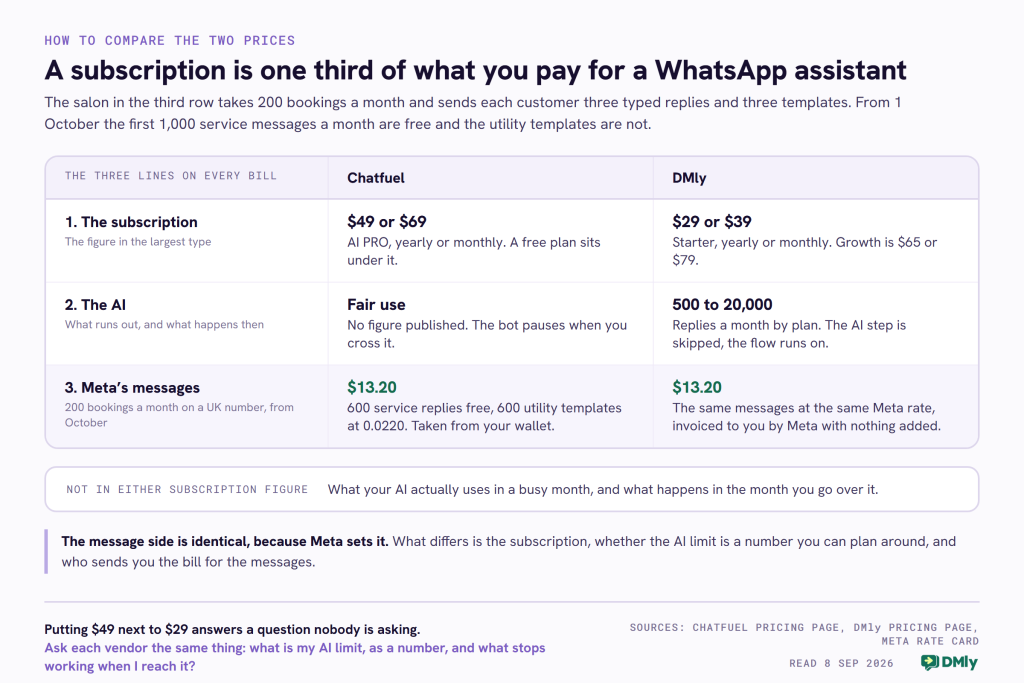
The gap between the two subscriptions is real but small next to the thing neither number contains, which is what your AI usage does in a busy month. That is why the published allowance matters more than the published price. Whichever way you go, get the answer to one question in writing before you commit: what is my AI limit, in a number, and what stops working when I reach it?
If you want to see how other platforms answer the same question, the Manychat review covers the closest product to Chatfuel in this market, the Zipchat comparison covers a vendor that meters by AI reply and publishes two different counts for it, and the QuickReply.ai review covers one that bills by the calendar day. No two of them count the same thing, which is the real reason these prices are so hard to compare.
The Verdict: When to Look for a Chatfuel Alternative
Chatfuel is a good product with a price you can read in five seconds and a limit you cannot read at all. The free plan is real and generous, the one bill for Meta’s charges is a genuine convenience, and the company explains its own mechanics better than most of its competitors. If you are experimenting, or your whole operation is Instagram and Facebook comments turning into DMs, start there and pay nothing.
Look for a Chatfuel alternative when you need to forecast. The moment your business depends on the assistant answering on a Saturday, an allowance with no number becomes the thing you worry about, and a bot that pauses is worse than a reply that arrives without AI polish. That is the gap DMly is built for: a printed allowance, a bar that warns you at 90 per cent, a flow that keeps running when the AI stops, and the bookings, invoices and payments that turn the conversation into money on every plan.
You can try DMly free for seven days without a card. If you want to check the numbers first, they are all on the DMly pricing page, including the AI reply allowance for each plan.
Frequently Asked Questions
How much does Chatfuel cost in 2026?
Chatfuel pricing in 2026 has two plans on the pricing page. Chatfuel Light is free with no card required. AI PRO is $49 a month billed yearly, or $69 a month billed monthly, according to the pricing data on Chatfuel’s own pricing page read on 8 September 2026. The page opens on the yearly toggle, so the $49 figure is the one most comparisons quote. A separate Chatfuel page for WhatsApp still lists a Business plan from $69 and an Enterprise plan from $400, so confirm which plan you are buying before you pay.
Is there a free Chatfuel plan?
Yes. Chatfuel Light is free, needs no credit card and is not a time limited trial. Chatfuel’s own list of what it includes is Instagram, Facebook and WhatsApp automations, a shared inbox, automated replies and the flow builder, contact management and segmentation, and ready-made templates. The paid AI PRO plan adds the AI sales manager, the AI knowledge base, AI-powered automations, broadcasts, funnels and advanced contact tools.
What is Chatfuel’s fair use AI limit?
Chatfuel does not publish a figure for it. Its plan limits page says your plan covers unlimited contacts and unlimited messages, but that the AI processing behind each reply carries a fair use allowance per billing period, sized to fit what it describes as 98 per cent of businesses. What it does publish is the consequence: exceed it and your bot pauses and stops replying until the limit resets. You can then renew early, wait for your renewal date, or give support your own OpenAI key, after which the fair use limit no longer applies.
Does Chatfuel add a markup to Meta’s WhatsApp rates?
Chatfuel says it does not raise its prices because of Meta’s October change, and that it opens a credit line with Meta on your behalf so that Meta invoices Chatfuel and Chatfuel bills you, from a US dollar wallet that also pays for AI and templates. It does not publish a per-message figure of its own, so ask what rate is applied to your wallet for each market you message. DMly takes the other route: Meta charges you directly at its published rate and DMly adds nothing on top.
How long does Chatfuel keep my chat history?
Chatfuel’s terms of use, effective 1 August 2026, say that anything you or your customers post, share, store or otherwise provide through the service is kept for three months, and that this applies to active as well as terminated accounts. If you need conversations from further back than that, export what you need or ask Chatfuel to confirm what the clause covers. DMly has the opposite behaviour and its own drawback: nothing is deleted until you delete it, and there is no retention policy you can configure to age data out automatically.
Are WhatsApp service messages free or paid from 1 October 2026?
Both, depending on volume. From 1 October every business phone number gets 1,000 free service messages a month, and Meta charges from the 1,001st. The allowance does not roll over and resets monthly. Separately, utility templates sent inside an open 24 hour window become chargeable with no free allowance at all, which for most local businesses is the change that actually costs money. A salon sending 600 replies and 600 reminders a month pays nothing for the replies.
What is the best Chatfuel alternative?
The best Chatfuel alternative depends on which Chatfuel limit you have run into. If it is the price, nothing beats their own free plan. If it is the AI pause, look for a platform that prints its allowance as a number and degrades gracefully when you reach it, which is what DMly does with 500, 5,000 or 20,000 AI replies a month and an AI step that is skipped rather than a bot that stops. If it is the channels, DMly adds Telegram, SMS and Google Business Profile. And if it is the three month history clause, ask any shortlisted vendor the same retention question before you choose.
Writing about WhatsApp automation, bookings and growth for local business.
Turn WhatsApp into your busiest channel.
Start free and run message, bookings, payments and reviews in one place.
