
Gallabox Review 2026: The Fourth Person, and the Second Meter
Before you read a single feature list, do one sum. Count the people in your business who will need to log in and answer a customer: you, whoever covers the phone, the person who chases the follow-ups. If that number is four, the rest of this Gallabox review comes down to one line on their pricing page, and the line is not a feature.
Gallabox is a well-built WhatsApp platform that has just rebuilt how it charges. The plan names are new, every price is new, and a second meter now runs alongside the subscription. If you last looked at Gallabox a few months ago, none of the numbers you remember are still on the page.
Everything below was read on 6 September 2026 from Gallabox’s own pricing page and their own documentation, with the currency and the billing period recorded beside every figure. Where we criticise them, we quote them. Where this page was wrong about them before, we say so.
What the Fourth Person Costs
Gallabox’s entry plan carries three users and there is no way to buy a fourth. The Basic plan is described on their own page as “3 users (hard cap)”, and in the comparison grid underneath, the row for additional users reads “Upgrade required” in the Basic column. That is not a seat price you can add to. It is a wall.
So the fourth login is not a purchase, it is a plan change, from Basic to Essential. Here is what that costs at both of the billing periods they sell.
| Seating one more person | Billed quarterly | Billed yearly |
|---|---|---|
| Basic, up to 3 users | $150 a month | $112 a month |
| Essential, up to 6 users | $331 a month | $248 a month |
| What the fourth person costs | $181 a month | $136 a month |
Once you are on Essential the wall is gone and extra users are $18 a month each, so the fifth and sixth people are cheap. It is only the step from three to four that costs more than doubling your bill. If your team is three people and staying three, none of this touches you and Basic is a fair buy. If you are three people who might hire, the number to plan around is $331 a month, not $150.
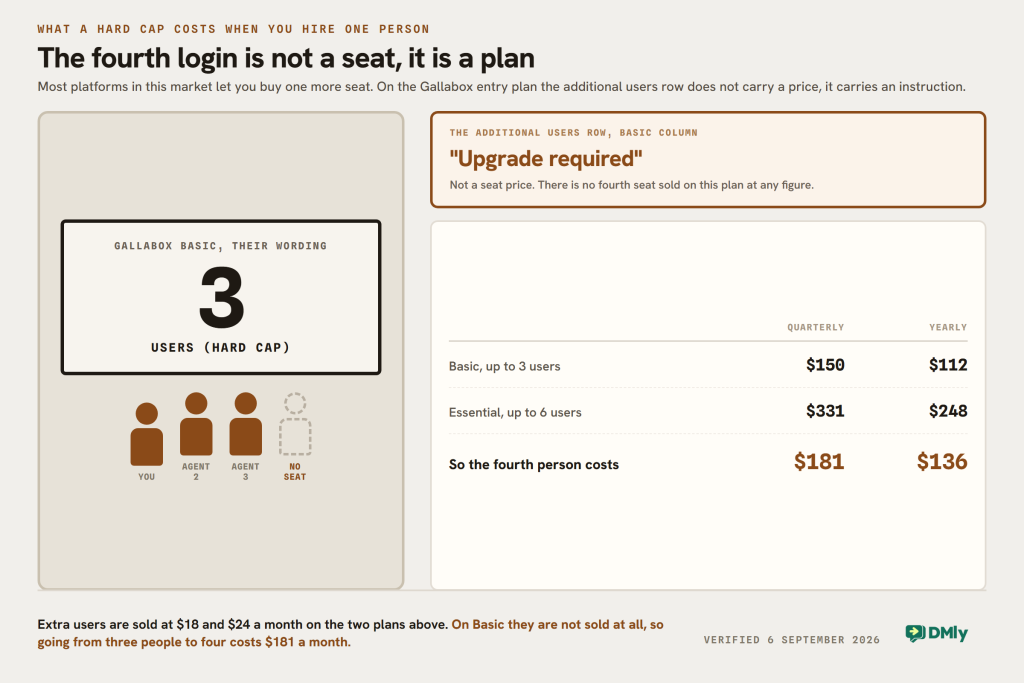
That is worth stating plainly because a hard cap is unusual. Most platforms in this market let you spend your way out of a limit. Gallabox does on Essential and Advanced, at $18 and $24 a user a month, and does not on Basic.
Gallabox Pricing in 2026: The Whole Rate Card Has Changed
If you are comparing Gallabox against a quote or an article written earlier this year, throw the numbers away. This page itself carried Growth at $89, Scale at $197 and Pro at $377 until today. None of those plans exists any more. The current ladder is Basic, Essential, Advanced and Enterprise, and it is sold on a quarterly or a yearly commitment rather than month to month.
| Plan | Billed quarterly | Billed yearly | Users | AI credits |
|---|---|---|---|---|
| Basic | $150 a month | $112 a month | 3, hard cap | 500 a month |
| Essential | $331 a month | $248 a month | 6, then $18 each | 2,000 a month |
| Advanced | $632 a month | $474 a month | 10, then $24 each | 8,000 a month |
| Enterprise | Quoted | Quoted | Custom | Custom pool |
Two things follow from that table and both are easy to miss. There is no monthly option at all, so the smallest commitment Gallabox sells is three months of Basic, which is $450 before you send a single message. And the gaps between tiers are wide: Essential is 2.2 times Basic, and Advanced is 1.9 times Essential.
They also publish a free trial with 500 AI credits and no card required, which is a fair way to try the product before any of this applies to you.
Three Bills, Not One
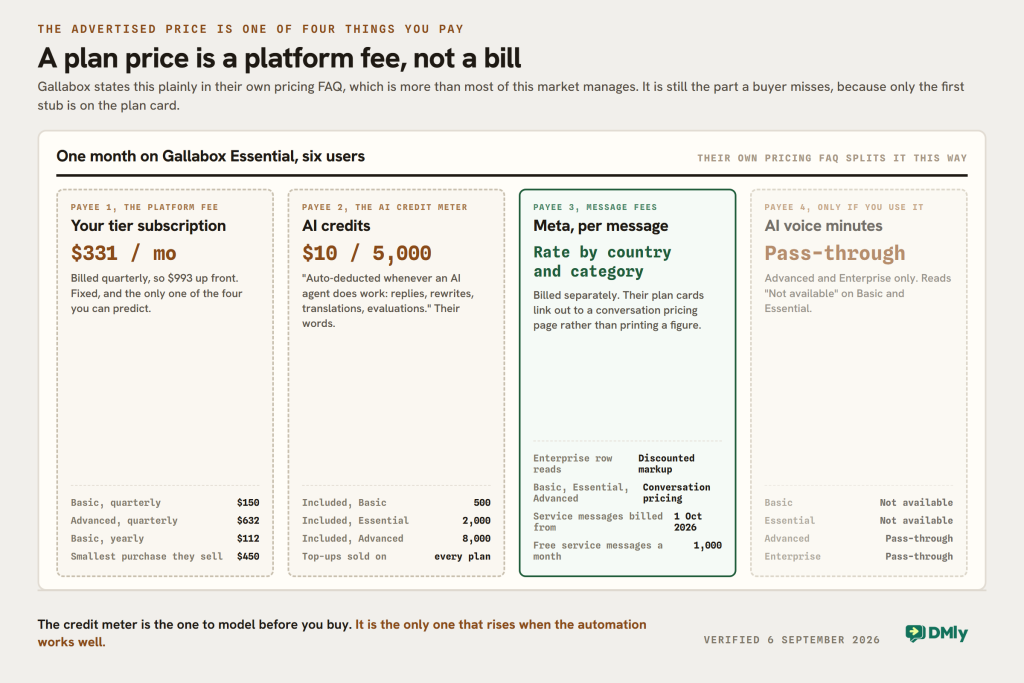
The plan price is a platform fee, and it is one of three things you will pay in a month, or four if you switch on AI voice. Gallabox says so themselves, and says it clearly, which is more than most of this market manages. Their pricing FAQ answers the question “What does the platform fee actually cover?” with the tier subscription, the users, the channels, the builder tools, automation, integrations, analytics and support, and then adds that “AI credits and pass-through usage (WhatsApp conversation fees, AI Voice minutes) are billed separately.”
So a month adds up like this, with the fourth line applying only on the two upper plans.
- The platform fee. $150, $331 or $632 a month on quarterly billing. Fixed and predictable, which is the easy one.
- AI credits. A monthly allowance of 500, 2,000 or 8,000, described on their own page as “auto-deducted whenever an AI agent does work: replies, rewrites, translations, evaluations”. Run out and you top up in blocks of 5,000 at $10 a block, available on every plan.
- Meta’s message fees. Charged per message by country and category. Every plan card links out to a conversation pricing page rather than quoting a figure.
- AI voice minutes, if you switch them on. Marked “Pass-through” on Advanced and Enterprise, and “Not available” on the two plans below.
The credit meter is the one to model before you buy, because it is the only one that rises when the automation works well. An AI agent that answers usefully gets used more, and a credit goes on the reply, the rewrite, the translation and the outcome evaluation alike. On Basic that is 500 units a month covering all four kinds of work. How far that goes is not obvious until you have run it for a fortnight, which is exactly why those trial credits are worth spending properly.
“Discounted Markup” Is Printed as an Enterprise Feature
On the row of their comparison grid headed “WhatsApp conversation fees”, three columns read “Conversation pricing” and the fourth reads “Discounted markup”. That is their wording, on their page, on 6 September 2026. The fourth column is Enterprise.
Here is the reasoning, and you can check every step of it yourself. A discount on a markup is a statement that a markup exists. If Gallabox passed Meta’s rates through untouched on Basic, Essential and Advanced, there would be nothing on those rows for a larger customer to negotiate down, and the Enterprise cell would say what the other three say.
The likely reading is that a margin sits on top of Meta’s per-message rate on the three self-serve plans, and that Enterprise customers argue it down. We are not putting that forward as a finding of fact, because Gallabox publishes no markup figure anywhere and we could not find one. What we can report is what is printed, and what is printed invites the question.
So ask them, in writing, before you commit to a quarter. The question that gets a usable answer is not “do you mark up messages”. It is this: for a marketing template to a customer in my country, what will you charge me per message, and what is Meta’s own published rate for that same message? Both numbers are knowable, and the gap between them is your answer. Our per-country rate card sets out Meta’s own figure market by market. Meta publishes its rate card by country, so you can look the second one up without asking anybody.
This matters more from 1 October than it did in August, for reasons set out further down. Two categories of message that are free today start being billed, so any percentage sitting on top of Meta’s rate starts applying to traffic it never touched before.
Four Things This Gallabox Review Got Wrong
An earlier version of this Gallabox review carried four criticisms that do not survive a look at the current product. They are withdrawn here rather than quietly deleted, because a review that only ever finds fault is not a review.
Withdrawn: “heavily WhatsApp-centric, and if your strategy expands to Instagram you will need additional tools.” Instagram is a real product inside Gallabox, not a checkbox. Every plan includes an Instagram handle in the shared inbox. Comment automation runs on basic intents on Basic and custom intents from Essential up, and there is a DM agent and a follower check. A website widget is included on every plan too. Advanced adds AI voice on WhatsApp and on your own phone line. That is a wider surface than this page credited them with.
Withdrawn: “analytics lack depth.” Their published grid lists conversation, broadcast, sequence, bot and WhatsApp template analytics, plus an agent analyse feature, from Basic upward. The narrow true version is that agent performance analytics and call analytics are both marked “Coming soon” on every plan including Enterprise, so if you need to see how each person on your team is performing, that is not there yet on any tier.
Withdrawn: “some users report slower response times from support.” That was an unsourced adjective about a company, and it should not have been published. What Gallabox actually does is rarer and better: they publish a response SLA on the pricing page, 48 hours on Basic and 24 hours on Essential and Advanced, with a custom SLA on Enterprise. Most of this market publishes nothing at all. Judge them on the number they printed.
Withdrawn: “CRM is more lite than full-featured.” Lead pipeline management and appointment booking are both listed on Advanced and Enterprise, and both are marked “Coming soon”. The honest statement is that the pipeline is announced rather than shipped, and that on Basic and Essential there is no pipeline view at all, promised or otherwise. That is a limitation with an edge on it. The adjective was not.
One more credit, and it is the one that surprised us. Their WhatsApp pricing documentation is among the best published by any vendor in this category. It explains the 24-hour service window and the 72-hour ad window separately, and it flags the trap that catches people: the ad window’s clock starts when you answer, it only applies to a tap-through from the WhatsApp mobile app, and it runs alongside the 24-hour window rather than replacing it, so a quiet customer still puts you back on templates. It also carried the 1,000 free service messages rule before Meta published it. That is a documentation team paying attention.
Where the Ceilings Actually Are
Adjectives are useless when you are choosing a plan, so here are the numbers Gallabox publishes for the things that stop you. These come from their own comparison grid, read on 6 September 2026.
| Limit | Basic | Essential | Advanced |
|---|---|---|---|
| Users | 3, hard cap | 6, then $18 each | 10, then $24 each |
| Drip and sequence campaigns | No | 10 sequences | Up to 100 |
| Active chatbot flows | 5 | 20 | Up to 100 |
| Broadcast contacts a month | 10,000 | 500,000 | 1,000,000 |
| Webhooks | No | Contact, basic conversation, basic message | Advanced conversation, message, broadcast, template |
| API access | Message and contact only | All APIs | All APIs |
| Messaging rate limit | 100 a minute | 200 a minute | 1,000 a minute |
| Roles and permissions | Owner only | Member, admin, owner | Plus custom roles |
| Custom inbox views | No | 5 | 10 |
| Knowledge base size | 10 MB | 100 MB | 1 GB |
| Knowledge base sources | No | Documents and PDFs | URLs, PDFs and documents |
| Extra channels | Not available | Up to 10, at $20 each a month | Unlimited, at $20 each a month |
| Support response SLA | 48 hours | 24 hours | 24 hours |
Read down the Basic column and a pattern shows up. Six of those rows are not a smaller allowance, they are an absence: no drip campaigns, no webhooks, no custom inbox views, no extra channels at any price, no knowledge-base sources for the AI agent, and no roles beyond owner. On a plan costing $150 a month billed quarterly, that is a lot of the product switched off.
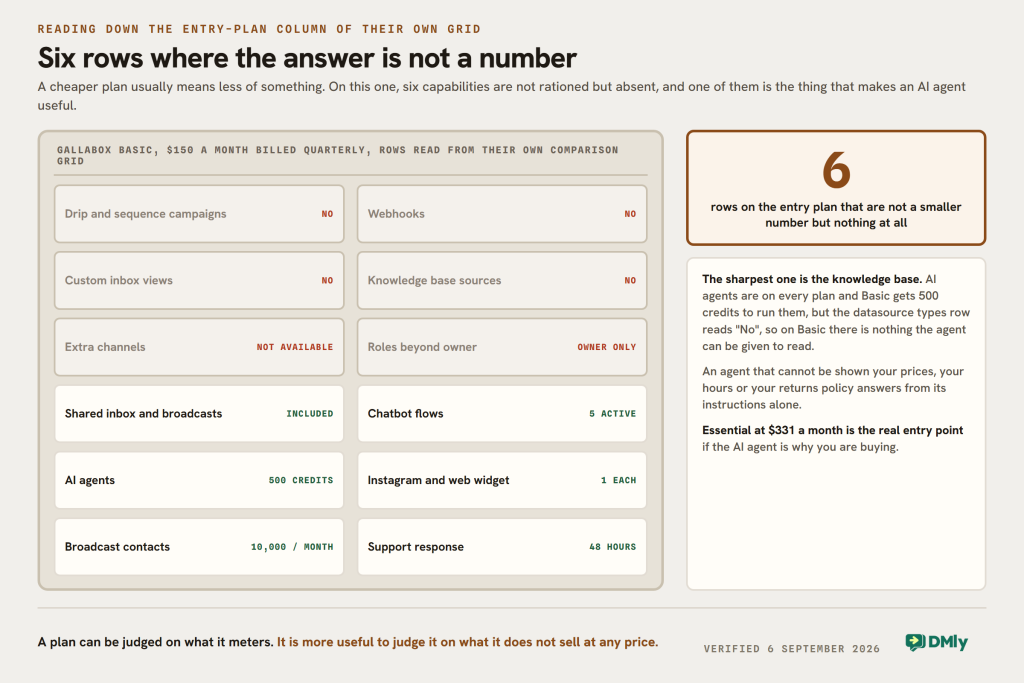
The knowledge-base row is the sharpest of them. Gallabox sells AI agents on every plan and gives Basic 500 credits to run them with, but on Basic there is no way to give the agent anything to read. The datasource types cell says “No”. So the agent runs on its instructions and persona alone. If the reason you are buying is an AI agent that knows your prices, your opening hours and your returns policy, Basic will not do it and Essential is the real entry point at $331 a month.
The channels row deserves a word too, because it is easy to misread as generous. Every plan includes one WhatsApp number, one Instagram handle and one widget. A second WhatsApp number is an add-on at $20 a month, and on Basic it cannot be bought at all. If you run two locations on two numbers, Basic is not a candidate.
What 1 October Does to Your Bill, Whichever Platform You Pick
Two kinds of message that cost you nothing today start being billed on 1 October 2026, and this has nothing to do with which platform you buy. It is Meta’s change, it applies to everyone on the WhatsApp Business Platform, and it lands on the busiest part of a support inbox.
In Meta’s own words, from their pricing documentation: from 1 October Meta “will charge on a per-message basis for all service messages”, which “have not been charged since November 1, 2024”, and it will charge for “utility messages sent in response to users (within an open 24-hour customer service window)”, free since 1 July 2025.
A service message is the ordinary free-form reply you type when a customer has messaged you first. That is most of what a busy inbox sends. From October, each one is charged at your market’s utility rate.
Three things have changed at Meta’s end since the start of September, and all three are new enough that most write-ups will not have them yet.
- The rates are published now. Meta’s pricing page says the October rate cards, service rates included, are published as of 1 September 2026. Until a few days ago they were not, and articles saying Meta has announced nothing are out of date.
- There is a free monthly allowance, and it is confirmed. Meta’s page reads: “Each month, every business phone number will receive 1,000 free service messages; Meta will only charge as of the 1,001st service message delivered.” They do not roll over and they reset monthly. Note the unit carefully: it is per phone number, per month, and it counts messages, not conversations.
- There is a deadline that can switch your replies off. Meta’s own wording: any provider or directly integrated business “that does not have a payment method on file by September 30, 2026” will have Meta “stop delivering service messages” once they become chargeable. If you have been running on free service messages and never added a card, that is a job for this month.
Rates also move by market on the same date. Marketing goes up in Kuwait, Mexico, Morocco, Saudi Arabia, the UAE and the rest of the Middle East and Asia Pacific regions. Utility and authentication go up in Kazakhstan, Kuwait, Morocco, Oman, Pakistan, Peru, South Africa and Ukraine, and down in Bangladesh, Iraq, Nepal and Sri Lanka.
The practical point for this comparison is simple. From October, the volume of chargeable messages goes up sharply for anyone doing real customer service. If your platform adds a percentage on top of Meta’s rate, that percentage is about to start applying to a much larger number. It is the reason the question in the last section is worth asking before you sign a quarter, not after.
DMly as a Gallabox Alternative, Including What It Cannot Do
DMly is built for the business Gallabox’s Basic plan cannot serve: a small team that needs more than three logins, more than one channel, and an AI agent that has read something. It is a different shape of product rather than a cheaper copy, so here is where it genuinely differs and where it does not.
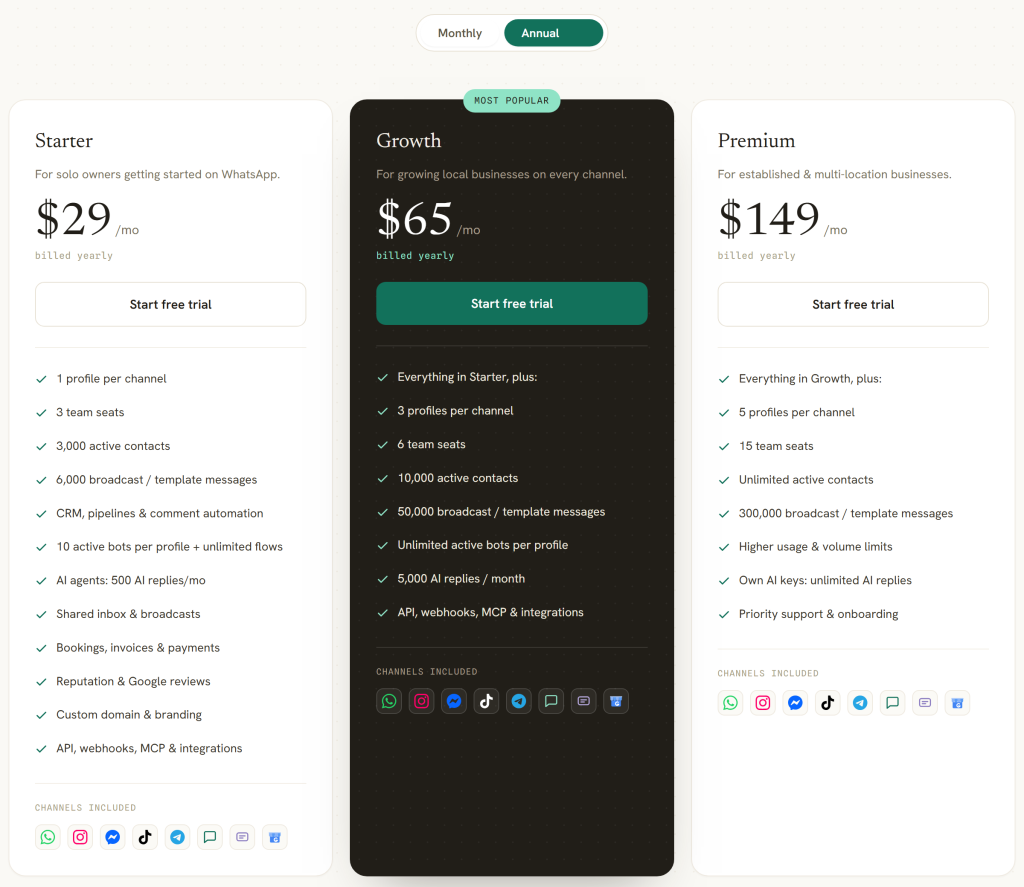
Seats are not a wall. Starter carries three team seats at $29 a month billed yearly, Growth six at $65 and Premium fifteen at $149. An extra seat is a $10 a month add-on on any plan, including the entry one, so the fourth person costs $10 rather than a plan change. That is the single sharpest difference between the two rate cards.
Seven chat channels come with every plan, not one. WhatsApp, Instagram, Facebook Messenger, Telegram, SMS, TikTok and a website Live Chat widget all land in the same inbox, with Google Business Profile connected as well for reviews and Q and A rather than chat. Two of them have real limits worth knowing before you plan a campaign: TikTok and Live Chat cannot send broadcasts at all, and Messenger and Instagram broadcasts only reach people who messaged you in the last 24 hours.
The automation is event-driven rather than a single flow with branches. Flows start from named triggers: a WhatsApp message, an incoming or missed call, a cart order from your catalogue, an Instagram story reply or story mention, a Facebook or TikTok comment, a new Google review, a tag applied or removed, a custom field changing, a lifecycle stage changing, a booking, an order placed or paid, a birthday, or a customer not replying to your last message. You can build the same journey several different ways because there is more than one door into it.
AI is on every plan, with the allowance as the difference. 500 AI replies a month on Starter, 5,000 on Growth, 20,000 on Premium, and on Premium you can bring your own provider key, in which case replies on that key are not metered at all. There is no plan you can buy that has the AI switched off.
And on message costs, DMly’s position is the one it prints: “You pay Meta’s standard per-message rates directly, DMly never adds a fee on top.” There is no discounted-markup row, because there is no markup row. You can check that the same way you would check anyone: compare an invoice line against Meta’s published country rate.
The Thing DMly Cannot Do, and the Way Round It
You cannot build a segment out of who opened your last broadcast. DMly reports it, so the number is right there: a broadcast’s analytics show Sent, Delivered, Opened, Replies and Failed, and Opened is real on WhatsApp. But the segment builder cannot read it. Its Engagement section holds exactly two fields, “reachable on channel” and “marketing opt-in”, and nothing that says opened, clicked or engaged. So “everyone who opened the last campaign but did not reply” is not a saved audience you can point a follow-up at.
The workaround is a tag, and it is worth setting up on your first campaign rather than your fifth. Build a flow on the “customer didn’t reply” trigger, or on an incoming WhatsApp message after a broadcast, and have it apply a tag. Tags are a first-class segment field, so from then on the audience you actually wanted exists and rebuilds itself. It takes about ten minutes once, and it is the honest answer to a real gap rather than a claim that the gap is not there.
What the segment builder does read is broad: lifecycle stage, source, any custom field, birthday month, tags, channel reachability, marketing opt-in, total spend, last purchase, order count, loyalty points and credit balance, combined in groups on ALL or ANY. That covers commerce properly. It does not cover campaign behaviour.
Gallabox and DMly Side by Side
| Gallabox | DMly | |
|---|---|---|
| Entry price | $150 a month billed quarterly, $112 billed yearly | $29 a month billed yearly |
| Shortest commitment | Three months | Monthly, or yearly at 20 per cent off |
| Seats on the entry plan | 3, hard cap, no extras sold | 3, plus $10 a month per extra seat |
| Channels on the entry plan | One WhatsApp number, one Instagram handle, one widget | Seven chat channels, one profile each, plus Google Business Profile |
| Second WhatsApp number | $20 a month, and not sold on Basic | $15 a month add-on for one more profile on every channel |
| AI metering | AI credits, 500 to 8,000 a month, top-ups $10 per 5,000 | AI replies, 500 to 20,000 a month, own provider key on Premium |
| AI knowledge base on entry plan | No sources can be added | Included |
| Drip and sequence campaigns on entry plan | No | Included |
| Webhooks on entry plan | No | Included |
| Roles on entry plan | Owner only | Roles and permissions included |
| Meta message fees | “Discounted markup” listed as an Enterprise feature | Paid to Meta directly, no fee added |
| Bookings, invoices and payments | Appointment management marked “Coming soon” on Advanced | Included on every plan |
| Published support SLA | Yes, 48 hours on Basic and 24 above it | No published SLA; email and chat, priority above Starter |
| Free trial | Yes, with 500 AI credits, no card | 7 days, every feature, no card |
The honest summary of this Gallabox review is that the two products are aimed at different sizes of business. Gallabox at $331 a month with six users, a hundred-megabyte knowledge base and half a million broadcast contacts is a serious tool for a company with a marketing function. Gallabox at $150 a month with three users and no drip campaigns is a harder sell against anything. If you are a salon, a clinic or a shop with a few people answering messages, the entry plans are where you will be shopping, and that is where the gap is widest.
FAQs
How much does Gallabox cost in 2026?
Gallabox pricing runs Basic at $150 a month billed quarterly or $112 billed yearly, Essential at $331 or $248, and Advanced at $632 or $474. Enterprise is quoted. There is no monthly billing option, so the smallest purchase is three months. On top of the plan you pay for AI credits beyond your monthly allowance and for Meta’s per-message fees. Read on 6 September 2026; their page also prints these in rupees and dirhams.
Why has Gallabox pricing changed so much?
This Gallabox review was rewritten from the pricing page up because they have rebuilt the plans around AI rather than around seats. The old Growth, Scale and Pro tiers are gone, replaced by Basic, Essential and Advanced, and a new AI credit meter runs alongside the subscription. Anything you read quoting $89, $197 or $377 for Gallabox is describing plans that no longer exist.
What are AI credits on Gallabox and how fast do they go?
They are the meter for AI work, described on their page as deducted whenever an agent replies, rewrites, translates or evaluates. You get 500 a month on Basic, 2,000 on Essential and 8,000 on Advanced, and top-ups cost $10 per 5,000 on any plan. How fast they go depends entirely on your conversation volume, which is why their free trial gives you 500 to find out with.
Does Gallabox mark up WhatsApp message costs?
They publish no markup figure, so we cannot tell you one. What their own comparison grid prints is “Discounted markup” as an Enterprise line on the WhatsApp conversation fees row, where the three self-serve plans link out to a conversation pricing page. A discount on a markup implies a markup, so ask them what you will be charged per message for your own country and compare it against Meta’s published rate for that same message.
What are the best Gallabox alternatives?
It depends on which ceiling you hit. If it is the three-user cap on Basic, look for a platform that sells single seats rather than plan jumps. If it is the missing knowledge base for the AI agent, check what the entry plan of any alternative actually lets the agent read. If it is the second WhatsApp number, check whether extra numbers are sold on the entry tier at all. DMly answers all three at $29 a month billed yearly, and there is a wider field of options worth comparing before you commit to a quarter anywhere.
Is Gallabox good for WhatsApp marketing?
From Essential upward, yes. That is the plan where drip and sequence campaigns appear at all, where the broadcast ceiling rises to 500,000 contacts a month and where CAPI and ads attribution arrive. Basic has broadcasts but no sequences and a 10,000 contact monthly ceiling, so it is a support inbox with a broadcast button rather than a marketing platform.
Does the 1 October WhatsApp change affect Gallabox customers?
It affects every business on the WhatsApp Business Platform equally, because it is Meta’s change and not a platform’s. Service messages and utility messages sent inside the 24-hour window both become chargeable, with the first 1,000 service messages per phone number free each month. The one urgent item is Meta’s requirement that a payment method be on file by 30 September, without which service messages stop being delivered once they become chargeable.
Writing about WhatsApp automation, bookings and growth for local business.
Turn WhatsApp into your busiest channel.
Start free and run message, bookings, payments and reviews in one place.
