
How to Automatically Remind Customers About Unpaid Invoices
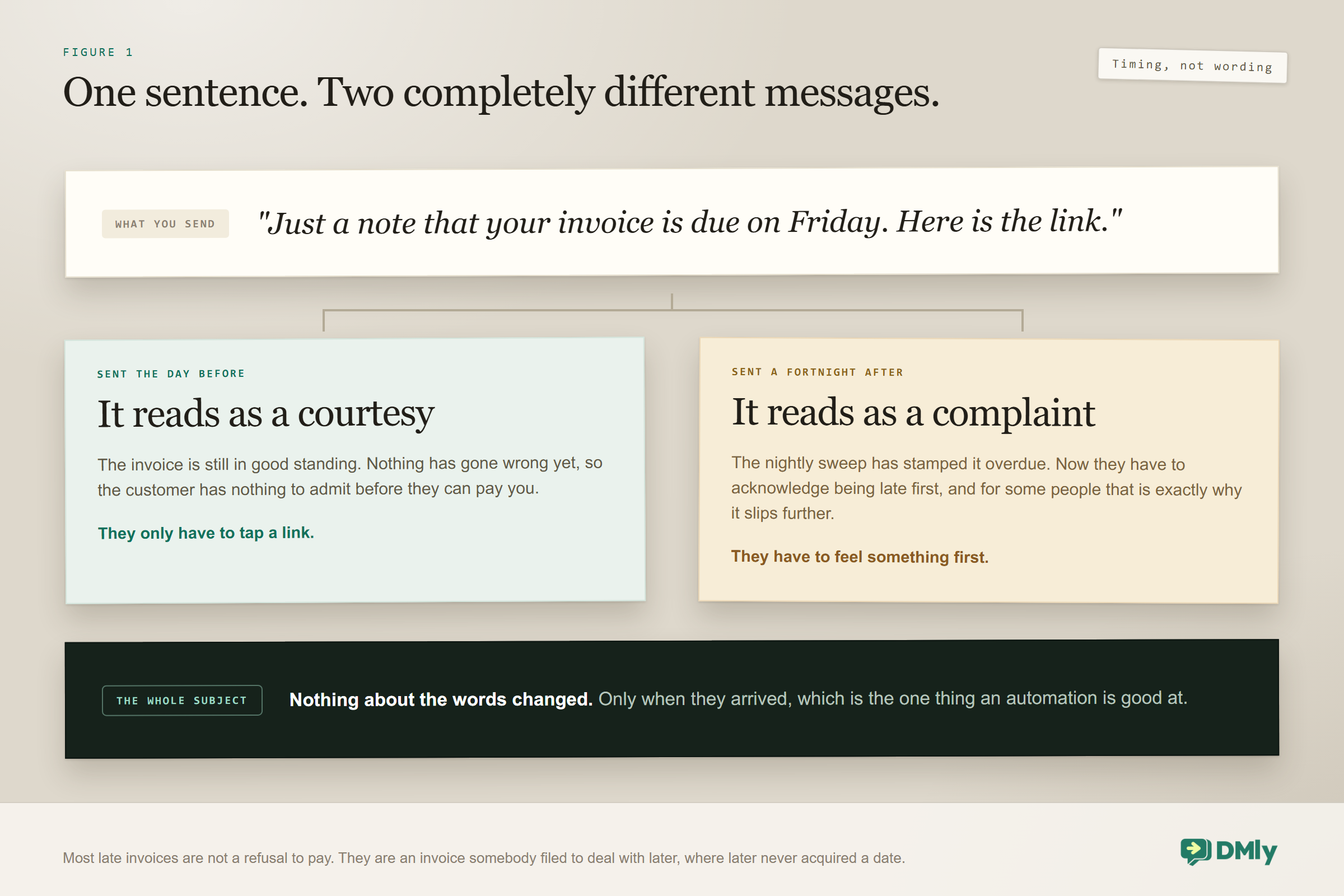
Here is the whole problem with unpaid invoices, in one sentence you could send this afternoon: just a note that your invoice for the kitchen job is due on Friday, here is the link. Send it on Thursday and it is a courtesy. Send the identical sentence three weeks later and it is a complaint, and both of you know it.
Nothing about the words changed. The only thing that changed was when they arrived. That is the whole of this subject, and it is why automating your reminders is worth doing for a reason that has nothing to do with saving admin time. Automation moves the message earlier, to the point where it costs neither of you anything to send or receive.
Most unpaid invoices are not a refusal to pay. They are an invoice somebody filed to deal with later, where later never acquired a date. A plumber’s invoice sits in a homeowner’s email for eleven days not because they resent it, but because nothing prompted them on a specific afternoon. The prompt is the product here, and the timing of the prompt is nearly all of its value.
This guide covers why the pre-due message recovers more, what DMly actually gives you to build a chase out of, how an invoice really becomes overdue, a four-step escalation that stops on purpose, what to write and what not to, partial payments, and the upstream changes that leave you with less to chase at all. Raising and sending the invoice itself is a separate job, covered in our guide to creating and sending invoices through WhatsApp.
Why the Pre-Due Reminder Recovers More Unpaid Invoices
Because it does not ask the customer to admit anything before they can pay you.
A message a day before the due date carries no accusation, because nothing has gone wrong yet. It arrives while the invoice is still in good standing, while the customer still has time to act without feeling caught, and while the whole exchange is administrative rather than personal. Nobody has to feel anything to respond to it.
Now picture your first message landing after the date. However kindly you word it, you are pointing out a failure. The customer has to acknowledge being late before they can settle up, and for a certain kind of person that acknowledgement is precisely why the payment slips further. You have quietly converted an admin task into a small social one, and social tasks are the ones people put off.
There is a practical consequence for the design of your sequence. Start before the deadline and stay in front of it for as long as the invoice allows. Everything after the due date is a recovery operation rather than a reminder, and recovery converts worse at every step. If you only ever set up one automated message about unpaid invoices, make it the one that goes out the day before.
The one that never annoys your best customers: Build the pre-due reminder so it checks whether the invoice is already settled before it sends. A customer who paid the day they received the invoice should never hear from your reminder sequence at all, and the fastest way to make automated chasing feel cheap is to send it to somebody who has already paid you.
What You Actually Build the Chase From
You assemble the sequence yourself in the flow builder, out of a small set of invoice events. It is worth being clear about that, because it is a twenty-minute job rather than a switch you flick, and knowing that up front stops you hunting for a setting that does not exist.
The events you can start an automation from are these, and they are not tied to a single channel the way a chatbot is. An invoice going unpaid is a workspace-level thing, so the same automation works whichever channel the customer talks to you on.
| Trigger | Fires when | Can it fire twice? |
| Invoice created | A new invoice is created for a contact | No |
| Invoice sent | An invoice is sent to the client | Yes, on each send |
| Invoice overdue | An invoice passes its due date unpaid | No, once per invoice |
| Invoice paid | An invoice is fully paid | No |
| Invoice voided | An invoice is voided | No |
| Payment succeeded | A contact completes a payment | Yes, per payment |
That table contains one trap worth pointing at. Invoice sent is the only trigger in the list that fires more than once. If you build your pre-due reminder to start on it, and you later re-send the same invoice because the customer mislaid it, you have started a second copy of the sequence. Design for that, either by keeping the sequence short enough that it does not matter, or by having it check the invoice is still unpaid before each message.
The template library ships more than a hundred ready-made automations and filters them by what they need, including a Requires payment chip, so it is worth a look before you build from a blank canvas. Do not go in expecting a specific named invoice-chasing template to be waiting for you, though. Build the sequence deliberately and you will understand it well enough to change it later, which matters more than the ten minutes it saves.
How an Invoice Actually Becomes Overdue
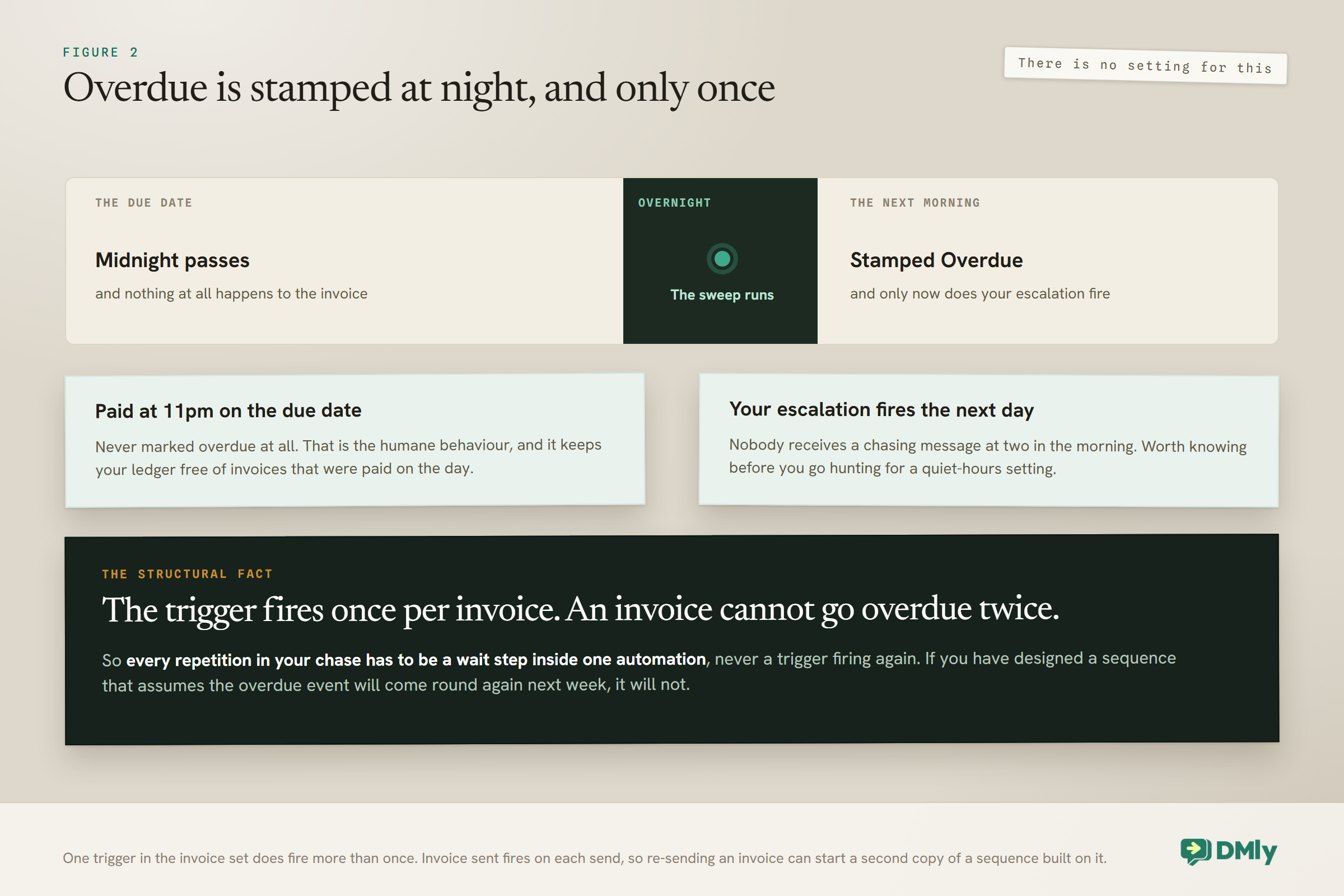
Overdue is stamped by a nightly sweep, not the instant the clock passes the due date. An invoice due today does not flip at one minute past midnight. It flips when that night’s job runs.
Two consequences follow, and both are in your favour.
- A customer who pays late on the due date is never marked overdue. Somebody who settles at eleven at night on the deadline is on time as far as your records are concerned. That is the humane behaviour, and it means your ledger is not full of technically-overdue invoices that were paid on the day.
- Your escalation fires the following day rather than in the small hours. Nobody gets a chasing message at two in the morning. Worth knowing before you go looking for a quiet-hours setting to prevent something that does not happen.
The same sweep that marks the invoice also fires the Invoice overdue trigger, and that trigger fires once per invoice, because an invoice cannot go overdue twice. This is the single most important structural fact for anyone building a chase. Your escalation cannot loop by re-triggering itself, and it cannot be restarted by anything re-marking the invoice. Every repetition in your sequence has to be built as steps and waits inside one automation. If you have designed a chase that assumes the overdue event will fire again next week, it will not.
It is also worth knowing the eight states an invoice can sit in, because what you count later depends on telling them apart: Draft, Sent, Partially paid, Paid, Overdue, Void, Refunded and Partially refunded.
A Proportionate Escalation for Unpaid Invoices
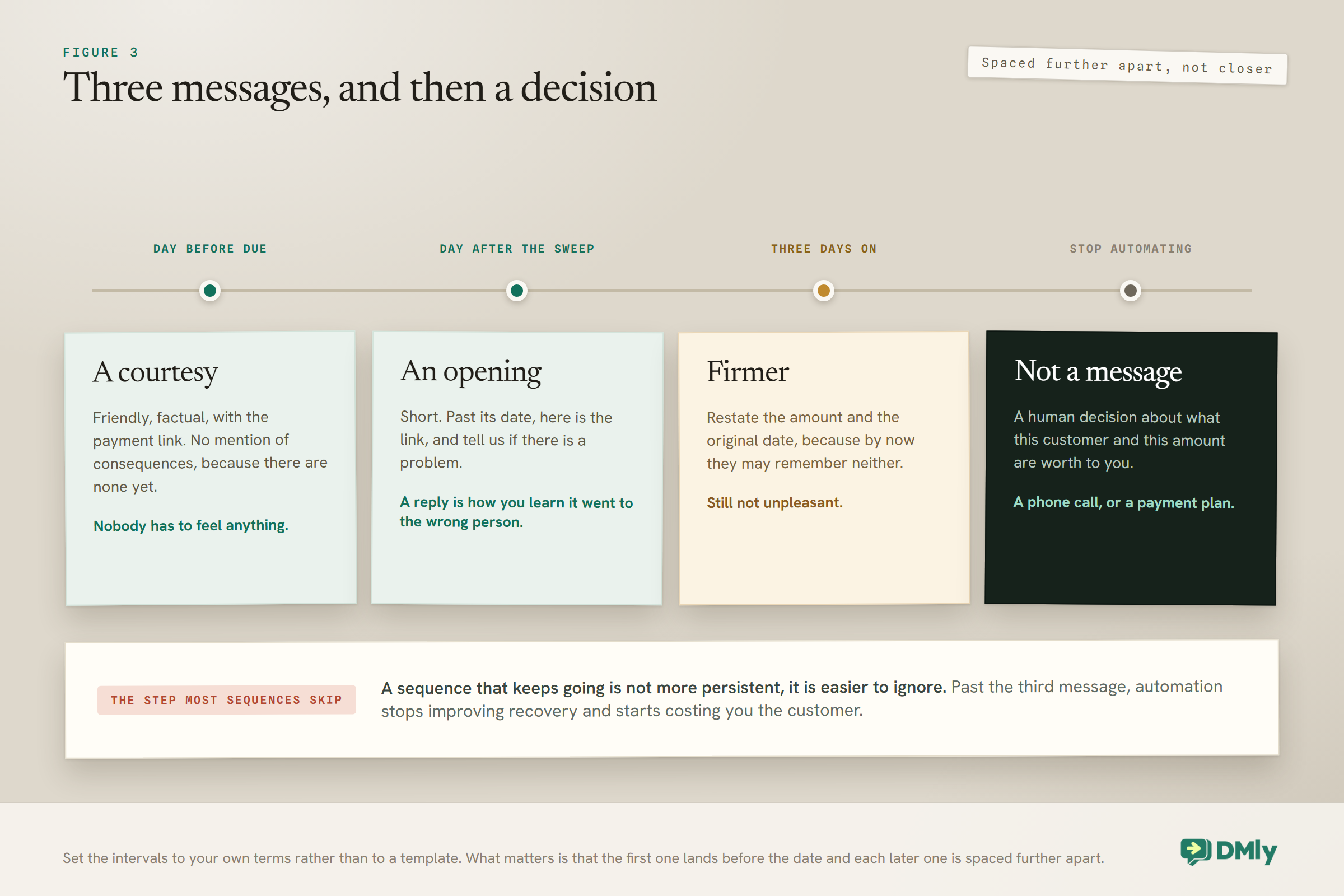
Four steps covers almost any small business, and the fourth one is a decision rather than a message. The shape matters more than the exact intervals, which you should set to suit your trade and your terms.
- One day before it is due. Friendly, factual, with the payment link. No mention of consequences, because there are none yet and hinting at them here is what makes an automated sequence feel cold.
- The day after the sweep marks it overdue. Short. The invoice is now past its date, here is the link, and tell us if there is a problem. That last clause earns its place: it turns a chase into an invitation to reply, and a reply is often how you find out the invoice went to somebody who left the company.
- Three days after that. Slightly firmer and still not unpleasant. Restate the amount and the original date, because by now the customer may genuinely not remember either.
- Then stop automating. A human decision about what this customer and this amount are worth to you. Automated messages beyond this point damage the relationship without measurably improving recovery.
Notice what is not in that list: a daily message, a threat, and a fourth, fifth and sixth automated attempt. A sequence that keeps going is not more persistent, it is easier to ignore, and it teaches the customer that your messages are noise.
Set the intervals to your terms, not to a template: A business on 30-day terms with commercial customers can afford a slower ladder than a mobile hairdresser invoicing on the day. If your default due period is short, compress the whole sequence rather than keeping three days between steps out of habit. The principle to preserve is that the first message lands before the date and each later one is spaced further apart, not closer together.
What Stops the Chase
The thing you must get right is that a customer who pays stops hearing from you immediately. Everything else about how you handle unpaid invoices can be imperfect and survive it. A reminder that arrives after the money did is the one mistake customers actually complain about.
Build the stop in two ways rather than one, because they cover different failures.
- Check before each message. Have the sequence confirm the invoice is still unpaid immediately before it sends, not only when it starts. An invoice paid on day two should not receive the day-four message.
- Watch the paid event. Invoice paid fires when an invoice is settled in full, and Payment succeeded fires on each individual payment. Either can end a sequence and start a thank-you instead, which is a much nicer note to finish on.
Gateway payments reconcile themselves, so the stop happens without you doing anything. Manual payments do not. Cash, a bank transfer or a cheque only stops your chase once somebody records it against the invoice, and until they do, your automation is behaving perfectly correctly while chasing a customer who has already paid you. If you take money in person or by transfer, recording it the same day is not bookkeeping tidiness, it is what stops your own reminders embarrassing you.
Partial Payments and the Balance
A part payment does not settle the invoice, and your sequence has to know the difference. An invoice with some money against it sits at Partially paid, or Overdue if its date has also passed, and it keeps a balance outstanding.
The useful behaviour is that the payment link follows the Balance due rather than the original total, and is re-minted after each part payment. So a customer who has paid half and asks for the link again gets one for the remaining half, without anybody working out the arithmetic. Practically, that means you should always send the current link from the invoice rather than resending an old message, because a saved link from last week may be asking for the wrong figure.
Part payments are also the mechanism behind the most useful thing you can offer a customer who genuinely cannot pay: a payment plan. Somebody paying you in three instalments is a far better outcome than an invoice you eventually write off, and the fact that the link keeps re-minting for what is left makes the arrangement almost administration-free once you have agreed it.
One thing to check in your own sequence: If your chase says “your invoice for 400 is unpaid” and the customer has already paid 250 of it, you have made an avoidable mistake in front of somebody who is trying. Reference the outstanding balance rather than the invoice total in any message that quotes a figure.
The Tone Question, Which Is Mostly a Timing Question
Most advice about how to word a payment reminder is trying to solve a problem that better timing removes. If the first message goes before the date, you barely have to think about tone at all.
Still, three things make a measurable difference to whether a message gets acted on, and none of them is about politeness.
- Name the amount in the message. A link with no figure beside it asks the customer to find out what they owe before deciding to pay it, which is one more step than you can afford.
- Say what it is for in their words. Not invoice INV-0042. The bathroom job, or Tuesday’s session. People pay for things they recognise.
- Say when. A date in the message converts better than one buried in a PDF, and it is what makes a later reminder feel like a reminder rather than a surprise.
What to leave out is shorter: apologies for sending it, and anything implying that paying is optional or that you feel awkward asking. You did the work. The message should read like the last ordinary step of the job. A tradesperson who writes “sorry to chase” on a fortnight-old invoice has told the customer that chasing is an imposition, and some customers will take them at their word.
When to Stop, and What Stopping Means
Stopping the automation and closing the invoice are two different decisions, and only the second one is irreversible.
Stopping the chase is easy: the sequence ends and a human takes over. That usually means a phone call, which recovers more at this stage than any message will, or an offer of a payment plan.
Closing the invoice is where people get stuck, because only a Draft can be deleted. Anything you have already sent has to be voided instead. Voiding keeps the record rather than erasing it, credits back the unpaid balance on the customer’s statement, and takes back any loyalty points that were earned on that sale. That is the correct behaviour for a document you issued and someone might reasonably ask about later, and it is worth explaining to whoever does your books before they go looking for a delete button.
The judgement about when to write something off is yours and depends on the amount, the customer and whether you want them back. What is worth deciding in advance rather than case by case is the threshold, because deciding it in the moment means deciding it while annoyed. A useful rule of thumb: below a certain figure, one phone call and then let it go; above it, a phone call and a payment plan before anything else.
Having Fewer Unpaid Invoices in the First Place
The best chase is the one you never have to run, and three upstream changes do more than any sequence will.
- Shorten your default due period. Whatever you set as the default due days is what every invoice inherits when you do not set a date by hand. Many businesses are on thirty days out of inheritance rather than decision. If your customers are consumers rather than companies, fourteen or even seven is often perfectly normal and halves the window in which an invoice can be forgotten.
- Take money before or at the point of work where the trade allows it. A deposit turns a possible bad debt into a partial payment. Even where a full up-front charge would be strange, a proportion up front changes the arithmetic of the worst case entirely.
- Send the invoice the day the work finishes. Not at the end of the week, not on the first of the month. The correlation between how long you take to invoice and how long the customer takes to pay is the least surprising thing in this whole subject, and the easiest to fix.
All three of those are decisions rather than features, and none of them takes longer to make than reading this paragraph. They also compound: a shorter due period on an invoice sent the same day means your pre-due reminder lands while the customer still clearly remembers the work.
Testing the Chase Without Annoying Anyone
Test it on yourself before it meets a customer, because the failures here are the embarrassing kind.
Raise a small invoice against your own contact record with a due date a day or two out, and let the whole sequence run. What you are checking is not that messages send, it is the four things that go wrong in practice.
- Does the pre-due message arrive on the day you expected? Off-by-one errors in a wait step are the most common fault and the least visible.
- Does paying it actually stop the sequence? Pay it midway through and confirm nothing else arrives.
- Does a manually recorded payment stop it too? This is the one that catches people out, because it depends on somebody recording the money rather than on the system noticing it.
- Does the message read correctly with the real values in it? An amount, a date and a name that all resolve properly, rather than an empty space where a figure should be.
Run that once and you will find at least one thing wrong. Everybody does. It is a far better place to find it than in a thread with the customer whose kitchen you just finished.
What You Can Honestly Measure
Be realistic here, because it saves you looking for a report that does not exist. There is no collections dashboard, no recovery-rate report and no comparison of one reminder’s wording against another’s.
What you do have is the invoices list with its statuses, and the payments ledger. From those, three numbers are worth pulling by hand once a month, and all three are more useful than any conversion metric would be.
- How many unpaid invoices are sitting Overdue right now, and their total value. The trend over a few months tells you whether anything you changed worked.
- How long invoices take to settle, roughly, from send date to paid. If that number drops after you add a pre-due reminder, the reminder is doing its job.
- How many overdue invoices turned out to be manual payments nobody recorded. If that is more than the odd one, your problem is not chasing at all, and the fix is a habit rather than an automation.
Contact-level history sits on the customer record, which is where to look before ringing anybody, and the broader picture of money in against money out is covered in our guide to tracking income and expenses in one place.
Mistakes Worth Avoiding
- Starting the chase after the due date. The single most expensive habit on this page, and the easiest to change.
- Sending to somebody who has already paid. Check the invoice is still unpaid before each message, not only at the start.
- Recording cash and transfers late. Your automation will chase a customer who paid you in person, and it will be right to.
- Quoting the invoice total after a part payment. Reference the outstanding balance instead.
- Assuming the overdue trigger fires more than once. It fires once per invoice. Repetition goes inside the automation.
- Forgetting that re-sending an invoice can restart your sequence, since Invoice sent is the one trigger here that fires again.
- Automating past the third message. Persistence stops working and starts costing you the customer.
- Writing “sorry to chase”. You are not imposing. You did the work.
- Leaving the default due period at thirty days by inheritance rather than because it suits your trade.
Frequently Asked Questions
How do I automatically remind customers about unpaid invoices?
Build an automation in the flow builder starting from an invoice trigger, then add message and wait steps. The sequence worth having first starts before the due date and checks the invoice is still unpaid before it sends. There is no single switch to turn on, so allow twenty minutes to build it properly.
When exactly does an invoice become overdue?
When a nightly sweep stamps it, not at the moment the due date passes. An invoice due today flips overnight, which means a customer who pays late on the due date itself is never marked overdue, and your escalation goes out the next day rather than in the small hours.
Can my overdue automation run more than once?
The Invoice overdue trigger fires once per invoice, because an invoice cannot go overdue twice. Any repetition has to be built as steps and waits inside a single automation. Invoice sent, by contrast, does fire again on each send, so re-sending an invoice can start a second run of a sequence built on it.
How do I stop reminders once someone pays?
Have the sequence check the invoice is still unpaid before each message, and use Invoice paid or Payment succeeded to end it. Gateway payments reconcile on their own; cash and bank transfers only stop the chase once somebody records them against the invoice.
What happens if a customer pays only part of the invoice?
It sits at Partially paid, or Overdue if the date has passed too, with a balance still outstanding. The payment link is re-minted for what is left, so the customer is never asked for the whole amount again. Make sure your messages quote the balance rather than the original total.
How many reminders should I send before giving up?
Three messages and then a human decision. One before the due date, one just after it and one a few days later covers almost every case. Beyond that, automated messages stop improving recovery and start costing you the relationship, so the fourth step is a phone call or an offer of a payment plan.
Can I delete an invoice I have given up on?
Only if it is still a Draft. Anything already sent has to be voided instead, which keeps the record, credits the unpaid balance back on the customer’s statement and takes back any loyalty points earned on that sale.
Move the Message Earlier
If you take one thing from this page, take the first step of the ladder. A single automated message the day before the due date, checking first that the invoice has not already been paid, will do more for your unpaid invoices than any amount of carefully worded chasing afterwards.
Then do the two unglamorous things around it. Shorten your default due period if it is thirty days out of habit rather than out of trade. And record cash and transfers the day they arrive, so your own automation never chases somebody who has already paid you.
Everything after that is a decision rather than a feature: three messages, spaced further apart rather than closer together, and then a phone call. If the invoice side of this is what needs work first, our guide to creating and sending invoices through WhatsApp covers raising a document worth opening, and our guide to setting up WhatsApp payments covers getting a working payment link into the message in the first place.
Writing about WhatsApp automation, bookings and growth for local business.
Turn WhatsApp into your busiest channel.
Start free and run message, bookings, payments and reviews in one place.
