
Instagram DM Automation: Setup, Comment-to-DM, and Flows (2026)
The Reel worked. A brow and lash studio posts 20 seconds of a lash lift on a Tuesday evening, and by Wednesday morning there are 60 comments, half of them saying one of three things: “Price?”, “How do I book?” and “Do you do this on Saturdays?”
Content is rarely where a small studio breaks. The break comes in the hour afterwards. The owner answers between clients. She sends the price list to some, tells others to “DM us”, and loses track of who she’s already replied to. A few of those people had a slot in mind and a card in hand. By Thursday, two of them have booked with the studio down the road that answered in four minutes.
That’s the gap Instagram DM automation closes. Not by spamming people, and not by pretending to be human, but by making sure every comment, story reply and message gets a fast, correct answer, and that the ones who want to book actually get booked.
This guide walks through it in plain terms. What Instagram DM automation is and what it is not. How comment-to-DM, story replies and mentions actually work. The Meta rules that decide what you can send and when (the 24-hour window, the 7-day human agent allowance, private replies). What to look for when you are choosing a tool, how AI changes the picture, and what the whole thing looks like day to day for salons, clinics, gyms, restaurants, tutors and D2C brands. And how a platform like DMly turns an Instagram DM into a booking, an order or a CRM contact, then carries it on to WhatsApp when that makes sense.
What Is Instagram DM Automation?
It is a way of making sure nobody who contacts your account is left waiting. Instagram DM automation is software that connects to your Instagram professional account through Meta’s official messaging system (the Instagram messaging API), watches for the things people do on your account, and answers in your DM inbox using rules you set. The things it watches for are simple enough: someone sends you a DM, comments on a post or Reel, replies to a story, or mentions you in theirs. The simplest version of the software is a keyword auto-reply. The most useful version answers, asks a question or two, checks your calendar, books the appointment, tags the person and hands anything unusual to one of your team.
The key phrase there is on your account. Official Instagram automation is permission-based and reactive, which is a formal way of saying it can only message people who have already messaged you or engaged with something you posted. It cannot go looking for strangers, follow them and slide into their DMs. That limit is exactly why it is safe, and it is why the “growth” tools promising the opposite are the ones that get accounts restricted.
What It Isn’t
Three things get confused with it, and none of them will do this job. It is not a follow/unfollow or mass-DM bot: tools that log in with your password and message people who never contacted you break Instagram’s terms, and they are the reason “Instagram automation” has a bad name. It is not Instagram’s built-in saved replies either, which save you typing but do not trigger on comments, book anything or remember who asked what. And it is not a replacement for your team: the setups that work answer the repetitive majority instantly and pass the rest to a person with the context already attached.
| Approach | How it connects | Who it can message | What it can do | Risk |
| Official-API automation (DMly and similar platforms) | Facebook Login and Meta’s messaging permissions; never sees your password | People who DM you, reply to a story, mention you or comment on your posts | Auto-replies, comment-to-DM, flows, AI, booking, CRM, handover to a human | Low, as long as you respect Meta’s windows and content rules |
| Growth or “engagement” bots | Log in as you, with your password or a browser session | Anyone, including strangers | Follow, unfollow, like, mass DM | High: against Instagram’s terms; accounts get action-blocked or disabled |
| Instagram’s in-app saved replies and FAQs | Built into the app | People already in your inbox | Insert canned text; show suggested questions | None, but nothing runs on its own |
| Meta Business Suite instant and away replies | Built into Business Suite | People who message you | One greeting or away message | None, but one step only: no booking, no CRM |
Practical takeaway: Two questions sort the safe tools from the risky ones. Does it ask for your Instagram password? It should not. Can it message someone who never contacted you? It cannot, if it uses Meta’s API. Everything in the rest of this guide assumes the official route.
How Instagram DM Automation Works
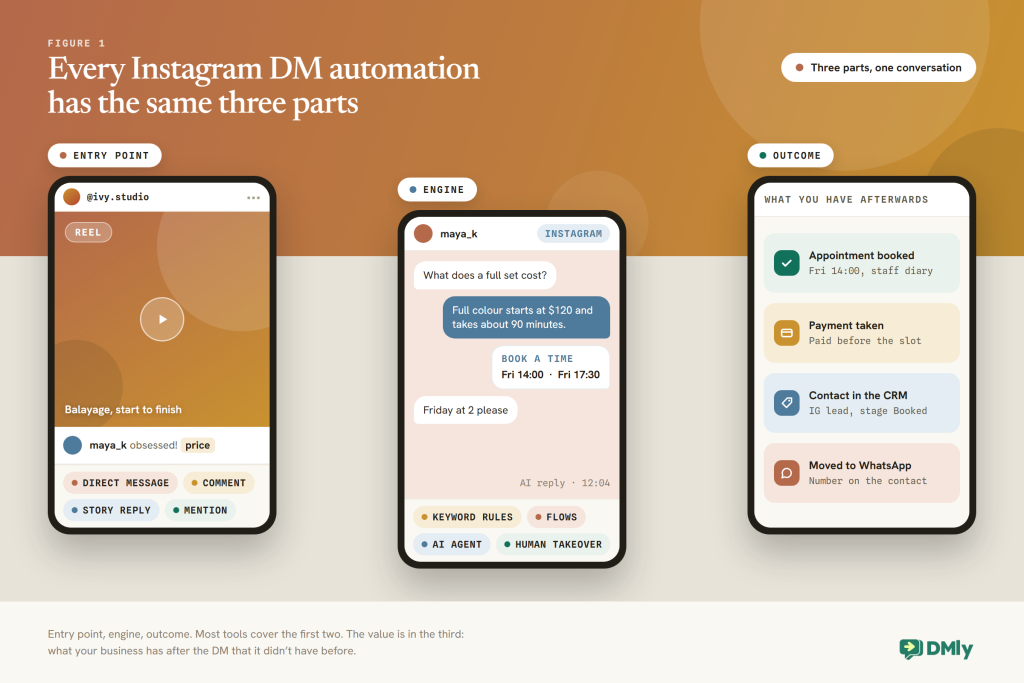
Whatever the badge on the box, every one of these tools is the same three pieces. There is an entry point (something the person does), an engine (the rules, flow or AI that decides what to send) and an outcome (what exists in your business once the conversation is over). Tools differ mostly in how many entry points they support, and in how far they take that third piece.
The Entry Points
- A DM. Someone opens your profile and messages you, taps an ice breaker (one of up to four suggested questions a first-time visitor sees), or picks something from your persistent menu. Ads and ig.me links that open a DM count too.
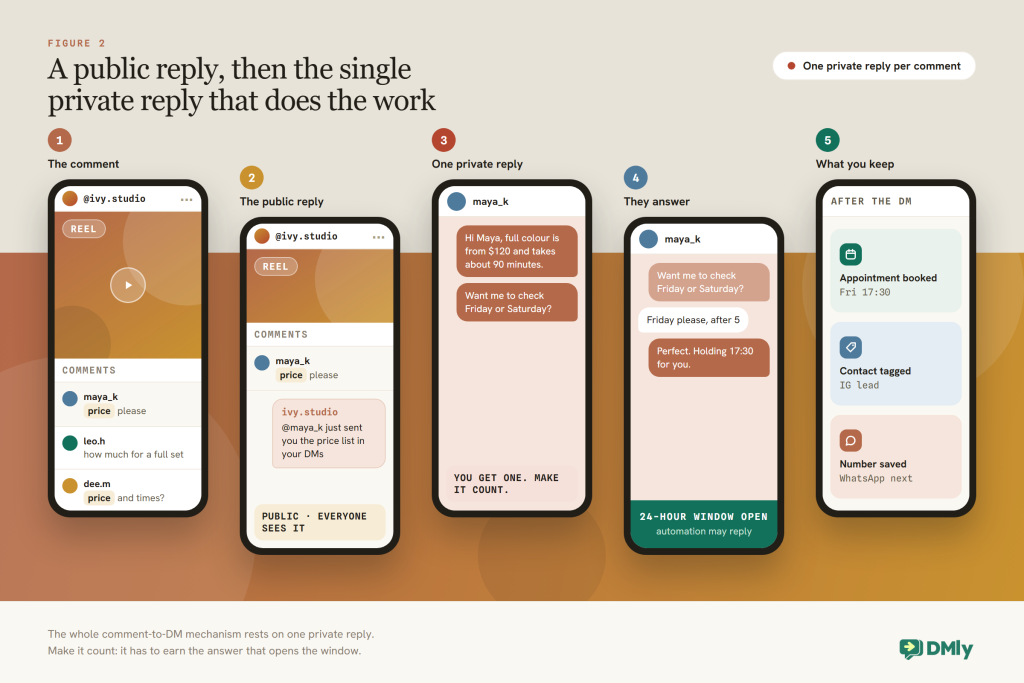
- A comment on a post, Reel or Live. This is the entry point behind “comment PRICE and I’ll DM you”. Meta lets a business send one private reply to a commenter, which opens a DM thread even though the person never messaged you.
- A story reply. Replies to your story arrive as DMs, so a “reply YES to get the link” story is an automation trigger like any other.
- A story mention. When someone tags you in their story, you can thank them, ask permission to reshare or send a small reward, automatically.
Each of these has its own rules, which we come to next, and its own playbook. Comment-to-DM setup, story reply automation, mention automation and turning comments into leads each get a guide of their own. This one is the map they all hang off.
The Engine: Rules, Flows and AI
There are three levels of engine, and most businesses end up running all three together. Keyword rules (“if the message contains PRICE, send the price list”) are quick to set up and blind to anything you did not predict. Flows are visual sequences of steps, such as send, wait for a reply, branch on the answer, tag, delay and hand over, and they are where comment-to-DM campaigns and lead capture live. An AI agent reads the message, answers from your price list and policies, and can call tools such as “check available times” or “book an appointment”, which covers every question you never wrote a rule for.
The Outcome: The “And Then What”
This is where most Instagram automation quietly stops. Sending a link is easy. What separates a toy from a business tool is what happens after the DM. Here is the same lash studio with the whole chain wired up:
Comment “Price?” on the lash-lift Reel
→ public reply: “Sent you a DM!”
→ private DM: price list plus “Want a slot this week?”
→ they reply “Saturday morning?” (the 24-hour window opens)
→ AI checks availability and offers 9:30 or 11:15
→ booking created, deposit link paid
→ contact tagged “lash lift”, stage moved to Client
→ confirmation and reminder go out on WhatsApp
Notice how much of that chain is not really messaging at all. It is calendar, payments and CRM. If your tool only does the top three lines, your team is still doing the rest by hand.
Practical takeaway: Before you build anything, write down the outcome you want for each entry point. Comment on a Reel becomes a tagged lead with the price list sent. Story reply becomes a booking. Mention becomes a thank-you plus a small reward. If you cannot name the outcome, you do not need the automation yet.
The Meta Rules Every Instagram Automation Must Follow
These rules decide what you may send and when, and they are stricter than most owners expect. Instagram messaging runs on the same Meta platform rules as Messenger. The good news is that they are consistent, and a decent tool enforces them for you, so after setup you rarely have to think about them again. As of August 2026, these are the rules that shape every Instagram automation. We go deeper, and keep it current, in our guide to the Instagram DM automation rules: the 24-hour window, the human agent tag and message limits.
The 24-Hour Standard Messaging Window
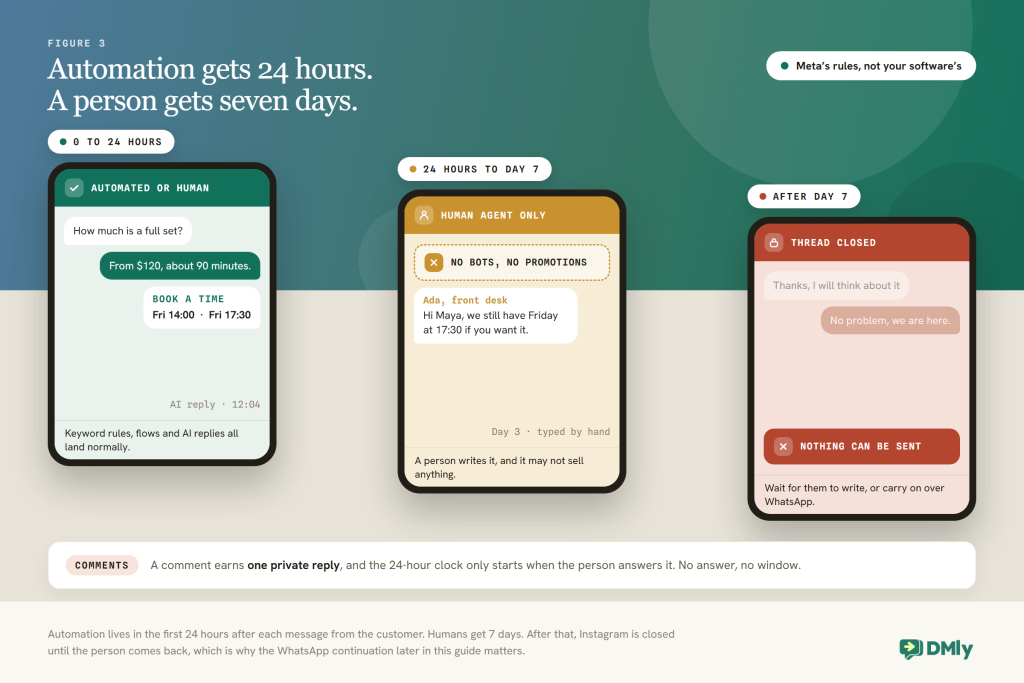
You can send whatever you like for 24 hours after someone messages you, and nothing at all after that. Meta’s documentation is blunt about it: only after an Instagram user has sent your professional account a message can your app send them one, and you have 24 hours from their last message to respond. Inside that window you can send anything, promotions included, automated or typed by hand. Every new message from them restarts the clock. Outside it, automation stops. In DMly, an automated Instagram send outside the window fails visibly and leaves a system note in the thread, rather than silently vanishing.
The 7-Day Human Agent Allowance
Your team gets a week instead of a day, but only by typing the reply themselves. Meta’s human agent tag lets a business representative manually respond to a person’s messages within 7 days of their last message. The examples Meta gives are a business closed for the weekend, or an issue that needs more than 24 hours to resolve. It is for a human typing a reply, not for flows or campaigns, and message tags cannot carry promotional content such as deals, coupons or discounts. In DMly, teammates can reply in the Inbox for 7 days under this allowance, while automations, sequences and broadcasts stay inside the 24 hours.
Private Replies to Comments
This is the rule that makes “comment PRICE and I’ll DM you” possible in the first place. Meta lets a business send a single private message to someone who commented on its post, ad, Reel or Live. One message per comment, sent within 7 days of the comment, or during the broadcast in the case of a Live. Only when the person replies does the normal 24-hour window open. In DMly, the first Send Message step of a comment-triggered flow is delivered as that private reply, and it is text only, so save your buttons, cards and images for the second message, after they answer.
Marketing Messages Need an Opt-In
You can only build a marketing list from people who ask to be on it, and you can only ask while the window is open. Meta allows recurring marketing messages on Instagram only to people who have opted in to a specific topic, and that opt-in can only be requested inside the 24-hour window. Their acceptance does not itself open a window. DMly’s Messenger (FB/IG) step group includes a Marketing opt-in step, which the docs describe as granting one additional message after the window closes. Check the current behaviour before you build a campaign around it, and treat Instagram broadcasts as a way to re-engage live conversations rather than as a mailing list.
No Templates, No Cold Outreach
There is no way to message someone on Instagram first. None at all. WhatsApp has approved message templates that let a business start a conversation. Instagram has nothing like them, and the Instagram “templates” in Meta’s documentation are card layouts you use inside a conversation, not a way to open one. So there is no compliant route to DM someone who has never messaged or commented. The job of Instagram automation is to catch and convert the people who come to you and, when you know you will want to reach them later, to move them to a channel where that is allowed. That is what the WhatsApp continuation further down is for.
Disclosure, Escalation and Opt-Out
Say that people are talking to a bot, give them a way out, and honour it when they take it. Where the law requires it, Meta’s policy asks that an automated experience discloses itself at the start of a conversation, after a long gap, or when a chat moves from a human to a bot. “You’re chatting with the studio’s automated assistant” is enough. Give people a route to a real person. And honour opt-outs: DMly treats “stop”, “unsubscribe” and similar keywords as an opt-out on Instagram, tags the contact Unsubscribe and stops automated messages, while still letting your team reply by hand.
| Entry point | What you can send automatically | Window for automation | Human replies |
| They DM you, tap an ice breaker or a menu item | Anything, including a promotion | 24 hours from their last message | Up to 7 days with the human agent tag |
| They reply to your story or mention you | Same as a DM; it lands in the DM thread | 24 hours | Up to 7 days |
| They comment on a post, Reel or ad | One private reply (text), plus a public reply under the comment | Private reply within 7 days of the comment; the 24-hour window opens when they answer | Once they’ve answered, up to 7 days |
| They comment during a Live | One private reply, only during the broadcast | As above | As above |
| They opted in to a marketing topic | Recurring messages on that topic | Per Meta’s marketing message rules | Not applicable |
| They’ve been quiet for more than 7 days | Nothing on Instagram | Closed until they message again | Closed |
Practical takeaway: Design every flow to finish its automated work inside 24 hours of the customer’s last message, and to end on a question, because a reply restarts the clock. And never build on the three things that get accounts restricted: messaging people who never contacted you, using message tags for promotions, and ignoring opt-outs.
Why Instagram DM Automation Matters
Your Instagram DMs are not marketing. They are your front desk. It is tempting to file them under “social” and leave them to whoever runs the account. The numbers say otherwise.
- 1 billion+ active conversation threads between people and businesses every day across WhatsApp, Messenger and Instagram. Meta, Q3 2025 earnings call
- 90% of customers rate an immediate response as important or very important when they have a service question; most define “immediate” as ten minutes or less. HubSpot Research
- 63% of consumers say they would switch to a competitor after just one bad experience, up 9% year on year. Zendesk CX Trends 2025
- 73% of shoppers in a study of 46,000 used multiple channels during their journey, and they spent more than single-channel shoppers. Harvard Business Review, 2017
Put those together and the case makes itself. People already message businesses at enormous scale, and Instagram is one of the three places they do it. They expect an answer in minutes. They forgive very little. And the customers who move between your channels, seeing your Reel, sending you a DM, booking, then getting a WhatsApp reminder, are the ones who spend the most.
For your business, the case is narrower and sharper than any of those figures. Instagram is where your work is on display, so it is where intent turns up: “price?”, “is this available?”, “can I book Saturday?”. Every one of those is a booking or an order that goes to whoever answers first. Automation gives you the four-minute reply at 9pm on a Sunday, and it makes sure the person who said “Saturday” actually ends up in Saturday’s calendar.
Practical takeaway: Measure two things from day one. How quickly your Instagram enquiries get a first answer, and how many of them end in a booking, an order or a saved contact. If that second number does not move, your automation is talking rather than working.
What to Look For in an Instagram DM Automation Tool
Almost every tool can send a DM when someone comments. The differences that matter show up on day 30. The market is crowded, so walk this list through with any platform you are considering, and ask to see anything you cannot check for yourself.
- Official Meta connection It connects through Facebook Login and Meta’s messaging permissions, never your password, and it says which Instagram account types it supports.
- All the entry points DMs, comments on posts and Reels, Live comments, story replies and mentions, ice breakers and a persistent menu. If it only does comments, you’re buying a feature, not a system.
- Comment actions beyond the DM Public reply with the person’s name, like, hide, delete, and sensible ordering (hide before the DM is safe; delete before the DM can make Meta reject the private reply).
- The windows enforced for you Automated sends stopped and logged outside 24 hours, a 7-day human allowance in the inbox, opt-out keywords honoured automatically.
- An AI agent that can act, not just chat Answers from your own price list and policies, checks real availability, books, tags, moves a pipeline stage and hands over to a person, with a limit on how long it will keep talking.
- Bookings, payments and a CRM underneath Real services and staff calendars, deposits before the slot is confirmed, and one contact record per person with tags, fields, stages and segments, so “Instagram user 4821” becomes “Amara, lash lift, Client” without anyone retyping.
- A shared inbox with human takeover Your team sees DMs and comments together, can pause the bot on a conversation, leave notes and pick up where the automation stopped.
- Other channels in the same place WhatsApp, Messenger, TikTok, SMS and website chat, so a conversation that starts on Instagram can continue where reminders and follow-ups are allowed.
- Honest reporting and honest pricing Instagram sends no delivery receipts, so a tool showing “delivered” for Instagram broadcasts is guessing; look for flow outcomes and bookings instead. Plan limits should be clear, with a trial you can test on a real account.
How AI Changes Instagram DM Automation
AI is what lets you stop trying to guess which words your customers will type. Keyword rules made Instagram automation possible; AI made it usable. The difference is easiest to see in a real message: “hey do you have anything sat morning for a lash lift, and how much is it with a tint? first time”. A keyword rule spots “lash lift” and sends the price list. An AI agent sees a first-time client asking about a specific service, on a specific day, with an add-on, and answers all three parts of the question.
A good AI agent for Instagram does five things. It answers from your material, meaning the price list, the policies and the FAQ page, not the open internet. It uses tools rather than guessing: list services, check available times, book, add tags, set custom fields. It follows the rules you give it, such as a deposit required for new clients, no medical advice, and no discussion of discounts. It knows when to hand the conversation to a person, with a note explaining why. And it stays inside Meta’s window like any other automation.
Here’s what that looks like for a dental clinic that gets asked about whitening every day:
Instagram DM: “How much is teeth whitening and can I come this week?”
→ AI answers from the price list: “In-chair whitening is £249, about 75 minutes.”
→ AI checks available times: “Dr Osei has Thursday 2:15pm or Friday 10:30am.”
→ patient: “Friday please, I’m a new patient”
→ AI books Friday 10:30, sets custom field “new patient: yes”, tags “whitening”
→ AI: “Booked. Shall I send your confirmation and reminder on WhatsApp? Just reply with your number.”
→ number saved to the contact; confirmation goes out on WhatsApp
→ AI hands over to reception with a note if the patient asks about medical history
Three boundaries keep all of that safe. Give the AI a scope: what it may discuss, what it must never promise, and when to hand over, such as a complaint, a medical question or a request for a discount. Keep the disclosure honest, because “I’m the clinic’s automated assistant” costs you nothing. And keep a human close: the best setups route anything uncertain into the inbox within the same conversation, so the patient never has to start again.
With a platform like DMly, the AI Reply step in a flow can use OpenAI, Claude, Google Gemini or DeepSeek models, read knowledge you upload (PDF, TXT and Markdown files up to 20 MB, web pages, FAQs) and call the booking and CRM tools above. Two brakes stop it running away with itself: each reply is capped at eight tool-calling rounds, and a conversation at 40 turns. Building one is the subject of our guide to creating an Instagram AI chatbot, and the setup section below shows where it fits.
Practical tip: Start the AI on the questions you can already answer from a document, such as prices, hours, policies and parking, and let it book. Add the judgement topics later, one at a time, once you have read a week of its transcripts.
What Instagram DM Automation Looks Like in 6 Industries
The mechanics of Instagram DM automation are identical everywhere. What changes is which entry point fires most, and which outcome pays. Here is how it tends to look for the businesses that get the most out of it. (For a support-focused angle, see our post on five ways businesses use Instagram DM automation for customer support.)
Salons, brows, lashes and spas
The Reel is the shop window. Comment “PRICE” or “BOOK” → price list in a DM → AI offers real slots → deposit → tagged by service. Story replies to “last-minute Saturday slot” posts fill cancellations, and a review request follows the visit.
Clinics, dental and aesthetics
Before-and-after posts bring “how much?” and “is it safe?”. The AI answers pricing and logistics from your documents, books consultations with the right practitioner, records “new patient” and “treatment of interest” fields, and hands anything clinical to reception.
Gyms and fitness studios
Class clips bring “can I try?”. Comment “TRIAL” → DM with the offer → AI lists upcoming classes and books a place → contact staged as Trial → a WhatsApp check-in after the first class. Mentions in members’ stories get a thank-you and a referral code.
Restaurants and cafés
Food Reels bring “do you take bookings?”. Comment “TABLE” → menu and booking link in a DM → reservation with a deposit on busy nights → tagged for the next event. Story replies to specials become pre-orders. From DM to reservation or order is its own guide.
Tutors, coaches and course creators
“Is there a beginners’ class?” arrives after every tip post. Comment “LEARN” → DM with levels and prices → AI qualifies (subject, level, timing) → books a free assessment → contact moved to Qualified, with follow-ups on WhatsApp where reminders are allowed.
Small D2C brands
Launch posts bring “restock?”, “sizes?” and “ship to Lagos?”. Comment “LINK” → product DM with a checkout link → questions answered from the catalogue → buyers tagged by product → order updates on WhatsApp with approved templates. Comment moderation hides scam replies on ads.
Two patterns repeat across all six. The entry point that fires most is the comment, because it is public and it costs the customer nothing. And the outcome that pays is rarely the DM itself. It is the booking, the deposit or the tagged contact you can follow up later, on a channel that lets you.
Why DMly Is the Best Way to Automate Instagram DMs
Plenty of Instagram tools are excellent at the first half. The second half is where your money is. Catching the comment and sending the DM is the easy part. DMly is built for the “and then what”, on the same contact record and under the same channel rules as WhatsApp, Messenger, TikTok, Telegram, SMS and website chat. Here is what that means, feature by feature, taken from the documentation.
Every Instagram Entry Point, One Connection
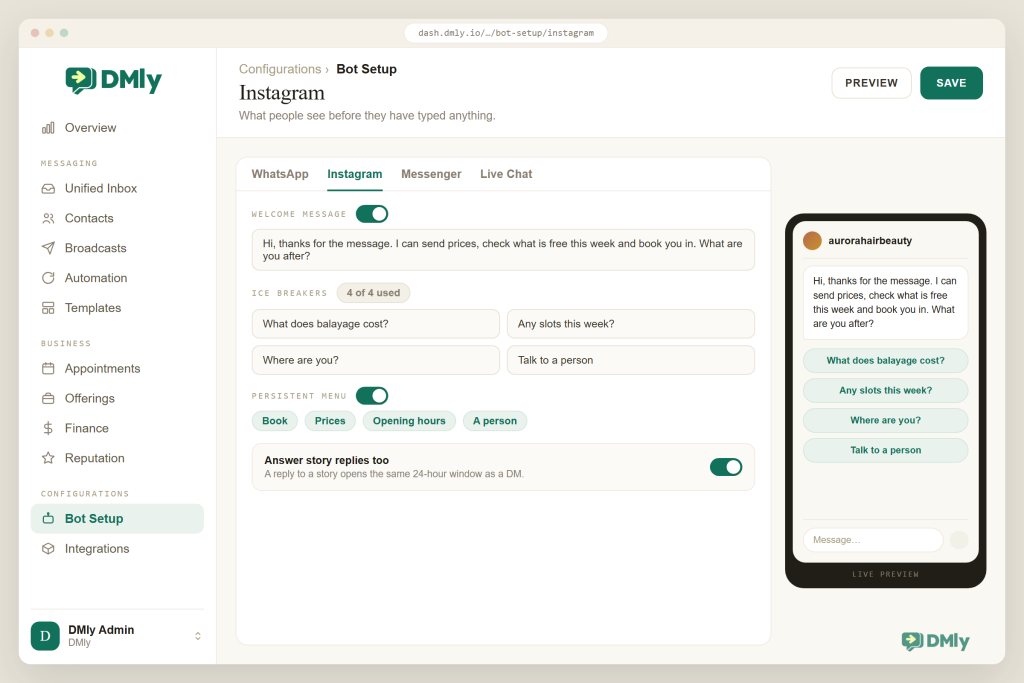
You connect once, and everything people do on your account starts arriving in one place. Go to Integrations → Channels, pick the “Instagram via Facebook” tile, and from then on DMly listens for direct messages, story replies and mentions, comments on posts, Reels and Lives, and media attachments. Its flow triggers are named after what people actually do: Instagram message, Post or Reel comments, Story reply, Story mentions, Live comments. Ice breakers (up to four) and a persistent menu (up to three items per level, three levels deep) are set under Configurations → Bot Setup and pushed out to Instagram. A welcome message answers a contact’s first ever DM, and a flow can check whether the person follows your account and take a different path if they do not.
Comment Automation That Does More Than Reply
A comment is not just something to reply to. It is five things you can do at once. DMly’s comment automation gives a comment-triggered flow five actions: Reply to Comment (public, and it can drop in the person’s first name), Like Comment, Hide Comment, Delete Comment and Send Message, where the first text message of the run goes out as Meta’s private reply. Keywords match on “contains”, “exact match”, “starts with” or any message at all, and “Only respond once per contact” stops the same person setting the flow off on every comment they leave. Comment threads and DM threads stay separate in the Inbox, with a DMs / Comments toggle between them, but both link to the same contact. A comment only creates a contact when an automation actually matches, so your CRM does not fill up with drive-by commenters. The feature page also describes AI moderation that hides spam and abusive comments.
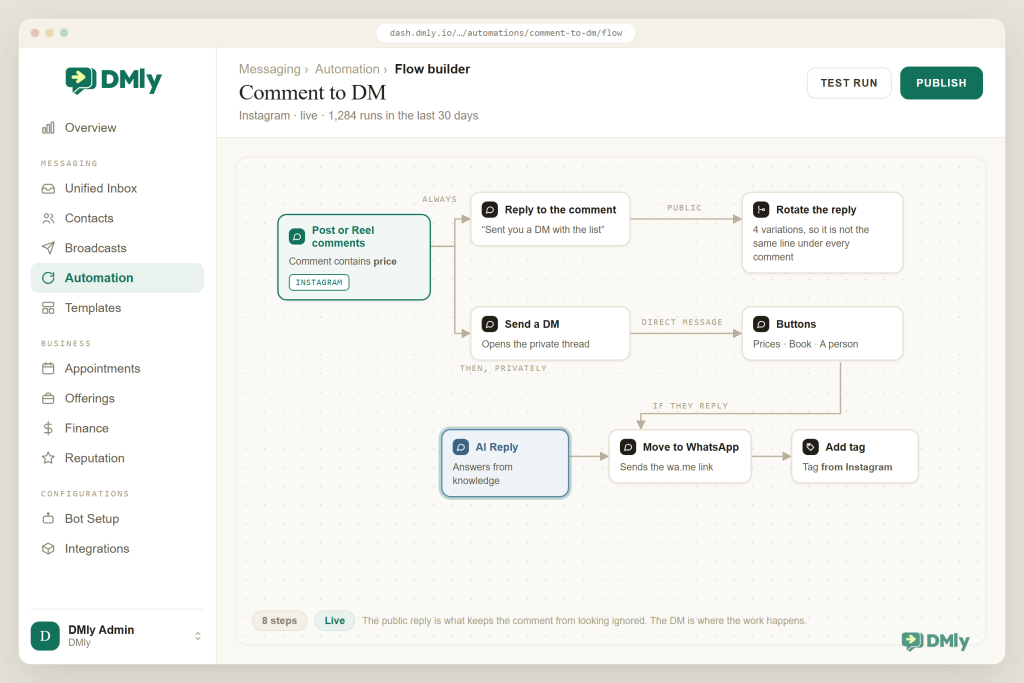
An AI Agent That Books, Tags and Hands Over
This is the step that turns a conversation into a booking while you are doing something else. The AI Reply step works on every channel your automations run on, Instagram included. You give it a persona and instructions, attach your knowledge (price list, policies, FAQs) and switch on the tools it is allowed to use: get contact info, update phone number, move CRM stage, add or remove tags, add a note, set custom fields, list services and staff, check available times, book, reschedule or cancel an appointment, list and book classes, hand over to a human, plus web search and custom HTTP functions if you need them. If it cannot answer, it falls back gracefully and the flow moves on, and a teammate can pause the bot on any conversation straight from the Inbox. Ready-made templates for customer service, lead qualification and appointment booking give you a working start; see DMly AI agents.
Bookings, Deposits and Payments Inside the DM
The slot your customer is offered is a real slot, not a request form. DMly’s Appointments module knows your services (duration, price, payment mode), your staff and their hours, and it only offers times that survive every one of those checks. Flows can create bookings through the Appointments step group, and the AI can do it conversationally. A service set to “pay before booking” holds the slot for 15 minutes while the client pays through Stripe, PayPal, Paystack, Razorpay, MyFatoorah or Mercado Pago, and nothing is confirmed until the money clears. Confirmations, reminders, reschedule and cancel links and a review request after the visit are all handled by DMly rather than by your receptionist.
A Real CRM Under Every Conversation
“Instagram user 4821” becomes “Amara, lash lift, Client” without anyone retyping a thing. New Instagram contacts arrive as “Instagram user” plus a few digits until you capture a name, and then a flow or the AI fills in the rest with tags, custom fields, a pipeline stage and a lifecycle status. One contact can carry Instagram, WhatsApp and Messenger threads together once the records are merged, and they do need merging, because DMly does not link channel identities automatically. Segments rebuild themselves from those fields, which is how “everyone who asked about lash lifts in July but didn’t book” becomes an audience in DMly’s CRM without a spreadsheet. Moving Instagram leads into your CRM, qualifying them from DMs and following them up each get a guide of their own.
Meta’s Rules, Enforced So You Don’t Have To
You should not have to hold any of the rules above in your head. The tool should. DMly applies the 24-hour window to Instagram flows, sequences and broadcasts, and gives teammates the 7-day human agent allowance in the Inbox. Failed sends leave a system note in the thread and turn up in the logs. Opt-out keywords add an Unsubscribe tag and stop automated messages, while manual replies stay possible. Instagram broadcasts are plain text, go only to reachable contacts, meaning those inside the window or opted in, and DMly will not pretend to know delivery or read counts that Instagram never reports. The builder even warns you that Instagram does not support call or web-view buttons before you publish a flow that uses them.
Instagram to WhatsApp, Without Breaking a Rule
Instagram goes quiet after a week. WhatsApp does not have to. This is the part most Instagram-only tools cannot do. Instagram closes after 24 hours of automation and 7 days of human replies, and it has no templates for reaching out later. WhatsApp does. So do the fast, public, visual work on Instagram, then move the relationship over to WhatsApp for reminders, follow-ups and future campaigns, with the person’s consent.
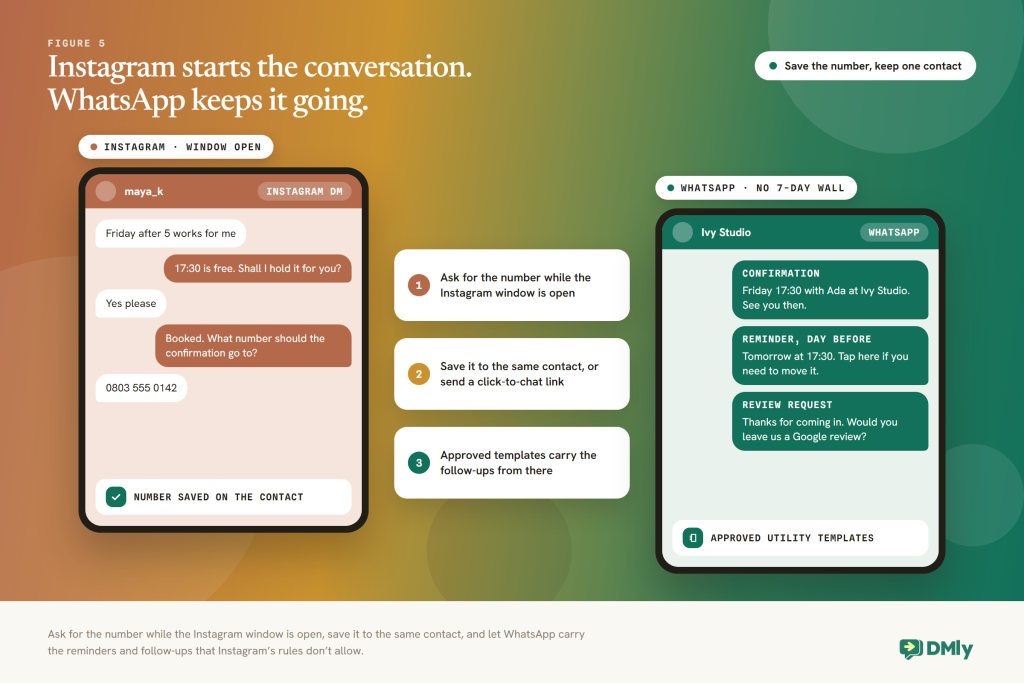
In DMly this takes three documented pieces, and all three are small. Capture the number while the Instagram conversation is still open. The AI’s “update phone number” tool saves it onto the contact, or an ask-and-wait step collects it. Keep it on one record. The number goes onto the Instagram contact, so the booking, the tags and the notes all stay with that person. DMly identifies contacts per channel and does not link them automatically, so if they start a separate WhatsApp chat instead, merge the two rows under Contacts, Possible duplicates. Then carry on where it is allowed. Send a WhatsApp click-to-chat link or QR code from Messaging → Growth Tools, which has the person message you first, opening a WhatsApp window and letting a greeting flow start. Once WhatsApp is connected, confirmations and reminders can go out on approved utility templates even when no window is open. Combining Instagram comment automation with WhatsApp is its own guide; our post on WhatsApp click-to-chat links covers the link side, and the WhatsApp channel page covers templates and windows.
One Plan, Every Channel
Instagram is not an add-on you pay extra for. Every plan includes it alongside WhatsApp, Messenger, TikTok, Telegram, SMS, live chat and Google Business Profile. Starter is $29 a month billed yearly (one profile per channel, 3 seats, 3,000 active contacts, 500 AI replies a month), Growth is $65 (three profiles per channel, 6 seats, 10,000 contacts, 5,000 AI replies) and Premium is $149 with unlimited contacts. WhatsApp usage is billed at Meta’s standard rates with no markup, and every plan starts with a 7-day free trial, no card required (prices as of August 2026).
| What you need | Typical Instagram-only DM tool | DMly |
| Entry points | Comments and DMs; story features vary | DMs, post, Reel and Live comments, story replies, story mentions, ice breakers, persistent menu |
| After the DM | A link, a tag, maybe a form | Real bookings with deposits, orders and invoices, CRM stages, sequences, review requests |
| AI | Drafts or answers FAQs | Agent with booking, CRM and handover tools; your choice of OpenAI, Claude, Gemini or DeepSeek |
| Meta’s windows | Often left to you | 24-hour window enforced on flows, sequences and broadcasts; 7-day human allowance in the Inbox; failures logged |
| Other channels | Instagram, sometimes Messenger | WhatsApp, Messenger, TikTok, Telegram, SMS, live chat, Google reviews, one contact record |
| Instagram to WhatsApp | Manual | Number captured in the DM, click-to-chat links and QR codes, template reminders and follow-ups |
| Team | Single inbox, limited roles | Shared Inbox with DMs / Comments toggle, assignment, notes, human takeover, roles |
| Pricing | Per contact, Instagram only | From $29 a month for every channel; 7-day trial |
Connect Instagram to DMly
Comment-to-DM, story replies, mentions and an AI agent that books, tags and hands over, on the same platform as your WhatsApp. Free for 7 days, no card required.
How to Set Up Instagram DM Automation With DMly
Here is the shape of a first setup that ends in bookings rather than just replies. For a click-by-click walkthrough of the account and connection steps, our post on how to set up Instagram automation goes screen by screen. This is the strategy view.
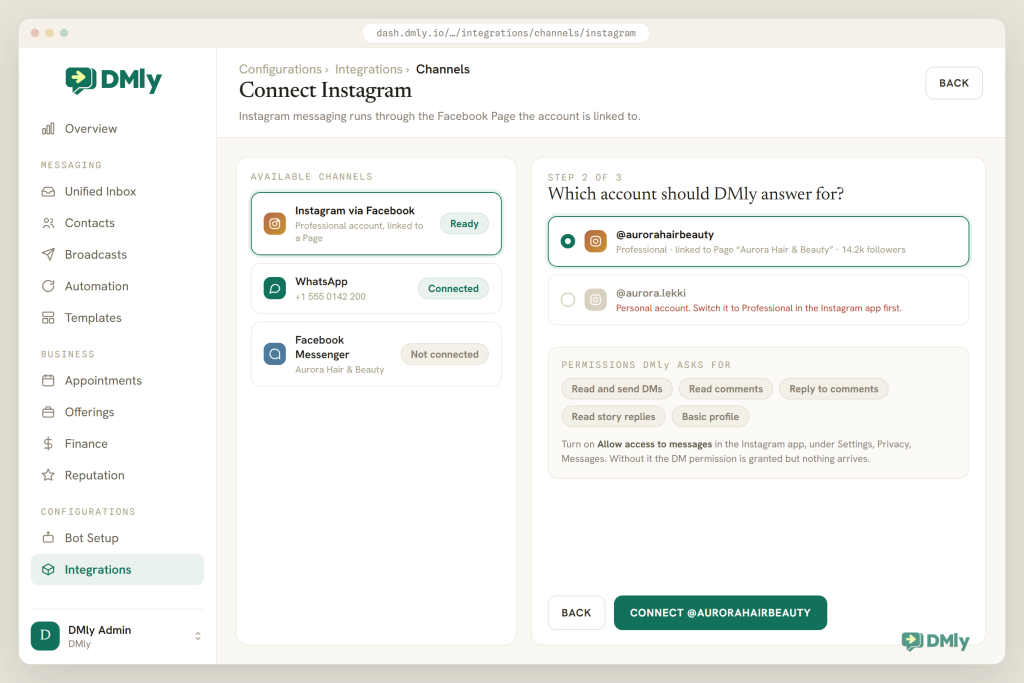
- Check the prerequisites. You need an Instagram Business account linked to a Facebook Page, and you must be an admin of that Page. If you’re still on a personal profile, our guide to setting up an Instagram business account covers the switch.
- Connect Instagram. Go to Integrations → Channels, choose the “Instagram via Facebook” tile (not the publishing-only Instagram tile), sign in to Facebook, approve the requested permissions and pick your account. DMly resolves the linked Page and subscribes it to messages. Your plan sets how many Instagram accounts you can connect.
- Set the basics in Bot Setup. Under Configurations → Bot Setup, write a welcome message for first-time DMs, add up to four ice breakers (“What are your prices?”, “Book an appointment”, “Where are you?”), build a persistent menu if you want one, and set a default reply for messages nothing else matches.
- Build the comment-to-DM flow. Create a flow with the Post or Reel comments trigger, set the keyword rule to “contains” your word (PRICE, BOOK, TABLE), turn on “Only respond once per contact”, add a Reply to Comment step for the public reply, then a Send Message step. The first message goes out as Meta’s private reply and is text only, so save buttons and images for the next step. Scope by keyword rather than by post; the docs note that the “Specific post” option isn’t enforced yet.
- Add the AI Reply step. After the private reply, connect an AI Reply step: persona and rules, your price list and FAQs as knowledge, and the tools it needs (list services, check available times, book, add tags, set custom fields, hand over to a human). Leave it as the last step so it stays conversational and answers follow-up questions.
- Wire the CRM. Add tags for the service and the source (“lash lift”, “reel-aug”), a pipeline stage for new leads and, if you follow up, a Sequence step for a within-window nudge (“Still want that Saturday slot?”). Set custom fields for whatever you’ll want to segment on later.
- Add the WhatsApp continuation. Have the AI (or an ask-and-wait step) ask for the person’s number once the booking is made, and offer a WhatsApp click-to-chat link from Growth Tools for anyone who’d rather start the chat themselves. With WhatsApp connected and DMly’s managed appointment templates approved in your WhatsApp account, confirmations and reminders go out there.
- Test, publish, watch. Test from a second account (your own comments and messages don’t trigger your automations), publish, then live in the Inbox for a week with the DMs / Comments toggle, pausing the bot where you need to step in. Read the logs for failed sends and fix the flow, not the customer.
Best Practices for Instagram DM Automation
- Make the private reply earn an answer. It’s one message, text only. Give the thing they asked for and end with a specific question (“Want Saturday morning or afternoon?”), because their reply is what opens the window.
- Reply publicly, briefly. The public reply is for everyone else reading the comments. “Sent you a DM, Amara!” signals that the account answers, without dumping the price list under the post.
- Use one keyword per outcome. PRICE sends the list, BOOK offers slots, LINK sends the product. Mixing them in one flow makes every path longer.
- Finish inside 24 hours, then hand to WhatsApp. Reminders, follow-ups and campaigns belong on a channel with templates and consent. Ask for the number while you have the window.
- Give the AI documents, not vibes. A current price list, hours, policies and a short list of “never say” items outperform a long personality prompt, and every flow should have a route to a person.
- Read the transcripts weekly. Ten minutes with last week’s Instagram conversations will show you the question you forgot, the price you changed and the Reel that brought the most bookings.
Mistakes to Avoid
- Buying a growth bot and calling it automation. Anything that needs your password or messages strangers is a fast route to an action block. Use the official API.
- Sending images or buttons as the private reply. The first message to a commenter is text only. Put media in the second message, after they answer.
- Deleting the comment before the DM goes out. Meta may reject the private reply to a deleted comment. Hide first if you must, DM, then delete.
- Building campaigns on the human agent tag. It’s for a person replying by hand within 7 days, and message tags can’t carry promotions. Automated promotions outside 24 hours are what get accounts restricted.
- Treating Instagram broadcasts like a newsletter. They reach people inside the window or opted in, and Instagram reports no delivery or read counts. Use them to re-engage live conversations, and move the list to WhatsApp for real campaigns.
- Automating without an outcome. If a flow ends with a link and nothing else changes (no tag, no booking, no stage), you’ve built a very fast way to be forgotten.
Final Thoughts
Instagram DM automation is not complicated. Someone acts, your system answers inside Meta’s rules, and something in your business changes as a result. The tools that disappoint stop at the second step: they send the DM, and your team is back to typing prices and copying names into a calendar.
The rules are on your side here, odd as that sounds. The 24-hour window keeps Instagram a place where people talk to businesses they chose. The private-reply limit makes comment-to-DM a conversation starter rather than a spam cannon. The human agent allowance gives your team room to be human. Build inside them, ask for the number while you still have the window, and let WhatsApp carry what Instagram will not.
DMly is built for exactly that chain: every Instagram entry point, comment automation that ends in a booking or a tagged contact, an AI agent with real tools, Meta’s windows enforced for you, and WhatsApp on the same contact record for whatever comes next. If your comments are full of “price?” and your calendar is not full, that is the gap to close first.
Frequently Asked Questions
Is Instagram DM automation allowed by Meta?
Yes, as long as it runs through Meta’s official Instagram messaging API on a professional account, connects through Facebook Login, and follows the platform rules: reply within the 24-hour window, use the human agent tag only for manual replies within 7 days, send one private reply per comment, and honour opt-outs. Tools that log in with your password and message strangers are not allowed, and they put your account at risk.
Can I automatically DM someone who hasn’t messaged me?
Only in one case: if they commented on your post, Reel, ad or Live, you can send one private reply within 7 days of the comment (during the broadcast for a Live). Otherwise no. Instagram has no equivalent of WhatsApp’s templates for reaching people who haven’t contacted you.
What is the 24-hour window, and what happens after it?
After a person messages you, you have 24 hours to send automated or human replies, promotions included, and each new message from them restarts the clock. After 24 hours your Instagram DM automation stops; a human can still reply for up to 7 days using Meta’s human agent tag, without promotional content. After 7 days the thread is closed until they message again, unless they opted in to marketing messages on a specific topic.
Can I automate replies to Instagram comments and Reels?
Yes. A comment automation can reply publicly under the comment, like it, hide it or delete it, and send the commenter one private DM. In DMly the trigger is “Post or Reel comments” (or “Live comments”), the first Send Message step is delivered as the private reply, and the flow continues once the person answers.
Do I need a Facebook Page to automate Instagram DMs with DMly?
Yes. DMly connects through the “Instagram via Facebook” tile, which requires an Instagram Business account linked to a Facebook Page where you are an admin. You sign in to Facebook and approve the requested permissions; DMly never asks for your Instagram password.
Can Instagram DM automation book appointments and take payments?
With a platform that includes booking, yes. DMly’s AI agent can list services, check real availability, book, reschedule and cancel appointments and classes, and a service can be set to require payment before the slot is confirmed. Confirmations and reminders then go out automatically, and they can move to WhatsApp once you have the person’s number.
How do I move an Instagram conversation to WhatsApp?
Ask for the number while the Instagram window is open (the AI’s “update phone number” tool or an ask-and-wait step saves it to the contact), or send a WhatsApp click-to-chat link so the person messages you first on WhatsApp. DMly keeps both threads under one contact, and WhatsApp’s approved templates then carry the reminders, follow-ups and opted-in campaigns that Instagram’s rules don’t allow.
Writing about WhatsApp automation, bookings and growth for local business.
Turn WhatsApp into your busiest channel.
Start free and run message, bookings, payments and reviews in one place.
