
How Small Businesses Can Track Income and Expenses in One Platform
Guides like this one usually oversell, so here is a confession first, about everything this one will not deliver.
DMly will not connect to your bank account. It won’t photograph receipts; there is no upload on the expense form. It won’t produce a formal profit and loss statement, calculate depreciation or file your taxes, and nothing here replaces your accountant. If you came hoping to cancel your bookkeeping software, this is the wrong page, and that is better said in the second paragraph than the twentieth.
Here is what it will do, and why that is worth a guide of this length anyway. The money questions that actually interrupt your week are operational ones, not accounting ones: Did I get paid? Who still owes me? Where did the money go? Am I actually making money? What do I hand the accountant? Most owners answer them by opening five apps: the bank app, the invoice tool, the card reader’s dashboard, a spreadsheet named FINAL v3, and a WhatsApp thread they scroll for “sent the transfer”. Intuit QuickBooks’ 2026 research found that manual work is the number one internal reason small businesses pay their own bills late, and that nearly three in four aren’t remotely automated about it. The cost of fragmentation isn’t abstract; it’s the Thursday evening you spend reconciling, and the payments that fall through the gaps between apps.
So the claim here is narrow and useful: the platform that already takes your bookings, sends your invoices and holds your customer conversations can also track income and expenses, both directions, in one place. This guide shows where DMly’s one-platform boundary actually sits, then answers your five questions one at a time: payments in, balances owed, expenses out, the profit picture, and the monthly handoff to the person who does your real accounts.
One Platform to Track Income and Expenses, and an Honest Boundary
Everything about money sits in one place, next to the customer it came from. In DMly that place is the Finance hub, in seven tabs: Invoices, Payments, Orders, Subscriptions, Statements, Expenses and Gift cards. Six of those are money coming in or the records of it; one is money going out. The point of keeping them together isn’t ambition, it’s adjacency: the invoice is raised from the same contact the WhatsApp conversation belongs to, the payment reconciles against that invoice on its own, and the expense you type in on Friday sits in the same hub you’ll open on Monday anyway.
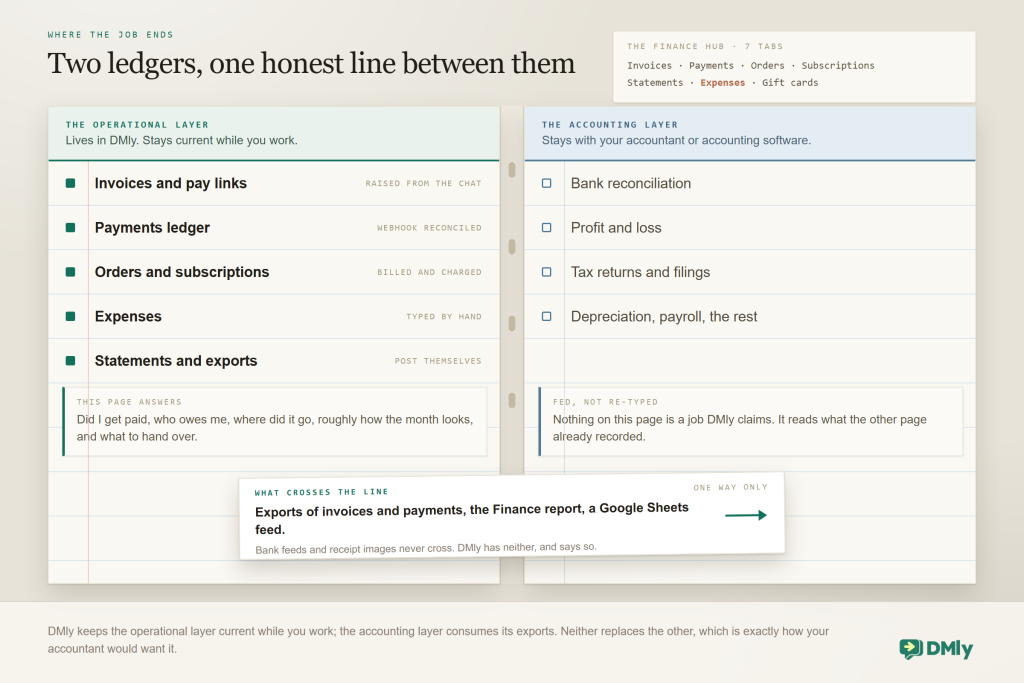
Money-in can arrive five documented ways, and every one of them lands in the same Payments ledger: an invoice paid through its hosted pay link, an order billed by generating an invoice from it, a subscription charged on its billing date, an appointment collected with Pay before booking or Pay after the appointment, and a gift card bought through its own purchase invoice. Money-out is simpler: you record each expense by hand in the Expenses tab, against a vendor, a category and an account. There is no bank feed doing this for you, which is the trade-off of the honest boundary above; the compensation is that the money-in side needs almost no typing at all.
Why bother pulling this into the platform your conversations live in? Because the gaps between tools are where the losses happen. In QuickBooks’ 2026 Late Payments Report, 49% of owners said ordinary payment processing timelines create real cash-flow gaps, 59% paid extra fees just to access money they’d already earned, and 39% said a single late payment made payroll or bills hard to cover in the past year. The report’s conclusion reads like a design brief for this setup: the owners with the smoothest payment cycles had, in its words, “fewer places for the money to get stuck”.
The one-time setup: Everything here assumes three pieces of plumbing you do once: your services and products priced in Offerings, a payment gateway connected with its webhook registered at the provider (the step everyone skips, and a webhook is simply the address your payment provider sends news of a payment to), and Finance defaults set (currency, due days above zero, tax rates). Our WhatsApp invoicing guide walks through all three; the short version of the gateway step is in our guide to setting up WhatsApp payments.
The takeaway: one hub to track income and expenses, both directions, and a boundary you can explain to your accountant in a single sentence. Now the five questions.
Question One: Did I Get Paid?
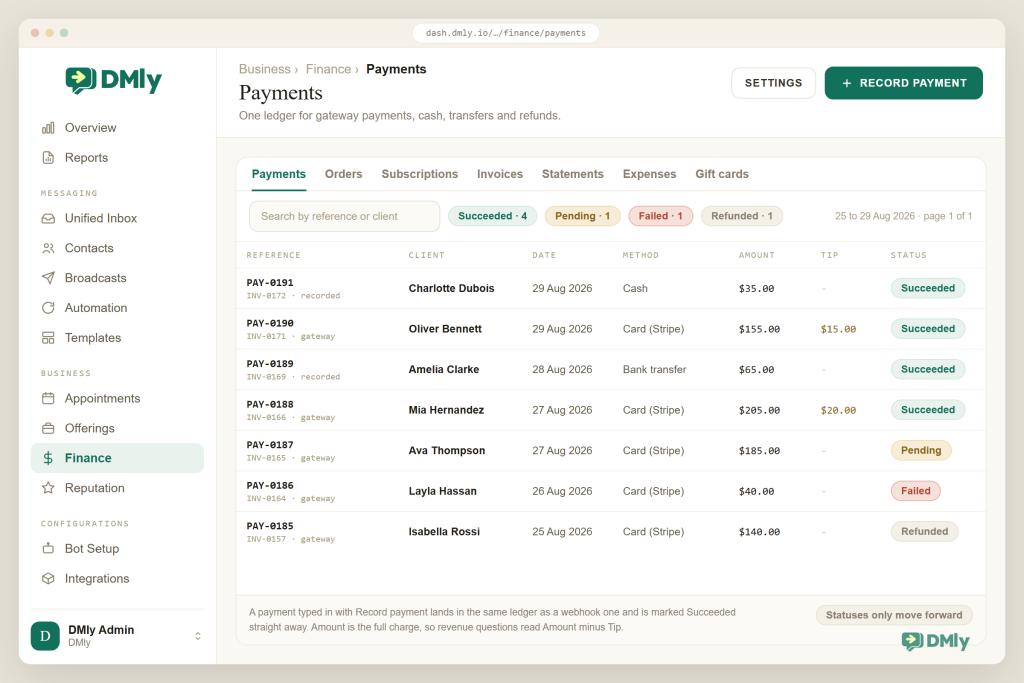
You should be able to answer this with one glance at one list, and that list is Finance → Payments. Every payment lands there, online, typed in by hand or refunded. When a customer pays through a checkout link, your payment provider tells DMly, and the payment flips to Succeeded and the invoice to Paid without anyone touching it. When someone hands over cash or sends a transfer, your team records it with Record payment and a method of Cash, Bank transfer, Credit / debit card, Cheque, EFTPOS or Other, and it lands in the same ledger, marked Succeeded immediately.
Customer pays the link → gateway webhook → payment Succeeded → invoice Paid → receipt → statement credited. Cash at the counter → Record payment (Cash, today) → same ledger, same statement.
Three properties make this ledger trustworthy enough to stop checking the bank app hourly:
- Statuses only move forward. Pending, Failed, Succeeded, Refunded, in that direction. A provider sending events late or out of order can never un-pay an invoice, and invoice balances count only Succeeded payments.
- Tips don’t inflate takings. The Amount column is the full charge; a separate Tip column shows the gratuity on its own, and a tip never marks more of an invoice settled than what was billed.
- Refunds are explicit. The Refund action needs the Issue refunds permission (admin-only by default), reverses the client’s statement, and deliberately does not touch the gateway: you make the actual repayment in the provider’s dashboard, so the ledger records intent and the provider records money.
Two nuances save confusion later. An order is not a payment: Finance → Orders tracks the goods (Draft, Confirmed, Cancelled, moving stock as they go), and money only moves when you generate an invoice from the order and it gets paid. And a gift card is income when it’s bought, through its own purchase invoice; the day it’s redeemed, staff apply it to the bill and no new money arrives, which is exactly what the ledger will show.
The takeaway: if every payment, card or cash, ends in this one ledger, “did I get paid?” becomes a glance, not an investigation.
Question Two: Who Still Owes Me?
This one has two answers, one for the person in front of you and one for the week ahead, and neither of them needs a spreadsheet.
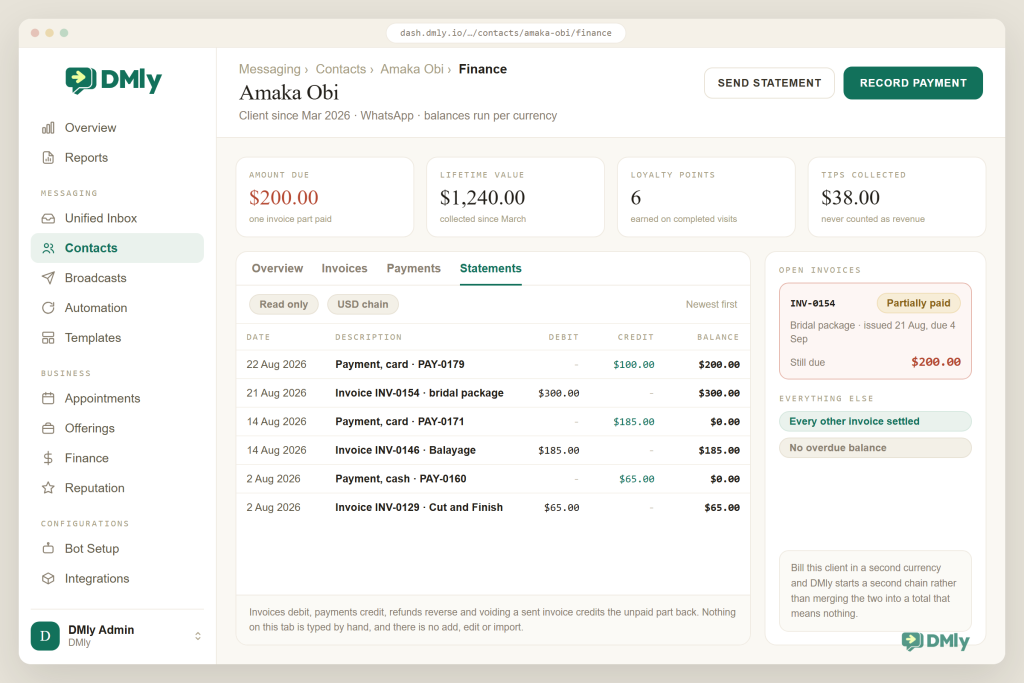
Per client: open the contact and the Amount due tile is on the profile, shown in red when there’s a balance, next to Lifetime value and the rest of the money tiles. Below them, the Finance tab lists that client’s invoices, payments and statements (the 50 most recent of each). When Amaka asks “what do I still owe you?” mid-chat, the answer is one click from the conversation, which is the quiet advantage of the money living where the messages do.
Per business: filter Finance → Invoices by status. Sent is fine, Partially paid is fine, Overdue is your call list, applied by an overnight job to any invoice past its due date with money owed. One trap to avoid: Default due days ships at 0, which means invoices get no due date and nothing ever turns Overdue. Set a real number in Finance → Settings or this whole question goes quiet on you.
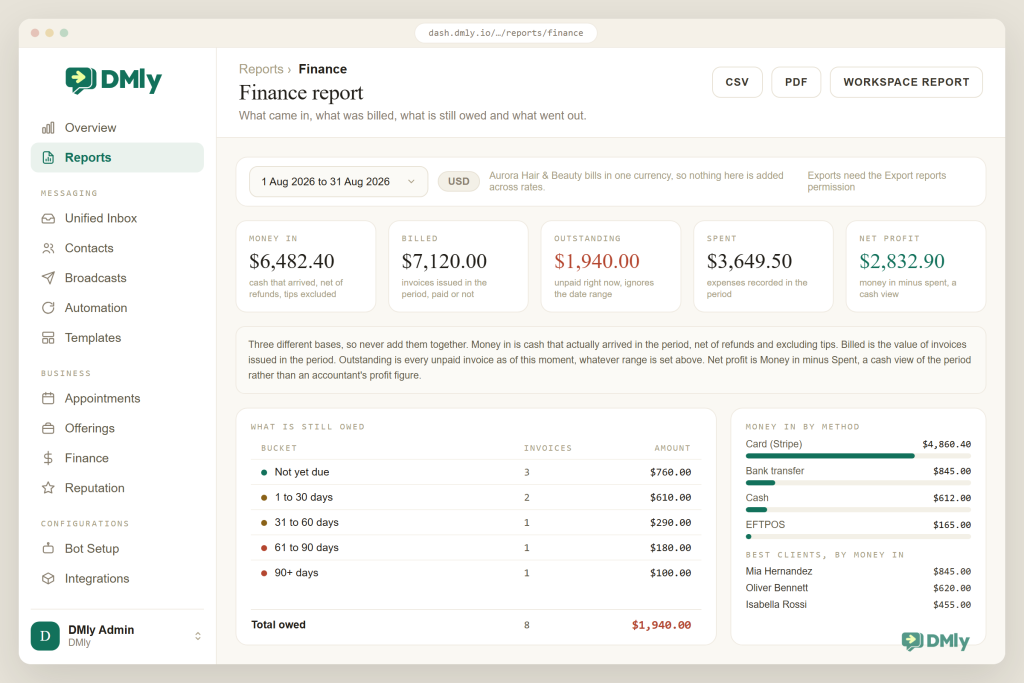
The third view arrived with the Finance report. Open Reports → Finance and the What is still owed table ages every unpaid invoice into buckets (Not yet due, 1 to 30, 31 to 60, 61 to 90 and 90+ days) with a count and amount per bucket and the total owed underneath, next to an Outstanding tile that always shows this moment’s position whatever date range the rest of the report is set to, because “who owes me?” is a today question, not a March question. This is the receivables aging view accountants build in spreadsheets, drawn for you: Not yet due is health, 1 to 30 is this week’s calls, and anything past 60 wants a firmer script. One behaviour to know, and it rhymes with the due-days trap above: an invoice with no due date can never age, so it sits in Not yet due forever, looking healthier than it is. Due days above zero keep this table honest too.
The machinery underneath is the statement: a running account ledger per contact where every invoice posts a debit, every payment a credit, refunds reverse and voiding a sent invoice credits back the unpaid part. It’s deliberately read-only: no add, no edit, no import, so when a client disputes a balance you can read the history line by line instead of defending a spreadsheet. Bill someone in two currencies and the Balance column runs a separate chain per currency rather than inventing a fake total. The workspace-wide view is at Finance → Statements, newest first; each client’s own history sits on their profile.
Chasing what’s owed is its own discipline, and it belongs to the invoicing side of the platform: reminder flows on the invoice due date, an escalation when something turns Overdue, and pay links that always ask for the current balance. We cover that machinery in our invoicing guide and in our post on invoicing from chat; the tracking side’s job is simpler, and this section is it: know the number, per client and in total, without adding anything up.
The takeaway: Amount due for the person in front of you, the Overdue filter for the week’s calls, the statement when anyone asks how the number got there.
Question Three: Where Did the Money Go?
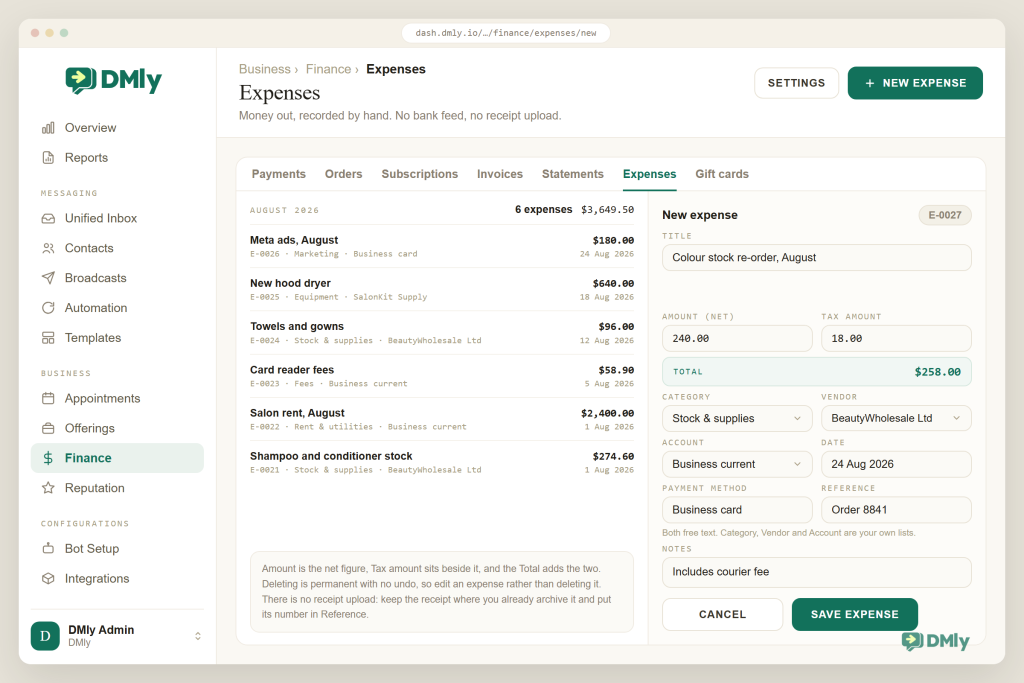
This is the one direction nothing will ever fill in for you, so it lives or dies on a one-minute habit. Finance → Expenses is where money going out gets recorded: rent, stock, the new dryer, the Meta ads bill. Each expense gets an automatic number with the E prefix (E-0001, E-0002, never reused in your workspace) and is filed against three lists you own: a Vendor (who you paid), a Category (what kind of spend) and an Account (which account the money left from). You create and maintain those three lists in Finance settings, which is ten minutes of setup that determines whether your expense record is analysable or a junk drawer.
Four rules keep this side honest, and all four are documented behaviour, not opinion:
- Net and tax are entered separately. The Amount field is before tax, the Tax amount sits beside it, and the Total adds the two. Type the gross into Amount and your tax picture quietly breaks.
- An expense never touches a client. It isn’t linked to a contact and can’t be billed to one. If a cost should be passed on (materials for a job, a courier), it belongs as a line on the client’s invoice instead; the expense record is for your side of it.
- Deleting is permanent. There’s no undo and no trash. Made a mistake? Edit the expense rather than deleting it, and keep the numbering trail intact.
- There is no receipt upload and no bank feed. Keep the paper or PDF receipt wherever you already archive them, put its number in the Reference field, and treat DMly’s record as the index that tells you where to look.
Make the three lists boring: Five to eight categories, named after how you actually think (“Stock & supplies”, “Rent & utilities”, “Marketing”, “Equipment”, “Fees”), a vendor per real supplier, an account per real card or bank account. Resist the fifteen-category taxonomy; you’ll stop filing. The lists exist so that “what did we spend on stock this quarter?” is a filter, not an archaeology dig.
The habit that makes this section work is unglamorous: record the expense the day the money leaves, from the phone, in under a minute. The QuickBooks research above found manual processes are the top internal reason outgoing payments slip; a one-minute record beats a shoebox reconstruction in March every time. That’s also the honest pitch of doing it in DMly rather than a spreadsheet: the tab is already open, because the rest of your day runs there.
The takeaway: money-out is a manual record by design. Make it a same-day habit against three tidy lists, and the direction nobody automates stays as legible as the one the webhooks handle.
Question Four: Am I Actually Making Money?
This is the one place the confession at the top has softened, because DMly now answers this question on a single screen. Reports → Finance (a Finance tab in the Reports section, between Appointments and CSAT) draws the working owner’s answer for you. Pick a date range, and five tiles report Money in, Billed, Outstanding, Spent and Net profit, with the breakdown behind each figure underneath. The report’s own subtitle is the fair summary: what came in, what was billed, what is still owed and what went out.
The tiles carry the same discipline as the ledger they summarise, and the definitions are worth thirty seconds because each answers a different question. Money in is cash that actually arrived in the period, net of refunds and excluding tips, so question one’s tip rule is baked in rather than left to your reading of the columns. Billed is the value of invoices issued in the period, paid or not. Outstanding is everything unpaid at this moment across every invoice you’ve ever issued, and it deliberately ignores the date filter (the aging table from question two sits beside it). Net profit is Money in minus Spent: a cash view of the period, not an accountant’s profit figure, and the report doesn’t pretend otherwise. Never add the three bases together; read the tile that matches the question you’re asking.
Beneath the tiles, the report shows money in and out plotted over the period, the money-in split by payment method, the spend split by the expense categories from question three (this is where those boring lists earn their keep), Top services and products by value billed on the period’s invoices, and Best clients ranked by money actually collected. For “am I actually making money?”, that is most of the answer, on a Tuesday, without asking anyone.
Three small prints worth knowing: Bill in more than one currency and the report adds the raw amounts together and says so; it does not convert, so treat mixed-currency totals as a flag rather than a figure. Viewing the report takes the same View finance permission that opens the Finance section, and the export buttons take the Export reports permission, admin-only by default. And a refund lowers Money in without pushing the amount back into Outstanding, because a refund returns money; it does not un-issue the invoice.
Two older views still matter beside the report:
- The per-client view. Every client profile carries Lifetime value (“what this client has been worth so far”) alongside Amount due and, where relevant, Tips collected. This is the number that changes behaviour: when you can see the quiet regular is worth four figures a year, you stop treating retention as a nice-to-have. Best clients in the report is the leaderboard; the profile is the story behind each name.
- The raw truth behind the tiles. The Payments ledger and the Expenses list remain the drill-down: when a tile surprises you, the period’s payment rows and expense entries are where the surprise lives. The report reads from them, never instead of them. The Reports section’s other tabs (Team performance, Appointments, CSAT, Logs) cover the rest of the business; the Appointments report’s Revenue paid by service and staff counts by booking date rather than payment arrival, so it can legitimately disagree with Money in across a boundary week. The Overview dashboard, for clarity, reports messaging (volume, reply rate, peak hours), not money; don’t go looking for revenue there.
When you want the numbers somewhere else, they travel. DMly’s invoices page says you can export invoices and payments for your accountant. The flow builder has a documented Send to Google Sheets step and a Webhook step, so a flow on Payment succeeded can append a row to your own running sheet as money arrives, and the API, webhooks, Zapier and n8n cover anything more ambitious. And if you’ve connected an AI assistant through DMly’s MCP server, the tools include get_revenue_summary and list_invoices, which turns “how did August actually go?” into a question you type rather than a report you build.
One statistic for perspective on why this matters weekly rather than yearly: in the 2026 QuickBooks report, 51% of businesses carrying overdue invoices said cash flow was a problem, against 36% of those without. The difference between those two groups isn’t accounting skill; it’s how quickly they notice. A five-minute Tuesday glance at the Finance report is the noticing.
The takeaway: one report for the period’s answer, lifetime value for who matters, the ledger and the expense list for the drill-down, and exports when the question gets serious.
Question Five: What Do I Hand the Accountant?
The last question isn’t a screen at all, it’s a routine, and it is short enough to keep. Here is the one to put in your calendar, shaped so nothing depends on memory or heroics.
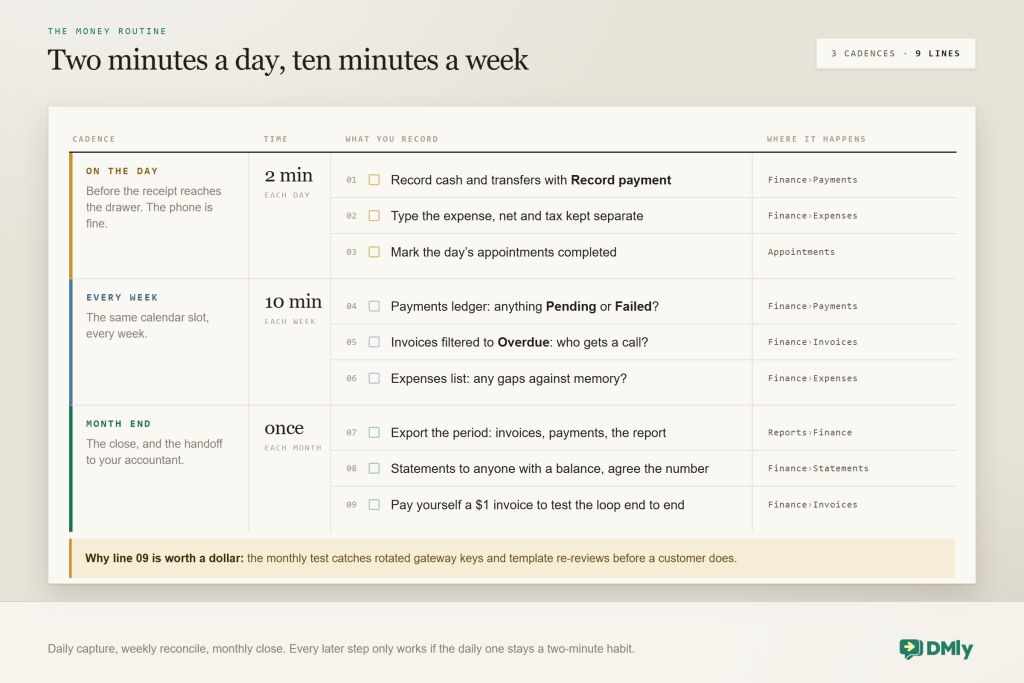
What the accountant actually receives from DMly: the Finance report for the period, exported from Reports → Finance (the CSV is one row per payment with gross, tip, refunded, net and currency in separate columns, which is exactly the shape reconciliation wants; the PDF carries the five tiles, the trend and every breakdown under a dated header), the invoices and payments export from the feature page’s documented option, and your expense record with net and tax already separated, referenced to receipts you’ve archived elsewhere. If they’d rather have everything at once, the Workspace report button bundles the sections into a single PDF, with one caveat to know: it always covers the trailing 30 days, whatever range the screen is showing. What they do with it, bank reconciliation, formal P&L, filings, stays their job, exactly as Figure 1 promised. And if they want a live feed instead of a monthly file, the Google Sheets step or a webhook gives them one without you exporting anything.
Two integrity habits make the handoff painless. First, never delete what you can void or edit: a voided invoice keeps its history and credits the statement; a deleted expense is gone for good, and a numbering gap invites questions you can’t answer in March. Second, keep refund records in both places deliberately: DMly’s Refund action for the statement, the provider’s dashboard for the money, and the Issue refunds permission restricted to the people who should be doing either.
The takeaway: the handoff is a routine, not a scramble, because the year was captured two minutes at a time.
The Five Questions in Six Businesses
Every business here uses the same hub to track income and expenses; what differs is which of the five questions eats the most of the owner’s week. Here is which one dominates where, and the habit that answers it.
Hair & beauty studio
Question one rules: a day mixes card links, cash and tips, so the ledger’s Tip column and same-day Record payment keep takings true. Expenses are stock-heavy; a “Stock & supplies” category plus vendor filing shows the real cost of a colour bar.
Clinic or dental practice
Question two rules: treatment plans paid across visits make Amount due and the read-only statement the practice’s source of truth when a patient asks what’s left. Reports’ Revenue paid by service shows which treatments carry the month.
Tutor or small school
Question four, per family: Lifetime value per parent contact reframes a “cheap” weekly lesson as a four-figure relationship. Termly fees by subscription keep money-in automatic; expenses are light and monthly.
Gym or studio
Question one, on autopilot: subscriptions charge, retry and pause themselves, so the weekly job is scanning Paused (three failed attempts) before it becomes churn. Equipment purchases are the expense side’s big rocks; file them to their own category.
Caterer or baker
Questions three and two together: every event pairs an invoice (deposit, then balance) with ingredient expenses, and margin per event is the ledger entries minus the expense entries for that week. The Reference field carrying the event name is the trick.
Mobile trades
Question one, from the van: record the cash job before driving off, put parts on an expense with the supplier as vendor, and pass materials on as invoice lines, never as “shared” expenses. The month-end export replaces the glovebox of receipts as the index.
Product-led businesses selling through the WhatsApp catalogue should note one boundary: orders from a connected Shopify or WooCommerce store stay in the store’s own system (DMly syncs customers and recent orders for automations), so your store’s money reporting stays where the store is, and DMly tracks what it billed directly.
The Weekly Ten Minutes, and the Habits Around It
- One home for every payment. Card through the gateway, cash through Record payment, same day. The ledger is only as honest as its slowest entry.
- References everywhere. Customers quote the invoice number on transfers; your expenses quote the receipt or order number in Reference. Future-you searches instead of remembering.
- Type the expense before you pocket the receipt. Under a minute, net and tax separate, right category, right vendor, right account.
- Keep the three lists small. Categories, vendors and accounts you maintain yourself; a tidy eight beats an aspirational twenty.
- Due days above zero, always. No due date means no Overdue, and question two goes dark.
- One currency per catalogue. An invoice must be single-currency and statements chain per currency; price your offerings in the currency you actually bank.
- Void and edit; don’t delete. Sent invoices void with a statement credit; expenses edit in place. Deleting an expense is permanent and leaves a numbering gap.
- Book the weekly ten minutes. Payments, Overdue filter, Expenses, in the same calendar slot, and the monthly close stops being an event.
When the Numbers Look Wrong
| Symptom | Likely cause | What to do |
| Customer paid, invoice still unpaid | The gateway webhook was never registered at the provider, so DMly never heard about the payment | Add the webhook URL from the gateway tile in the provider dashboard; record the payment manually meanwhile. |
| Nothing ever shows Overdue | Default due days is still 0, so invoices carry no due date | Set a real default in Finance → Settings; it applies to new invoices. |
| Takings look higher than the till | You’re reading the Amount column, which includes tips | The Tip column shows gratuities separately; revenue questions read Amount minus Tip. |
| A statement shows two balances | The client has been billed in two currencies; each currency keeps its own chain | By design. Read the chain in the currency you’re discussing. |
| Money in, Billed and Outstanding disagree | They measure three different things: cash that arrived in the period, invoices issued in the period, and everything owed right now (Outstanding ignores the date range entirely) | Nothing is wrong. Read the tile that matches the question, and never add the three together. |
| Refund recorded, customer has no money | DMly’s Refund action is bookkeeping; it never contacts the gateway | Make the actual repayment in the provider’s dashboard; keep the DMly record for the statement. |
| An order shows no payment | Orders track goods and stock, not money; there’s no pay link on an order | Generate an invoice from the order; the invoice takes the payment. |
| Shopify orders missing from Finance → Orders | Store orders live in the store; DMly syncs customers and recent orders for automations, not as Finance records | Read store revenue in the store’s reports; DMly’s Finance tracks what DMly billed. |
| Expense totals disagree with receipts | Gross amounts typed into the net Amount field, or tax left blank | Amount is net; Tax amount sits beside it; the Total adds them. Edit the entries. |
| An expense vanished | Someone deleted it; deletion is permanent with no undo | Re-enter it with a note, and agree the team edits rather than deletes from now on. |
Why Track Income and Expenses Where the Messages Are
You could assemble all of this from parts, and the seams are what would cost you. An invoicing app, a payments dashboard, an expense tracker, a spreadsheet for balances, and your chat tool floating free of all of them. Every seam between those tools is a place where a payment goes unrecorded, a balance goes stale, or your evening disappears into matching one list against another. The argument for DMly isn’t that it out-features an accounting suite; it’s that the record-keeping happens where the transactions already do: the invoice raised from the conversation, the payment reconciled by the webhook, the booking that collects on completion, the subscription that bills itself, and the expense typed into the same hub. One system, one contact record, one ledger, with the team inbox, CRM and automations around it.
| What you need | Five apps and a spreadsheet | DMly |
| Did I get paid? | Check the bank app, the card dashboard and the chat thread | One Payments ledger, webhook-reconciled, manual methods included |
| Who owes me? | A spreadsheet that was true last Tuesday | Amount due per client, Overdue filter, read-only statements |
| Where did it go? | A shoebox and a memory | Expenses filed by vendor, category and account, net and tax split |
| Am I making money? | Ask the accountant in April | The Finance report’s five tiles for any period, lifetime value per client, the ledger behind them |
| The accountant handoff | An email thread with nine attachments | Documented exports, report CSVs and PDFs, or a live Sheets feed |
| Cost of the messaging around it | Often marked up per message | No markup on WhatsApp; Meta’s rates pass through |
Track income and expenses in one place
Invoices, payments, statements and expenses beside the conversations they came from. Every DMly plan includes Finance, and the 7-day trial needs no card.
Questions Owners Ask About How to Track Income and Expenses
Is DMly accounting software?
No, and this guide is built on that honesty. DMly keeps the operational money record (invoices, payments, orders, subscriptions, statements and expenses, current as you work) and the Finance report summarises it for any period: money in, billed, outstanding, spent and a cash-view net profit. Bank reconciliation, formal financial statements and tax stay with your accountant or accounting software, fed by DMly’s exports.
Can DMly import my bank transactions?
No, there are no bank feeds. Money-in mostly records itself through pay links, webhooks and subscriptions; cash and transfers take a ten-second Record payment. Money-out is typed by hand into Expenses, which is the trade-off for a system that never guesses.
Can I attach receipts to expenses?
No, the expense form has no upload. Keep receipts wherever you already archive them (a drive folder, your email), and put the receipt or order number in the expense’s free-text Reference field so the DMly record points straight at it.
Can I bill an expense to a client?
No. An expense is deliberately not linked to any contact and can’t be passed on. Costs a client should cover, like materials or a courier, go on their invoice as line items; the expense entry records your side of the spend.
How do I see income for a month?
Open Reports → Finance and set the range: the Money in tile is the month’s cash answer, already net of refunds and excluding tips, with the method split and the over-time chart beneath it and a CSV export of one row per payment when you want it in a spreadsheet. Behind the report, the Payments ledger remains the raw list, the Appointments report’s Revenue paid gives the by-service view, and a flow’s Send to Google Sheets step can append each payment to your own sheet as it happens.
What about multiple currencies?
Each invoice must be in a single currency, and a client billed in two currencies gets a separate statement balance per currency rather than a merged total. Keep your catalogue and Finance default in the currency you bank, and treat any second currency as its own lane.
Who on my team can touch the money records?
Team members work invoices and payments as their role allows, and recording a refund specifically requires the Issue refunds permission, which is admin-only by default. Two things to socialise with everyone: expenses should be edited rather than deleted (deletion is permanent), and sent invoices are voided, never deleted.
The Confession, Revisited
Everything from the second paragraph still stands. DMly hasn’t connected to your bank in the last four thousand words, still won’t photograph a receipt, and your accountant is still your accountant. What has changed is the shape of your week: paid is a glance, owed is a filter, spent is a same-day habit against three tidy lists, the month has a real report any Tuesday you care to look, and the handoff is an export instead of an excavation.
That was the narrow claim, and it is the one that survives contact with reality: fewer apps, fewer seams, and, in QuickBooks’ phrase, “fewer places for the money to get stuck”. Set up the three pieces of plumbing this week, book the ten minutes, and let the platform that already talks to your customers track income and expenses for you.
Writing about WhatsApp automation, bookings and growth for local business.
Turn WhatsApp into your busiest channel.
Start free and run message, bookings, payments and reviews in one place.
