
How to Recover Abandoned Shopify Carts With WhatsApp
Almost every piece of cart recovery advice is about wording. Send at one hour, name the item, add a little urgency, hold the discount for the third message. All of it is reasonable, and all of it is irrelevant if the message has nowhere to go, which is the usual state of affairs with abandoned Shopify carts on WhatsApp.
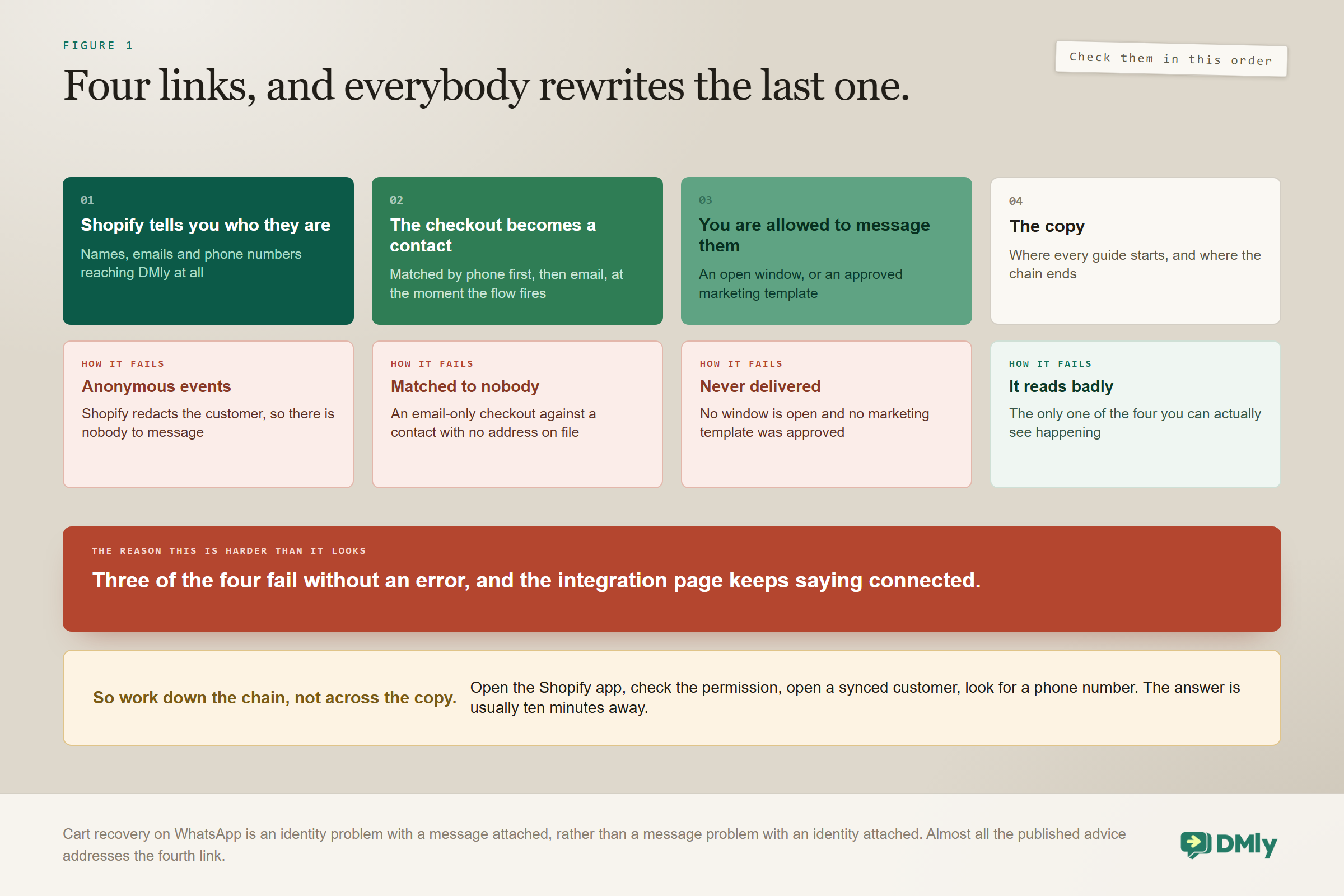
Recovery on this channel depends on a chain of three things being true, and the copy is the fourth. You have to know who abandoned the cart. You have to hold a phone number for them. And you have to be allowed to message that number. Break any link and the best-written sequence in the world sends to nobody, quietly, while your integration reports that everything is fine.
This guide works down the chain in order: the Shopify permission that decides whether you get phone numbers at all, what actually syncs when you connect, how a checkout becomes a contact, the window problem, and then, finally, the sequence itself.
What this page is, and what sits next to it: This is the build. If you want the wider picture of what a connected store can do, ten events and six automations and where cart recovery sits among them, that is our complete guide to Shopify WhatsApp automation. If you want the craft of writing the messages themselves, across every channel rather than this one, that is our post on follow-ups that convert abandoned carts into revenue. This page does not repeat either.
What Has to Be True Before You Can Recover Abandoned Shopify Carts
Three conditions, in order, and every one of them fails silently. That is the whole reason this is harder than it looks: nothing goes red, no error appears, and the integration page keeps saying connected.
- Shopify has to tell you who they are. Customer names, emails and phone numbers have to reach DMly, and that depends on a permission on the Shopify side that is off unless you turn it on.
- The checkout has to become a contact. Store customers are matched to contacts by phone number, then email, at the moment an automation fires.
- You have to be allowed to message them. On WhatsApp that means an open 24-hour window or an approved message template, and somebody who abandoned a cart has almost certainly never messaged you.
Most businesses that report cart recovery not working have failed at the first or the third, and have spent their time rewriting the fourth. Check them in order and you will usually find the answer in ten minutes.
Connecting Shopify Properly
The connection takes about five minutes and one of its steps decides whether any of this works. DMly connects with a custom app token from your own Shopify admin rather than an app install, and the integration panel carries a setup guide that walks the Shopify side.
You need three credentials: the store URL in the form your-store.myshopify.com, an Admin API access token beginning shpat_, and the API secret key. The secret is what DMly uses to verify that incoming events really came from your store, so it is not optional. DMly calls your store’s API immediately to prove the credentials, so wrong ones fail there with Shopify’s own error rather than failing quietly a week later, and webhooks register automatically. There is nothing to paste back into Shopify afterwards.
The custom app needs Admin API scopes to read and write orders, customers, products and price rules, and to read checkouts. That last scope is what makes cart recovery possible at all.
The step that decides everything, and it is not in DMly: You have to enable Protected customer data access on the custom app in Shopify. Without it, Shopify redacts customer names, email addresses and phone numbers from the API, so DMly receives checkout events for people it cannot identify and cannot match to anybody. The integration looks connected. Events arrive. Recent activity fills up. And not one message can be sent, because there is no one to send it to. If you take a single thing from this page, take that.
Two controls on the tile are worth knowing before you need them. Test connection re-runs the credential check at any time, which is the first thing to try when events stop arriving. Save and reconnect is how you change credentials later, for instance after rotating a token.
What Syncs, and What Does Not
The first sync brings in all your products, all your customers, and orders from the last 90 days only. Older order history stays in Shopify, which is rarely a problem for messaging and occasionally a surprise when somebody goes looking for it.
Two behaviours of that first sync are worth expecting rather than discovering.
- The initial sync never fires automations. Backfilled orders do not trigger Order placed, so connecting a store with ten thousand historical orders does not message anybody. This is a relief, and it is also why nothing appears to happen when you first connect.
- Synced data does not appear under Finance and Orders. That screen is for orders you create in DMly. There is no store-order browser, no list of store customers and no list of store products. The synced data exists to power triggers, the product pickers in store steps and in-chat order lookups, and that is all it is for.
After the first sync, webhooks keep orders, refunds, checkouts, customers, products and inventory levels current, and every delivery from Shopify is signature-checked against your API secret key before DMly acts on it, so a forged event cannot start your automations. What you get to use in messages is a practical set: order numbers, totals, statuses and tracking links; customer names, emails, phones and spend; product titles, prices and stock.
Where to look when you want to know if it is working: The tile’s Synced data panel shows the Products, Customers and Orders counts, the time of the last sync, and a Sync now button. Recent activity on the same page lists the latest store events as they arrive. Between them they answer the two questions that matter early on: is anything coming in, and is it coming in with a person attached to it.
What Actually Fires the Recovery, and What Cannot
Shopify reports an abandoned checkout as a real event, so the recovery starts from a genuine signal rather than an inference. The Checkout abandoned trigger fires when a started checkout goes quiet for about an hour, once per checkout.
That is worth knowing because it is not how every platform works. WooCommerce has no checkout object at all, so on WooCommerce an unpaid pending order is what counts as an abandoned checkout, which is a coarser signal on a slower clock. If you run both, the two recoveries are not the same build.
DMly lists 18 store events in total. The ones that matter for recovery are Checkout abandoned, Order placed, Order paid and Payment failed; the rest cover shipping and delivery, cancellations and refunds, stock, milestones, new customers and marketing opt-ins. Payment failed does work on Shopify. It fires when Shopify records a failed or errored sale, authorization or capture on an order, so a “your payment did not go through” message can be built here. Keep it separate from cart recovery: Checkout abandoned is for people who walked away, Payment failed is for people whose payment was refused.
The filters are a commercial control, not a technical detail: Every store trigger starts with Store, either any connected store or one specific store if you run several. Checkout and order events then take a minimum and maximum order total and a currency. That matters more than it sounds on this particular automation, because the first message is a paid marketing template. A minimum order total is how you stop spending one on a six pound basket, and it is a single field.
How a Checkout Becomes a Contact
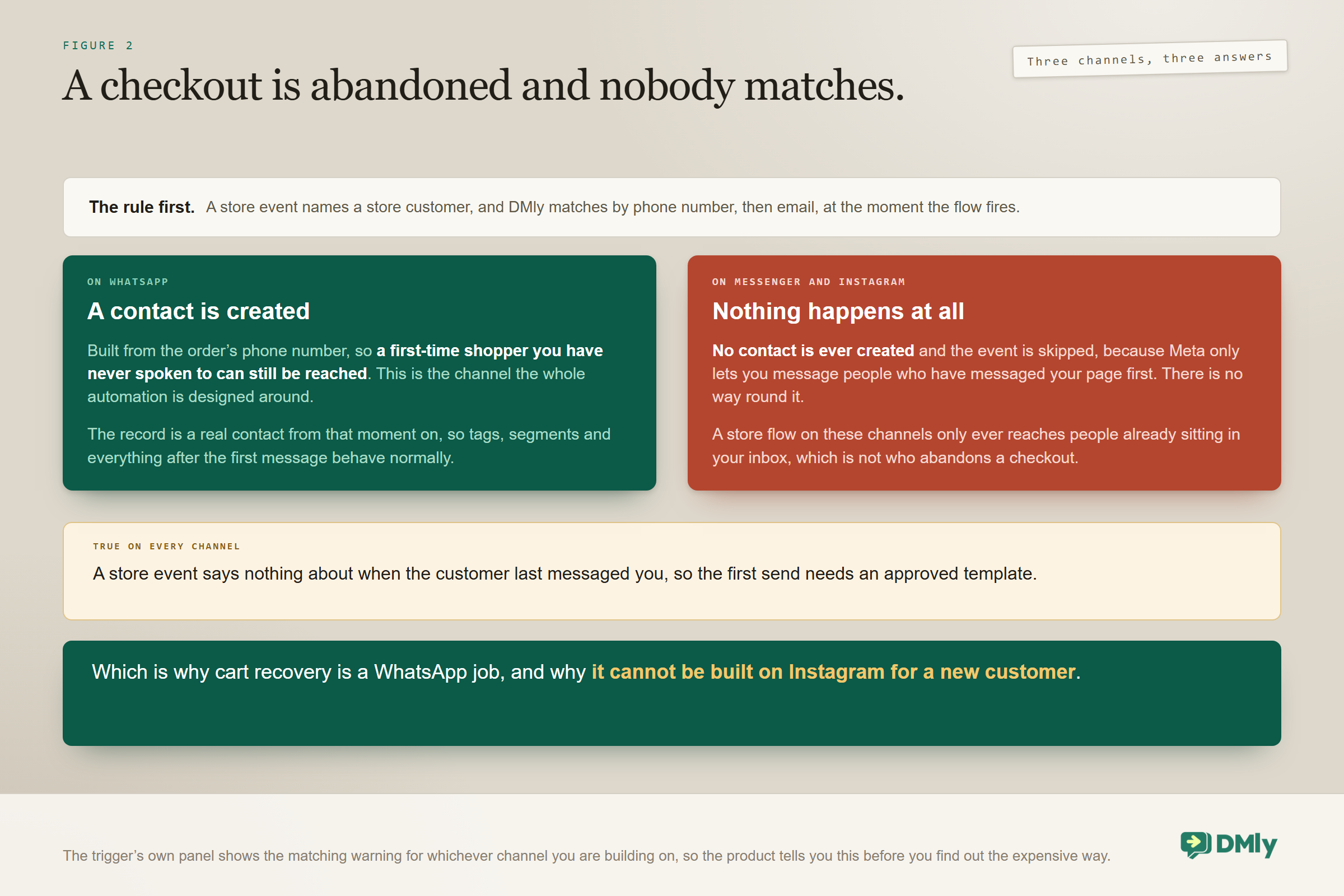
Store customers are matched to contacts by phone number first, then email, at the moment an automation fires. Not at sync time. At fire time, which matters more than it sounds, because it means a customer with no record when they abandoned can still be reached if a record appears before the flow runs.
What happens when there is no match at all depends entirely on the channel, and this is the fact that makes cart recovery a WhatsApp job rather than a general messaging job.
On WhatsApp a contact is created. On Meta’s other channels nothing happens.: On a WhatsApp automation, a store customer with no matching contact gets one created from the order’s phone number, so a first-time shopper you have never spoken to can still be messaged. On Messenger and Instagram no contact is ever created and the store event is simply skipped, because Meta only lets you message people who have messaged your page before. The trigger’s own panel shows the matching warning for whichever channel you are building on. This is why cart recovery on Instagram is not a thing you can build for new customers, however much sense it would make.
Two practical consequences follow for anybody working with abandoned Shopify carts. Collect a phone number at checkout if you possibly can, because it is the primary match key and it is the only thing that makes WhatsApp possible at all; a checkout that captures only an email will match on email alone, and only to a contact that already carries that exact address. And expect duplicates, because a shopper who has also messaged you on WhatsApp may exist as two records until somebody joins them. Our CRM guide covers merging, and a merge keeps the more restrictive of the two opt-out states.
The Permission Problem
Somebody who abandoned a cart has almost certainly never messaged you on WhatsApp, so there is no open window and the only way to reach them is an approved template. This is the constraint that separates WhatsApp cart recovery from email cart recovery, and it is not a small one.
Two different things are called a template here: Cart recovery needs both and they have nothing to do with each other. An automation template is a whole ready-made flow you install from DMly’s library in one click, needs no approval and belongs to DMly. The library ships an abandoned-cart nudge among more than a hundred of them, and the picker is scoped to the channel you are working on, so if the one you were told about is missing, switch channels and look again. A WhatsApp message template is a single message Meta has to approve before you can send it outside the 24-hour window. Installing the first does not give you the second.
- The message template has to be filed as Marketing, because a cart recovery message is promotional however helpfully it is worded. Filing it as Utility to save money is the most common category rejection there is. Our template library has wording you can adapt.
- Consent is your question, not the platform’s. DMly’s enforced gate is the opted-out flag: a contact who replies STOP, or who is unsubscribed by an automation, stops receiving automated messages entirely, and that is reversible from Suppressions or by the contact replying RESUBSCRIBE. Nothing in the software checks whether a phone number captured at a Shopify checkout amounts to consent to receive marketing on WhatsApp. In most markets that is a legal question and the answer is yours.
- Sending marketing nobody expected damages the number you depend on. Blocks and reports move your quality rating, and the damage lands on the order confirmations and shipping notifications you send to everybody else. Our guide to quality rating, messaging limits and bans covers what that costs.
The honest version of the judgement is short. Recover carts on WhatsApp for customers who opted in, and use email for the rest. A smaller programme that nobody complains about earns more over a year than a larger one that quietly degrades every other message you send.
Timing the Abandoned Shopify Carts Sequence
Two messages recover most of what is recoverable, and three is the practical maximum before you are annoying people who already decided. The first one does most of the work, for a reason that is behavioural rather than technical.
| Message | Timing | The job it is doing |
| First | 1 to 2 hours after abandonment | Assume a genuine interruption. Remind, do not sell |
| Second | 20 to 24 hours later | Address the likely objection: delivery, sizing, a question |
| Third, optional | 48 to 72 hours | Only if you are willing to discount. Otherwise stop |
Most abandoned carts are not decisions. They are interruptions: a phone call, a train stop, a child, a colleague at the desk. A message an hour later reaches somebody who intended to come back and forgot, which is why the first message outperforms everything after it and why a discount in it is wasted money.
Hold the code back for the second nudge. A code in the first message teaches your customers to abandon a basket on purpose, which is a habit that costs you margin on orders that were never at risk. And if you do use one, mind the variable: {{discount.code}} resolves to the code minted by a Create discount step earlier in the same flow, and to nothing at all otherwise. Put it in a message with no Create discount step in front of it and your customer receives a sentence with a hole in it.
Not Messaging People Who Already Bought
The trigger already protects you from the obvious version of this, and not from the one that actually happens. Getting the distinction right saves you building the wrong defence.
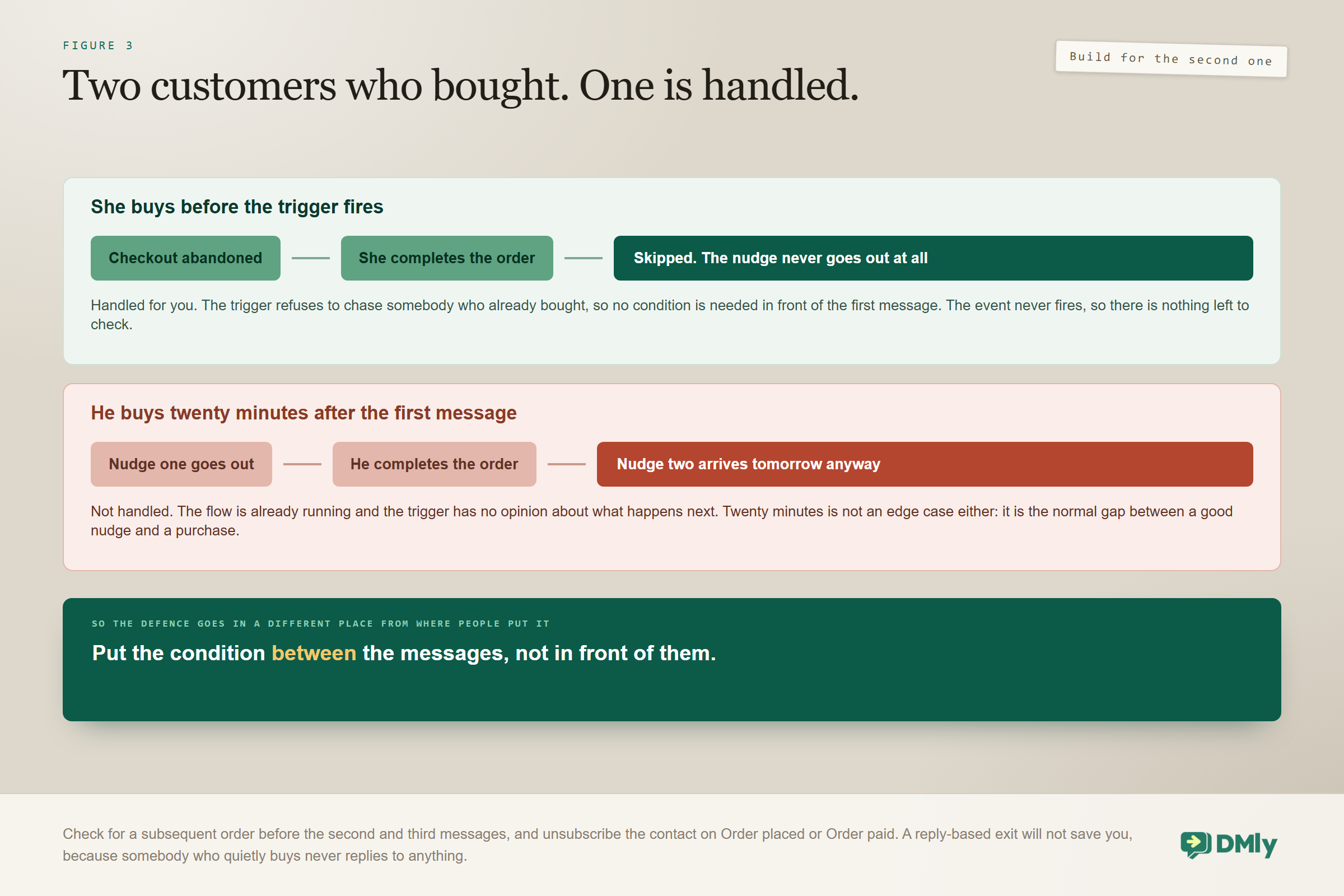
A customer who completed the purchase after abandoning is skipped by the Checkout abandoned trigger itself. The nudge never chases somebody who already bought, so the first message was never the risk, and you do not need a condition in front of it.
The one real risk in a run of abandoned Shopify carts is the purchase that happens after the flow has started. Somebody gets your one-hour reminder, buys twenty minutes later, and is still sitting in a sequence with a message due tomorrow morning. That is the one customers screenshot, and it is the one you have to build for.
Build the exit for the middle of the flow, not the start of it: Keep the follow-ups inside the Checkout abandoned flow, after a delay, and put a condition before the second and third messages that checks whether an order has since been placed. Do not reach for Unsubscribe Contact on an Order placed or Order paid trigger: in DMly that step is a full opt-out from all your messages, not an exit from one sequence, and no flow step takes someone out of a single sequence (a teammate can use Remove from sequence by hand). Keeping the follow-ups in the flow also keeps the checkout link working, because a DMly sequence step fills in contact details only, so {{order.checkout_url}} would arrive empty there. Do not rely on a reply-based exit either, because a customer who completes a purchase silently never replies to anything. Then test exactly that: abandon a cart on a contact you control, receive the first message, complete the purchase, and confirm the second never arrives.
What the Message Should Say
Because the template is approved in advance, the wording has to work for every cart rather than for one particular cart. That pushes you towards structure over cleverness, which is no bad thing.
- Say who you are. The customer may not recognise a number they have never messaged, and a nameless message about a basket reads like a scam.
- Reference the cart, not the item.
{{order.items_summary}}renders the whole basket in one line, in the form “2x Aurora Hoodie, 1x Trail Socks”, which is why it is the right variable. A template built around one product name reads strangely on a three-item cart. - Give one link back, and make it the checkout.
{{order.checkout_url}}is the recovery link. The homepage is not a recovery link; it is a request to start again. - Handle the objection in message two. Delivery time, returns, sizing, whatever your support inbox says people actually ask before they buy.
- Make it easy to stop. A customer who does not want these should be able to say so in one word, and on WhatsApp that word is STOP.
There is an alternative to a plain template send that is worth knowing about. The store palette includes a Send checkout link step alongside find an order, send order status, send a product, sync the contact, create a discount code and write a note back onto the store order. On a channel where the first message has to be a template, the checkout-link step with a template fallback is a tidier way to build the same thing, and the notes step is how a recovery can leave a trace your fulfilment staff can see.
The Abandoned Shopify Carts You Cannot Reach on WhatsApp
On any real store this is most of them, and pretending otherwise produces a recovery programme that quietly covers a fraction of your carts. Sizing that fraction before you build is the difference between a sensible afternoon’s work and a disappointment.
Three groups fall out of WhatsApp recovery for three different reasons: shoppers who gave an email and no phone number, shoppers whose number you hold but who never opted in to marketing, and shoppers in markets where WhatsApp is not what people use. None of those is a failure of your setup.
- Email remains the workhorse. Shopify’s own abandoned checkout email exists and works, and there is no reason at all to switch it off because you added a second channel. WhatsApp is a layer for the customers you can reach well, not a replacement for the one that reaches everybody.
- SMS is the middle option. It has no messaging window and no template approval, so it reaches anybody with a phone number, and it costs more per message while consent rules apply just as firmly. Reserve it for higher-value carts. Our SMS guide covers the setup.
- Use the data even when you cannot message. A checkout event still tells you what somebody wanted. Tagging those contacts builds an audience for a campaign they did opt into, which is slower and entirely legitimate.
Beyond the Cart: The Other Store Triggers
Cart recovery is the one store owners come for, and it is not the highest-return automation a connected store gives you. The other events reach customers who already want to hear from you, which makes them both easier to build and safer to send.
| Trigger | Worth building because |
| Order placed | A confirmation in the channel they use, which also opens the window for everything after it |
| Order paid | The receipt, and the moment to ask for anything you need before dispatch |
| Order shipped | The tracking link. The single most-opened message any store sends |
| Order cancelled and Order refunded | An acknowledgement, which prevents the support ticket that would otherwise follow |
| Product back in stock | A recovered sale from somebody who already told you exactly what they wanted |
| Inventory low | Internal, to you, not to the customer |
| Customer milestone | A spend or order-count threshold crossing, which is your loyalty moment, and it fires once per customer per automation |
There is an advantage buried in the first row that is easy to miss. An order confirmation is a transactional message the customer expects, and once they reply to it the 24-hour window is open, which makes everything for the next day free-form and template-free. A store whose confirmations get replies has a much easier time with every message after that, and the easiest way to get a reply is to ask a question worth answering.
Order shipped deserves particular attention, because tracking links are opened by almost everybody. If you are only going to build one automation from your store, build that one before you build cart recovery.
Testing the Whole Chain
Test in the order the chain runs, because a failure at the first link looks identical to a failure at the last one. The whole list takes under an hour and it is the hour that decides whether this works.
- Synced data Open the panel and check the customer count is what you expect, then open a synced customer and check there is a phone number on them. If names and numbers are missing across the board, Protected customer data access is not enabled and nothing else on this list matters.
- Abandon a real checkout on your own store, using a contact you control with a phone number DMly already holds.
- Recent activity Watch for the event arriving, then confirm the Checkout abandoned trigger fired and matched the right contact.
- Confirm the template was delivered, not merely attempted. A marketing template to a contact who has opted out is the most likely silent stop.
- Complete the purchase and confirm the second message never arrives. This is the test worth running twice, and the one to run before you point real traffic at it.
- Abandon a checkout as an email-only customer and watch what happens, so you know what that looks like in your own logs rather than in an article.
- Check the link in the message returns to a working checkout rather than an expired one.
The Numbers Worth Watching
Five numbers tell you whether recovering abandoned Shopify carts is worth running at all, and the first one exposes the permission problem in a single glance. Our note on the metrics worth tracking after you automate covers how to instrument them.
- Abandonment events matched to a contact. Look here first. A low number is the Protected customer data access permission, not your copy.
- Messages sent against events fired. A large gap means template or opt-out problems rather than a wording problem.
- Recovery rate by message number. If the second message recovers almost nobody, stop sending it.
- Revenue recovered against messages sent. The number that decides whether the third message is worth its risk.
- Opt-outs and blocks after the sequence. The cost side of the ledger, and the one that turns up later as reduced deliverability on everything else.
Mistakes Worth Avoiding
Every one of these produces a system that looks like it is working. That is what makes them expensive rather than merely annoying, and it is why abandoned Shopify carts are usually diagnosed backwards.
- Forgetting Protected customer data access. No names, no emails, no phone numbers, nothing recoverable, and no error anywhere.
- Building a condition in front of the first message. The trigger already skips anybody who bought after abandoning. Spend the effort on the exit between messages instead.
- Putting a discount code in the first message. It costs margin on carts that were never at risk and teaches people to abandon on purpose.
- Using
{{discount.code}}with no Create discount step ahead of it. The variable resolves to nothing and the message goes out with a gap in it. - Filing the template as Utility. A recovery message is marketing. It will be rejected, and the rejection is the good outcome.
- No minimum order total. You are paying for a marketing template on every abandoned basket, including the tiny ones.
- Expecting store orders under Finance and Orders. Synced data powers automations and lookups only. There is no store-order browser.
- Building it on Messenger or Instagram. No contact is ever created there from a store event, so it cannot reach a new customer at all.
Frequently Asked Questions
Why are my abandoned Shopify carts not producing any messages?
In almost every case, Protected customer data access is not enabled on the Shopify custom app, so Shopify is redacting names, emails and phone numbers and DMly has nobody to match the checkout to. The integration still shows as connected and events still arrive, which is what makes it hard to spot. Check a synced customer for a phone number before you check anything else.
How quickly does the Checkout abandoned trigger fire?
When a started checkout has been quiet for about an hour, once per checkout. That is a real Shopify event rather than a guess, which is why Shopify recovery is more precise than the WooCommerce equivalent, where an unpaid pending order is what counts as abandoned.
Will the sequence message somebody who has already bought?
Not on the first message. A customer who completed the purchase after abandoning is skipped by the trigger itself. A purchase made after the flow has started is a different matter: keep the follow-ups inside the flow with a condition before the second message, and test it. Don’t use Unsubscribe Contact for this, because it opts the customer out of everything you send.
Do I need a WhatsApp message template for this?
Yes, for the first message, filed as Marketing. Somebody who abandoned a cart has almost certainly not messaged you in the last 24 hours, so there is no open window and free-form text will not be delivered. Note that the abandoned-cart flow in DMly’s automation template library is a different kind of template and does not remove that requirement.
Can I recover abandoned Shopify carts on Instagram or Messenger instead?
Not for anybody new. On those channels no contact is ever created from a store event, because Meta only lets you message people who have messaged your page first, so the event is skipped. WhatsApp is the only one of the three that creates a contact from the order’s phone number.
Why is the Payment failed trigger doing nothing?
On Shopify it fires only when a payment transaction on an order (a sale, authorization or capture) fails or errors. A customer who simply leaves the checkout never creates one, so that person is a Checkout abandoned case, not a Payment failed one. If you expected a payment to fail and nothing fired, check that the store is still connected.
Where do my synced Shopify orders appear in DMly?
Nowhere you can browse them. There is no store-order list, no store-customer list and no store-product list, and Finance and Orders is for orders you create in DMly. The synced data exists to power triggers, product pickers and in-chat order lookups, and an order linked to one of your contacts also counts toward the order count, total spend and last purchase conditions in segments.
Does disconnecting Shopify delete everything?
No. Disconnect removes the webhooks from your store and wipes the stored credentials, and the already-synced products, customers and orders stay in DMly. Nothing updates while you are disconnected, and reconnecting later does not start from zero.
Fix the Chain, Then Write the Message
If your recovery is producing nothing, resist the urge to rewrite the copy. Open the Shopify app and check the permission. Open a synced customer and look for a phone number. Look at whether the event matched anybody at all. Nine times in ten the answer is in one of those three places, and none of them is a wording problem.
Once the chain holds, abandoned Shopify carts become one of the better automations a store can run, because the customer already chose the thing and only needs reminding that they did. Build the two messages, put the exit between them, set a minimum order total, and then go and build the shipping notification, which will be opened by more people than either of them.
Writing about WhatsApp automation, bookings and growth for local business.
Turn WhatsApp into your busiest channel.
Start free and run message, bookings, payments and reviews in one place.
