
How to Set Up Automated WhatsApp Replies for Your Business
Count the messages you got yesterday. For most small businesses the list is shorter than it feels. Someone asked what you charge. Someone asked if you were open. Someone asked whether you had a slot on Friday. Someone said “hi” and nothing else. And two people you replied to never wrote back.
That is the whole shape of it. A handful of questions, asked over and over, plus a few conversations that quietly die. Automated WhatsApp replies are not about replacing you. They are about handling that repeat list so the messages that actually need you are the only ones left.
You will see these called auto replies, automatic replies, canned responses or away messages depending on who is writing. They are the same idea: a message that goes out on its own when something specific happens.
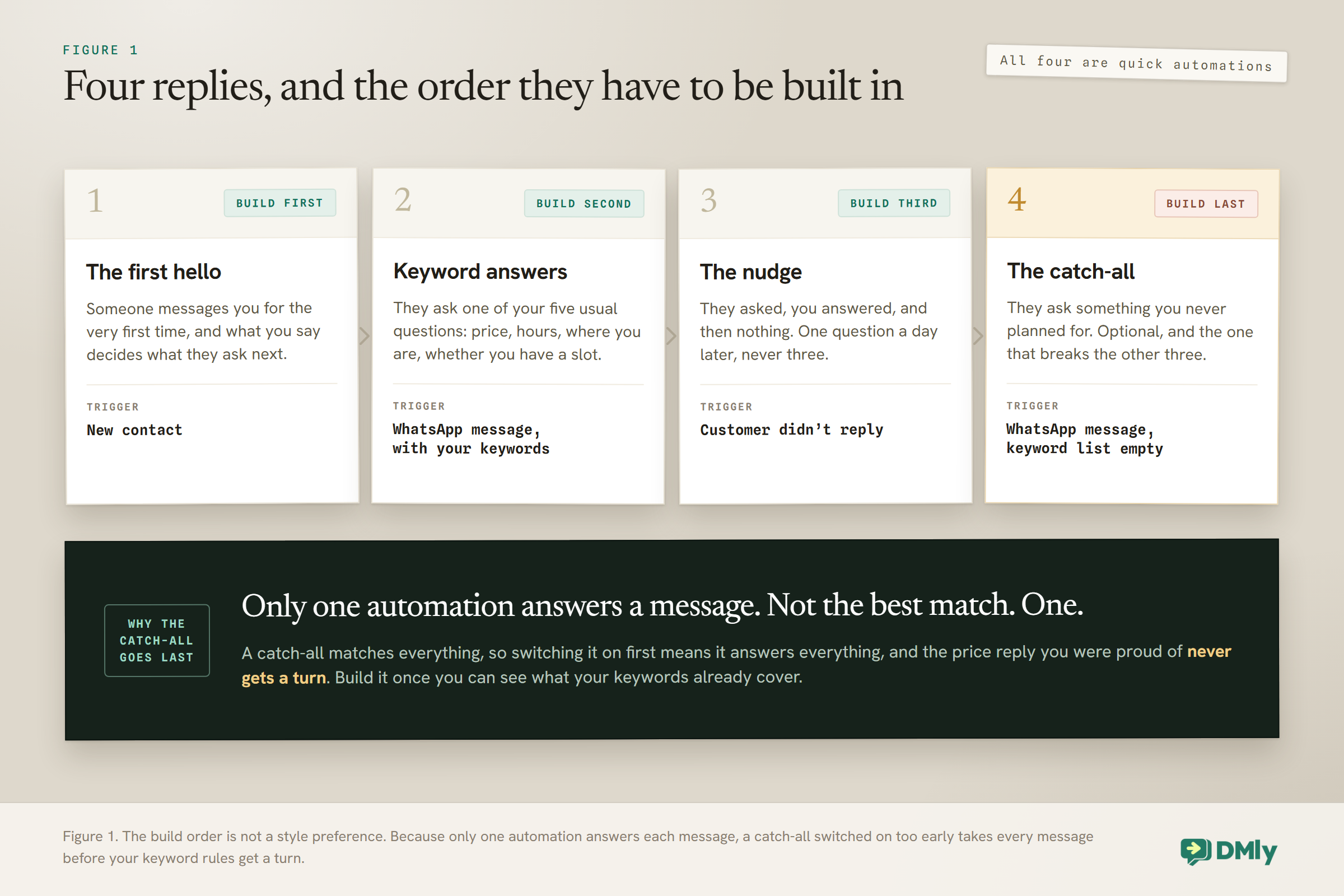
Four replies cover almost all of it, and this guide builds them in the order that works: the first hello, keyword answers, a catch-all for everything you did not predict, and a nudge for people who go quiet. The order matters more than you would expect, for one reason we will come back to.
The one rule to hold on to: Only one automation answers any given message. Not the best match, not all of them: one. Build a catch-all first and it will quietly answer everything, and every keyword rule you add afterwards will never get a turn.
The Two Ways to Build Automated WhatsApp Replies (Pick the Simple One First)
DMly gives you two builders, and most auto replies only need the simpler one. When you create a new automation you are asked “How do you want to build it?” and the choice is between a quick automation and a flow.
A quick automation is described in DMly as “a single trigger and reply, set up in a simple form”. Something happens, you send one message back. That is it. There is no canvas, no dragging, no wiring boxes together.
A flow is “a visual canvas with branching and multiple steps”. You need it when the reply depends on an answer, when you want buttons that lead somewhere different, or when there is a wait in the middle.
Three of the four replies below are quick automations. Start there. You can move a quick automation into the flow builder later using Edit in Flow Builder, and it is worth knowing before you click it that this conversion only goes one way.
One-way door: Converting a quick automation to a flow is permanent. There is no button that turns it back into a form. Nothing is lost, but if you liked the simple version, duplicate it before you convert.
If you have never opened the canvas and want to know what the steps do before you need them, our beginner’s guide to no-code WhatsApp automation walks through it without assuming any of this. This page stays on replies.
The Four Automated WhatsApp Replies Worth Building
Almost every message a small business receives falls into one of four situations. Build a reply for each and you have covered the repeat traffic without trying to script every conversation.
Reply 1: The First Hello
The first message someone gets from you sets what they ask next, so it is worth more than a greeting. A friendly “hi, thanks for messaging” tells a customer nothing. A first message that lists what you can do for them cuts the back-and-forth in half.
There are two ways to handle a first hello, and which one you use depends on the channel. This is the part where WhatsApp genuinely differs from the rest, and most guides get it wrong.
On Facebook, Instagram and Telegram, the greeting is a setting rather than an automation. Under Bot Setup you can turn on a Welcome message, add up to four ice breakers (tappable suggested questions a first-time visitor sees), and switch on a persistent menu using the setting labelled “Show a persistent menu in the conversation”.
On WhatsApp, there is no Welcome setting. WhatsApp handles its front door differently, through a section called Conversational Components on the Bot Setup screen for WhatsApp. If you go looking for a welcome message there, you will not find one under that name.
So on WhatsApp the practical way to greet a new customer is an automation on the New contact trigger. That fires the first time someone you have never spoken to messages you, which is exactly what a greeting is for.
Write it to do work. Not “Hi, thanks for your message, we will get back to you shortly”, which asks the customer to wait and tells them nothing. Something closer to:
Hi, thanks for messaging Aurora Hair. I can help with prices, opening times and booking. Which do you need? If it is something else, just type it and a human will pick it up.
That last sentence matters. It tells the customer a person exists, which stops the two most common frustrations at once: not knowing whether they are talking to a robot, and not knowing how to escape it.
Reply 2: Keyword Auto Replies for Your Five Usual Questions
Write down the five questions you answer most and you have your keyword list. For most service businesses it is price, opening hours, location, whether you have availability, and whether you do a particular service.
Each one becomes a quick automation: the trigger is a WhatsApp message, you add the words that should set it off, and you write the reply.
When you add keywords you choose how they should match, and the choice changes how often the rule fires:
- Contains is the one you want most of the time. “Price” will catch “how much is a retouch”, “whats the price for braids” and “price list please”.
- Starts with fires only when the message opens with the word. Useful for a command-style word like “BOOK”.
- Exact match fires only when the message is that word and nothing else. Good for a single-word reply you have advertised, like a code on a poster.
- Any message is the catch-all, which is reply 4 below. Leave it alone for now.
Two things make this easier than it sounds. Matching ignores capitals, so you do not need to add “Price”, “price” and “PRICE”. And one keyword hitting is enough, so a single rule can carry a whole family of words: price, cost, how much, rate, charge.
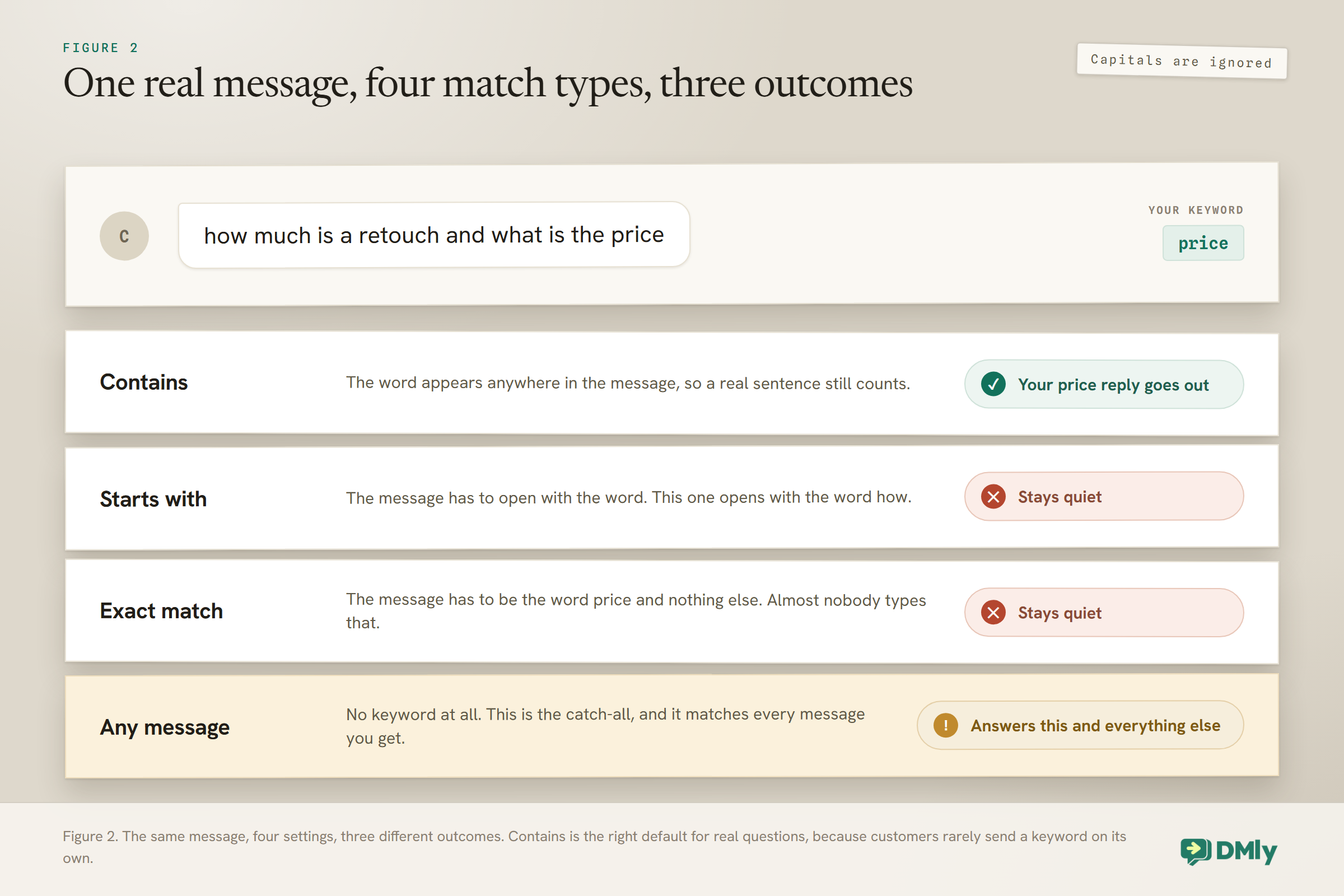
Look at what that means in practice. If you set your price rule to exact match, it fires only for a customer who sends the single word “price” and nothing else. Almost nobody does that. Meanwhile the customer who typed a real sentence gets your catch-all, or nothing at all, and you never find out why the rule you were proud of does not seem to work.
The other habit worth forming early is writing keywords the way customers type, not the way you would. People send “wat time u open”, “opening hrs” and “are you open sunday”. A contains rule on “open” catches all three. A rule on “opening hours” catches one of them.
Worth knowing before you write ten of these: Because only one automation answers a message, two rules that could both match will clash. DMly will not let you publish the second one: it blocks it and names the conflict, because otherwise the older automation would answer every time and the newer one would never reply. If that happens, give one rule a more specific keyword or pause the other.
That block is a feature, not an obstacle. It is the software refusing to let you build something that would fail silently.
Keep the replies short and end each one with a next step. A price reply that finishes with “want me to check Friday for you?” books appointments. A price reply that just lists numbers ends the conversation.
If your questions are more varied than five keywords can carry, that is the point where an AI agent earns its place, because it answers from what you have taught it instead of from a word list. Our guide to WhatsApp AI chatbots for small businesses covers when that is worth doing, and our FAQ auto-response guide covers how to work out what people actually ask.
A Short Warning About Buttons
Buttons make replies much easier to use, and on WhatsApp they only work if you build them the right way. This catches almost everyone once.
Adding buttons or quick replies to a plain message step does not work on WhatsApp. Those are a Meta feature, used on Facebook and Instagram, and WhatsApp ignores them. For buttons on WhatsApp you need the Buttons Message step instead, which is a different step type.
The limits are small enough to design around, and worth knowing before you write the copy:
- Buttons Message: one to three buttons, and each title has to fit in 20 characters.
- List Message: one to ten rows, 24 characters for a row title and 72 for its description.
Twenty characters is shorter than it looks. “See prices” fits. “See our full price list” does not.
Reply 3: The Nudge When Someone Goes Quiet
The most valuable automation most businesses never build is the one that follows up when a conversation stops. Someone asks your price, you answer, and then nothing. They were not annoyed. They got distracted.
DMly has a trigger for exactly this, called Customer didn’t reply. You set how long to wait, and if they have not written back by then, your follow-up goes out.
One message, gently worded, sent a day later, recovers more bookings than any other automation on this page. Ask a question rather than repeating yourself: “Did you want me to hold Friday at 2, or would another day suit better?” gives them something easy to answer.
Send one. Not three. A second nudge occasionally helps and a third reliably annoys, and annoyed people block businesses, which does real damage to your number. Our guide to WhatsApp quality rating and messaging limits explains how blocks and reports feed back into whether WhatsApp keeps delivering your messages.
Reply 4: The Catch-All, Built Last
A catch-all answers anything your keywords missed, and it is the last thing you build rather than the first. You create it exactly like the others, but you leave the keyword list empty. An empty list means every message matches.
Now the reason for the order. Only one automation answers a message. A catch-all matches everything. So if it is switched on before your keyword rules exist, it answers every message that arrives and your carefully written price reply never runs. Build it last, once you can see what your keywords already handle.
Keep it modest. A catch-all should acknowledge, orient and hand over:
Thanks, I have got that. I can help straight away with prices, hours and booking. For anything else, one of the team will reply here as soon as they are free.
Some businesses are better off without one. If you are usually at your phone within the hour, a catch-all mostly adds a robotic layer between you and a customer who was about to get a real answer anyway. Skip it and let the conversation land in your inbox.
What About After Hours?
An out-of-hours reply is a different job from the four above, and it has its own page. The short version is that you do not need a separate “away message” feature to do it well.
The building block is a step called Smart Delay, which can hold a message until a time you choose. Its “Wait until” mode gives you a toggle for each of the seven days and a From and To time, so a message can sit quietly overnight and go out when you open rather than pinging someone at 11pm.
Setting up business hours properly, including holidays and the difference between “we are closed” and “we are closed but here is what you can still do”, is covered in our guide to WhatsApp away messages and business-hours replies.
What to Actually Write
Most auto replies fail on wording rather than setup. The rule fires perfectly and the customer still goes quiet, because the message told them nothing they could act on.
Three habits fix almost all of it.
Answer the question in the first line. People read the first line in the notification and decide from there. Do not open with “Thanks for getting in touch with Aurora Hair, we appreciate you reaching out”. Open with the answer.
| Instead of | Write |
| Thanks for your message. Someone will be with you shortly. | A cut and finish is $45 and takes about an hour. Want me to check this week? |
| Our opening hours are on our website. | We are open 9 to 6 Tuesday to Saturday, closed Sunday and Monday. Shall I book you in? |
| Please hold while we check availability. | I can see Thursday 2pm and Friday 11am. Which works? |
End with one question, not three. A reply that asks “what service, what day, and what time?” gets one answer out of three, and now you are reconstructing the rest by hand. Ask the single question that moves things forward and collect the rest as they come.
Say a human is coming, once. The most common complaint about business automation is not that it exists, it is that customers cannot tell whether anyone will ever read what they wrote. One plain sentence removes that worry: “If this is something else, type it and one of us will pick it up.”
Length is worth watching too. A reply that fills the screen gets skimmed. Two or three short lines with a question at the end outperforms a paragraph in almost every case, and it is easier to keep accurate when your prices change.
If you would rather start from copy that already works, our collection of WhatsApp quick replies covers the shortcuts your team can use by hand alongside the automated ones.
What Not to Turn Into an Automated Reply
The fastest way to make an auto reply feel cheap is to point it at the wrong messages. Some things should always reach a person first.
- Complaints. An automated reply to “I am really unhappy with my colour” reads as a shrug. Let those land in the inbox.
- Anything with a number in it that you have not checked. Quoting a price automatically is fine when the price is fixed. It is not fine when it depends on hair length, condition or how long the job takes.
- Medical, legal or financial specifics. Confirm the appointment automatically by all means. Do not answer the question automatically.
- Regulars. A customer of six years does not want a menu. If you tag your regulars, you can exclude them.
There is also a limit on volume rather than topic. Automated replies answer people who message you. Messaging people who did not is a different activity with different rules, covered in our guide to WhatsApp broadcasts.
Test Your Automated WhatsApp Replies Before You Trust Them
Message your own business from a different phone and watch what your auto reply actually does. Not the preview, the real thing. Five minutes here saves the awkward week where a customer tells you your bot is broken.
Check four things:
- The right rule answered. Send “how much for a trim” and confirm you get the price reply, not the catch-all.
- It answered once. Two replies to one message usually means an automation and a workspace notification are both firing on the same event. DMly warns you about this on the trigger step; turn one of them off.
- Buttons appear as buttons. If they arrive as a wall of text, you used a plain message step instead of the Buttons Message step.
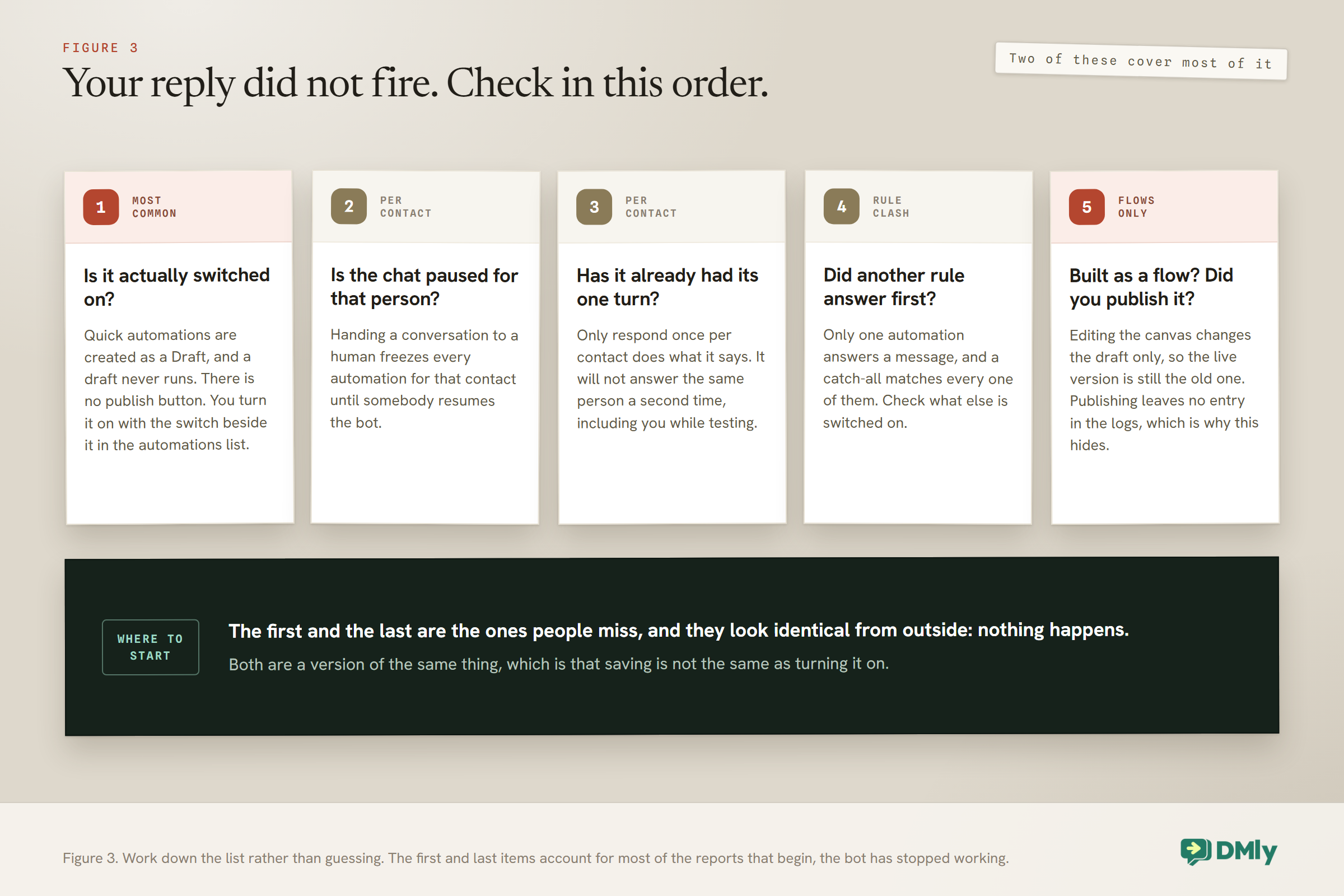
- It is actually switched on. Quick automations are created as a Draft and turned on with the switch in the automations list. There is no publish button, which is why this is the single most common reason a new reply does nothing.
If it still will not reply: Three causes cover almost every case. The conversation is paused for that contact, which freezes every automation for them until you unpause it in the inbox. Or the rule has “Only respond once per contact” switched on and has already had its turn with you. Or, if you built a flow rather than a quick automation, you edited the canvas but did not publish it, so the live version is still the old one. That last one is easy to miss because publishing leaves no entry in the logs.
Once the replies are running, the useful next step is making sure what they collect is kept. A reply that answers a price question and leaves no trace is a missed customer record. Our guide to WhatsApp CRM for small businesses covers turning those conversations into contacts you can follow up later, and if the questions you are answering are mostly about availability, our WhatsApp appointment booking guide shows how to let people book from the same chat.
Putting It Together
Build in this order and each reply makes the next one easier.
- Turn on a first hello that says what you can do, not just that you exist.
- Write your five keyword replies, using contains unless you have a reason not to, and end each with a next step.
- Add the nudge for people who go quiet. One message, worded as a question.
- Only now, add a catch-all with an empty keyword list, if you still want one.
- Test from another phone, and check it fired once.
That is an afternoon of work covering the majority of what arrives in a normal week. The broader picture of what else can run without you, from reminders to review requests to payment follow-ups, is in our complete guide to WhatsApp Business automation. If you want the exact wording for common replies, our WhatsApp message templates collection has copy you can paste and adapt.
Frequently Asked Questions
Can I set up automatic replies on WhatsApp without the Business API?
Yes, up to a point. The free WhatsApp Business app has a basic away message and a greeting message, and for a one-person business that is sometimes enough. What it cannot do is keyword rules that branch, follow-ups when someone goes quiet, more than one person answering from the same number, or connecting a reply to a booking or an invoice. Those need the official API behind the number, which is what a platform like DMly connects for you.
Why is my automated reply not sending?
Start with whether it is switched on: quick automations are created as a Draft and turned on with a switch in the automations list, not with a publish button. If it is on, check whether the conversation is paused for that contact, since pausing freezes every automation for them. Then check whether the rule is set to respond only once per contact and has already replied to you before. If you built it as a flow, make sure you published the canvas after editing it.
What happens if two of my automations match the same message?
Only one answers. DMly prevents the situation rather than letting it fail quietly: when you try to publish a second automation that overlaps an existing one, it blocks the publish and names the conflict, because otherwise the older automation would answer every time and the newer one would never run. Give one rule a more specific keyword, or pause the one you no longer need.
Do keywords need to match exactly?
Only if you choose exact match. You get four options: any message, exact match, starts with, and contains. Contains is the most forgiving and the right default for real questions, because “price” inside “how much is a retouch and what is the price” still counts. Matching ignores capitals, and if you list several keywords, one of them hitting is enough.
Should every business have a catch-all reply?
No. A catch-all is useful when messages arrive faster than you can look at them, or outside your working hours. If you normally reply within the hour, a catch-all mostly puts a robotic sentence in front of a customer who was about to hear from a real person. It is also the one rule that can break the others, because it answers everything, so if you do use it, add it last.
Will automated replies get my WhatsApp number banned?
Replying to people who messaged you first is the safest thing you can do on WhatsApp, and it is not what gets numbers restricted. Problems come from messaging people who did not opt in, sending at volume without consent, and getting blocked or reported often enough that your quality rating falls. Our guide to WhatsApp quality rating, messaging limits and bans covers how that is measured and what to watch.
How many automated replies is too many?
Judge it by whether a customer can reach a person. One greeting, a handful of keyword answers and one follow-up is a good week’s worth for most businesses. The failure is not the number of rules, it is a customer sending three messages and getting three automated answers with no way through. Every automated reply should make the next human message easier, and at least one of them should say plainly that a person is coming.
Writing about WhatsApp automation, bookings and growth for local business.
Turn WhatsApp into your busiest channel.
Start free and run message, bookings, payments and reviews in one place.
