
Textable vs DMly (2026): Check Your Phone Number First
Before you compare a single feature, answer a question you have already answered without noticing: who sold you your business phone number?
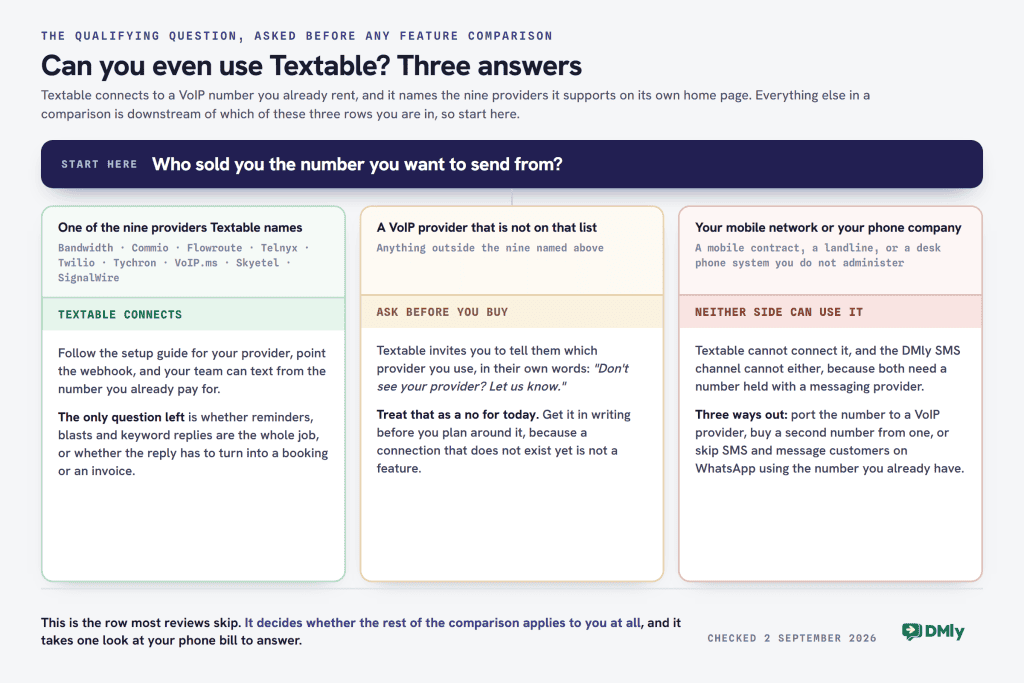
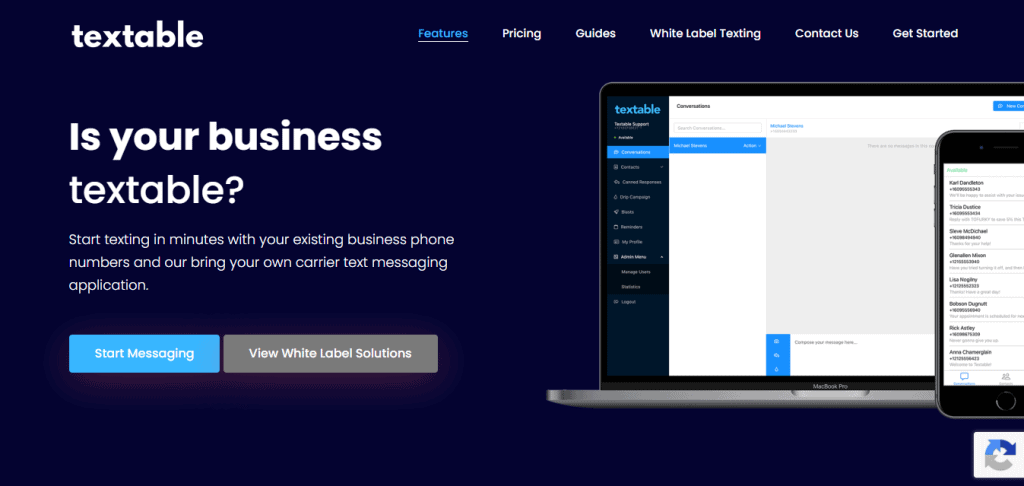
If it came from your mobile network or the phone company that wired your shop, you have just ruled yourself out of Textable, and no review of its features will tell you that. Textable does not sell you a phone number, and it does not sell you the texts either. It is an app that sits on top of a VoIP number you already rent from somebody else, and its own home page says so in the first sentence: “Start texting in minutes with your existing business phone numbers and our bring your own carrier text messaging application.”
That single fact reorders the whole Textable vs DMly comparison. Once you know Textable does not sell you the pipe, the interesting question stops being “which platform has more features” and becomes “which pipe are my customers actually on, and what does that pipe cost me before either subscription is paid?”
DMly is in the same position from the other direction. It does not sell you WhatsApp messages either. You pay Meta directly, and DMly adds nothing on top. So Textable vs DMly is not really a fight between $5 a month and $29 a month. It is a choice between two message pipes with two very different bills underneath them.
Every price and limit below was read on 2 September 2026 from each company’s own published pages, and the source is named each time so you can check it yourself. There is also a dated change on 1 October 2026 that moves the WhatsApp side of this bill, covered near the end.
Textable vs DMly: the short answer
Choose Textable if you already have VoIP numbers
Textable is the right answer when the number is already sitting in a VoIP account and nobody can text it. That is a real and common problem, and Textable solves it cheaply:
- your numbers are with Bandwidth, Commio, Flowroute, Telnyx, Twilio, Tychron, VoIP.ms, Skyetel or SignalWire
- your customers text you, and they are not on WhatsApp, Instagram or Messenger
- you want to send pictures, and you want them to arrive as pictures
- the whole job is reminders, replies and the occasional blast, and nothing needs to happen automatically after the reply comes back
- you are a managed service provider or a VoIP reseller who wants to resell texting under your own brand
Choose DMly if the conversation has to lead somewhere
DMly makes sense when the message is the start of something rather than the whole thing. Booking, invoicing, chasing a review, moving a customer along a pipeline:
- your customers already message you on WhatsApp, Instagram or Messenger, and you are answering from your phone
- you want the appointment, the invoice and the review request to happen without anyone typing them
- you want one customer record rather than a contact list per channel
- you want an AI agent answering the first question at 9pm
- you still want SMS, but as one channel among several rather than the only one
Neither one, if you are on a normal mobile number
This is the case nobody writes about, and it is probably the largest. If your business number is a mobile contract or a landline, Textable cannot connect to it at all, and DMly’s SMS channel cannot either, because both need a number that lives with a messaging provider rather than a phone company. Your realistic options are to port the number to a VoIP provider, buy a second number from one, or skip SMS and use WhatsApp on the number you already have. Work that out before you compare anything else, because it decides which half of this article applies to you.
What Textable actually is
Textable turns a VoIP phone number into a shared texting inbox. That is the whole product, and it is a genuinely useful one. Voice providers hand you a number that can make and take calls, and then treat texting as an afterthought or leave it off entirely. Textable is the missing half: it connects to your provider’s account, claims the numbers you already pay for, and gives you and your team an app on the web, on iOS and on Android to text from them.
The company describes itself in its own footer as “a messaging platform for VoIP phone numbers used by individuals, businesses and Managed Service Providers”, and it is a product of VoIPCX. Its page title names the carriers before it names the features. Everything about the positioning says the same thing: this is telecoms software, sold to people who already have telecoms.
The nine providers it works with, and the ones it does not
Textable publishes its supported provider list on the home page. As of 2 September 2026 it names nine:
- Bandwidth
- Commio
- Flowroute
- Telnyx
- Twilio
- Tychron
- VoIP.ms
- Skyetel
- SignalWire
Underneath the list sits an invitation: “Don’t see your provider? Let us know.” That is honest, and it is also the answer to whether an unlisted provider works today, which is no. The setup guides section carries twenty-four walkthroughs, with named guides for Telnyx, Flowroute, Twilio, SignalWire and VoIP.ms, so the connection is a real configuration job rather than a one-click sign-in.
What this rules out matters more than what it rules in. A number from your mobile network, a landline from your phone company, a number tied to a desk phone system you do not administer, or a number with a VoIP provider that is not on the list: none of those can be connected. If you are not sure which you have, the test is whether you can log into an account somewhere and see the number as a line item you could point at a webhook. If you cannot, it is not a VoIP number in the sense Textable means.
Textable pricing, and the three bills underneath it
Textable’s published prices are correct and refreshingly plain, which is rarer in this category than it should be. Three plans, one page, no sales call. Note that the page lives at /our-pricing/ rather than /pricing/, which is worth knowing if you go looking for it and land on a 404.
| Plan | Price | What it includes | Contacts |
|---|---|---|---|
| Basic | $5 a month | Single number, SMS and MMS messaging, away messages, canned responses | Up to 5,000 |
| Pro | $30 a month | Everything in Basic, plus blasts, contact lists, drip campaigns and scheduled messages | Up to 10,000 |
| Teams | $75 a month | Everything in Pro, plus 10 users and numbers, number sharing, per-number permissions. Additional users $7.50 a month each | Up to 10,000 per number |
Four things on that page are worth more than the headline figures, and none of them appears in any Textable review we could find, including the version of this page we published in May.
Number sharing is a Teams feature, and Teams is $75
Shared team texting is the thing Textable is best at, so it is easy to assume it comes with the product. It does not. Their pricing FAQ is direct about it: “No, number-sharing is currently limited to the Teams account levels.” On Basic and on Pro, one number belongs to one login.
That changes the real entry price for a business with two people answering the phone. It is not $5 and it is not $30. It is $75, plus $7.50 a month for every person past the tenth. The same FAQ says a sharing system for up to three accounts on one login is being worked on, and has been described as arriving “in the next several months” for long enough that it is worth asking about rather than waiting for.
The contact limits are soft, and Textable says so
This one is in Textable’s favour and most comparisons get it wrong by treating 5,000 and 10,000 as hard caps. They are not. In their own words: “Currently, the limit is a soft-limit and the app will still function with a larger amount of contacts, however, user experience can be degraded by a large number of contacts.”
So the plan will not stop you. It may get slow. That is a more useful thing to know than a number, and it is the sort of candour that tells you a small team is running the product honestly.
There is no free plan and no published annual discount
The pricing FAQ answers “Do you offer a free plan?” with “Once we exit our preview period, we will no longer offer a free tier.” That sentence is written in the future tense about something that has already happened, which makes it ambiguous, so treat it as: do not plan on a free tier, and ask before you sign up if it matters.
Annual billing is not published either. The answer is “Please e-mail support@textable.co to discuss annual billing arrangements.” Volume pricing for teams over a hundred users is the same: an email address, not a figure. Neither is unreasonable at this size of company, but it means the three prices above are the whole published rate card, and anything else is a conversation.
The subscription is the smallest of your three bills
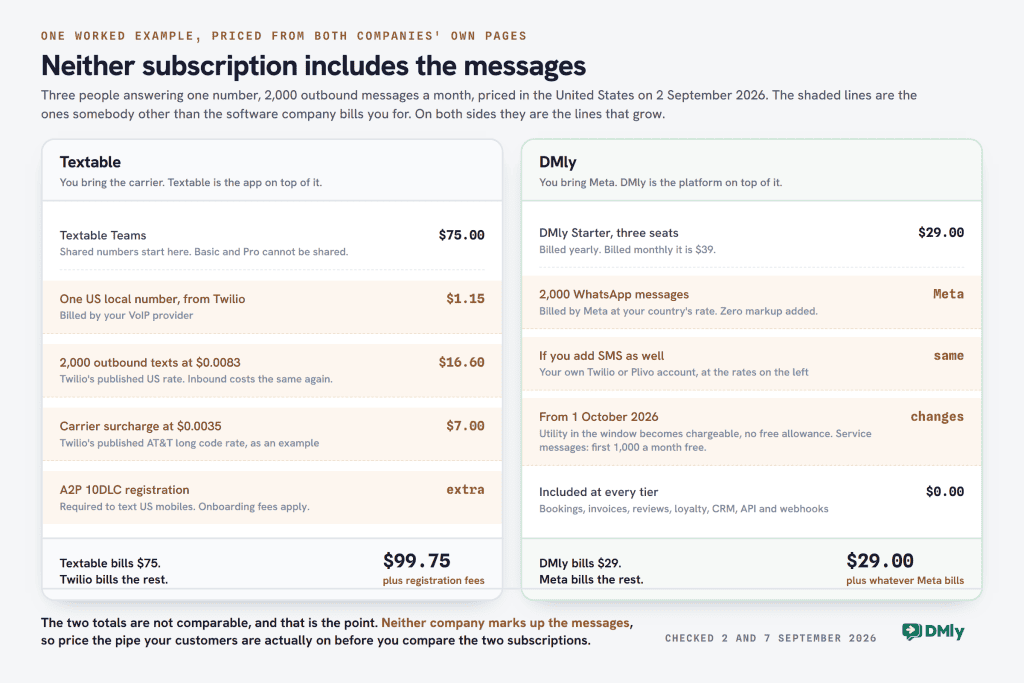
This is the part that makes $5 a month misleading, and it is not Textable’s fault: they say plainly that you bring the carrier. A working Textable setup means paying three separate people.
- Textable, for the app. $5, $30 or $75 a month.
- Your VoIP provider, for the number. Twilio publishes $1.15 a month for a US local long code number, which is a reasonable anchor for the others.
- Your VoIP provider again, for every message. Twilio’s published US rate is $0.0083 to send an SMS and $0.0083 to receive one, with carrier fees on top that vary by network. AT&T long code outbound, for example, adds $0.0035 a message. MMS costs more than SMS everywhere.
There is a fourth item in the United States that catches people out. Sending business texts to US mobile numbers on a standard 10-digit number requires A2P 10DLC registration, which means registering your brand and your campaign with the carriers. Twilio’s own pricing page notes that US A2P 10DLC is subject to registration onboarding fees. Neither Textable’s subscription nor anyone else’s covers that, and an unregistered number gets filtered rather than delivered.
None of this is a criticism of Textable. It is how bring-your-own-carrier works, and it is the same shape as the DMly and Authkey comparison, where neither platform marks up Meta either and the whole difference sits in what each charges before the first message. Run a modest example. Two thousand outbound texts a month from a Teams account: $75 for Textable, about $1.15 for the number, about $16.60 in Twilio message fees, plus carrier surcharges of roughly $7 at the AT&T rate, before 10DLC. The app is still the biggest line, but it is nothing like the whole bill, and at higher volumes the message fees overtake it.
What Textable does well
Judged as what it is rather than what it is not, Textable is a tidy piece of software. It does a narrow job and it does not pretend otherwise, which is worth something when half this category oversells itself.
- MMS that actually sends pictures. Photos, documents and graphics go out as media rather than as a link. This is a genuine advantage over DMly’s SMS channel, which is text only, and it matters for anyone sending a quote, a menu or a photo of the finished job.
- Multi-device sync. Web, iOS and Android, in sync, on one subscription. Answer on the desktop, carry on from the phone.
- Number sharing and per-number permissions. On Teams, several people work one number, and you can control who reaches which. This is the strongest thing in the product.
- Auto-replies on keywords, canned responses and away messages. Three small features that between them cover most of what a two-person business needs after hours.
- Scheduled messages, blasts and drip campaigns. On Pro and above. Enough for reminders and a monthly promotion.
- Reminders as a named feature. Appointment reminders scheduled in advance, which is the single most valuable automation a local business runs.
- A relay webhook and an API. Their own description is “Integrate Textable with your CRM, Support Desk, or even your coffee machine!” Do not skip past this: it means Textable is connectable, and a comparison that marks it as a closed box is wrong.
- Contact lists and organised contacts. Business and personal contacts stay separate and sync across devices, and Pro adds contact lists for sending to a group rather than to everyone. Textable does not publish the segmentation fields anywhere on its site, so if you need to target by location or customer type, ask during the trial rather than assuming.
- A published white-label price. Their white-label product starts at “$250/mo minimum” and covers the web app URL, logos and colours. Publishing a floor at all puts them ahead of most of this market.
Where Textable stops
The limits are all the same limit wearing different clothes: the product ends where the text message ends. That is a design decision, not a defect, but it decides whether the tool grows with you.
- One channel. SMS and MMS, and nothing else. If a customer messages your Instagram, that conversation lives somewhere else and always will.
- Automation that sends, but does not decide. Drip campaigns, schedules, keyword auto-replies and away messages are all send-side. There is no branching flow that reads a reply and acts differently on it.
- No AI. Nothing on the site describes an AI agent, an AI reply or intent handling. Keyword matching is the extent of it.
- Reminders, but no calendar. You can schedule a reminder. You cannot publish bookable times, take the booking, hold the slot or collect the payment, because there is no booking system underneath the reminder.
- No invoicing, payments, reviews or loyalty. Nothing on Textable’s site offers any of these, and it does not claim to. The money side of your business stays in whatever you use now.
- Contact management rather than a CRM. Their own framing is that you connect Textable to the CRM you already run. That is the right answer if you have one.
- Shaped around the United States. The nine supported carriers are US-facing, the compliance burden the product assumes is A2P 10DLC, and the guides are written for that market. Nothing says it cannot work elsewhere, but check that your country and your provider are covered before you plan around it.
What DMly is, and the honest answer about SMS
DMly is built around WhatsApp, with seven other channels attached, and the shop admin behind them. Bookings, invoices, payments, reviews, loyalty and a customer record all live in the same place as the conversations, so the reply and the thing the reply is about are never in two systems.
The documented channel list runs to eight, and it is worth reading in full because the plan cards only advertise five of them. DMly’s own navigation counts them as “7 channels and SMS”, which comes to the same total:
- WhatsApp. The one everything else assumes. The only channel with approved templates, voice calling and a catalogue.
- Facebook Messenger and Instagram. DMs and comments, in the same inbox. No templates on either.
- Telegram. A bot, with broadcasts and no sending window.
- TikTok. DMs and video comments, with a 48-hour reply window and no broadcasts at all.
- The live chat widget on your own site. Also cannot be broadcast to.
- SMS, through Twilio, Plivo or a custom HTTP gateway.
- Google Business Profile, which is reviews and posts rather than customer chat.
DMly does SMS, and here is exactly how far it goes
This is the correction that matters most on this page, in both directions. Every previous version of this comparison, ours included, framed Textable as the SMS platform and DMly as the not-SMS platform. That is wrong: SMS is a documented DMly channel. Connect Twilio, Plivo or a custom HTTP gateway from the Integrations page, point one webhook at DMly, and texts arrive in the same inbox as everything else, start the same flows, and can be broadcast to with no 24-hour window and no template approval.
But saying “DMly has SMS too” and stopping there would be the same overselling this page is trying to strip out. DMly’s own documentation lists what its SMS channel cannot do, and every one of these is a point for Textable:
- Text only. No images, no files, no tappable buttons. If a flow step tries to send media over SMS, only the caption and the link go out. Textable does MMS and DMly does not, and if you send photos this is the single biggest reason to pick Textable.
- No read receipts. Sent, delivered or failed. Nothing tells you it was read, so a broadcast report shows Delivered and leaves Opened empty.
- No growth tools. Chat links and QR codes need a channel a link can open, so that whole section is greyed out when SMS is the active channel. DMly’s own message: “Growth tools need a channel reachable by a chat link, not available on SMS, TikTok or Live Chat.”
- The custom HTTP gateway is outbound only. It sends, but replies never reach your inbox and delivery reports never update. Two-way SMS means Twilio or Plivo, not the generic option.
- DMly does not count your segments or track what a send costs. Long messages are passed to your gateway whole and your provider bills you for however many segments that becomes. Their own note: watch spend in your Twilio or Plivo dashboard, not in DMly.
If SMS is going to be a serious part of your setup either way, our guide to SMS marketing automation, gateways and compliance covers the gateway choice and the registration side in more depth than belongs here. The workaround for the media limit is the one this whole comparison keeps circling back to: send the picture on WhatsApp, where images, files and buttons all work and an image costs no more than a plain text, because Meta prices a message by its category rather than by what is inside it. That only helps if the customer is on WhatsApp. If they are not, Textable wins that round outright.
What DMly does that Textable is not trying to do
The difference is not “more features”. It is that the conversation is wired to the rest of the business.
- Flows that read the reply. The flow builder branches on conditions, waits properly and acts. The waiting step is called Smart Delay, and its three modes are worth knowing: wait a fixed duration, wait until the next weekday window you draw so an overnight reply holds until 9am, or wait against a real date on an appointment, invoice or subscription. That last mode re-reads the object when the step runs, so a rescheduled booking moves its own reminder.
- AI agents that answer, not keywords that match. AI replies are on every plan: 500 a month on Starter, 5,000 on Growth, 20,000 on Premium, and unlimited on Premium if you bring your own provider key.
- A real booking calendar. Services, staff and classes, published bookable times, and three payment modes on a service: no payment, pay after, or pay before with a 15-minute slot hold.
- Invoices and payments. Branded invoices, orders, subscriptions, coupons, expenses and a finance report, with partial payment supported so a deposit against an invoice is real.
- Reviews. Google review requests sent automatically after a completed job, and the reviews answered from the same place.
- Loyalty and stored value. Points that turn into a coupon, plans and credits, and gift cards sold up front and spent against a later invoice.
- A customer record, not a contact list. Pipeline stages, lifecycle stages, tags, notes, custom fields, documents and a spend history on the same profile as the conversation.

DMly pricing, in full
Read from the DMly pricing page on 2 September 2026. The first figure is the billed-yearly rate, which is how the page displays by default; the second is what you pay billed monthly.
| Plan | Yearly / monthly | Seats | Contacts | Broadcast or template messages | AI replies a month |
|---|---|---|---|---|---|
| Starter | $29 / $39 a month | 3 | 3,000 active | 10,000 | 500 |
| Growth | $65 / $79 a month | 6 | 10,000 active | 50,000 | 5,000 |
| Premium | $149 / $199 a month | 15 | Unlimited | 300,000 | 20,000, or unlimited on your own AI keys |
Three more things off the same page. Add-ons are priced rather than negotiated: an extra team seat is $10 a month, an extra profile set is $15 a month, and extra contacts are $15 per thousand. The trial is 7 days on any plan with no credit card. And annual billing saves 20 per cent, which is where the gap between the two columns above comes from.
What the subscription does not include is the messages, exactly as with Textable. DMly’s own wording: “You pay Meta’s standard per-message rates directly, DMly never adds a fee on top.” For SMS the same applies to your Twilio or Plivo bill. You can price the WhatsApp side for your own country with the WhatsApp pricing calculator, or read the rate card by country.
Textable vs DMly, side by side
Every row in this Textable vs DMly table was re-checked against the two companies’ own published pages on 2 September 2026. Four rows in the previous version of this table were wrong, and three of the four were unfair to Textable, so they are corrected here with the old claim named.
| What you are comparing | Textable | DMly |
|---|---|---|
| What it is | A texting app for a VoIP number you already rent | A messaging and operations platform built around WhatsApp |
| Prerequisite | A number with one of nine named VoIP providers | A WhatsApp Business account, or any of the other seven channels |
| Entry price | $5 a month, but $75 for shared numbers | $29 a month billed yearly, $39 monthly, three seats included |
| Who bills you for messages | Your VoIP provider, directly | Meta directly for WhatsApp, your gateway directly for SMS. No markup either way |
| Free trial | None published. No free tier | 7 days on any plan, no credit card |
| SMS | Yes, the whole product | Yes, via your own Twilio, Plivo or HTTP gateway. No sending window |
| MMS | Yes | No. SMS is text only: no images, files or buttons |
| Other channels | None | WhatsApp, Messenger, Instagram, Telegram, TikTok, live chat widget, Google Business Profile |
| Automation | Send-side: schedules, blasts, drips, keyword auto-replies, away messages | Branching flows that read the reply, with Smart Delay waits anchored to a real appointment or invoice date |
| AI | None published | AI agents on every plan: 500, 5,000 or 20,000 replies a month |
| Bookings | Appointment reminders, but no calendar to book into | Services, staff and classes, with pay-before, pay-after or no payment. No deposit option |
| Invoices and payments | None | Invoices, orders, subscriptions, coupons and expenses. Partial payment supported |
| Reviews | None | Automatic Google review requests and a reputation inbox |
| Loyalty | None | Points that become coupons, plans and credits, gift cards |
| CRM | Contact lists, and a webhook and API to feed the CRM you already run | Built in: pipeline and lifecycle stages, tags, notes, custom fields, spend history |
| Campaign reporting | Not published. Their pricing FAQ says better reporting is planned | Delivered and opened on WhatsApp, delivered only on SMS, neither on Meta channels. Replies always reads 0 |
| White label | Yes, from $250 a month minimum | Yes: Launch $99 a month shown against a struck-through $149, Growth $399 against $499, Agency on application |
| Best for | VoIP resellers, and businesses whose customers only text | Local businesses that book, invoice and get reviewed over messaging |
The four rows that were wrong, named
Comparison tables get copied between pages and stop being checked, so it is worth saying exactly what changed and why:
- “White-label: not available” for Textable was false. Textable sells a fully white-labelled platform to managed service providers and VoIP resellers, with your own web app URL, logo and colours, and it publishes a floor of $250 a month. There is a link to it in their main navigation. Marking that as absent understated a competitor’s product in a way that would have cost a reseller a real option.
- “Bookings: not available” was too blunt. Textable has a named Reminders feature for scheduling appointment reminders in advance. What it does not have is a calendar to take the booking into, which is the useful version of the same point.
- “Campaign analytics: engagement-focused” for DMly was overstated. The honest version is in the table above and in the limits section below. On a broadcast, Replies is always 0 on every channel, and the “engagement over time” chart is placeholder data that shows the same shape for every campaign.
- The DMly channel count was five and should have been eight. The old page listed WhatsApp, Instagram, Messenger, Telegram and web chat, which quietly dropped SMS, TikTok and Google Business Profile. On a page comparing DMly with an SMS platform, dropping SMS was the worst possible one to lose.
Textable vs DMly: which one fits your business
A clinic or salon sending appointment reminders
In a Textable vs DMly decision this is the closest call on the page, because both can send the reminder. The question is what happens next. With Textable the reminder goes out and the reply lands in a shared thread for someone to read. With DMly the reminder is anchored to the actual booking, so if the client reschedules, the reminder moves itself, and a “can I move to Thursday?” reply can go straight into a rebooking flow. If your reminders are already going out fine and nobody is complaining, Textable is cheaper and enough. If you are retyping appointment times into two places, the calendar is the reason to move.
A shop whose customers message on Instagram and WhatsApp
Textable vs DMly stops being a comparison here, because Textable cannot help at all and does not claim to. Those conversations will keep arriving in the apps on somebody’s phone. This is the clearest case for DMly, and the reason is not the automation: it is that the same person is one contact whether they arrive by Instagram DM or WhatsApp, with one history and one spend total.
A trades business sending photos of finished work
This is the case where Textable wins on a feature and it is worth being blunt about it. If your customers are on ordinary phones and you send them photos, Textable does MMS and DMly’s SMS channel does not. DMly’s answer is to send the photo on WhatsApp instead, where an image costs the same as a text and buttons work. That is a good answer only if your customers will message you on WhatsApp. Ask five of them before you decide.
A managed service provider or VoIP reseller
You are Textable’s actual target customer, and their white-label product is built for you: your brand on the app, your existing carrier relationships and rates, from $250 a month. The comparison is not really against DMly’s platform plans but against DMly’s white-label tier, which starts at $99 a month, shown against a struck-through $149, for ten client workspaces and ten WhatsApp numbers with no revenue share. Ask which of those two figures you renew at. The deciding question is what your clients sell. If they are selling voice and want texting on top, Textable fits the existing relationship. If they are local businesses that book and invoice, the WhatsApp side is the bigger product. There is more detail in our guide to white-label WhatsApp software for agencies.
A team of three answering one number
This is the comparison most people think they are making, and the numbers are closer than the headline prices suggest. Textable needs the Teams plan for shared numbers, so $75 a month plus your carrier’s number and message fees. DMly Starter is $29 a month billed yearly, or $39 monthly, and includes three seats. Textable’s $5 plan is not in this comparison at all, because it cannot be shared.
A dated change that only affects one side of this comparison
If you take the WhatsApp route, your message bill changes on 1 October 2026, and there is a deadline before that which can stop your replies going out altogether. Textable is unaffected: SMS pricing is between you and your carrier and none of this touches it. So this section is only for readers leaning towards DMly or any other WhatsApp platform, and it is short.
Two categories of message start being charged, not one. Most coverage mentions only the first:
- Service messages, but only above a free allowance. Meta’s own wording: “Meta will charge on a per-message basis for service messages, consistent with how Meta charges for template messages.” These are the ordinary free-form replies you type inside the 24 hours after a customer messages you, and they have been free since November 2024. Meta has since published the allowance that comes with the change: “every business phone number will receive 1,000 free service messages; Meta will only charge as of the 1,001st service message delivered.” It resets every month, it does not roll over, and one shop or clinic answering its own messages rarely gets near it, so for most readers this half of the change costs nothing.
- Utility messages sent inside that same window. Also Meta’s wording: “Meta will charge on a per-message basis for utility messages sent in response to users within an open 24-hour customer service window.” This one gets no free allowance at all, so for an appointment business sending confirmations and reminders it is the bigger of the two, and by a wider margin than the headlines suggest.
The two now scale differently, which is the detail worth carrying. Meta states: “Meta does not offer volume tiers for service messages. Meta continues to offer volume tiers for utility and authentication messages.” So a long back-and-forth costs nothing until the 1,001st service message that month and then rises in a straight line, while your in-window reminders are charged from the first one but keep their volume discounts. A business that sends a lot of notifications is more exposed by this change than one that answers a lot of questions.
Before that, there is a hard date: 30 September 2026. Every account on the WhatsApp Business Platform needs a payment method on file by then. Accounts without one stop having service messages delivered from 1 October, and that applies whether or not you ever send past the free 1,000. This catches businesses whose replies have always been free and who therefore never added billing details. It is set in WhatsApp Manager, under your business portfolio’s billing settings, and it takes about two minutes. None of this affects the free WhatsApp Business app, only the API that platforms like DMly run on.
What the rates turned out to be, and what to do about it
Meta’s own commitment on that page reads: “Meta will announce and publish the rates that take effect October 1, 2026, including rates for service messages, by September 1, 2026.”
On 2 September 2026, the day after that date, neither of the two pages where those rates would appear carried them. We looked again on 7 September and they are up: Meta has published the rate cards that take effect on 1 October, and in every market the service rate is set to the same figure as that market’s existing utility and authentication rate. So this is now a price you can look up for your own country instead of an estimate.
The action is the same whichever platform you choose: put a payment method on the account before 30 September, then re-check Meta’s pricing pages in the week you read this rather than trusting any figure printed by a vendor, ourselves included. We have written up what is known in the 1 October WhatsApp pricing change, and the per-country rates as they stand in the 2026 rate card by country.
Where DMly loses, stated plainly
A Textable vs DMly comparison written by one of the two products is worth reading only if it says where its own side is weak. These are from DMly’s own documentation, and several of them are things Textable either does better or does not need at all.
- No MMS on SMS. Text only, no images, files or buttons. Textable wins this one outright.
- Broadcast reporting has three holes. Replies always reads 0, on every channel, because nothing counts replies to a broadcast. The “engagement over time” chart is placeholder data with the same shape for every campaign. And Delivered and Opened stay at 0 on Messenger and Instagram, because DMly records those against the individual message but never totals them onto the broadcast. On SMS you get Delivered but never Opened, and Telegram sends no delivery confirmations at all.
- A failed broadcast gives you a count, not a reason. The reason is recorded, but the broadcast page does not show it. You can get it per recipient through the API, or from a template’s failed-sends list on WhatsApp only.
- Two of the eight channels cannot broadcast. The live chat widget and TikTok. A campaign that needs to reach widget visitors has to reach them somewhere else.
- Message volume is capped by plan. 10,000, 50,000 or 300,000 broadcast or template messages a month, with no message top-up add-on. Textable does not cap sends at all, because your carrier does the metering.
- Appointments have three payment modes and none of them is a deposit. No payment, pay after, or pay before with a 15-minute hold. A part-payment has to go through an invoice, which does support it.
- No campaign-engagement field in the segment builder. You cannot build an audience of “people who opened the last broadcast”. The segment builder has four basic filters, on pipeline stage, tags, excluded tags and days since last activity, and twelve condition fields including lifecycle stage, source, custom fields, birthday month, marketing opt-in, total spend, last purchase, order count, loyalty points and credit balance. Engagement with a specific campaign is not one of them.
- No native Salesforce or Zoho connector. There is a HubSpot connector, and HubSpot and Mailchimp appear under Sales and CRM in the integrations, alongside Shopify, WooCommerce, Zapier, n8n, Google Sheets, Google Calendar, Slack, Zoom and the payment gateways. Anything past that goes through Zapier, n8n or the API.
- Unlimited AI needs your own provider key, and that is Premium only. Below Premium you are on an allowance of 500 or 5,000 replies a month.
The verdict
Textable is a good product with a narrow entrance. If you already have VoIP numbers, or you are reselling them, it does a specific job cheaply and honestly, publishes its prices, publishes its white-label floor, and admits which of its limits are soft. It sends MMS, which DMly does not. The catch is the prerequisite: without a number at one of nine providers, none of the rest applies to you.
DMly is the answer when the reply has to turn into something. A booking with a held slot, an invoice that can be part-paid, a review request that fires when the job is marked done, a customer record that survives the customer switching channels. Its SMS channel is real but plainer than Textable’s, and its broadcast reporting is weaker than its marketing has historically implied.
The honest summary of Textable vs DMly is that the two products answer two different questions. Textable answers “how do we all text from this number?” DMly answers “how does the conversation become a booking, an invoice and a review without anyone retyping it?” Neither subscription includes the messages, so start by pricing the pipe, not the app. Then pick the platform that sits on the pipe your customers are already using.
If the cost side is what you are still weighing, our breakdown of what a WhatsApp chatbot actually costs prices the WhatsApp route end to end. If you want to see the platform working before you decide, DMly runs a 7-day trial on any plan with no credit card. If you would rather compare more options first, our roundup of twenty messaging automation tools prices each one from its own page.
Textable vs DMly FAQs
Can I use Textable with my normal mobile number?
No. Textable connects to a VoIP number held with one of nine providers it names on its home page: Bandwidth, Commio, Flowroute, Telnyx, Twilio, Tychron, VoIP.ms, Skyetel or SignalWire. A number from a mobile network or a traditional phone company cannot be connected, and neither can a VoIP provider that is not on that list, though Textable does invite you to tell them which one you use. Check this before anything else, because it is the one condition that decides whether the product is available to you at all.
How much does Textable really cost?
The subscription is $5 a month for Basic, $30 for Pro and $75 for Teams, and additional users on Teams are $7.50 a month each. Those are the app fees only. On top of them you pay your VoIP provider for the number and for every message sent and received, plus that provider’s carrier surcharges, and in the United States you also need A2P 10DLC registration, which carries its own onboarding fees. As an anchor, Twilio publishes $1.15 a month for a US local number and $0.0083 each way per SMS, with carrier fees added on top. Also worth knowing: number sharing only exists on the $75 Teams plan, so for any business with more than one person answering, $75 is the real entry price rather than $5.
Does DMly do SMS, or only WhatsApp?
It does SMS. You connect your own Twilio, Plivo or custom HTTP gateway from the Integrations page, and texts then arrive in the same inbox as WhatsApp, start the same flows and can be broadcast to with no 24-hour window and no template approval. The limits are worth knowing before you rely on it: SMS is text only, so no images, files or buttons; there are no read receipts, so a broadcast shows Delivered and never Opened; growth tools like chat links and QR codes do not work on SMS; the custom HTTP gateway sends but cannot receive replies; and DMly does not count message segments or track what a send costs, so you watch spend in your provider’s dashboard.
Which is better for sending photos to customers?
Textable, if the customer is on an ordinary phone and expects a text. It supports MMS, so photos, documents and graphics arrive as media. DMly’s SMS channel is text only, and a flow step that tries to send media over SMS delivers just the caption and the link. DMly’s answer is to send the image on WhatsApp instead, where images, files and buttons all work and an image costs no more than a plain text, but that only helps if your customers will message you there. If you send photographs to people who will never open WhatsApp, that is a real reason to choose Textable.
What are the best Textable alternatives?
It depends which half of Textable you are replacing, and a Textable vs DMly comparison only covers one of them. Picking a Textable alternative is really two different shortlists wearing one search term. If you want the same job done, a texting layer over VoIP numbers, look at other bring-your-own-carrier apps and at your provider’s own messaging console, since several of the nine carriers offer one. If what you actually want is to reach customers who are not reachable by text, the alternatives are conversational platforms rather than SMS tools, and that is where DMly, along with the platforms in our roundup of messaging automation tools, sits. The two groups are not really substitutes for each other, which is why comparing them on features alone tends to mislead.
Does either platform mark up the cost of messages?
Neither one does, and both say so. Textable’s whole model is bring your own carrier, so the messages never pass through Textable’s billing at all: your VoIP provider invoices you at your own rates. DMly’s pricing page states that you pay Meta’s standard per-message rates directly and DMly never adds a fee on top, and the same applies to your Twilio or Plivo bill on the SMS channel. That is genuinely unusual in this category, where a percentage on top of the message rate is common, and it means the subscription comparison is a fair one on both sides.
Textable vs DMly: which is better for a small business?
Neither wins a Textable vs DMly comparison in general, only for a particular kind of business. DMly is the better fit when the conversation needs to lead to a booking, an invoice, a review or a customer record, and when your customers already message you on WhatsApp, Instagram or Messenger. Textable is the better fit when you already own VoIP numbers, your customers text and nothing else, you need MMS, and nothing has to happen automatically after the reply arrives. Textable also does two things DMly does not: it sends MMS, and it does not cap how many messages you send, because your carrier does that metering instead.
Writing about WhatsApp automation, bookings and growth for local business.
Turn WhatsApp into your busiest channel.
Start free and run message, bookings, payments and reviews in one place.
